


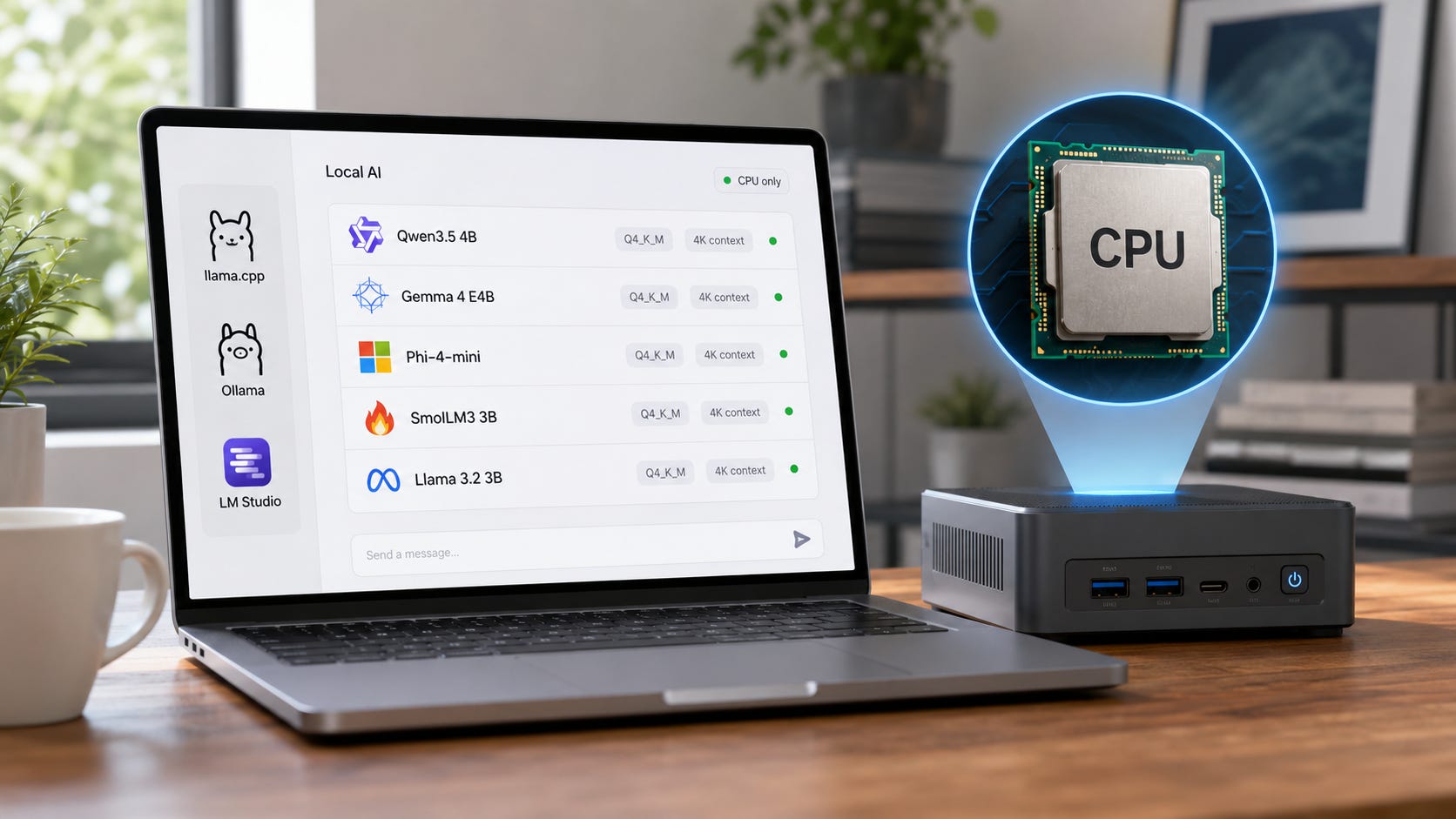
The best CPU-only local LLM in 2026 is a small, modern, quantized model that respects the limits of your processor. Start with Qwen3.5 4B, Gemma 4 E4B, Phi-4-mini-instruct, SmolLM3 3B, or Llama 3.2 3B. Move up to 7B or 8B only when you have enough RAM, patience, and a clear reason.
CPU-only local AI is useful. It is also easy to oversell.
A CPU can run local LLMs through tools like llama.cpp, Ollama, and LM Studio. llama.cpp is built for local inference across a wide range of hardware, with support for CPU instruction paths such as ARM NEON, AVX, AVX2, AVX512, and AMX.
The problem is speed. A GPU does not make a model smarter, but it makes local chat feel alive. Without GPU acceleration, model size matters more than brand hype, benchmark screenshots, or the biggest context number on a model card.
Quick verdict
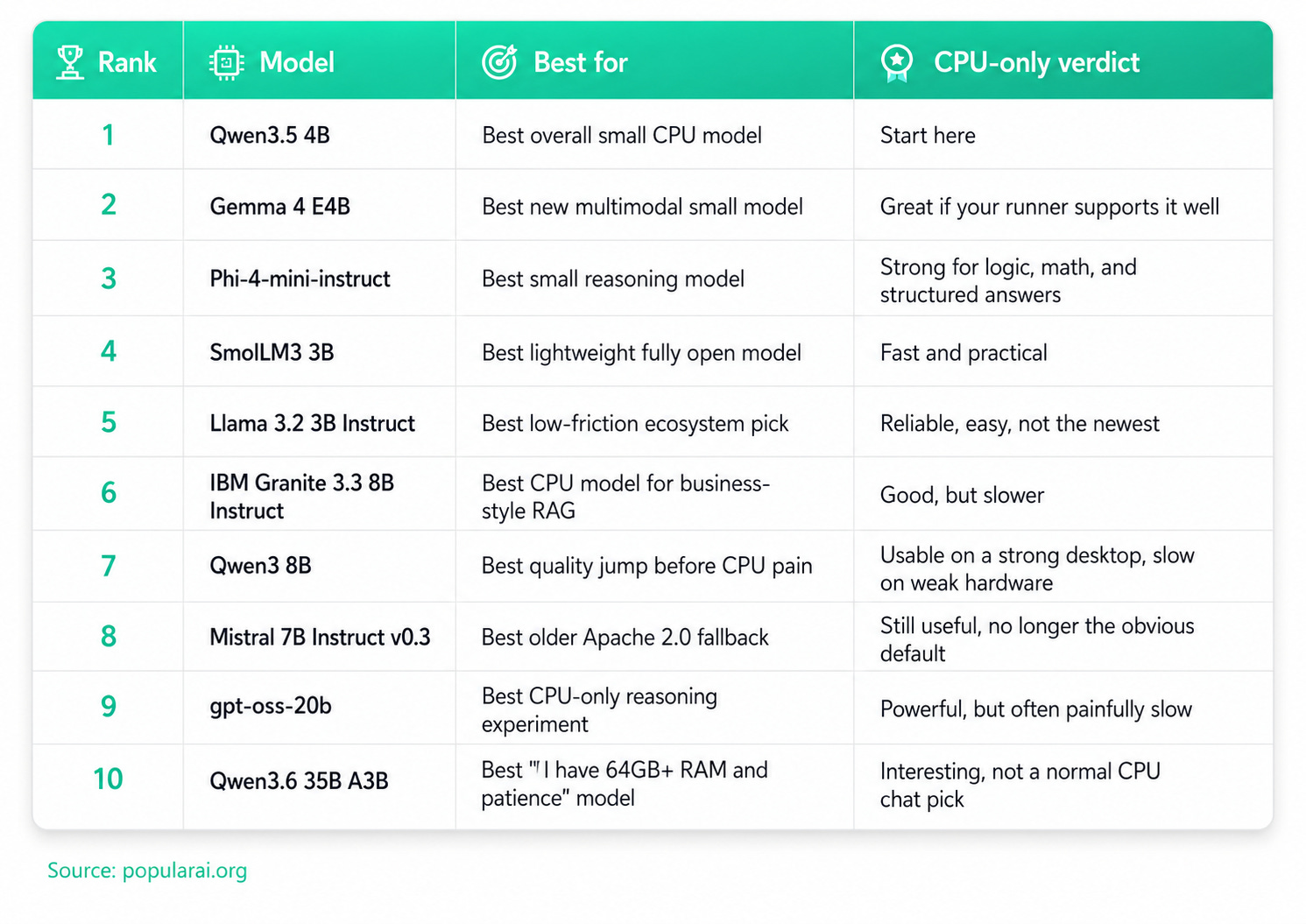
For most people running without a GPU:
What CPU-only actually means in 2026
CPU-only means the model is loaded into system RAM and generated by the processor, without GPU acceleration.
That gives you three advantages. You can run models on ordinary desktops, older laptops, mini PCs, servers, and NAS boxes. You can keep private prompts local. You can avoid buying a GPU just to test local AI.
It also gives you three problems. Generation is slower. Long context can crush memory and latency. Large models may technically run while feeling miserable.
The Ollama context documentation warns that larger context lengths increase memory requirements, and it recommends checking processor split and offload behavior with ollama ps. That matters even more on CPU-only machines, where every extra token of context can make an already slow setup feel stuck.
For CPU-only local LLMs, use this rule:
1B to 2B models are fast and useful for simple tasks, but weaker at reasoning.
3B to 4B models are the sweet spot for CPU-only chat.
7B to 8B models give better answers, with slower replies.
12B to 14B models are possible on good desktops, but annoying for daily chat.
20B+ models are experiments, background jobs, or patient-user tools.
30B+ MoE models are worth trying only with lots of RAM and realistic expectations.
More on local LLMs:

Ranking criteria
This list ranks CPU-only local LLMs by practical usefulness, not benchmark vanity.
The criteria are usable CPU speed, answer quality, small-model efficiency, GGUF or runner availability, license clarity, RAM realism, and whether the model is still worth choosing in July 2026.
Long-context support is helpful, but it should not decide the ranking by itself. A 128K or 256K context window looks great on a model card. On CPU, most users should run much smaller contexts unless the task is worth the wait.
1. Qwen3.5 4B: best overall CPU-only local LLM
Qwen3.5 4B is the best first pick for most CPU-only users in 2026.
It hits the right size. It is much more capable than old tiny models, while still being small enough to run in a quantized format on ordinary hardware. The official Hugging Face page lists Qwen3.5 4B as a post-trained model, and the Ollama Qwen3.5 4B page provides a simple ollama run qwen3.5:4b path for local use.
Choose Qwen3.5 4B if you want one CPU model for general chat, summaries, light coding help, structured extraction, and private document questions.
The main warning is context. A model can advertise a huge context window and still feel bad on CPU when you actually try to use it. Start at 4K or 8K context. Increase only when a specific task needs it.
Best use cases:
Everyday local chat.
Summarizing private notes.
Light coding help.
JSON extraction.
Drafting and rewriting.
Small local agents with tight prompts.
Skip it when you want the strongest possible reasoning and can tolerate slow output. In that case, gpt-oss-20b or a larger MoE model may be more interesting, though less pleasant.
2. Gemma 4 E4B: best new small multimodal CPU pick
Gemma 4 E4B is the most interesting new small model for CPU-only users who want a modern Google open-weight model with multimodal support.
Google describes Gemma 4 as an open model family with multimodal support, and the E2B and E4B models are positioned for efficient on-device use. The Gemma 4 E4B model card says the family handles text and image input, with native audio support on the small models, and is designed for tasks such as text generation, coding, reasoning, and multimodal understanding.
For CPU-only text chat, treat Gemma 4 E4B as a strong new contender rather than an automatic replacement for Qwen3.5 4B. Runner support, quant quality, prompt templates, and memory behavior matter.
Choose Gemma 4 E4B if you want a newer model for reasoning, coding help, and multimodal experiments.
Skip it if your local runner has weak support for the exact Gemma 4 quant you want. In that case, Qwen3.5 4B or Phi-4-mini will be easier.
3. Phi-4-mini-instruct: best small reasoning model for CPU-only use
Phi-4-mini-instruct is a strong CPU-only choice when you care more about reasoning than personality.
Microsoft’s model card describes Phi-4-mini-instruct as a lightweight open model in the Phi-4 family with a 128K token context length. It is aimed at memory-constrained, compute-constrained, and latency-bound environments, with a focus on reasoning, math, logic, instruction following, and function calling.
That makes it a good local model for logic questions, math explanations, small coding tasks, structured outputs, tool-call experiments, and prompt pipelines that need predictable formatting.
The tradeoff is style. Phi models can feel less natural than Qwen or Gemma in open-ended writing. They are best when the task is clear and the answer format matters.
Use Phi-4-mini-instruct when you want a compact brain, not a chatty companion.
4. SmolLM3 3B: best lightweight fully open model
SmolLM3 3B is a good pick when you want a fast, small model with a clean small-model identity.
Hugging Face describes SmolLM3 as a 3B parameter model with dual-mode reasoning, six-language support, long context, and strong 3B to 4B scale performance. Hugging Face’s launch post also describes it as a 3B model trained on about 11T tokens with multilingual support and think or no_think modes.
That makes it a useful CPU-only model for fast chat, simple writing help, summaries, classification, lightweight automation, and low-power machines.
SmolLM3 is not the strongest model here for hard reasoning or coding. Its value is responsiveness. On weak hardware, that can matter more than squeezing in a larger model that takes forever to answer.
5. Llama 3.2 3B Instruct: best low-friction ecosystem pick
Llama 3.2 3B Instruct is no longer the newest small model, but it remains a safe, easy recommendation for people who want broad runner support.
Meta’s model card describes Llama 3.2 as a multilingual text-in, text-out model family in 1B and 3B sizes. The 3B version has 3.21B parameters, a 128K context length in the text-only model card, GQA, and official support for English, German, French, Italian, Portuguese, Hindi, Spanish, and Thai.
Choose it if you value broad model support, easy downloads, familiar prompt behavior, lightweight local chat, summarization, and retrieval tasks.
The downside is simple: newer small models have passed it in several practical areas. Qwen3.5 4B, Gemma 4 E4B, and Phi-4-mini are usually more interesting if you are choosing today.
6. IBM Granite 3.3 8B Instruct: best CPU model for RAG and business-style tasks
Granite 3.3 8B Instruct is a good CPU-only model if your workload looks like business text rather than casual chat.
IBM’s model card describes Granite 3.3 8B Instruct as an 8B parameter, 128K context model tuned for reasoning and instruction following. It lists summarization, text classification, extraction, question answering, RAG, code-related tasks, function calling, multilingual dialogue, and long-document tasks among its capabilities, with an Apache 2.0 license.
That makes it a good fit for private document Q&A, RAG prototypes, meeting and document summaries, classification, extraction, business workflows, and local assistant projects.
The cost is speed. An 8B model on CPU is a different experience than a 3B or 4B model. Use it when answer quality and task fit matter more than quick back-and-forth chat.
7. Qwen3 8B: best quality jump before CPU-only gets annoying
Qwen3 8B is the model to try when 4B feels too weak and you can tolerate slower generation.
Qwen describes Qwen3 as a family with dense and mixture-of-experts models, designed for reasoning, instruction following, agent capabilities, and multilingual support. The Qwen3 8B model sits in the zone where a strong CPU-only desktop can still run a quantized model, while weaker laptops may struggle.
The reason to choose Qwen3 8B is simple: it is a stronger general model than the smaller Qwen options, while still living in the range that a CPU-only desktop can run in quantized form.
The reason to avoid it is just as simple: it may be too slow for casual use.
Use Qwen3 8B for better reasoning than 4B models, more robust coding help, better long-form answers, local RAG where latency is acceptable, and overnight or batch jobs.
Do not start here on an old laptop. Start with Qwen3.5 4B or SmolLM3 3B.
8. Mistral 7B Instruct v0.3: best older Apache 2.0 fallback
Mistral 7B Instruct v0.3 is still worth keeping around because it is mature, widely supported, and permissively licensed.
The Hugging Face model card identifies Mistral 7B Instruct v0.3 as the instruction-tuned version of Mistral 7B v0.3, with Apache 2.0 licensing. It also adds v3 tokenizer support and function calling compared with older Mistral 7B versions.
In 2026, Mistral 7B is no longer the obvious CPU-only default. Qwen, Gemma, Phi, and Granite have better current small-model stories.
Still, Mistral 7B remains useful when you need Apache 2.0, want predictable behavior, already have prompts tuned for it, want a proven 7B fallback, or have a runner that supports it better than newer architectures.
It is the boring backup. Sometimes that is exactly what you want.
9. gpt-oss-20b: best CPU-only reasoning experiment
gpt-oss-20b is powerful enough to deserve a place here, but it is not the model most CPU-only users should open first.
OpenAI released gpt-oss-20b and gpt-oss-120b as open-weight reasoning models. OpenAI describes gpt-oss-20b as suitable for local or specialized use cases, with 21B parameters and 3.6B active parameters, and says the MXFP4 quantization lets gpt-oss-20b run within 16GB of memory.
That sounds perfect for CPU-only users until you remember the memory path.
A 20B-class MoE can fit more easily than a dense 20B model, but it still carries routing overhead, total weight movement, and latency that you do not feel with a 3B or 4B dense model. It is a good model for patient reasoning tasks, not a pleasant default chat model on weak hardware.
Use gpt-oss-20b if you want stronger reasoning, agentic experiments, tool-use testing, OpenAI-compatible local workflows, or a model that can run without renting API access.
Skip it if you want a fast daily local assistant. Qwen3.5 4B will feel better.
10. Qwen3.6 35B A3B: best big MoE experiment for CPU-heavy machines
Qwen3.6 35B A3B is here because CPU-only users with 64GB or 128GB RAM will try it anyway.
Qwen’s model card lists Qwen3.6 35B A3B as a causal language model with a vision encoder, 35B total parameters, 3B activated parameters, 40 layers, and a 262,144-token native context length. NVIDIA’s catalog page describes it as a multimodal MoE model with 35B total parameters, 3B activated, and a context length extendable via YaRN.
This is not a normal CPU-only recommendation. It is a high-patience, high-RAM experiment.
Use it if you have 64GB or 128GB RAM, want to test large MoE behavior locally, care about agentic coding experiments, are willing to tune context and quantization, and understand that active parameters do not erase total model memory.
Skip it if you want a comfortable chat model. Big MoE on CPU is fun when it works. It is not the best daily experience.
Best CPU-only local LLM by RAM size
If you have 8GB RAM
Use a 1B to 3B model.
The best picks are SmolLM3 3B if it fits comfortably, Llama 3.2 1B or 3B, Qwen3.5 0.8B or 2B if available in your runner, and Gemma 4 E2B if your runner supports it well.
Do not try to make 7B your daily model on an 8GB machine. It may load with a small context and aggressive quantization, but the experience is usually too cramped.
If you have 16GB RAM
This is the real CPU-only starting point.
The best picks are Qwen3.5 4B, Gemma 4 E4B, Phi-4-mini-instruct, SmolLM3 3B, and Llama 3.2 3B. Mistral 7B or Qwen3 8B can also work if you accept slower replies.
Use Q4 quantization first. Keep context modest.
If you have 32GB RAM
You can run better models, but speed still matters.
The best daily chat pick is still Qwen3.5 4B. Try Qwen3 8B for better quality, Granite 3.3 8B for RAG and business tasks, Mistral 7B for compatibility, and gpt-oss-20b for reasoning experiments.
A 32GB CPU-only box is good for private AI workflows. It is still not a replacement for a 24GB GPU machine if you care about speed. Once you want larger local models to feel fast, memory bandwidth and acceleration matter.
If you have 64GB RAM or more
You can experiment with larger models.
The best picks are gpt-oss-20b, Qwen3 14B, Gemma 4 12B, Qwen3.6 35B A3B, and Qwen3 30B A3B.
The question is no longer “will it load?” The question is whether it is fast enough to use.
Best quantization for CPU-only local LLMs
Start with Q4_K_M when available.
That usually gives the best balance between size, quality, and speed for ordinary local use. Move to Q5 or Q6 when you have extra RAM and care about quality. Move down to smaller quants only when the model will not fit.
llama.cpp supports low-bit quantization formats, which is why GGUF models are so important for CPU-only setups. A 2026 quantization study on llama.cpp also frames quantization as a practical method for lowering memory use and making local deployment more feasible on constrained hardware.
Practical rule:
Q4_K_M: start here.
Q5_K_M: better quality if RAM allows.
Q6_K: good quality, but larger and slower.
Q8_0: useful for testing, usually too heavy for CPU-only daily use.
Ultra-low quants: use only when fit matters more than quality.
Best tools for CPU-only local LLMs
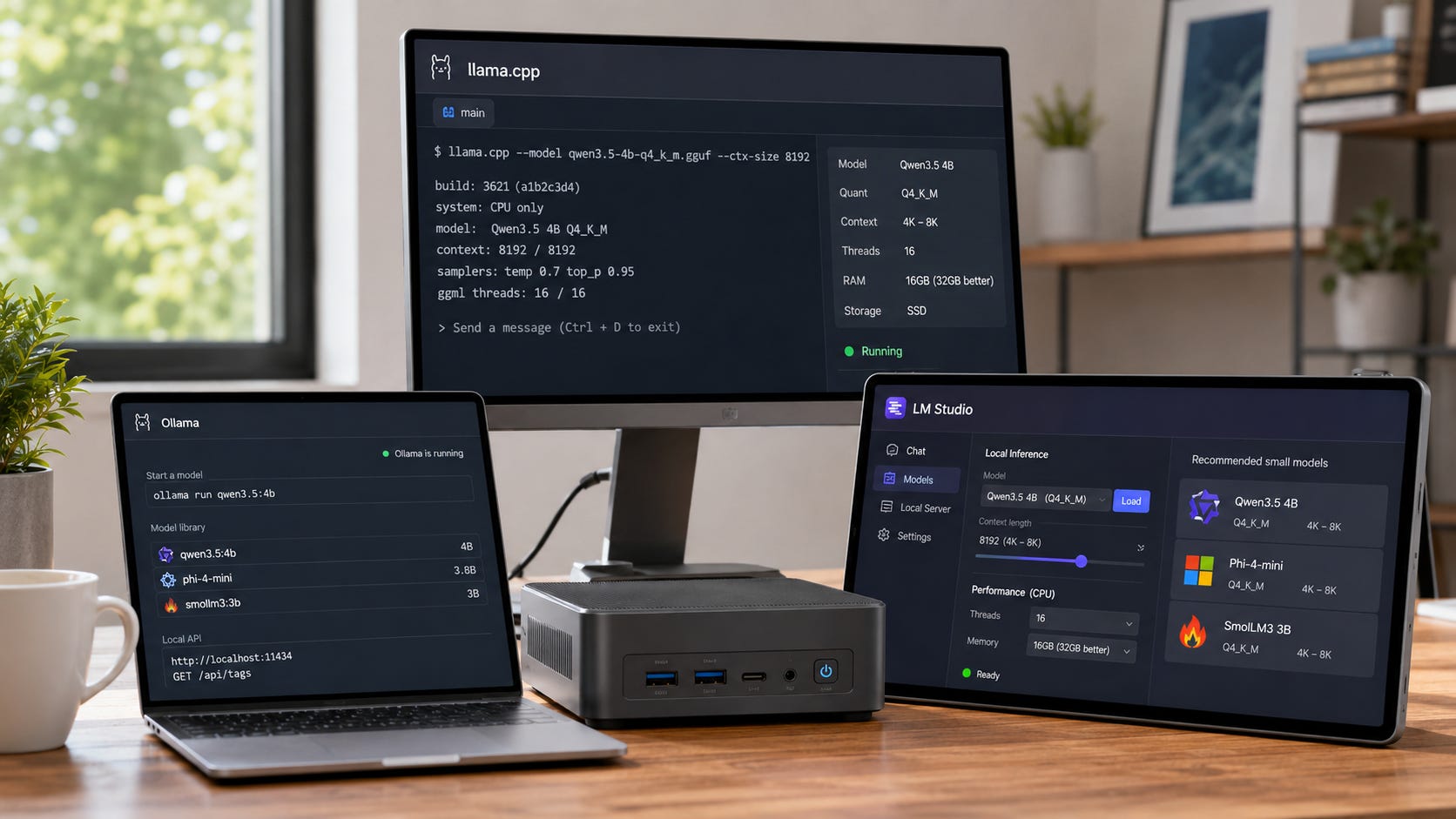
llama.cpp
Use llama.cpp if you want maximum control, direct GGUF support, and the most transparent CPU-first path. It is the engine layer.
It is best for power users, benchmarking, custom flags, servers, unusual hardware, and CPU tuning.
Ollama
Use Ollama if you want the simplest model pulls and local API workflow.
It is best for fast setup, local API use, scripts, simple model management, and developers who want ollama run modelname.
The catch is that defaults matter. Always check context length and memory behavior.
LM Studio
Use LM Studio if you want a desktop app for browsing, downloading, testing, chatting, and serving models.
It is best for beginners, model comparison, desktop chat, local server mode, and avoiding terminal friction.
The simple split is this: llama.cpp gives you the most control, Ollama gives you the easiest local API path, and LM Studio gives you the friendliest desktop experience.
What is painfully slow on CPU-only?
Running huge context windows
Do not run 128K context just because the model card says it exists. Context costs memory. It can slow prompt processing, increase KV cache load, and make a small model feel broken.
Use 4K or 8K for chat. Use 16K or 32K only when you need it. Use 128K only when the task is worth the wait.
Running 20B+ models as daily chat
gpt-oss-20b, Qwen3 30B A3B, and Qwen3.6 35B A3B are interesting. They are not normal daily CPU chat models.
If your workflow is “ask, wait, paste, wait,” they may be acceptable. If your workflow is fast interactive writing or coding help, they will annoy you.
Using the wrong quant
A larger high-precision model that barely fits is usually worse than a smaller Q4 model that responds quickly.
Fit is only the first test. Responsiveness is the one you feel every day.
Expecting CPU-only to replace a GPU box
CPU-only local AI is good for privacy, portability, experimentation, and light automation. It is bad for high-throughput serving, big coding agents, and large-model chat.
If you want serious local LLM speed, you eventually care about GPU memory. That is where the difference between “can run” and “pleasant to use” becomes obvious.
More on CPU-only local AI:

Best CPU-only setup to start with
Use this simple stack:
Tool: LM Studio if you want a GUI, Ollama if you want a local API, llama.cpp if you want control.
First model: Qwen3.5 4B Q4_K_M.
Backup model: Phi-4-mini-instruct or SmolLM3 3B.
Context: 4K or 8K.
RAM: 16GB minimum, 32GB better.
Storage: SSD, not a slow external drive.
Expectation: private and usable, not frontier-model speed.
Then test three prompts:
A normal chat question.
A summary of a real document.
A structured output request, such as JSON extraction.
If the model is too slow, go smaller. If it is fast but too weak, go up to 7B or 8B.
The best CPU-only local LLM to start with
The best CPU-only local LLM for most people in 2026 is Qwen3.5 4B in a good Q4 quant. It is small enough to feel usable, capable enough for real work, and easy enough to run in Ollama, LM Studio, or llama.cpp.
Use Gemma 4 E4B if you want a newer multimodal model and your runner supports it well. Use Phi-4-mini-instruct if reasoning matters more than chat style. Use SmolLM3 3B or Llama 3.2 3B on weaker machines. Use Granite 3.3 8B, Qwen3 8B, gpt-oss-20b, or Qwen3.6 35B A3B only when you know why the extra size is worth the wait.
CPU-only local AI is still useful. It rewards honest expectations. Pick a small model, quantize it well, keep context under control, and you can get a genuinely practical local assistant without buying a GPU.
Explore more from Popular AI:
Start here | Local AI | Fixes & guides | Builds & gear | Popular AI podcast
For CPU-only local AI, what matters more to you: faster replies from a smaller model, or better answers from a slower one?