


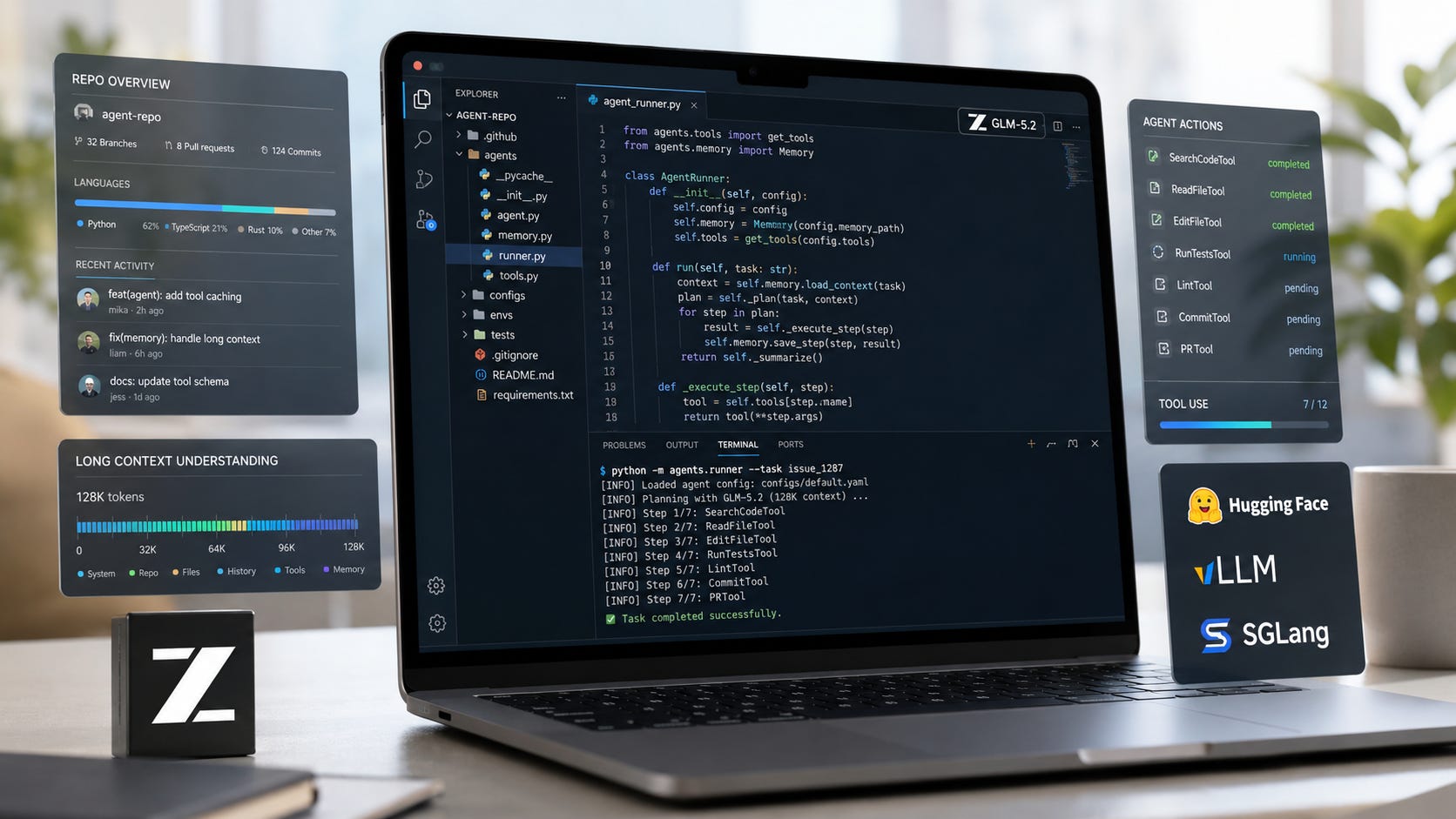
GLM-5.2 is the rare open-weight model release that local AI users should care about immediately, even though most of them will not run it comfortably on a normal desktop. Z.ai released GLM-5.2 on June 16, 2026, with an open-weight model, a claimed 1 million-token context window, strong coding-agent benchmarks, and a permissive model license listed on Hugging Face.
The practical question is whether GLM-5.2 belongs in your workflow today. For most readers, the answer will depend on whether they should test it through an API, rent serious GPU hardware, or wait for better quantizations and runtime support. GLM-5.2 matters. The hard part is turning that promise into something fast, private, affordable, and reliable enough to use on real code.
Key takeaways
GLM-5.2 is worth testing now if you build coding agents, run evals, operate vLLM or SGLang servers, or compare open models against Claude-style coding workflows.
Most desktop local AI users should wait before treating it as a daily driver. The full model is a 753B-parameter MoE model, and the serving recipes point toward multi-GPU server hardware rather than a single RTX 3090 or RTX 4090.
The benchmarks are promising, but they should guide testing rather than hardware purchases. Coding-agent results depend on the benchmark harness, context length, tool environment, output budget, and serving stack.
The license is one of the strongest parts of the release. The GLM-5.2 Hugging Face model card lists the model under an MIT license, which matters for local builders, commercial experiments, and teams that need control over model deployment.
The API and the weights create different control stories. Local weights give you more operational control. Hosted access through Z.ai’s API brings account terms, pricing, rate limits, and data-handling rules.
For local AI users, GLM-5.2 is a signal as much as a model. It shows where open coding models are moving, but the near-term desktop story depends on quantization quality, llama.cpp support, Ollama packaging, LM Studio usability, and smaller variants.
What Z.ai released with GLM-5.2
Z.ai released GLM-5.2 as its latest flagship model for long-horizon tasks, coding, and agent workflows. The company is positioning it around long-context engineering work, project-level code understanding, and tool-heavy coding tasks rather than casual chat.
The official documentation describes GLM-5.2 as a model with a 1 million-token context length and up to 128,000 output tokens. The model card lists it as a 753B-parameter model with BF16 and F32 tensor types, while Z.ai’s official GLM-5 repository links both BF16 and FP8 downloads.
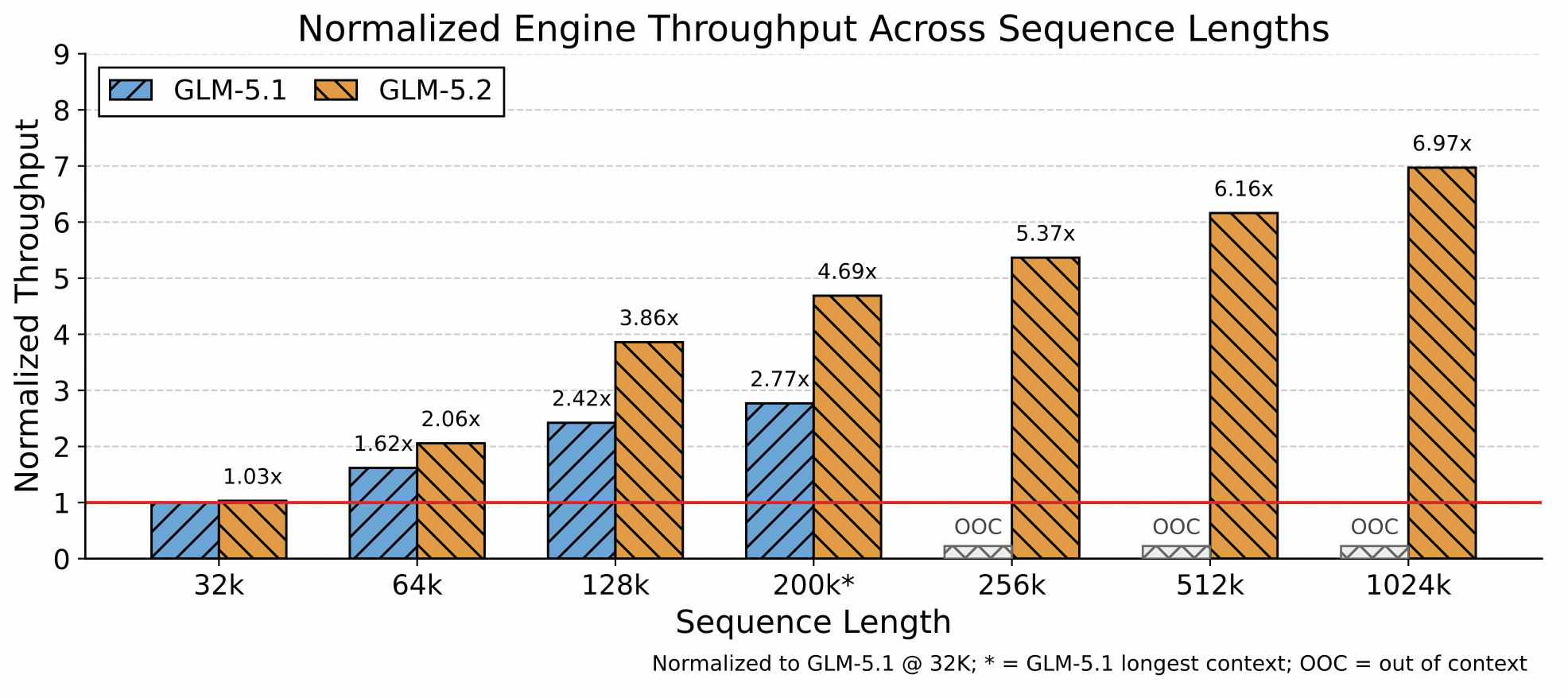
The release matters because GLM-5.2 is not locked inside one chat product. Developers can use it through Z.ai’s hosted API, download the weights, or run supported serving paths such as vLLM, SGLang, Transformers, KTransformers, Unsloth, and Ascend NPU tooling, according to the official repository.
That openness is why local AI users should pay attention, even if their machines are nowhere near ready for the full model. GLM-5.2 gives developers a serious new target for evaluation, self-hosting experiments, coding-agent stacks, and private code workflows. It also gives the local ecosystem a new stress test. If a model this large can eventually become usable through better quantization, runtime support, and packaging, the same work will help smaller models become easier to run too.
Business Insider reported that GLM-5.2 drew attention from Silicon Valley developers because of its coding focus, open availability, and long-context claims. The same report cited public praise from Vercel CEO Guillermo Rauch and Microsoft alumnus Matt Velloso, who said he had used it as a coding daily driver for a full day. Tom’s Hardware also covered the performance claims and the public debate around how close Chinese open models are getting to leading closed models.
That developer attention matters. Press releases are cheap. Developers voluntarily trying a model inside coding workflows is a stronger signal.
What makes GLM-5.2 different
The most important change is where GLM-5.2 is aimed. This is a model for the part of AI coding where local and open models have often felt weakest: long-horizon, tool-using, repo-level work.
Z.ai says GLM-5.2 is built for tasks such as project-level codebase takeover, long-horizon refactoring, production-grade standards checks, and agentic coding. The docs give examples around codebase understanding, migration, testing, and debugging rather than simple one-shot code completion.
The model card highlights several practical changes. The first is the 1 million-token context window, which matters for large codebases, long logs, documentation bundles, and multi-file refactors. The second is advanced coding with flexible effort, which lets the model spend more reasoning budget on harder tasks. The third is IndexShare, which Z.ai says reduces per-token FLOPs at 1 million-token context by 2.9x. The fourth is MTP support, which Z.ai says can improve serving throughput by increasing accepted draft tokens.
The catch is familiar to anyone who has run local models. Context length only helps when the serving stack can afford the KV cache, the hardware can hold the model, and the workflow benefits from giving the model a very large prompt. A 1 million-token context window on a model card does not automatically translate into fast, cheap, reliable local coding on a desktop.
That distinction matters because coding models are judged differently from chat models. A chat model can feel impressive after a few good answers. A coding model has to modify files, preserve architecture, run or anticipate tests, avoid unnecessary churn, and recover when the first patch fails. GLM-5.2’s long-context design is interesting because those are exactly the tasks where context and tool use can change the result.
Benchmarks are useful, but they do not settle the question
The benchmark claims are strong enough to deserve attention, but they should be read like engineering data rather than a buying decision.
On the Hugging Face model card, Z.ai reports that GLM-5.2 scores 62.1 on SWE-bench Pro, compared with 58.4 for GLM-5.1, 60.6 for Qwen3.7-Max, 55.4 for DeepSeek-V4-Pro, 58.6 for GPT-5.5, 54.2 for Gemini 3.1 Pro, and 69.2 for Claude Opus 4.8. On Terminal-Bench 2.1 with Terminus-2, Z.ai reports GLM-5.2 at 81.0, compared with 63.5 for GLM-5.1, 74 for Gemini 3.1 Pro, 84 for GPT-5.5, and 85 for Claude Opus 4.8.
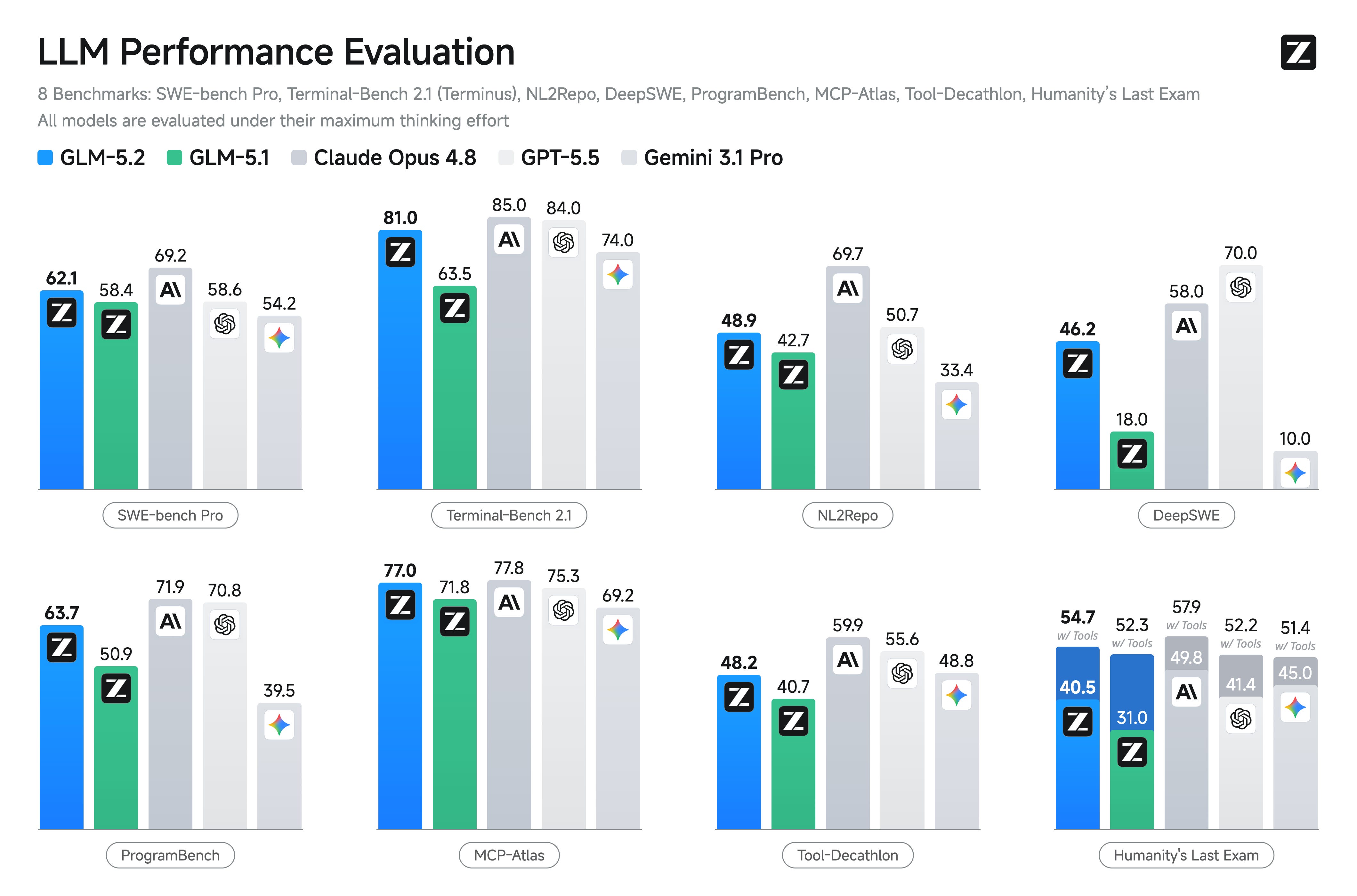
Those numbers are serious, but the footnotes matter. The model card says the SWE-bench Pro result uses OpenHands with temperature 1, 32K maximum new tokens, and 400K context. Terminal-Bench 2.1 uses Terminus-2 with 256K context. Some other evaluations use 1 million context and maximum effort settings.
That means GLM-5.2’s headline performance is tied to a particular harness, context length, token budget, and agent setup. Your coding workflow probably does not match that benchmark exactly.
The vLLM GLM-5.2 recipe also warns that pure throughput benchmarks may under-report real speed because synthetic benchmarks do not capture MTP acceptance well. That is a useful reminder in both directions. A bad benchmark can miss performance. A strong benchmark can still fail to predict whether the model will patch your repo cleanly.
The right response is controlled testing. Put GLM-5.2 on the same task you already use for Claude, ChatGPT, Qwen Coder, DeepSeek, or your current local coding model. Use the same repo snapshot, the same prompt, the same failing tests, and the same time budget. Measure accepted diffs, test pass rate, cost, latency, tool mistakes, and cleanup work.
This is especially important because we have already covered why local coding agents can look better in demos than they feel during real desk work. GLM-5.2 deserves the same kind of hands-on test before anyone treats it as a replacement for an existing coding setup.
More on local coding agents:

Where GLM-5.2 could actually help
GLM-5.2’s strongest use cases are bigger than “write me a Python function.” Smaller models can already handle many short coding prompts well enough. The interesting question is whether GLM-5.2 can hold more of a real software project in its working context and make better tool-driven decisions over time.
For repo-level coding agents, GLM-5.2 is most interesting in frameworks that need to read a codebase, inspect files, modify several parts of a project, run tests, and recover from errors. That includes workflows similar to Claude Code, OpenHands, Aider-style editing, SWE-agent setups, and custom internal coding agents.
For large refactors, the long context could help when a model needs to understand architecture, dependencies, old APIs, migration docs, and test failures in one run. This is where a small local coder model often falls apart, especially when a change touches multiple files and old assumptions are scattered across the repo.
For migration work, GLM-5.2 may be useful on SDK upgrades, framework migrations, type-system cleanups, and API changes. These tasks often require a model to read old patterns, infer the new pattern, apply that pattern repeatedly, and check whether the result still fits the project’s conventions.
For code review and standards checks, GLM-5.2 may help review pull requests, spot inconsistent patterns, write test plans, and check whether a change follows a team’s internal rules. That use case could be attractive even when the model is too expensive or slow to give full control over edits.
For private code workflows, the open-weight release is the key advantage. If a team can self-host GLM-5.2, the model becomes more interesting for companies or developers who do not want private code moving through a closed model account. The downside is that this path immediately runs into hardware.
Access, pricing, and availability
There are three practical access paths for GLM-5.2.
The first is hosted API access. Z.ai’s docs show an OpenAI-compatible API pattern using glm-5.2, which means developers can adapt many existing OpenAI-style clients by changing the base URL and model name. Z.ai’s pricing page lists GLM-5.2 at $1.40 per 1 million input tokens, $0.26 per 1 million cached input tokens, and $4.40 per 1 million output tokens, as of June 24, 2026.
The second is the open-weight path. The main GLM-5.2 model card on Hugging Face lists the model under the MIT license. Z.ai also provides a GLM-5.2-FP8 model page, which is the more practical starting point for serious serving work because FP8 is far lighter than BF16 for this class of model.
The third is the community quantization path. Unsloth has a GLM-5.2 GGUF page with usage examples for llama.cpp, LM Studio, vLLM, and Ollama. Another GGUF page describes a Q4_K_M quantization split into multiple shards and weighing roughly hundreds of gigabytes.
That last phrase is doing a lot of work: hundreds of gigabytes. A quantized GLM-5.2 build may be easier to experiment with than the full-precision weights, but it still does not behave like a small local coder model that fits cleanly on a gaming GPU.
Can you run GLM-5.2 locally?
Yes, technically. For most local AI users, the answer is still no in the practical sense.
The vLLM GLM-5.2 recipe describes the model as a roughly 743B-parameter MoE with 39B active parameters, a 1,048,576-token context window, and a vLLM requirement of 0.23.0 or later. It lists 8xH200 or 8xH20 as prerequisites for single-node FP8 serving, and 8xB200 for full 1 million-token context.
The same vLLM provider page lists GLM-5.2 FP8 at 893 GB and BF16 at 1786 GB. SGLang’s GLM-5.2 material similarly points toward H200, B200, B300, or GB300-class setups, with FP8 as the realistic default and BF16 as a much heavier deployment.
That is not a normal home lab.
A desktop with 24GB of VRAM is not the target environment for full GLM-5.2. A dual RTX 3090 build is not the target environment either, at least not for the full model in a comfortable configuration. Those machines still matter for smaller local coding models, but GLM-5.2 sits in a different class.
Community GGUF quantizations lower the barrier, but they do not turn a 753B-parameter model into a casual install. The Q4_K_M GGUF page describes a model size around the mid-hundreds of gigabytes. You may be able to experiment with enough system RAM, fast storage, patience, and a supported runner. That is different from a responsive local daily driver.
Readers with 8GB, 12GB, 16GB, or 24GB GPUs should treat GLM-5.2 as something to test through an API or watch through downstream quantization work. It is not a reason to panic-buy hardware. For practical desktop local models, start with a VRAM-tier decision like choosing the right local LLM for 8GB, 12GB, and 24GB VRAM, then move up only when your actual workflow justifies it.
If you are deciding whether local AI hardware is worth the money at all, read the broader local AI hardware buying analysis before treating GLM-5.2 as your baseline.
More on local AI hardware:

License, restrictions, and control points
The model license is the cleanest part of the GLM-5.2 story. The Hugging Face model card lists GLM-5.2 under an MIT license. That is a major advantage for developers who want to test, modify, package, or build around open weights.
Control points change depending on how you use the model. If you use the weights locally, your main constraints are hardware, software support, the model license, and your own operational security. If you use Z.ai’s hosted API or chat product, you are also accepting hosted-service terms, pricing, rate limits, account rules, and data-handling policies.
Z.ai’s terms say individual users retain rights to prompts and outputs, but they also authorize Z.ai to store and use submitted content for model development and service improvement. The same terms say API user content will not be used for model development or improvement unless the API user explicitly agrees. Z.ai’s API services DPA also says the company processes API content as a processor under customer instructions and that API service content is processed in real time and not saved on servers.
That distinction matters. Open weights do not make every hosted interface automatically private. If you are testing GLM-5.2 on private client code, proprietary repos, customer data, or unpublished research, use local weights where possible or read the API terms carefully. At minimum, strip secrets, keys, credentials, internal URLs, and customer data before sending code to a hosted endpoint.
Hosted access is useful. Owned capability is more resilient.
Privacy and data handling
GLM-5.2 creates two different privacy paths.
The local path gives you the strongest control, assuming you can run the model securely and keep logs, prompts, repos, and outputs inside your own environment. That path is expensive and technically demanding for this model.
The API path is easier, but the privacy story depends on Z.ai’s current terms and your account type. Z.ai’s privacy policy says it can collect account information, communications, user content, device and network data, usage data, and logs. It also says personal data may be used to operate, provide, develop, and improve services, including model training under legitimate interests. The API DPA language is more favorable for business API customers, especially the statement that API content is processed in real time and not saved on servers.
Use the API for public repos, synthetic tasks, open-source tests, or low-risk code. Use local weights or a controlled deployment for sensitive code. Do not paste secrets, .env files, credentials, tokens, customer data, or private incident logs into a hosted model. Keep coding-agent runs on a branch or worktree, not your main working tree. Review every diff before merging.
What GLM-5.2 means for local AI users
GLM-5.2 is good news for local AI, but it is not a simple desktop win yet.
The good news is that a serious open-weight coding model gives developers more optionality. You are less dependent on a closed chat account, a shifting model picker, or a vendor-controlled coding assistant. Model weights create a path to self-hosting, custom serving, internal evaluation, privacy-aware code workflows, and eventually better quantized community builds.
The bad news is that the full model belongs to the server class. The hardware requirements are closer to an inference cluster than a creator PC.
That means GLM-5.2 currently makes the most sense in three layers.
API testing is where most developers should start. Use Z.ai’s API, a third-party host if one becomes reliable, or a managed endpoint to test whether GLM-5.2 is good on your actual coding tasks.
Serious self-hosting is for teams with H200, H20, B200, B300, GB300, or comparable rented infrastructure. These teams should test vLLM and SGLang deployments directly because model quality and serving quality are inseparable for agentic coding.
Desktop experimentation is for power users with large RAM pools, fast NVMe storage, and patience. GGUF quantizations through llama.cpp, Ollama, or LM Studio may be worth trying, but friction should be expected.
For readers building local coding agents on normal consumer GPUs, GLM-5.2 is more of a north star than a daily-driver recommendation. If you want practical local coding-agent work now, also look at smaller GGUF-based workflows such as GGUF Loader Agentic Mode, where the model sizes are closer to desktop reality.
More on GGUF Loader:

Who should test GLM-5.2 now
Coding-agent developers should put GLM-5.2 in their eval set immediately. If you build agents, editor tools, repo analyzers, automated coding workflows, or internal software maintenance tools, GLM-5.2 is relevant because it targets the kind of long-horizon work those systems need.
Teams already using Claude, ChatGPT, Qwen, or DeepSeek for code should also compare it. The open-weight angle makes GLM-5.2 worth testing, especially if account dependency, data exposure, or model availability is becoming a concern.
vLLM and SGLang operators should treat GLM-5.2 as a serious serving-stack test. The model’s practical value depends on attention kernels, KV cache handling, FP8 support, MTP behavior, batching, and memory management. A model this large can expose issues that smaller models hide.
Companies with access to serious GPU servers should run controlled benchmarks on their own tasks. If you can rent or operate H200 or B200-class hardware, GLM-5.2 is worth testing against the work your engineers actually do.
Open model benchmarkers should verify the headline claims independently. The reported coding-agent scores are strong enough to deserve careful reproduction, especially across different harnesses and prompt styles.
Privacy-sensitive teams with budget should evaluate self-hosting. If your code cannot go to closed coding assistants, GLM-5.2 may be worth testing even if the hardware bill is painful.
Who should wait
Single-GPU desktop users should wait before treating GLM-5.2 as a normal local install. A 24GB card is useful for many local AI workflows, but it is not enough to make full GLM-5.2 practical.
Most Windows beginners should wait too. The early local story is not a clean “download and chat” experience for ordinary machines, especially if the goal is responsive coding assistance.
People buying hardware because of one model release should slow down. A benchmark chart is not a hardware plan. Start with your workload, then choose hardware around the models and runtimes you can actually use.
Production teams that need stable local deployment today should wait for more independent testing, more runtime fixes, better quantization notes, and clearer performance data. Early support is promising, but production reliability depends on more than a model card.
Users who need fast local coding on modest hardware should keep using smaller coding models until GLM-5.2-derived or GLM-5.2-adjacent options become easier to run. The most useful version for desktop users may arrive indirectly, through smaller models, better quantizations, or improved serving stacks.
How to test GLM-5.2 without fooling yourself
Use a small, repeatable test before making any workflow decision.
Create a safe repo copy. Use a branch, worktree, or disposable clone. Remove secrets and private credentials.
Choose three real tasks. Good tests include a failing unit test, a small refactor, a dependency migration, or a bug with logs.
Use the same task across models. Compare GLM-5.2 with your current coding model using the same prompt and same repo state.
Measure outcomes, not vibes. Track whether tests pass, how many files changed, whether the diff is understandable, how much human cleanup was needed, total wall time, and token cost.
Check rollback safety. A coding model that changes too much can be more expensive than a weaker model that stays inside the task.
Repeat with a larger context task. GLM-5.2’s selling point is long-horizon coding. Give it a task where that context could matter.
A simple first prompt:
You are working inside a copy of this repository.

Task:
[DESCRIBE THE BUG OR REFACTOR]

Constraints:
- Do not change public APIs unless necessary.
- Explain the files you plan to edit before making changes.
- Keep the patch minimal.
- After proposing changes, list the tests that should be run.
- Flag any uncertainty instead of guessing.

Repository context:
[PASTE STRUCTURE, KEY FILES, ERROR LOGS, OR AGENT TOOL OUTPUT]
If the model cannot produce clean, reviewable changes on that setup, its benchmark score does not matter for your workflow yet.
FAQ
Is GLM-5.2 open source?
The safest wording is that GLM-5.2 is an open-weight model with a permissive model license. The Hugging Face model card lists GLM-5.2 under the MIT license, and the weights are publicly available. If you require full training code, data transparency, and complete reproducibility, treat open source claims carefully and inspect the exact artifacts you plan to use.
Can ordinary users run GLM-5.2 locally?
Technically yes, but most ordinary local AI users should not expect a smooth desktop experience yet. The model is a 753B-parameter MoE model, and official serving recipes point toward multi-GPU server hardware. Community GGUF quantizations exist, but they are still hundreds of gigabytes.
Is GLM-5.2 better than Claude or GPT for coding?
Z.ai reports strong coding benchmark results, including competitive scores on SWE-bench Pro and Terminal-Bench 2.1. That does not prove GLM-5.2 will beat Claude, GPT, Qwen, or DeepSeek on your repo. Coding-agent performance depends heavily on tools, prompts, context handling, test feedback, and the serving stack.
What hardware do you need for GLM-5.2?
For serious FP8 serving, vLLM’s GLM-5.2 recipe points to 8xH200 or 8xH20, with 8xB200 for full 1 million-token context. SGLang material similarly points toward high-end server GPUs. Desktop users should treat GGUF quantizations as experimental unless they have very large RAM pools and accept slower performance.
Should I send private code to Z.ai’s API?
Only after reading the current API terms and deciding the risk fits your use case. Z.ai’s API DPA says API content is processed in real time and not saved on servers, while the consumer privacy and terms language is broader. For sensitive code, local weights or a controlled self-hosted deployment remain the safer path.
What should local AI users watch next?
Watch for better GGUF quantizations, llama.cpp support improvements, Ollama and LM Studio usability, independent coding-agent evals, SGLang and vLLM performance notes, and smaller GLM-family coding models that bring the same training direction into desktop-friendly sizes.
Why GLM-5.2 is worth attention, even if your desktop cannot run it
GLM-5.2 is one of the first open coding models in 2026 that deserves immediate testing by serious developers, agent builders, and local AI operators. The combination of open weights, MIT licensing, strong coding-agent benchmarks, 1 million-token positioning, and vLLM/SGLang support makes it more than a press-release model.
The hardware story is still brutal. For most Popular AI readers, the right move is to test GLM-5.2 through an API or rented infrastructure, compare it on real coding tasks, and watch the quantization and runtime ecosystem closely. Open weights create more control, but they do not automatically make a 753B-parameter model easy to run at home.
GLM-5.2 is worth attention now. The local daily-driver version of the story still depends on serving stacks, quantization quality, and hardware you actually control.
Explore more from Popular AI:
Start here | Local AI | Fixes & guides | Builds & gear | Popular AI podcast
Would you test GLM-5.2 through an API first, wait for better local AI quantizations, or try to run this open coding model yourself anyway?