


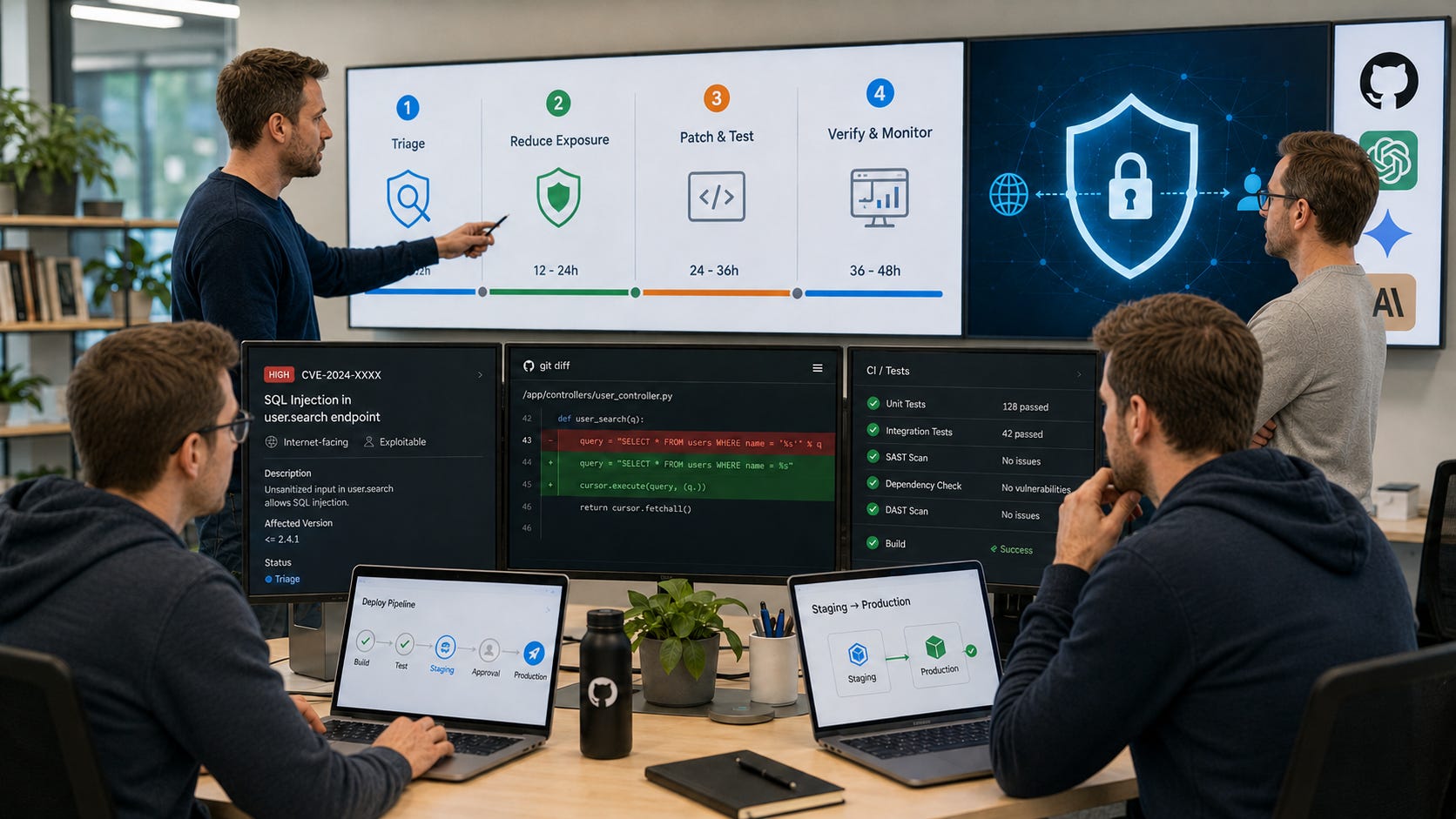
If you run a small app, public API, WordPress site, SaaS dashboard, internal tool, or AI-coded prototype, the AI cyber tools story is no longer abstract. The practical risk is simple: models are getting better at finding vulnerable paths, reasoning through code, and validating whether software can be exploited.
For small teams, the point is not that elite human operators are suddenly targeting every app. The point is that the time between “a vulnerability exists” and “someone can test whether you are exposed” is getting shorter. Slow patching, forgotten staging servers, public admin panels, weak authorization checks, and unreviewed AI-generated code are becoming more expensive mistakes.
On June 22, 2026, the Five Eyes cyber security agencies warned that frontier AI could transform offensive and defensive cyber capability on a timeline of “months,” not years. Their advice was practical rather than theatrical: reduce exposure, accelerate patching, strengthen identity controls, prepare for incidents, and use AI defensively where it helps. This should serve as a useful signal for developers, founders, and small teams that still treat patching as something to squeeze in after feature work.
Key takeaways
Patch the most exploitable public systems first. Public, known, automatable vulnerabilities are the ones most likely to have their exploitation window compressed by AI cyber tools.
Treat patching as a product workflow. Assign owners, reproduce issues, test fixes, document changes, and deploy with the same seriousness you bring to shipping features.
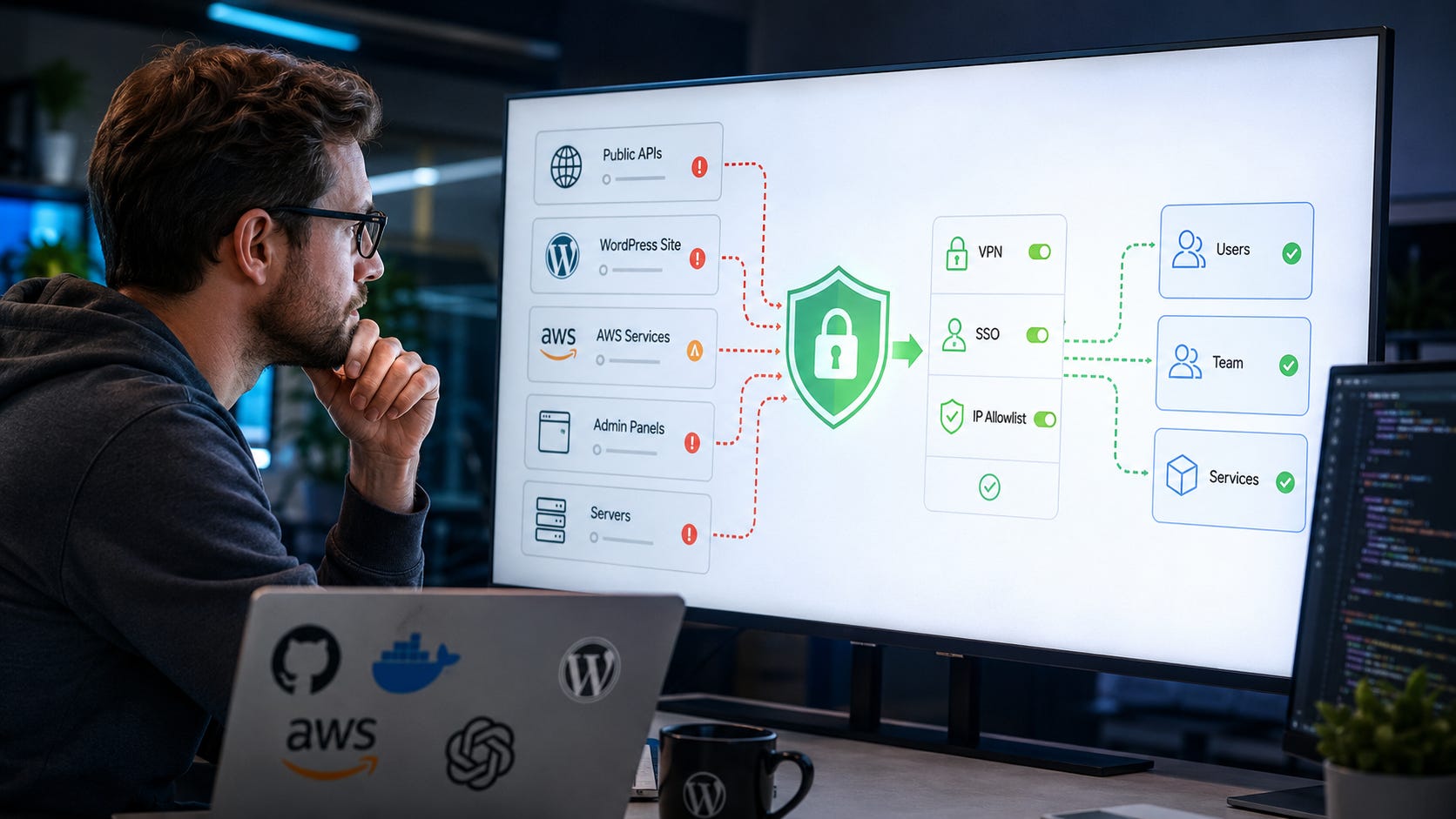
Reduce exposure before buying another dashboard. A service that does not need to be public should move behind VPN, SSO, IP allowlisting, zero-trust access, or a private network.
Verify AI-generated vulnerability reports before acting. A report should identify the affected component, reachable path, safe reproduction, likely impact, proposed fix, and verification test.
Use AI security tools to speed up work, not to transfer responsibility. AI can help with triage, review, test generation, and documentation, but humans still own severity, scope, deployment, and incident judgment.
Review AI-generated code as a high-risk diff. Isolate workspaces, remove secrets, check dependencies, require tests, and review authorization logic before merge.
What changed with AI cyber tools
The warning from the Five Eyes agencies made one thing clear: cyber risk assumptions are aging faster. AI can help defenders find and fix software flaws, but it can also lower the barrier for malicious actors, increase attack speed, and shrink the window between vulnerability discovery and exploitation.
Reuters reported that the warning reflected official concern over advanced models such as Anthropic’s Mythos and OpenAI’s GPT-5.5-Cyber, which officials said could help users execute complex cyber operations more quickly. More and more, AI capability is framed as improving across both offensive and defensive workflows.
OpenAI’s own June 22 Daybreak post adds the product side of the story. OpenAI says the full version of GPT-5.5-Cyber is being released through a continued limited release to trusted defenders, with a focus on finding, validating, and patching software vulnerabilities. In the statement, the company reports GPT-5.5-Cyber scores of 85.6% on CyberGym, 39.5% on ExploitGym, and 69.8% on SEC-bench Pro, while describing stronger monitoring, scoped controls, and trusted access for defensive use.
If defenders can use stronger models to find vulnerable paths faster, attackers will try to use the same class of capability, or local and open substitutes, to find the same paths. Rather than panic, small teams need faster, cleaner, more evidence-driven patching.
The practical answer for small teams
Small teams should not freeze development or ban AI coding tools. They should tighten the boring parts that decide whether a vulnerability becomes a breach.
Start with this order of operations:
Patch internet-facing, actively exploited, automatable vulnerabilities first.
Remove public exposure where public exposure is not needed.
Require human reproduction before accepting AI-generated vulnerability claims.
Use AI to speed up review, testing, and documentation, while keeping humans accountable.
Make incident response real before the first incident.
CISA’s newer patching direction shows where the pressure is going. Cybersecurity Dive reported that CISA’s 2026 vulnerability directive can give federal agencies a three-day remediation window for actively exploited, automatable vulnerabilities on internet-facing systems, with forensic triage required in severe cases. That does not legally bind most private teams, but it is a strong market signal. The old “patch it sometime this sprint” rhythm is losing ground.
Small teams do not need to copy federal bureaucracy. They do need to copy the logic. Public exposure matters. Known exploitation matters. Automation matters. Business impact matters. A low-risk internal issue and an internet-facing authentication bypass should never sit in the same queue with the same priority label.
What this means for developers
The biggest change is the shrinking gap between “a bug exists” and “someone can check whether your app is exposed.” That matters most for teams with public admin panels, old CMS plugins, unpatched frameworks, exposed dev tools, forgotten staging servers, leaky API routes, weak object-level authorization, hardcoded secrets, over-permissive cloud credentials, and AI-generated code that went live with minimal review.
Those are ordinary problems, which is exactly why they matter. AI cyber tools do not need cinematic zero-days to create pressure. They only need enough speed, scale, and context to find the weak spots teams have been leaving around for years.
OWASP’s 2025 Top 10 keeps broken access control as A01 and lists software supply chain failures as A03. That maps painfully well to AI-coded apps, where common failures include missing authorization checks, bad defaults, sketchy dependencies, and code that works until someone asks what a user should be blocked from doing. It is also especially relevant for AI-generated software because many failures happen at the boundary between what a route technically does and what a user should be allowed to do.
A developer-friendly patch routine has to start from that reality. The most important question is rarely “Can the scanner find something?” It is “Can an unauthenticated user, a low-privilege user, a compromised account, or a malicious integration reach something they should not reach?”
Why AI-generated apps are exposed
The Verge’s recent warning about vibe-coded apps focused on the same practical issue: AI makes it easier for non-specialists to build public software, but many of those apps move online without threat modeling, secure authentication, access-control review, or serious testing.
Vibe coding still has value, but deployment discipline matters more.
A prototype on localhost is one risk profile. A public app with user data, payment hooks, uploaded files, API keys, admin functions, and a database is another. The moment an AI-coded app touches real users or real data, it needs the same security basics as any other software. That includes server-side authorization, strong authentication, secret scanning, dependency review, logging, backups, and a patch process that can move quickly when an issue lands.
The research on AI coding tools also points to workflow fragility. A March 2026 arXiv study manually analyzed more than 3,800 publicly reported bugs across Claude Code, Codex CLI, and Gemini CLI. The authors found that more than 67% of the reported bugs involved functionality, with many root causes tied to API, integration, and configuration errors. Common symptoms included API errors, terminal problems, and command failures.
Agents call tools, update files, install dependencies, alter configs, and run commands. When those steps are brittle, your patch workflow can become brittle too. A coding agent that fixes the vulnerable function but breaks deployment, disables a test, modifies a config, or updates an unrelated dependency can create a new problem while appearing to solve the old one.
Make an exposure list before you scan
Do not start with a scanner. Start with a list of what is reachable.
Write down the domains, subdomains, public IPs, cloud services, admin panels, APIs, webhooks, staging environments, object storage buckets, databases, SSH, RDP, VPN, management ports, and third-party apps with access to production data.
Then ask one blunt question for each item: does this need to be public?
If the answer is no, remove public access first. Put it behind a VPN, SSO, IP allowlist, zero-trust access layer, private network, or no network path at all. This is one of the highest-return moves a small team can make because it reduces what both human attackers and AI-assisted scanners can touch.
The Five Eyes statement tells organizations to limit unnecessary system access and external connectivity, then challenge whether systems need to be exposed at all. That advice sounds basic because it is basic. It also works. A forgotten admin panel behind SSO is far less attractive than a forgotten admin panel sitting on the open internet.
The exposure list should live somewhere the team actually uses. A spreadsheet is fine. A ticketing system is fine. A simple repository file is fine. The format matters less than ownership, freshness, and whether someone checks it before new services go live.
Patch by exploitability
A giant vulnerability backlog is useless if it treats every issue as equal. Patch by exploitability and impact.
Prioritize this way:
Known exploited vulnerabilities on internet-facing assets.
Vulnerabilities with public exploit code or easy reproduction.
Bugs that grant remote code execution, authentication bypass, privilege escalation, data access, or account takeover.
Vulnerable dependencies in code paths that are actually reachable.
Internal-only issues that become serious after a foothold.
Low-impact issues with no realistic path to damage.
WIRED’s coverage of CISA’s 2026 directive described similar risk factors, including whether an asset is publicly exposed, whether the vulnerability appears in the Known Exploited Vulnerabilities catalog, whether exploitation is automatable, and how much access exploitation grants. That translates the same pressure into plain operational terms: some bugs now need days, not weeks.
For small teams, the best version is lightweight. Tag assets as internet-facing or internal. Mark whether the affected component is actually deployed. Track whether exploit code exists. Record whether the vulnerable feature is enabled. Assign one owner. Put a date on the decision. Revisit the decision when new exploitation details appear.
A vulnerability in a package you do not call should not consume the same energy as a live authentication bypass. A critical CVE on a server that is no longer reachable still needs cleanup, but it should not outrank a high-risk bug in a public payment or account route. Context is what turns vulnerability management from theater into defense.
Require reproduction before panic
AI security tools can produce useful findings. They can also produce plausible nonsense. Treat every AI-generated report as a lead until there is evidence.
Before treating a finding as real, require a clear affected component, vulnerable version or commit, reachable code path, safe reproduction in an owned environment, expected versus observed behavior, plain-English impact, proposed fix, and regression test or verification step.
Trail of Bits’ Patch the Planet write-up names the maintenance problem directly. Stronger models can produce a flood of security findings, but maintainers still need deduplication, false-positive filtering, and severity correction. It argues that project-specific threat models and severity criteria are especially important because models may otherwise overrate issues.
That lesson applies beyond open source. A small SaaS team also needs severity criteria. What counts as critical? What counts as customer data exposure? What requires disabling a feature? What can wait for the next release? What needs legal, customer support, or leadership review? Decide those rules before the alert lands.
Do not let an AI report jump straight from “possible vulnerability” to “production emergency” without human verification. At the same time, do not dismiss AI reports because one was wrong last week. The right default is evidence: reproduce, assess, fix, test, and document.
Patch with tests attached
A patch without a test is a hope. That is a bad security strategy when AI cyber tools are making discovery faster.
For each serious fix, require at least one of these:
Unit test for the vulnerable function
Integration test for the affected route
Authorization test for the blocked action
Regression test using the safe reproduction case
Dependency update plus lockfile review
Configuration test in CI
Manual verification checklist for infrastructure changes
NIST’s Secure Software Development Framework remains a good baseline because it treats secure software as a lifecycle problem. It covers secure development practices, vulnerability review, testing, third-party component review, and secure default configuration. Useful for teams that need a stable reference for secure software practices without inventing their own framework from scratch.
The AI-era adjustment is speed. The same steps remain, but the lag between report, reproduction, patch, review, deployment, and monitoring has to shrink. Tests are what let you move faster without turning every urgent fix into a guess.
Small teams should also keep patches small. Do not merge a giant agent-generated patch that touches unrelated files. Security fixes should be easy to review, easy to roll back, and easy to explain later. A clean patch with one regression test beats an impressive diff that changes authentication, dependencies, formatting, and configuration in the same pull request.
Review AI-generated code with a different lens
AI code review should include normal correctness checks plus agent-specific traps. Look for missing authorization checks, client-side checks pretending to be security, user-controlled IDs, insecure file upload handling, SSRF paths, SQL or NoSQL injection, cross-site scripting, hardcoded secrets, overbroad API keys, new dependencies with unclear provenance, public debug routes, dangerous shell calls, over-permissive CORS, and silent logging of tokens, prompts, or customer data.
Do not ask the coding agent, “Is this secure?” Ask for adversarial checks tied to specific abuse cases.
Example prompt:
Review this diff for security issues only.

Focus on:
- authentication bypass
- missing authorization checks
- user-controlled object IDs
- injection
- unsafe file handling
- secret exposure
- insecure logging
- dependency risk
- public debug routes

Return:
1. Confirmed issues with file and line reference.
2. Issues that require reproduction.
3. False-positive candidates.
4. Test cases that would prove the fix.
5. Questions a human reviewer must answer.

Do not mark an issue critical unless the exploit path and impact are clear.
The last line matters. Without severity guidance, models often inflate risk. A model can still be useful when it over-warns, but only if a human reviewer has a process for sorting confirmed issues from weak guesses.
The stronger pattern is to ask for specific abuse cases. Can a user access another user’s record by changing an ID? Can an unauthenticated request hit the admin route? Can a file upload reach internal services? Can a webhook replay cause a duplicate action? Can an API key from staging reach production? These questions are more useful than a broad request for “security review.”
Use AI security tools without fooling yourself
OpenAI says GPT-5.5 with Trusted Access for Cyber can help verified defenders with secure code review, vulnerability triage, malware analysis, detection engineering, and patch validation. It says GPT-5.5-Cyber is for more specialized authorized workflows such as red teaming, penetration testing, and controlled validation.
That is the right mental model for small teams, even if they do not have access to GPT-5.5-Cyber.
Use AI for explaining unfamiliar code, mapping attack surface, reviewing diffs, writing regression tests, generating safe reproduction harnesses, drafting patch notes, summarizing advisories, checking dependency update impact, turning logs into incident timelines, and producing remediation checklists.
Do not use AI as the final authority on whether a system is safe, whether a vulnerability is exploitable, whether customer data was exposed, whether a patch is complete, whether a report is legally or contractually reportable, or whether an incident is over.
AI belongs in the loop. Accountability belongs with the team.
A practical 48-hour patch workflow
Use this workflow when a serious vulnerability appears in a dependency, framework, plugin, or service you run. The exact timing may change by risk and team size, but the sequence is useful because it separates triage, exposure reduction, patching, and monitoring.
Hour 0 to 2: triage
Identify whether you use the affected component, which version is deployed, whether it is internet-facing, whether the vulnerable feature is enabled, whether exploitation is known or public, what access an attacker would gain, whether a vendor patch or mitigation exists, and whether logs show suspicious activity.
Create one owner, one ticket, and one status channel. Do not scatter the response across chat threads. The owner does not have to do every task personally, but they must keep the response coherent and visible.
Triage should end with a decision: patch now, mitigate now, monitor and schedule, or close as not affected. Document why. That written decision is useful when someone asks later why one issue jumped the queue and another did not.
Hour 2 to 8: reduce exposure
Before the full patch is ready, apply safe exposure cuts. Disable the affected feature if possible. Block risky routes at the edge. Add WAF or reverse-proxy rules where appropriate. Remove public access to admin panels. Rotate exposed secrets. Tighten IAM permissions. Pause risky integrations. Add logging around the suspected path.
OpenAI’s Daybreak post describes the defensive loop as discovery, prioritization, patch generation, validation, and evidence production. That is useful, but small teams should remember that exposure reduction often protects users before the clean patch lands.
Exposure reduction is especially important when the patch is risky, the dependency update is large, or the vulnerable component sits inside a fragile part of the stack. A temporary block is not a substitute for a fix, but it can buy time without leaving the door open.
Hour 8 to 24: patch and test
Do the boring work. Update the vulnerable dependency. Review release notes. Update lockfiles. Run the test suite. Add a regression test for the vulnerable path. Run the app in staging. Check logs for new errors. Validate that the vulnerable behavior no longer works. Document exactly what changed.
This is where AI can help without taking over. Ask it to summarize release notes, identify likely breaking changes, generate a regression test, explain a stack trace, or produce a short remediation note. Keep the final review human, especially if the patch touches authentication, authorization, billing, user data, file handling, cloud permissions, or deployment configuration.
Do not merge unrelated cleanup during an urgent security patch. That is how teams make fixes harder to audit.
Hour 24 to 48: verify and monitor
After deployment, confirm production version numbers, confirm the risky route is fixed or blocked, review access logs, review authentication failures, review WAF or edge logs, review cloud audit logs, check for new accounts, check for new tokens, and look for unusual exports. Keep a written incident note even when no breach is found.
CISA’s 2026 federal patching coverage highlights forensic triage for severe cases because patching a compromised system does not automatically remove the attacker. That is the part small teams often miss. A patch closes the door. It does not prove nobody walked through it yesterday.
Verification should answer two questions. First, is the vulnerable behavior gone? Second, is there evidence that someone used it before the fix? The first question is engineering. The second question is incident response.
What local AI changes
Local AI changes who controls the tool and where your code goes. It does not remove security risk.
A local coding or security model can help with private code review without sending a repository to a hosted provider. That is useful for sensitive projects, prototypes, client work, and local experiments. We have already covered local coding agents such as GGUF Loader Agentic Mode, where the tradeoff is clear: local file access reduces cloud account risk, but the agent still needs strict workspace boundaries, no secrets, version control, and human diff review.
The same principle applies to local security analysis. A local model can summarize code, suggest tests, and help reason about an issue. It can also miss the flaw, invent a flaw, or edit the wrong file. Local means you own more of the workflow. It does not make the output automatically safe.
Use local AI when privacy, account independence, or offline work matters. Use stronger hosted tools when capability matters more and the code can safely leave your environment under the right terms. For many teams, the best workflow is hybrid: local tools for sensitive review and repeatable checks, hosted models for higher-capability analysis when policy allows, and human review as the final gate.
The control layer in AI cyber tools
The power question is who gets access to the most capable cyber models and under what terms.
OpenAI’s Trusted Access for Cyber is identity-based and gives verified defenders reduced refusals for authorized cybersecurity workflows while continuing to restrict malicious activity such as credential theft, stealth, persistence, malware deployment, or exploitation of third-party systems.
That is a rational deployment strategy for a dual-use capability. It is also a control layer. The model provider decides who is trusted, which workflows are allowed, what monitoring applies, what gets refused, which partners get higher-capability access, whether your account remains available, and whether the model changes under your workflow.
Developers do not need to reject hosted cyber tools because of that control layer. They should avoid building their entire security process around a permissioned account they do not control.
Keep local tools, reproducible tests, plain logs, standard scanners, human review, and exportable evidence in the workflow. A good security process should still function if an AI provider changes access, changes model behavior, tightens policy, or becomes unavailable during an incident.
More on local AI hardware:

FAQ
Are AI cyber models already dangerous for small teams?
They are dangerous in the same way faster scanners, exploit frameworks, and automated recon are dangerous: speed and scale. Publicly exposed, poorly patched systems become easier to find and test, especially when the vulnerable path is known or easy to reproduce.
Does the Five Eyes warning mean developers should stop using AI coding tools?
No. It means developers should stop treating AI-generated code as production-ready without review. Use AI coding tools, but require tests, diff review, dependency checks, secret scanning, and access-control review before deployment.
Should I trust AI vulnerability reports?
Trust the report only after reproduction. A useful report should identify the affected component, reachable path, safe reproduction steps, likely impact, patch, and verification test. Without those details, treat the report as a lead.
What should I patch first?
Patch known exploited, internet-facing, automatable vulnerabilities first, especially when exploitation gives remote code execution, authentication bypass, privilege escalation, data access, or account takeover.
Is local AI safer for code review?
Local AI can be safer for privacy because code does not need to leave your machine. Capability still depends on model quality, context, review process, and testing. Use local models for sensitive review when the task fits their capability, but keep human review and tests in the loop.
What is the fastest useful improvement for a small team?
Make an exposure list, remove anything public that does not need to be public, and set a rule that high-risk internet-facing vulnerabilities get a same-day owner. That beats buying another tool while old admin panels remain exposed.
The winning AI cyber tools strategy is faster fixing
Do not turn the AI cyber story into theater. The useful response is operational.
Patch faster. Expose less. Verify AI reports before acting. Review AI-generated code like it came from a fast junior developer with no fear and no memory of your threat model. Use AI to compress the work, but keep humans responsible for reproduction, severity, patch approval, deployment, and incident judgment.
The teams that handle this phase well will not be the ones with the loudest AI security posture. They will be the ones that can move from finding to fixing before the same finding becomes someone else’s exploit.
Explore more from Popular AI:
Start here | Local AI | Fixes & guides | Builds & gear | Popular AI podcast
Where do you think small teams are most exposed right now: unpatched dependencies, AI-generated code, public admin panels, or something else?