


Docker is an engine that packages an application and everything it needs to run (libraries, binaries, configs) into a self-contained container. A container is just an isolated Linux process that shares the host’s kernel but sees its own mini-filesystem, network stack, and PID space. Think of it as a lightweight, sealed‐off room in your house: far cheaper than renting a second house (a full virtual machine) yet private enough that the noise and mess stay inside.
Because containers reuse the host kernel, they start in milliseconds, consume little overhead, and can be packed densely on a single box. Handy when you’re juggling half-a-dozen AI micro-services on one GPU rig.
Containers ≠ Virtual Machines
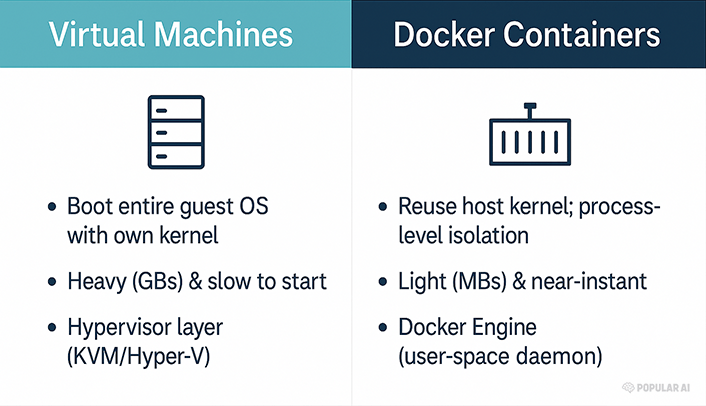
A VM is a tanker ship: stable but lumbering. A container is a speedboat: fast, cheap, and easy to redeploy when the seas get rough.
Why Docker matters for local, open-source AI
Reproducibility – Pin exact CUDA, PyTorch, and model versions so your results remain stable months later. This is vital for scientific credibility and for rolling back when a framework update breaks your prompt.
GPU acceleration out-of-the-box – Since Docker 19.03 you can expose GPUs with a single flag:
bash

docker run --gpus all nvidia/cuda:12.4.0-base nvidia-smi
The NVIDIA Container Toolkit takes care of driver passthrough without polluting the host OS.
Isolation & security – Keep that bleeding-edge forks of llama.cpp from stomping on your system Python; if the container misbehaves, you nuke it with docker rm -f.
Portability – Develop on a laptop, deploy to an on-prem GPU server or a cloud VM running the same image.
Composable services – Stitch a vector database, embedding service, and UI together with Docker Compose, spin up the whole stack with one command.
Data sovereignty – Running locally means your chats, embeddings, and proprietary datasets never leave the box, aligning with the liberty-minded principle of own your data, own your future.
Quick-start: Llama 2 in under five minutes
1. Pull the official Ollama image
bash

docker run -d --name ollama \
  -v ollama:/root/.ollama \
  -p 11434:11434 \
  --gpus all \
  ollama/ollama
This launches an OpenAI-compatible REST endpoint on localhost:11434.
2. Run a model inside the container
bash

docker exec -it ollama ollama run llama2
3. Compose a full RAG stack (Ollama + Qdrant + WebUI)
yaml

# compose.yaml
services:
  llm:
    image: ollama/ollama
    container_name: ollama
    command: ollama serve
    ports: ["11434:11434"]
    deploy:
      resources:
        reservations:
          devices:
            - capabilities: [gpu]
  qdrant:
    image: qdrant/qdrant
    ports: ["6333:6333"]
    volumes: ["qdrant_data:/qdrant/storage"]
  webui:
    image: ghcr.io/open-webui/open-webui:cuda
    environment:
      - OLLAMA_BASE_URL=http://llm:11434
    ports: ["3000:8080"]
volumes:
  qdrant_data:
Bring it up with:
bash

docker compose up -d
In one command you get a self-hosted ChatGPT-style interface that never phones home.
Best practices for AI containers
Use slim base images (
python:3.12-slim,nvidia/cuda:runtime) to shrink attack surface.Pin versions in your
requirements.txtand LABEL your containers withorg.opencontainers.image.documentation.Mount datasets read-only to avoid accidental corruption (
-v /data:/data:ro).Leverage multi-stage builds to keep final images lean: compile wheels in stage one, copy only
/opt/conda/envs/…in stage two.Automate with Compose profiles so you can toggle CPU-only vs GPU stacks by adding
--profile gpu.
Own your compute, protect your data
Centralized AI clouds promise convenience but demand tribute in the coin of control over hardware, software, and your private intellectual labor. Docker hands that control back to you. By containerizing open-source models and their dependencies you gain:
Freedom to audit, fork, and improve the code.
Portability across any box that speaks Docker: x86, ARM, bare-metal, or cloud.
Reproducibility for scientific integrity.
Security through isolation.
In an era when regulators flirt with outlawing unapproved algorithms and corporate gatekeepers throttle APIs, running your own stack is a quietly radical act. Docker is the ship that lets you sail those unregulated waters fast, light, and under your own flag.
Happy hacking!
Explore more from Popular AI:
Start here | Local AI | Fixes & guides | Builds & gear | Popular AI podcast
Docker and containers can seem like overkill until dependency hell hits and everything suddenly makes sense. For AI projects especially, reproducibility, portability, and clean environments matter a lot more than most people expect at first. What made Docker click for you, or what still keeps you from using it in your own workflow?