


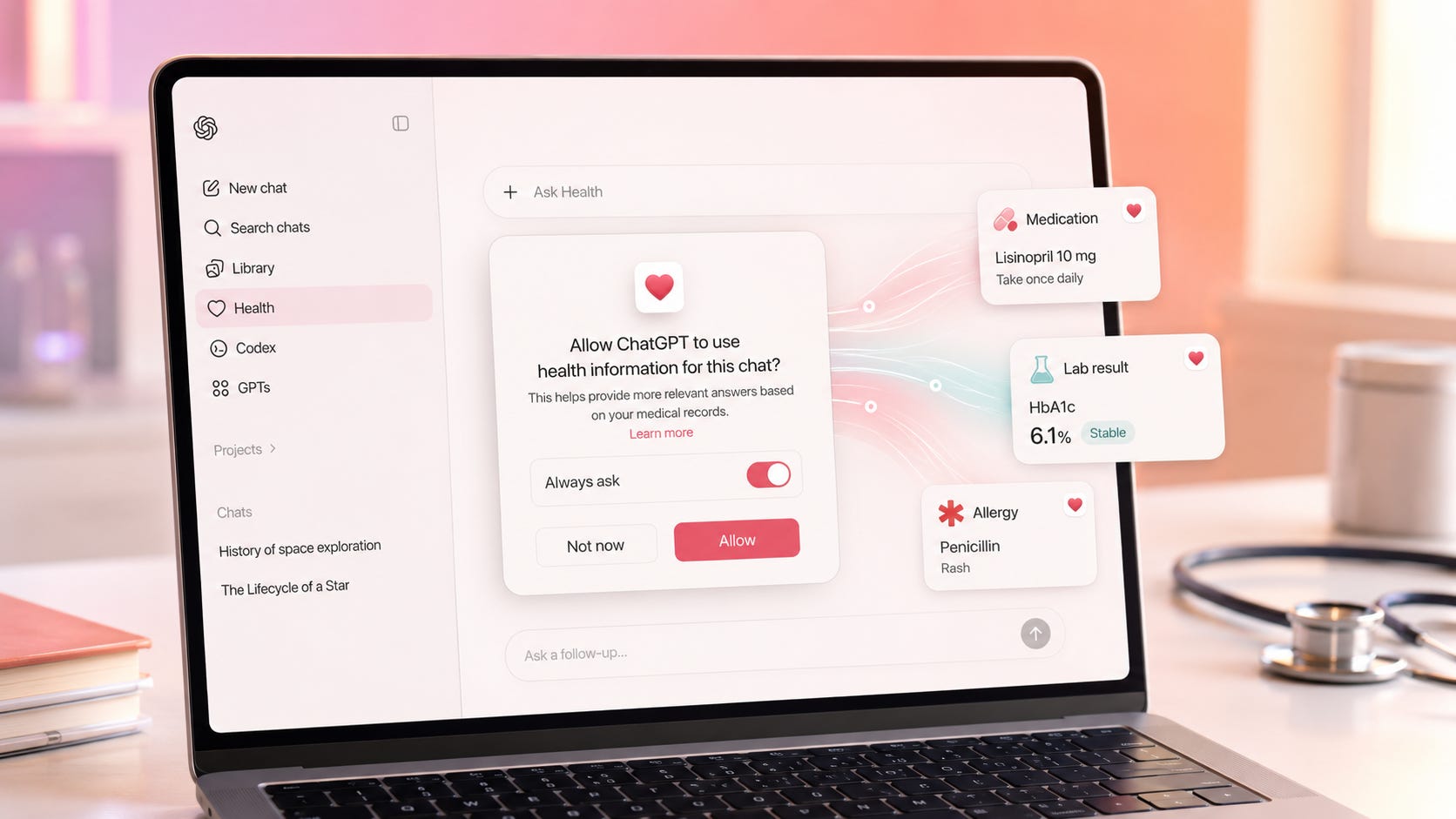
ChatGPT Health can use connected medical records and Apple Health information in conversations outside the dedicated Health area. That can make meal planning, exercise guidance, appointment preparation, and lab-result questions more useful. It also means an ordinary-looking conversation may be influenced by medications, diagnoses, visits, allergies, sleep data, activity patterns, or other health information stored elsewhere in your account.
The safest default is simple: leave the per-use permission prompts turned on. Use @Health when you deliberately want medical context. Do not give ChatGPT permanent access merely to avoid one extra confirmation.
OpenAI began rolling out the new Health experience to eligible U.S. users on July 23, 2026. It is initially available to logged-in adults on web and iOS across Free, Go, Plus, and Pro plans. The rollout is gradual, so some eligible accounts may not see it immediately. OpenAI also says more than 300 million people ask ChatGPT health-related questions each week.
This is a meaningful expansion of what ChatGPT can know and use across everyday conversations. The important privacy question is no longer only whether to connect your records. It is also when ChatGPT should be allowed to bring those records into a specific chat.
Key takeaways
ChatGPT can use information connected through Health in ordinary conversations when the information appears relevant and permission has been granted.
The default setting asks before each use. Choosing “always allow” turns those prompts off.
Connected records can be incomplete or outdated. OpenAI specifically warns that a discontinued medication may remain listed.
Health conversations can create memories when memory is enabled, even though memories are not created directly from the raw synced records.
Disconnecting a provider or Apple Health deletes synced source data within 30 days, but it does not delete health information already written into conversation history.
Consumer ChatGPT Health is not intended for clinical or HIPAA-covered use and does not include a Business Associate Agreement.
What changed on July 23
OpenAI introduced ChatGPT Health in January 2026 as a dedicated, compartmentalized experience. Health conversations, files, and memories were kept apart from ordinary chats. Information created inside Health could use context from outside Health, but Health information and memories were not supposed to flow back into non-Health conversations.
The July release changes that operating model. OpenAI says early users asked most health-related questions outside the dedicated Health space. More than 70 percent of health conversations among testers reportedly took place elsewhere in ChatGPT, so moving into a separate area became an extra step. OpenAI responded by letting users bring connected Health information into ordinary conversations.
Once information is synced, ChatGPT can consider relevant medications, laboratory results, recent visits, sleep, activity, and other connected information alongside the current conversation. It may use an allergy while recommending a restaurant or consider a recent injury while planning family activities. Users can now ask questions with connected Health information anywhere in ChatGPT, subject to relevance and permission.
The original Health Project does not disappear. Earlier Health chats and uploads remain in a separate project with project-contained memory. Those older chats and files do not automatically move into the new Health tab, and their memories remain contained within that project. The new Health tab and cross-conversation system therefore sit alongside the older compartmentalized experience.
That distinction matters because the privacy boundary depends on which Health experience you are using. The legacy project keeps its content segmented. The newer Connect Health system can make connected information available across ordinary chats when you authorize it.
Permission prompts are the main privacy control
By default, ChatGPT asks before using connected Health information to personalize a response. You can approve one request or choose to allow all future access. Choosing permanent access turns off the permission prompts. The setting can be changed under Settings → Plugins → Health.
That prompt is more than interface friction. It is the point at which you can decide whether medical context belongs in the current conversation.
A request to interpret a laboratory result clearly calls for Health information. A restaurant search may benefit from allergy information. A conversation about travel, work performance, insurance, family plans, mental health, or another sensitive topic is less automatic. Permanent access lets ChatGPT make more of those relevance decisions without asking you first.
This is the medical-record version of context contamination, where available information influences an answer simply because the model can see it. The information may be accurate and still be unnecessary for the task. It may also be outdated, incomplete, or more revealing than you intended.
The same permission principle applies to workplace agents. A safer rollout begins with low-risk, read-only access and expands permissions only after the workflow proves it needs more. Medical records deserve at least that much restraint because they can affect advice across food, exercise, travel, family life, and other routine decisions.
More on AI memory and context:


Why “Always ask” should stay enabled
Permanent permission saves a tap. It also removes visibility.
A permission prompt tells you that ChatGPT is about to include Health information in its working context. Without that prompt, the answer may be personalized by a medication, diagnosis, activity pattern, family-history detail, or past visit without an obvious reminder that the connected record was consulted.
That becomes especially important when the information is sensitive, surprising, stale, or wrong. It also matters when another person can access your unlocked device or ChatGPT account. A response that quietly incorporates medical context may reveal more than the visible prompt appears to contain.
A better operating pattern is:
Leave Always ask enabled.
Add
@Healthwhen you deliberately want connected health context.Approve the request for that conversation.
Check the cited or displayed source information before acting on an important answer.
Use a new or Temporary Chat when the topic should not become part of your normal conversation history.
This preserves most of the feature’s usefulness while keeping the decision visible. The extra confirmation is small, but it creates a recurring checkpoint between a broad medical archive and the specific question in front of you.
The prompt also helps you notice when ChatGPT’s idea of relevance differs from yours. If Health access appears during a restaurant search, that may be welcome because of an allergy. If it appears during a work-planning conversation, you may decide the medical context is unnecessary. “Always ask” keeps that judgment with you.
Connected records can be wrong or outdated
Medical records are not a perfectly current biography.
OpenAI warns that connected information may be incomplete or stale. A medication can remain listed after you stop taking it. Diagnoses may be duplicated, provisional, outdated, or missing useful context. Fitness metrics can also differ from what appears in the original wearable app because some proprietary scores are not transferred through Apple Health.
Health lets users review active conditions, current medications, and family history. You can mark a medication or condition as no longer current and add missing details. ChatGPT cannot alter the source records held by your provider or Apple Health because the connection only reads from those records.
That separation is useful. It prevents ChatGPT from silently rewriting the medical source.
It does not prevent the model from reasoning from a stale entry. If an old medication affects a meal recommendation, symptom discussion, exercise plan, or interaction warning, the answer can be coherent while still starting from the wrong premise. A fluent explanation does not make the underlying record current.
Review the imported information before granting broad access. Repeat that review after a hospital visit, medication change, new diagnosis, corrected lab result, or major change in your health. For any consequential answer, compare what ChatGPT used with the original record rather than assuming the synchronized copy is complete.
The same caution applies to wearable data. ChatGPT only receives what the app makes available through Apple Health or another connected source. An app-specific sleep score, readiness score, leaderboard position, or other proprietary metric may not transfer or may be calculated differently.
Health conversations can create ordinary ChatGPT memories
OpenAI says memories are not created directly from raw medical records or Apple Health data. That is an important protection, but it does not end the memory question.
Conversations that use Health can create memories when memory is enabled. A discussion about improving sleep, accommodating an allergy, recovering from an injury, or managing a routine may produce information that personalizes future chats. OpenAI recommends Temporary Chat or disabling memory when you do not want that to happen.
The Health Privacy Notice distinguishes the original ChatGPT Health compartment from the newer Connect Health system. Memories created only inside the original Health space remain separated from the main account. Connect Health conversations, by contrast, follow the memory settings of the main ChatGPT account.
That means the privacy outcome depends on the conversation, not merely on the source of the information. Raw synced records may not directly become memories, but details discussed in a conversation can still become part of personalization.
Deleting a chat and deleting a memory are separate actions. OpenAI’s Memory FAQ says that fully deleting something may require removing every place it appears, including chats, archived chats, files, the memory summary, and connected apps. Turning memory off does not delete past chats. If memory is later turned back on, older chats that remain in history may contribute to new memories.
For sensitive health information:
Review Settings → Personalization → Memory.
Delete any unwanted health-related memory.
Delete the original conversation separately.
Disconnect the underlying Health source when continued syncing is unnecessary.
Check archived chats too, because archiving hides a conversation without deleting it.
Memory controls reduce persistence, but they are not a universal erase button. The conversation, the memory summary, uploaded files, archived chats, and connected sources can all require separate attention.
Temporary Chat reduces persistence, but not to zero
Temporary Chat is the better choice for a one-off health conversation that should not appear in history or create an ordinary personalization memory.
OpenAI says Temporary Chats do not appear in history, do not create or use ordinary personalization memories, and are not used to improve its models. The company may still retain a copy for up to 30 days for safety purposes. Temporary Chat can also continue to follow enabled custom instructions, and limited safety systems may use relevant context in rare high-risk situations.
That makes Temporary Chat useful for questions involving mental health, reproductive health, substance use, sexual health, family medical history, or another topic you do not want influencing later conversations.
Temporary does not mean the conversation vanishes immediately. It means the chat is excluded from visible history and ordinary personalization, with automatic deletion from OpenAI’s systems within 30 days under the stated policy. Security and legal exceptions can still apply.
A Temporary Chat also does not automatically solve every third-party data issue. If a GPT action sends information to another service, the recipient’s privacy policy can govern what happens to that data and may allow longer retention. The safest use is a direct Temporary Chat that avoids unnecessary actions, plugins, or external sharing.
For a sensitive one-off question, Temporary Chat is a stronger default than a normal conversation. It narrows persistence, but it should not be described as zero retention or complete isolation.
Disconnecting Health does not erase conversation history
Disconnecting a medical provider or Apple Health stops the connection and starts deletion of the synced source data. OpenAI says that data is deleted from its systems within 30 days.
Information that already appeared inside a ChatGPT conversation remains until the conversation itself is deleted. Disconnecting therefore stops future access to the source, but it does not reach backward into every answer, summary, or memory created while the connection was active.
This creates three separate deletion jobs:
Disconnect the source. This removes future access and schedules the synced provider or Apple Health data for deletion.
Delete affected conversations. Kept and archived chats remain in the account until manually deleted.
Delete related memories. A memory may survive deletion of the chat that helped create it.
Deleted chats disappear from the account interface immediately and are scheduled for permanent deletion within 30 days, subject to de-identification, security, and legal exceptions. Archived chats follow the same retention rules as ordinary saved chats. Archiving is a visibility control, not deletion.
Files can also require separate attention. OpenAI’s retention documentation says files saved to Library can be managed separately from chats, so deleting a conversation may not delete a file that remains in Library. A user trying to remove sensitive health material should check the conversation, memory, connected source, archived chats, and any stored files.
Simply disconnecting Health is therefore not a complete erasure process. It is one part of a larger cleanup.
Connected Health data is excluded from foundation model training
OpenAI says connected medical records, Apple Health information, and conversations that use them are not used to train its foundation models or target advertisements, regardless of the account’s general model-training setting. Conversations that do not use connected Health information follow the user’s ordinary ChatGPT data-control settings.


That is a stronger training exclusion than the default policy that may apply to ordinary consumer conversations, depending on the user’s settings.
It should not be translated into “nobody can ever access the information.” The Health Privacy Notice says a limited number of authorized personnel and trusted service providers may access Health data for model-safety improvement unless the user has opted out. It also describes processing by hosting, cloud, customer-support, and safety-monitoring providers operating under OpenAI’s instructions.
“No foundation-model training” and “no possible human or service-provider access” are different claims. The published policy supports the first. It does not promise the second.
This distinction matters because privacy language is easy to flatten into a broader guarantee than the policy actually makes. Training exclusion limits one use of the data. It does not erase operational processing, safety review, legal obligations, or the service providers required to run the product.
Users should still treat connected medical information as highly sensitive, secure the account, review permissions, and avoid assuming that a consumer cloud service offers the same confidentiality model as a clinician’s record system.
Consumer ChatGPT Health is not a HIPAA product
ChatGPT Health is a consumer feature. OpenAI says it is not intended for diagnosis or treatment, is not intended for clinical or covered-entity use, and does not include a Business Associate Agreement.
Doctors, insurers, clinics, contractors, and other organizations handling protected health information should not assume that a patient-facing ChatGPT feature is suitable for regulated work. Personal usefulness and institutional compliance are different questions.
OpenAI separately lists HIPAA-eligible products available under a Business Associate Agreement, including ChatGPT for Healthcare, ChatGPT Enterprise with a Regulated Workspace, ChatGPT for Clinicians, ChatGPT FedRAMP, and qualifying API configurations. Covered functionality depends on the product, workspace configuration, and agreement.
The existence of those separate offerings reinforces the boundary. A consumer feature that can connect personal records is not automatically a compliant environment for a healthcare organization’s protected health information.
Individuals can still use ChatGPT Health to understand records, prepare questions, summarize changes, or organize information before an appointment. They should treat the output as preparation for a medical conversation, not as diagnosis, treatment, or a replacement for professional care.
Why people will connect their records anyway
The appeal is real.
People already use ChatGPT because it is available without an appointment, can explain unfamiliar language, can help organize questions, and may feel easier to approach with embarrassing or emotionally difficult subjects. Reddit discussions show users weighing perceived support and accessibility against privacy and accuracy concerns. Those threads are anecdotal evidence of demand and concern, not proof of clinical performance.
Connected records can improve context, particularly for people managing several conditions, medications, appointments, or years of fragmented test results. Instead of manually copying every result into a new prompt, a user can ask about changes over time or prepare a summary for a conversation with a clinician.
The cost of convenience is that a larger part of a person’s life becomes available to the same general assistant used for work, shopping, travel, relationships, and everyday planning. The value comes from continuity. The privacy risk comes from that continuity spreading farther than the user intended.
That does not make ChatGPT Health useless. It makes visible consent more valuable.
The best use case is deliberate rather than ambient. Bring in medical context when it materially improves the question. Keep it out when the task does not need it. Verify important details against the original record, and move consequential decisions back into a conversation with a qualified professional.
A practical ChatGPT Health privacy checklist
Before connecting anything:
☐ Confirm that the account belongs only to you.
☐ Turn on multifactor authentication.
☐ Review which provider portals and Apple Health categories you plan to expose.
☐ Remove or correct stale medications and conditions.
☐ Check the account’s memory and data-control settings.


After connecting:
☐ Keep Health permissions set to Always ask.
☐ Invoke Health deliberately with @Health.
☐ Verify important results against the original record.
☐ Treat ChatGPT’s explanation as preparation for a medical conversation, not a diagnosis.
☐ Use Temporary Chat when history and memory are unnecessary.
☐ Review Health-related memories periodically.
☐ Delete chats and memories separately.
☐ Disconnect sources that no longer need to remain synchronized.
For highly sensitive archives, local processing remains an alternative. Popular AI’s guide explains why private health notes and medical documents are among the clearest use cases for local AI. Local models can still hallucinate, require maintenance, and deliver weaker performance than frontier cloud systems, but the files can remain on hardware you control.
Local processing does not remove the need for security, backups, access control, or verification. It changes where the data is stored and processed. For a large personal archive that does not need live cloud integrations, that trade may be worthwhile.
More on local AI for privacy:

FAQ
Can ChatGPT use my medical records outside the Health tab?
Yes. Once records are connected and synchronized, ChatGPT can use relevant Health information in conversations anywhere in ChatGPT when you permit it. You can also add
@Healthto request the context explicitly.
What happens when I choose “always allow”?
ChatGPT stops asking for permission each time it wants to use connected Health information. You can change the permission later under Settings → Plugins → Health.
Does ChatGPT create memories directly from my medical records?
OpenAI says memories are not created directly from synced medical records or Apple Health data. Conversations that use that information can create memories when memory is enabled.
Does disconnecting my medical provider delete everything?
No. Synced data from the disconnected source is scheduled for deletion within 30 days. Health information already included in conversation history remains until those conversations are deleted. Related memories and stored files may also require separate deletion.
Is connected Health data used to train ChatGPT?
OpenAI says connected medical records, Apple Health information, and conversations using that information are not used to train its foundation models or target ads. Its Health Privacy Notice still allows limited authorized access for model-safety improvement and specified operational purposes.
Is ChatGPT Health HIPAA-compliant?
Consumer ChatGPT Health does not offer a Business Associate Agreement and is not intended for clinical or HIPAA-covered use. OpenAI offers separate HIPAA-eligible products and configurations for qualifying organizations.
Can ChatGPT change my medical records?
No. The Health connection is read-only. ChatGPT can read connected medical records and Apple Health information, but it cannot update those records.
How long are Temporary Chats kept?
Temporary Chats do not appear in history and are automatically deleted from OpenAI systems within 30 days. OpenAI says it may retain a copy for up to 30 days for safety purposes.
Keep ChatGPT Health permission prompts as the privacy checkpoint
ChatGPT Health can turn a scattered medical history into useful context. The capability is strongest when the user decides where that context belongs.
Leave permission prompts on. Use Health deliberately. Keep memory under review. Treat disconnection, chat deletion, file deletion, and memory deletion as separate controls. Use Temporary Chat when a conversation should not enter ordinary history or personalization, while remembering that temporary does not mean immediate disappearance.
Permanent access gives ChatGPT one less interruption. Per-use permission gives you one more chance to notice when your medical history is entering the conversation.
That is a good trade because the cost is one confirmation and the benefit is visible consent. For ChatGPT Health medical records, the permission prompt is the checkpoint worth keeping.
Explore more from Popular AI:
Start here | Local AI | Fixes & guides | Builds & gear | Popular AI podcast
Would you connect your medical records to ChatGPT Health, or is the privacy tradeoff too high even with the right settings?