


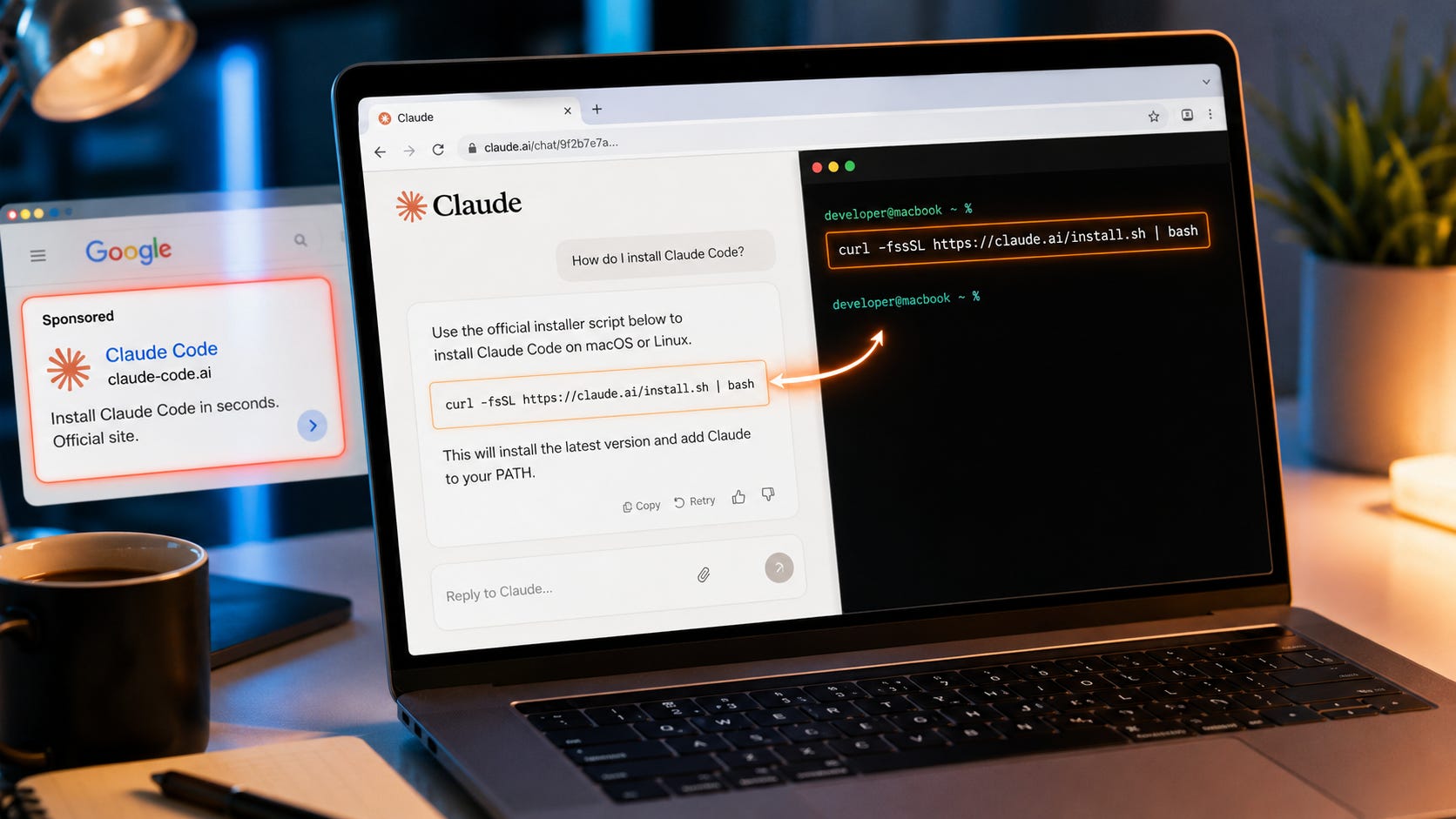
If you are installing Claude Code, the dangerous link may now look legitimate.
Trend Micro says attackers abused Google Ads and Claude’s own shared-chat feature to send developers to real claude.ai/share/... pages that displayed fake Claude Code install instructions. That changes the old advice to “just check the domain.” A real Claude link can still contain a malicious shared conversation created by someone who is not Anthropic.
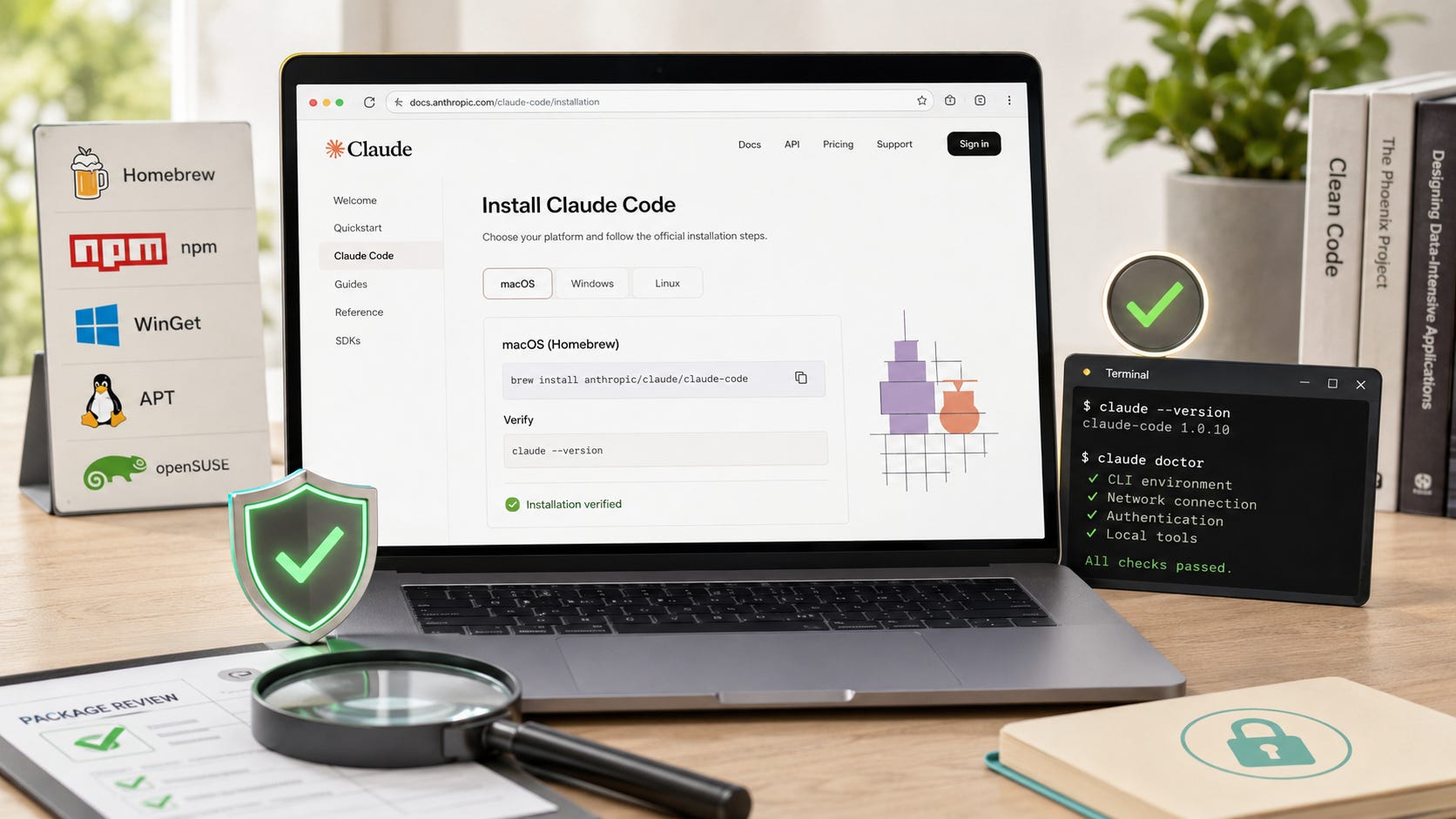
The safe rule is simple: do not install coding tools from shared chats, ads, comments, GitHub clones, screenshots, YouTube descriptions, Discord messages, or pasted terminal commands. Start from the official Claude Code setup docs, verify the package name, check the publisher or signature where possible, then run the tool first inside a low-risk project folder.
More Claude AI news:

Quick answer
Before installing Claude Code, open the official setup page directly, not through an ad or shared chat. Do not run terminal commands from forum posts, social media replies, Discord messages, screenshots, AI answers, “support” pages, or any Claude shared chat you did not create yourself.
Use only documented install paths and exact package names. The official options include the native installer from Claude, the Homebrew cask claude-code, the WinGet package Anthropic.ClaudeCode, the Linux package claude-code, and the npm package @anthropic-ai/claude-code.
After installation, run:
claude --version
claude doctor
Start Claude Code inside a disposable test repo first. Do not launch it in your home folder, a production repo, a client repo, or any folder containing .env files, SSH keys, cloud tokens, wallet files, customer data, database dumps, or private credentials.
Keep Claude Code in its default permission mode until you understand what it is asking to read, edit, and run.
If you already ran a command from a shared chat or ad, treat it as a possible infostealer incident. Disconnect the machine, rotate credentials from a clean device, revoke tokens, and do not assume uninstalling Claude Code is enough.
What happened
Trend Micro published research on June 17, 2026, describing a malvertising campaign that targeted people searching for AI developer tools. The campaign used Google Ads, GitLab Pages, and later Claude’s shared-chat feature to deliver ClickFix-style instructions that tricked users into copying terminal commands.
Trend Micro tracked campaign activity from April 8 to June 14, 2026, including 106 malicious hostnames across six waves and later abuse of claude.ai shared chats. According to the report, Anthropic investigated after notification, banned the responsible accounts, disabled the malicious shared conversations, and began adding abuse mitigations.
The important escalation was the move from fake-looking domains to a real platform URL. Trend Micro observed attackers creating weaponized shared chats on claude.ai and running Google Ads that pointed directly to those shared-chat URLs. The shared pages impersonated support-style instructions and told users to open Terminal and paste commands.
Trend Micro said one payload chain led to the MacSync infostealer, which harvested browser credentials and cookies, SSH keys, and cryptocurrency wallet files.
TechRadar covered the same Trend Micro findings, reporting that attackers used Claude shared chats and Google Ads to push malware under the guise of Claude Code installation instructions. The practical warning is the same: a claude.ai URL does not prove that the command on the page is safe.
This was not the only Claude-themed lure. Sophos analyzed a separate fake Claude site, claude-pro[.]com, that imitated the real Claude site and offered a malicious Windows download. Sophos found that the archive installed an MSI that dropped files into the Windows startup folder, used DLL sideloading, and deployed DonutLoader followed by a backdoor Sophos named Beagle.
Why this works
Developer tools are an easy lure because developers are trained to run install commands.
A normal install guide might say:
curl -fsSL https://example.com/install.sh | bashThe familiar example.com/install.sh placeholder shows the broader pattern attackers copy. A command that downloads a script and executes it immediately can feel normal when it appears inside a polished AI chat, a “support” page, or a sponsored search result.
ClickFix attacks exploit that habit. The user becomes the installer. The browser does not need to exploit a vulnerability when the victim voluntarily pastes a command into Terminal or PowerShell.
Claude shared chats make this worse because they add borrowed trust. The page can live on a real claude.ai URL, while the command inside it can point somewhere else. The control signal has moved from “is the domain real?” to “who created this content, where did the command come from, and can I verify the binary?”
Start from the official docs, not search ads
Open the Claude Code setup page directly from your address bar:
https://code.claude.com/docs/en/setupDo not use a sponsored result. Do not use a shared Claude chat as the source of install commands. Do not use a random GitHub repo that claims to provide “Claude Code unlocked,” “Claude Code Pro,” “Claude Code enterprise,” a patched desktop client, or a free version of paid features.
The official Claude Code setup page lists supported platforms, system requirements, install methods, verification steps, authentication requirements, update commands, and signature checks. As of June 24, 2026, Anthropic says Claude Code supports macOS 13.0+, Windows 10 1809+ or Windows Server 2019+, Ubuntu 20.04+, Debian 10+, and Alpine Linux 3.19+, with 4GB+ RAM and an x64 or ARM64 processor.
That page is also where Anthropic documents official install commands for macOS, Linux, WSL, Windows PowerShell, Windows CMD, Homebrew, WinGet, Linux package managers, npm, and binary integrity checks.
Prefer package managers when you can inspect the package
The official docs list several install paths. For most users, the safest practical route is the one you can verify most easily on your operating system.
On macOS, the official Homebrew cask is:
brew install --cask claude-codeBefore installing, inspect it:
brew info --cask claude-codeOn Windows, the official WinGet package is:
winget install Anthropic.ClaudeCodeBefore installing, inspect it:
winget show Anthropic.ClaudeCodeOn Debian or Ubuntu, Anthropic documents a signed apt repository and the claude-code package. On Fedora and RHEL, it documents a signed dnf repository. On Alpine, it documents an apk repository. If you use those routes, verify the signing key before trusting the repository.
For npm, the official package name is:
@anthropic-ai/claude-codeThe official npm install command is:
npm install -g @anthropic-ai/claude-codeAnthropic’s docs say the npm package requires Node.js 18 or later and warns users not to run sudo npm install -g because it can create permission problems and security risks. The same docs say npm users should upgrade with:
npm install -g @anthropic-ai/claude-code@latestDo not use similarly named packages. A fake package name, typo, or “helper installer” should be treated as suspicious.
Treat one-line install commands as high-trust commands
Anthropic’s official native install commands include the claude.ai/install.sh script for macOS, Linux, and WSL:
curl -fsSL https://claude.ai/install.sh | bashFor Windows PowerShell, Anthropic documents the claude.ai/install.ps1 script:
irm https://claude.ai/install.ps1 | iexThose commands are in the official docs, but the pattern is still risky when copied from the wrong place. A command that downloads a script and executes it immediately gives the source a lot of power over your machine.
Only run the command after opening the official setup page directly. Check that the URL in the command is exactly the official Claude install URL. Do not run a similar command from a shared chat, ad, search snippet, Reddit comment, Discord message, copied screenshot, YouTube description, or AI-generated answer.
Be extra suspicious if the command contains unreadable base64 text, shortened URLs, random domains, or obfuscated shell logic. Trend Micro’s report warned that one malicious shared-chat instruction looked like a single command that decoded an unreadable string, then fetched and executed another script.
Verify signing keys and checksums for direct binary checks
Anthropic’s setup docs provide binary integrity instructions. For releases from version 2.1.89 onward, each release publishes a manifest.json with SHA256 checksums, and the manifest is signed with an Anthropic GPG key.
The Anthropic Claude Code release signing fingerprint is:
31DD DE24 DDFA B679 F42D 7BD2 BAA9 29FF 1A7E CACEAnthropic publishes the Claude Code GPG key and release files through its Claude Code releases host. The official docs show this workflow:
curl -fsSL https://downloads.claude.ai/keys/claude-code.asc | gpg --import
gpg --fingerprint security@anthropic.com
Then download and verify the release manifest:
REPO=https://downloads.claude.ai/claude-code-releases
VERSION=2.1.89
curl -fsSLO "$REPO/$VERSION/manifest.json"
curl -fsSLO "$REPO/$VERSION/manifest.json.sig"
gpg --verify manifest.json.sig manifest.json
For Windows binary checksum checks, Anthropic lists:
(Get-FileHash claude.exe -Algorithm SHA256).Hash.ToLower()For macOS and Linux, it lists:
shasum -a 256 claudeor:
sha256sum claudeMost ordinary users will not verify every binary manually. Developers installing a command-line agent that can read files, edit code, run shell commands, and sit near credentials should still know how to do it.
Verify the install after it completes
After installing, run:
claude --version
claude doctor
If the claude command runs from an unexpected location, stop and inspect your PATH. Multiple installation routes can leave more than one claude executable on a machine. That can happen if you previously installed Claude Code through npm, Homebrew, WinGet, a native script, or a manual binary.
On macOS or Linux:
which claudeOn Windows PowerShell:
Get-Command claudeThe goal is to confirm which executable is running before you give it access to a real repo.
Start in a disposable folder
Create a test project first:
mkdir claude-code-test
cd claude-code-test
git init
claude
Do not start inside your home directory, downloads folder, production repo, client repo, or any folder containing .env files. Keep Claude Code away from SSH keys, API keys, wallet files, private notes, browser exports, customer files, database dumps, and deployment credentials during first run.
This matters because Claude Code is an agentic tool. Anthropic’s Claude Code security docs say Claude Code uses strict read-only permissions by default, then asks before edits, tests, and command execution. That is useful, but it still means you are placing an AI system close to your filesystem and shell.
Keep permission prompts on at first
Anthropic says Claude Code starts with strict read-only permissions by default and asks before actions such as editing files, running tests, or executing commands. The permission system can allow, ask, or deny tool use. That is the correct starting point.
Do not start with:
claude --permission-mode bypassPermissionsDo not start with:
claude --dangerously-skip-permissionsAnthropic’s Claude Code permissions docs say bypassPermissions skips permission prompts, including for writes to sensitive project configuration paths. The docs say to use that mode only in isolated environments such as containers or VMs where Claude Code cannot cause damage.
A good first-run policy is straightforward. Use default mode for sensitive work. Use plan mode when exploring a new repo. Use acceptEdits only when you are reviewing diffs carefully. Use dontAsk only when you have pre-approved a tiny set of tools. Use bypassPermissions only in a disposable container or VM.
That may feel slower than letting the agent run freely. It also limits blast radius when a prompt, repo instruction, package, hook, or MCP server does something unexpected.
Lock down MCP, plugins, hooks, and repo configuration
Claude Code can connect to more than the model. It can use MCP servers, plugins, hooks, settings, project rules, and subagents. That gives it power, and it also increases the attack surface.
Anthropic’s security docs say users should either write their own MCP servers or use servers from providers they trust. The same page says Anthropic reviews connectors before adding them to its directory, but does not security-audit or manage every MCP server.
Before trusting any repo or tool configuration, open .claude/ files and read them. Check CLAUDE.md and project rules. Inspect hooks before allowing them. Treat MCP servers like executable code. Do not install MCP servers from a shared chat. Do not approve network tools you do not understand. Deny access to secrets, home directories, and credential files.
The wider research picture supports this caution. A March 2026 arXiv paper, “Are AI-assisted Development Tools Immune to Prompt Injection?”, studied prompt-injection and tool-poisoning risks across Claude Desktop, Claude Code, Cursor, Cline, Continue, Gemini CLI, and Langflow. The paper describes prompt injection as a way to subvert guardrails, disclose sensitive data, or trigger unauthorized tool use, especially when tools can read files, write files, run commands, and call APIs.
Check data handling before using private code
Claude Code runs locally as a tool, but it still sends prompts and model outputs over the network to interact with the model. Anthropic’s Claude Code data usage docs say local Claude Code sends user prompts and model outputs over TLS 1.2+, while session transcripts are stored locally in plaintext under ~/.claude/projects/ for 30 days by default.
The same docs say consumer users on Free, Pro, and Max can choose whether to allow data use for model improvement, and that Anthropic may train using data from those accounts when that setting is on. For commercial users under Team, Enterprise, API, third-party platforms, and Claude Gov, Anthropic says it does not train generative models using code or prompts sent to Claude Code under commercial terms unless the customer opts in.
Before using Claude Code on private repos, check your account type and data training setting. Decide whether the repo belongs in a hosted-model workflow at all. Remove secrets from the working tree. Keep .env files out of the folder unless absolutely necessary. Use a separate test repo for prompts that involve unknown web content, MCP servers, or downloaded packages.
For a lower-dependency coding setup, Popular AI has covered how to build an independent AI dev stack with Claude Code. A local fallback such as GGUF Loader Agentic Mode can make sense for smaller file-aware coding tasks. Local agents still need strict workspaces, no secrets, git checkpoints, and careful review.
Red flags that mean do not run this
Stop if the install came from a sponsored result, a shared Claude chat, a social post, a copied screenshot, or a random “support” page that tells you to paste shell commands.
Stop if the page claims to be Apple Support, Claude Support, GitHub Support, or a random “team” but sends you to Terminal or PowerShell. Stop if the command contains base64 text, a URL shortener, a random domain, or obfuscated shell logic. Stop if the installer is called “Claude Pro,” “Claude-Pro Relay,” “Claude Code unlocked,” or “enterprise unlocked.”
Treat ZIP files and MSI installers from non-Anthropic domains as suspicious. Treat GitHub repos that promise paid features for free as suspicious. Treat close-but-wrong package names as suspicious. Treat any guide that tells you to disable antivirus, Gatekeeper, SmartScreen, endpoint protection, or shell protections as hostile until proven otherwise.
The same goes for installers that ask for broad system permissions before you understand what they are doing. Be careful with commands that use sudo without a clear reason. Be especially careful with any guide that tells you to use --dangerously-skip-permissions during install or first run.
What to do if you already ran a fake Claude Code command
Do not keep working in the same session. Do not simply uninstall the app and move on.
First, disconnect the machine from the network. Turn off Wi-Fi and unplug Ethernet. Infostealers move fast, but cutting network access can still reduce follow-up damage.
From a clean device, rotate credentials. Start with email, password manager, GitHub, GitLab, Bitbucket, npm, PyPI, Docker Hub, cloud providers, Anthropic, OpenAI, SSH keys, API keys, deployment tokens, database credentials, and crypto wallets.
Revoke tokens, not only passwords. Check GitHub personal access tokens, OAuth apps, deploy keys, SSH keys, npm tokens, cloud access keys, CI secrets, and service account keys.
Preserve the suspicious command and page for incident response. Save the URL, command text, timestamp, shell history, browser history, and downloaded file name if you can do so safely. Do not re-run anything.
Scan with reputable endpoint security, but do not treat a clean scan as proof that nothing happened. Infostealers can remove traces or be missed.
Check persistence locations. On Windows, Sophos found one fake Claude campaign dropping files into the startup folder. On macOS, check Login Items, LaunchAgents, LaunchDaemons, shell profiles, and suspicious cron jobs. For business devices, hand this to IT or incident response.
Consider rebuilding the machine. If you confirmed an infostealer or backdoor ran, a clean OS reinstall may be safer than trying to surgically remove it.
Audit your repos and cloud accounts. Look for new SSH keys, new deploy keys, strange commits, package releases, OAuth grants, CI changes, new service accounts, and unknown login locations.
Trend Micro’s MacSync case matters because it targeted exactly the files developers care about: browser credentials, cookies, SSH keys, and wallet files. Sophos’ Beagle case matters because a backdoor can execute commands, upload and download files, create directories, rename files, list directories, and remove directories. That is account and machine compromise, not a nuisance install.
Common mistakes developers make
Trusting a real claude.ai shared-chat URL is the first mistake. A real shared-chat URL only proves the content is hosted on Claude’s platform. It does not prove the person who created the shared chat is Anthropic, Apple, GitHub, or any other trusted party. Trend Micro’s research shows that attackers used real shared-chat links as the social-engineering surface.
Trusting search ads for developer tools is another mistake. Treat search ads as paid placement, not software provenance. Trend Micro said attackers bought ads against AI developer tool searches. When you need a developer tool, go directly to the vendor’s official documentation or a package manager you can inspect.
AI-generated install instructions can also create risk. AI models can produce outdated commands, hallucinated package names, and unsafe install paths. A May 2026 arXiv paper on LLM package hallucinations and slopsquatting found that frontier code-capable models still invented package names across PyPI and npm, creating a supply-chain attack surface. Use AI to explain commands, not to decide which package is real.
Running Claude Code on a repo full of secrets is another common problem. Claude Code can be useful, but it sits close to your files and shell. Anthropic says users remain responsible for reviewing proposed code and commands before approval. Start with a clean test repo, then bring it into real projects after you understand the permission prompts.
Turning off permission prompts for convenience is a risky shortcut. Prompt fatigue is real, and so is blast radius. Use permissions and sandboxing before you use auto-approval. Anthropic’s own docs say bypassPermissions should be limited to isolated environments such as containers or VMs.
A safer first-run setup
Use this starter process for a new Claude Code install.
Install only from the official docs or a verified package manager. Confirm the executable path:
which claudeor on Windows:
Get-Command claudeCheck the version and health:
claude --version
claude doctor
Create a disposable repo:
mkdir claude-code-test
cd claude-code-test
git init
echo "# Claude Code test" > README.md
git add .
git commit -m "Initial test repo"
Start Claude Code:
claudeAsk it to read and summarize the README before making changes. Ask it to propose a plan before editing. Review every command and file diff. Commit good changes before asking for more. Do not add secrets until you have a clear permission and data policy.
That may feel slower than pasting a magic command into Terminal. It is also how you avoid turning a coding assistant install into a credential theft event.
The platform-control lesson
The uncomfortable part of this campaign is that it used trust built by the platform against the user. A shared Claude page looks safe because it lives on Claude’s infrastructure. Google Ads look safe because they are placed inside the search flow. GitLab Pages look safer than a random throwaway domain because they sit under a known developer platform.
That is the control layer in miniature. Users are trained to trust platform surfaces, then attackers abuse those same surfaces. The platform can ban accounts and disable malicious pages after detection, which Anthropic reportedly did here, but the user still needs a local verification habit before running code.
For developers, the answer is not to abandon Claude Code if it helps. The answer is to treat installation, permissions, MCP, plugins, and repo access like real security boundaries.
Hosted coding agents are powerful. Local coding agents can reduce cloud account risk. Both can damage files, expose secrets, or follow poisoned instructions if you give them too much authority. Popular AI’s guide to GGUF Loader Agentic Mode makes the same point from the local side: file access is useful, but it needs workspace limits and rollback.
Final recommendation
Use Claude Code if it improves your coding workflow, but install it like a security-sensitive developer tool.
Do not install it from a shared chat. Do not trust search ads. Do not paste terminal commands from pages you did not intentionally navigate to. Verify the official package name, confirm the executable path, run claude doctor, and test it inside a disposable git repo before opening real work.
The safe default is provenance. Know where the command came from, know which binary is running, and know what the tool can access before you let it near valuable code or credentials.
FAQ
Is a Claude shared-chat link safe because it is on claude.ai?
No. A shared-chat link can be hosted on
claude.aiwhile containing instructions written by someone else. Trend Micro’s June 2026 report found attackers abusing Claude shared chats to host fake install instructions.
What is the official Claude Code install page?
Use the official Claude Code setup docs. Open them directly, not through a sponsored result or shared chat.
What is the official npm package for Claude Code?
The official npm package listed in Anthropic’s docs is
@anthropic-ai/claude-code. Do not install similarly named packages.
Is curl | bash always malware?
No. Anthropic’s official native installer uses that pattern for macOS, Linux, and WSL. The problem is provenance. Only run it after checking the official docs directly, and never run a similar command from a shared chat, ad, forum post, or screenshot.
Should I use --dangerously-skip-permissions?
Do not use it on your host machine. Anthropic says bypass-permissions mode skips permission prompts and should only be used inside isolated environments like containers or VMs.
Can local coding agents avoid this problem?
Local tools avoid some cloud-account and data-upload risks, but they do not remove file-access risk. A local agent that can write files or run tools still needs a restricted workspace, no secrets, git checkpoints, and human review.
Explore more from Popular AI:
Start here | Local AI | Fixes & guides | Builds & gear | Popular AI podcast
What’s your personal red flag before trusting a Claude Code install command: the domain, the package name, the permissions prompt, or something else?