


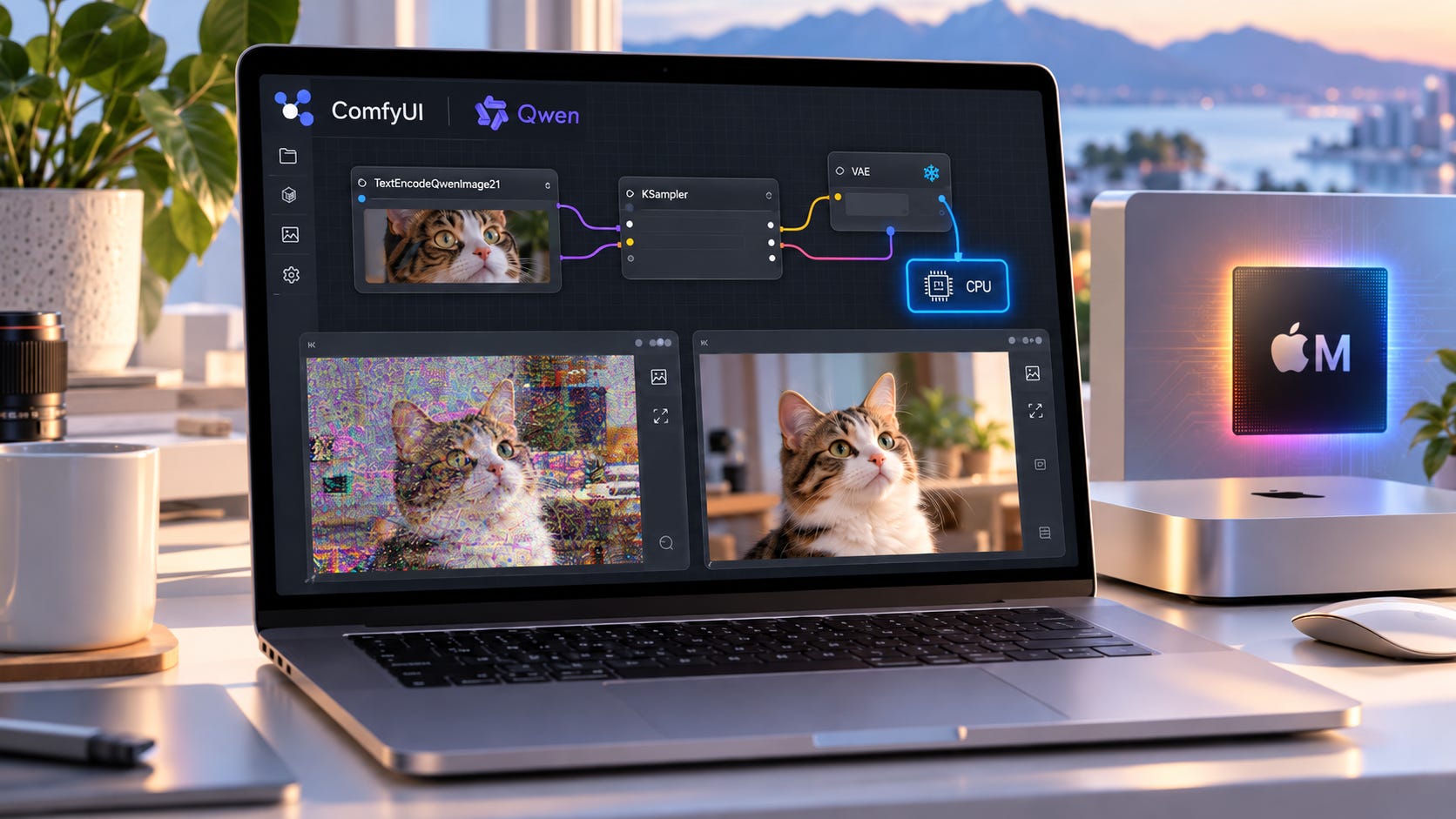
Qwen-Image-2.1 can produce clean text-to-image results in ComfyUI, then freeze, crawl, or return corrupted output as soon as you switch to image editing. That symptom can come from the software path even when the model files and GPU are capable of running the workload.
As of September 28, 2026, the evidence points to several separate failures. Apple Silicon has a reproducible MPS bug in the Qwen VAE encode path. AMD/ROCm has a separate DynamicVRAM corruption report that appears after model eviction and reload. A third reference-latent problem can produce noisy edits at particular image grids on more than one backend.
The first fixes are simple. On Apple Silicon, run the VAE on the CPU with --cpu-vae. On AMD, disable DynamicVRAM before blaming the card or replacing hardware.
Qwen released Qwen-Image-2.1 on September 20 with native day-one ComfyUI support for text-to-image and image editing. The current stable ComfyUI release also includes the model support, so a broken edit does not point to one universal Qwen incompatibility. The failure may sit farther down the stack.
Qwen-Image-2.1 ComfyUI quick fixes for Mac and AMD
If you are on an Apple Silicon Mac and Qwen-Image-2.1 text-to-image works while image editing turns noisy, degraded, or corrupted, launch ComfyUI with --cpu-vae:
python main.py --cpu-vaeComfyUI provides --cpu-vae, --enable-dynamic-vram, and --disable-dynamic-vram as command-line options. The Mac flag leaves the rest of the workflow on its normal backend while moving the VAE to the CPU. It costs some speed, but it avoids the confirmed MPS encoding failure.
On AMD, remove --enable-dynamic-vram first if you added it manually. If ComfyUI still reports DynamicVRAM as active, turn it off explicitly:
python main.py --disable-dynamic-vramThe current ROCm DynamicVRAM report found that removing DynamicVRAM stopped the corruption without another flag change.
Restart ComfyUI after changing either setting. Do not judge the fix from a process that has already entered the corrupted state.
Why text-to-image can work while Qwen image editing fails
Working text-to-image does not exercise every path used by Qwen-Image-2.1 editing.
ComfyUI’s Qwen image-edit node takes reference images and, when a VAE is connected, calls vae.encode() to turn those references into latents. Plain text-to-image does not run that same reference-image encoding path.
That explains an otherwise confusing symptom. The same model can render text-to-image cleanly while every edit fails. The diffusion model weights can be fine. Sampling can be fine. VAE decoding can even be fine. The broken operation can sit specifically in VAE encoding of the reference image.
AMD exposes a different pattern. In the DynamicVRAM report, the first generation after ComfyUI started was clean. A prompt or resolution change forced models to be evicted and reloaded. Output then became corrupted and stayed that way until ComfyUI restarted.
Both failures can ruin the output, but the trigger and fix are different. Treat them as separate bugs during diagnosis.
Diagnose the Qwen edit failure before changing drivers or hardware
Start with the official Qwen-Image-2.1 workflow and reduce the setup to the smallest useful test before reinstalling drivers, rebuilding ComfyUI, or shopping for a different GPU.
Start from a fresh ComfyUI process. Use the official Qwen-Image-2.1 image-edit workflow, one reference image, and a modest resolution. Temporarily disable unnecessary custom nodes if the graph is heavily modified.
Run text-to-image first. If text-to-image is already corrupt, the problem is broader than the edit-specific failures covered here.
Run one image edit with the same model files. If text-to-image is clean and editing alone breaks, focus on reference encoding, memory loading, and the edit path.
On Apple Silicon, compare normal MPS behavior with
--cpu-vae. A clean edit with the CPU VAE strongly points to the MPS VAE problem.On AMD, test beyond the first generation. Run once, change the prompt so the text encoder must run again, then change resolution once. If the first job is clean but later jobs corrupt after reloads, the behavior closely matches the DynamicVRAM report.
This sequence also avoids a common AMD misdiagnosis. One RX 9070 XT owner reported Qwen Image Edit 2.1 freezing around the If/Else Switch node even after dropping to one reference and 0.5 MP.
The visible node where ComfyUI appears to stop is not automatically the failing component. Model loading, offloading, system RAM pressure, VRAM pressure, or a backend operation can stall execution before the next visible node does useful work.
Fix Apple Silicon editing with --cpu-vae
The Apple Silicon failure has unusually strong reproduction evidence.
ComfyUI issue #16433 isolates the failure to a VAE encode-and-decode round trip, with no sampler, diffusion model, or text encoder involved. On MPS, the Qwen-Image-2.1 VAE badly corrupted the image. Moving the VAE to CPU restored a clean reconstruction.
The measurements are hard to dismiss. The default MPS VAE round trip measured 6.60 dB PSNR against the input. --fp32-vae also measured 6.60 dB. With --cpu-vae, reconstruction rose to 49.10 dB.
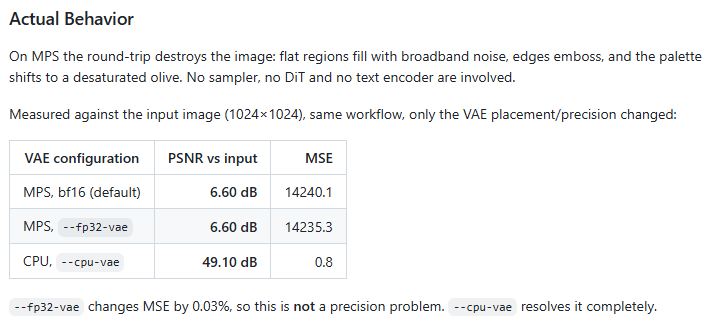
So --fp32-vae is a poor first Mac fix. The controlled test shows the failure survives a switch from BF16 to FP32. The useful change is moving VAE work off MPS.
A second reproduction localized the corruption to a temporal F.pad() operation inside the VAE’s AvgDown3D path. That matches an upstream PyTorch report documenting silent corruption when padding large rank-five tensors on MPS.
PyTorch has since merged a fix for the MPS padding defect. That still does not make the ComfyUI workaround obsolete today. The Qwen failure was reproduced on PyTorch 2.14.0, and ComfyUI issue #16433 remains open on September 28.
If --cpu-vae fixes your edits, keep using it until the exact ComfyUI and PyTorch combination you run contains a verified fix. A community-tested source patch that replaces the problematic temporal padding with zero concatenation also produced successful MPS VAE results in reported testing. It is useful evidence about the cause. A reversible launch flag is still the cleaner first move.
Fix AMD corruption by disabling DynamicVRAM
The AMD failure looks different internally and in how it develops over a session.
The reported RX 9070 XT case starts clean. The first generation after startup renders correctly. When a prompt or resolution change forces model eviction and reload, later images become corrupted. Restarting ComfyUI resets the session and restores the clean first generation.
Removing DynamicVRAM stopped that sequence in the reported test.
Use the conservative loading path:
python main.py --disable-dynamic-vram
Then restart ComfyUI and repeat the same sequence that previously broke.
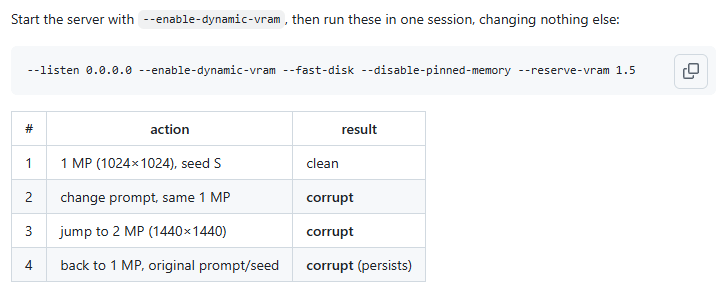
Generate once. Change the prompt and generate again. Change resolution and generate again.
If those jobs remain clean, you have much stronger evidence that DynamicVRAM was involved than you would get from one successful render after startup.
Another user in the same GitHub thread reported similar garbage output after several generations on a Radeon RX 7900 XTX. That is useful corroboration, but it is still user evidence rather than proof that every ROCm image-edit failure shares one cause.
Freezing is less specific than repeatable output corruption. A 16GB card can spend a long time moving large model components between VRAM and system memory. Qwen-Image-2.1 editing also adds reference-image processing that text-to-image does not need. If disabling DynamicVRAM changes nothing and ComfyUI stalls instead of returning corrupt output, test one small reference before making a backend diagnosis.
A full reinstall belongs well down the troubleshooting order.
A separate reference-grid bug can imitate both failures
Even after fixing the Mac VAE path or AMD DynamicVRAM behavior, a Qwen edit can still turn crunchy or speckled.
ComfyUI issue #16435 documents a separate reference-latent edit failure. In the original Apple and CPU reproduction, an effective 1024×1024 reference grid produced heavy broadband noise. Moving one 32-pixel step away to 992 or 1056 produced clean output.
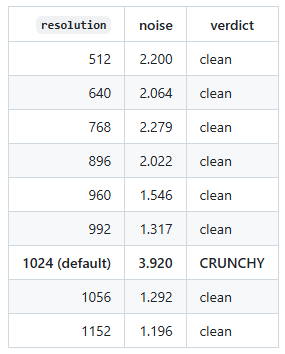
This bug also reproduced on full CPU inference, so it is not simply another MPS failure.
CUDA makes the pattern less tidy. A second report on an RTX 5070 Ti found 1024×1024 clean but a 1536×1024 reference grid badly broken. That points to an interaction in the reference-latent or attention path rather than a universal rule that 1024 is bad.
A proposed attention-chunking workaround in PR #16444 was closed without being merged.
The practical workaround is diagnostic. If edits remain noisy after the backend-specific fix, slightly change the effective reference resolution and rerun the same seed and prompt. A clean result at a nearby grid tells you the CPU VAE or DynamicVRAM fix did not necessarily fail.
This is also why random sampler changes can burn time without teaching you much. Different bugs are converging on a similar visible symptom.


NVIDIA can be slow even without the Mac or AMD failure
NVIDIA users do not have the confirmed MPS VAE failure described above, and the DynamicVRAM corruption report cited here is from ROCm. That still leaves plenty of ways for Qwen-Image-2.1 editing to run slowly.
One RTX 4090 owner reported about nine minutes for a five-reference edit at 1376×768 while text-to-image took about 20 seconds. Other users in the same discussion reported much faster results on weaker hardware.
That spread makes one render time a poor hardware benchmark.
Qwen-Image-2.1 supports multiple reference images, and each reference adds conditioning work. Large source images can also increase encoding and memory pressure. If CUDA text-to-image is fast but editing is strangely slow, start with one downscaled reference. Add references back one at a time after you know the small case behaves normally.
If one reference is fast and five are not, replacing the GPU before examining the workload is expensive debugging.
You’ve got the fixes. Now make sure they actually hold.
The rest of this guide covers how to verify the fix under a real workflow, what to record if Qwen-Image-2.1 still breaks, and how to tell a software problem from a genuine GPU limitation.
Subscribe or upgrade to a paid subscription to continue reading.
More on local AI image generation:

Qwen-Image-2.1 ComfyUI FAQ
Why does Qwen-Image-2.1 text-to-image work while editing fails?
Image editing adds reference-image processing. In ComfyUI, the edit path can call the Qwen VAE encoder to turn reference images into latents. Text-to-image does not test that same encode path, so a clean text-to-image result does not validate every operation needed for editing.
Does --fp32-vae fix Qwen-Image-2.1 editing on Apple Silicon?
The current MPS bug report says no. Switching the VAE from BF16 to FP32 produced essentially the same corruption in its controlled round-trip test.
--cpu-vaewas the configuration that restored a clean reconstruction.
Is Qwen-Image-2.1 broken on AMD?
The evidence does not support a blanket AMD incompatibility. One reproducible RX 9070 XT report ties a specific corruption pattern to ComfyUI’s DynamicVRAM reload path. Disable DynamicVRAM, restart ComfyUI, and retest the sequence that previously broke before treating the GPU as incompatible.
Should I reinstall ComfyUI if editing freezes on an RX 9070 XT?
Not first. Test the official workflow with one small reference, restart ComfyUI, disable DynamicVRAM, and watch the console during model loading. Reinstall only after you have evidence that the installation itself is damaged.
Fix Qwen-Image-2.1 ComfyUI before replacing hardware
When Qwen-Image-2.1 text-to-image works but image editing fails, test the backend-specific path before spending money.
▪ On Apple Silicon, start with --cpu-vae. The VAE encode path has a reproducible MPS failure, and changing VAE precision alone did not fix the controlled test.
▪ On AMD, disable DynamicVRAM and restart ComfyUI. Then deliberately trigger model reloads by changing the prompt and resolution. The goal is to prove that later generations stay clean, not merely to get one good image after startup.
If those fixes work but particular reference sizes still produce noisy edits, change the effective reference resolution slightly. That grid-dependent edit problem is separate and can appear outside Apple Silicon or AMD.
Buying another GPU belongs at the end of this troubleshooting process. First isolate whether the thing that broke is VAE encoding, model reload, reference-grid handling, or a genuine memory and performance limit.
Explore more from Popular AI:
Start here | Local AI | Builds & gear | Autonomy & policy | Fixes & guides | Popular AI podcast