


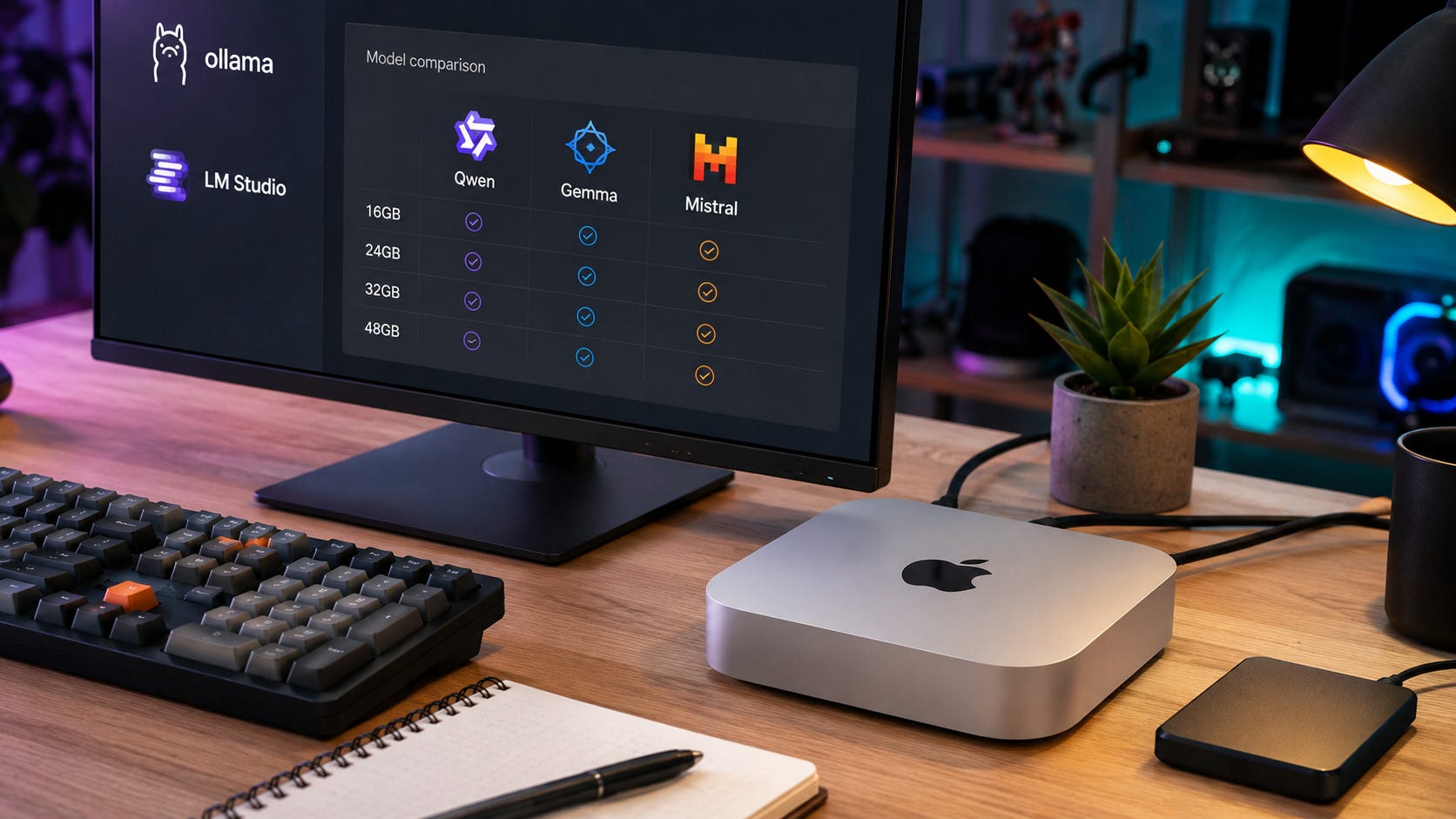
The best local LLM for Mac Mini M4 in 2026 depends more on unified memory than the M4 chip itself. A 16GB Mac mini should run a fast 4B to 9B model. A 24GB Mac mini can start using 24B to 27B models if context is controlled. A 32GB Mac mini, if you already own one or find one refurbished, is where larger local models become comfortable. A 48GB M4 Pro Mac mini is the best practical tier for serious local LLM work.
The short answer:
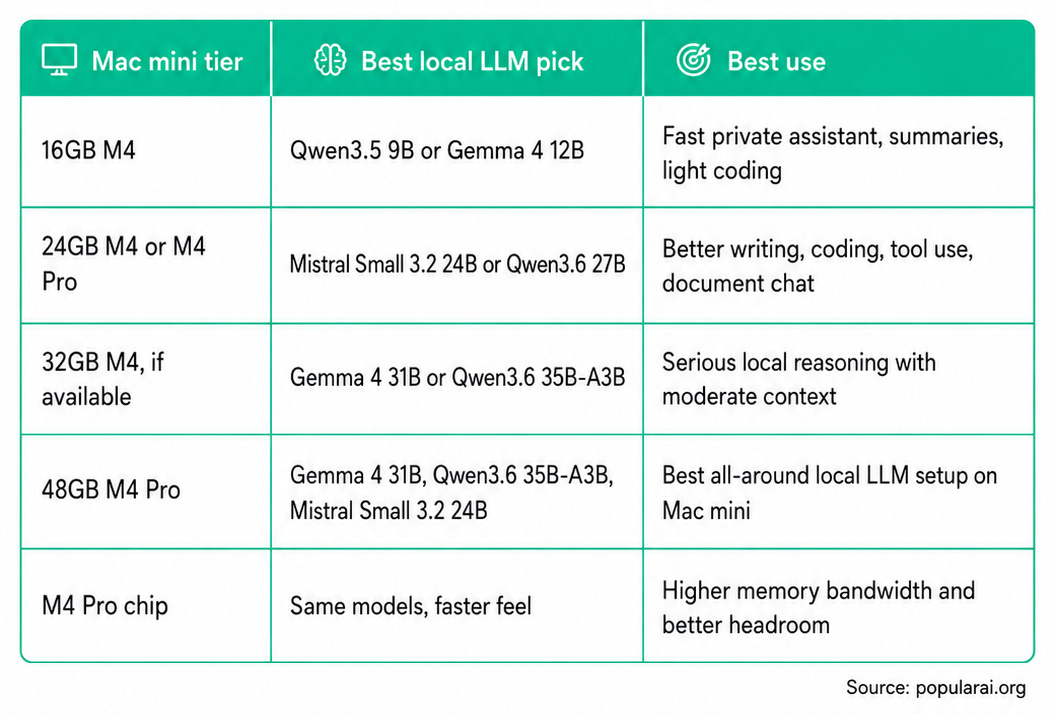
Apple’s current Mac mini technical specifications list the standard M4 chip with 120GB/s memory bandwidth and the M4 Pro with 273GB/s memory bandwidth. That matters because local LLM inference is heavily memory-bound. The M4 Pro does not make a smaller model smarter, but it can make the same model feel much more responsive.
Apple’s current spec page also shows the regular M4 Mac mini around 16GB and 24GB memory configurations, while the M4 Pro model starts at 24GB and can be configured higher. Availability and older configurations can vary, so this guide still includes 32GB because many searchers already own that tier or are comparing used, refurbished, or previously available models.
For buyers starting from scratch, the base Mac mini M4 with 16GB unified memory is the cheapest practical entry point for private local AI. The Mac mini M4 with 16GB unified memory and 512GB storage is easier to live with once you start collecting model files, although memory still matters more than storage for model fit.
Quick verdict
For most people, the best local LLM on a Mac Mini M4 in 2026 is Qwen3.5 9B on 16GB, Mistral Small 3.2 24B on 24GB, and Gemma 4 31B or Qwen3.6 35B-A3B on 32GB and 48GB.
The best overall model for a serious Mac mini local AI setup is Gemma 4 31B if you want high-quality general reasoning, writing, coding help, and multimodal work. Google’s Gemma 4 memory table estimates Gemma 4 31B at about 17.5GB in Q4_0 before runtime overhead and KV cache.
The best coding and agentic pick is Qwen3.6 35B-A3B if you have enough memory. Ollama’s Qwen3.6 model tags list 27B and 35B options, 256K context, text and image input, and MLX variants for Apple Silicon.
The best safe 24GB pick is Mistral Small 3.2 24B. The Mistral Small 3.2 model card says Small 3.2 improves instruction following, repetition behavior, and function calling compared with Small 3.1.
What matters on a Mac mini M4
Mac mini local LLM decisions are different from Windows or Linux GPU decisions.
On an NVIDIA desktop, the first question is usually how much VRAM the GPU has. On a Mac mini, the better question is how much unified memory the model, macOS, the runner, the context window, and your other apps can share.
That makes model size only part of the answer. Context length is the hidden memory bill. Ollama’s context length documentation defines context length as the maximum number of tokens a model has access to in memory. It also says Ollama defaults to 4K context below 24GiB VRAM, 32K context between 24GiB and 48GiB, and 256K context at 48GiB and above.
In plain terms, do not buy a Mac mini because a model file technically fits. A 20GB model on a 24GB Mac mini leaves little room for macOS, browser tabs, the chat app, a vector database, coding tools, and long prompts.
That is why the Mac mini M4 16GB configuration makes sense as a small-model machine, while the 24GB, 32GB, and 48GB tiers are better targets for heavier local AI. For a broader hardware comparison, see our existing guide to Mac mini LLM performance in 2026.
More on the Mac Mini for local AI:

Ranked list: best local LLMs for Mac Mini M4
1. Gemma 4 31B: best overall quality for 32GB and 48GB Mac minis
Gemma 4 31B is the best model to try first if your Mac mini has enough memory and your priority is output quality. It is strong for general reasoning, writing, coding help, long-document work, and multimodal input.
Google’s Gemma 4 model overview lists the family across E2B, E4B, 12B, 26B A4B, and 31B sizes, with a memory table that puts Gemma 4 31B at about 17.5GB in Q4_0 before runtime and KV cache effects. LM Studio’s Gemma 4 model page says the family supports tool use, vision input, and reasoning, with GGUF and MLX availability.
Best on:
16GB: Skip it.
24GB: Possible, but cramped.
32GB: Good with moderate context.
48GB M4 Pro: Excellent.
M4 Pro 24GB: Possible, but not the best use of the chip.
Use Gemma 4 31B when you want the best single-model answer quality on a memory-heavy Mac mini. Skip it on 16GB. Be careful on 24GB unless you are willing to keep context modest and close other apps.
2. Qwen3.6 35B-A3B: best coding and agentic pick for 32GB and 48GB
Qwen3.6 35B-A3B is the model to test when your workflow is coding, repository reasoning, tool use, or local agent experiments.
Ollama’s Qwen3.6 listing describes the release as focused on agentic coding and thinking preservation. The same model tag page lists 27B and 35B variants with 256K context and text-image input. It also lists the 35B-A3B default at 24GB and an MLX NVFP4 variant at 22GB.
That size makes it a bad fit for a 16GB Mac mini and a risky fit for 24GB. It becomes more realistic at 32GB, and much better on 48GB M4 Pro.
Best on:
16GB: Skip it.
24GB: Too tight for daily use.
32GB: Good if context is controlled.
48GB M4 Pro: Strong pick.
M4 Pro 24GB: Use Qwen3.6 27B instead.
Choose Qwen3.6 35B-A3B if you care more about coding workflows than polished prose. Choose Gemma 4 31B if you want broader general-purpose quality.
3. Qwen3.6 27B: best high-end compromise for 24GB and 32GB
Qwen3.6 27B is the smarter Qwen3.6 pick for most 24GB Mac mini owners. Ollama’s Qwen3.6 tags list the 27B model at 17GB and the 27B MLX variant at 20GB, both with 256K context and text-image input.
That does not mean you should run 256K context on a 24GB machine. It means the model family supports it. On a 24GB Mac mini, use a smaller context setting first, then increase it only after checking memory pressure.
Best on:
16GB: Skip it.
24GB: Best stretch pick.
32GB: Very good.
48GB M4 Pro: Fast and comfortable.
M4 Pro 24GB: Good use of Pro bandwidth.
Qwen3.6 27B is the model to choose when Mistral Small 3.2 feels too conservative but Qwen3.6 35B-A3B is too cramped.
4. Mistral Small 3.2 24B: best safe 24GB model
Mistral Small 3.2 24B is the practical 24GB Mac mini pick because it gives you a serious 24B-class model without pushing memory as hard as 31B or 35B models.
The Mistral Small 3.2 model card says Small 3.2 is a minor update to Small 3.1 that improves instruction following, reduces repetitive outputs, and makes the function-calling template more robust. Ollama’s Mistral Small 3.2 page describes it as a 24B model with vision and tool support.
Best on:
16GB: Too tight.
24GB: Best safe large-model pick.
32GB: Very comfortable.
48GB M4 Pro: Fast, reliable daily driver.
M4 Pro 24GB: Strong pick.
This is the model to use when you want fewer memory surprises. It may not beat the best 31B or 35B models on every reasoning task, but it is often the model you will actually keep running.
5. Gemma 4 12B: best quality pick for 16GB and 24GB
Gemma 4 12B is the best quality-oriented model for a base 16GB Mac mini, assuming you are realistic about context size.
Google’s Gemma 4 inference memory table estimates the 12B model at about 6.7GB in Q4_0 before runtime overhead and KV cache. That leaves enough room on a 16GB Mac mini for macOS and a normal local chat session, but not unlimited browser tabs, giant context, and a heavy IDE all at once.
Best on:
16GB: Best quality stretch.
24GB: Comfortable.
32GB: Comfortable, but you can run larger.
48GB M4 Pro: Too small unless speed matters.
M4 Pro 24GB: Good fast assistant.
Use Gemma 4 12B when you want a capable model that still feels responsive on smaller memory tiers.
6. Qwen3.5 9B: best fast daily model for 16GB
Qwen3.5 9B is the best everyday local assistant for the 16GB Mac mini M4. It is small enough to stay usable, but large enough to be useful for rewriting, summarizing, simple coding help, private notes, and document questions.
Ollama’s Qwen3.5 tags list Qwen3.5 9B at 6.6GB, with 256K context support and text-image input. The same page lists smaller Qwen3.5 sizes down to 0.8B, 2B, and 4B, which are useful when speed matters more than answer quality.
Best on:
16GB: Best default.
24GB: Fast and easy.
32GB: Good secondary model.
48GB M4 Pro: Use it as a fast helper, not your main model.
M4 Pro 24GB: Very fast.
Choose Qwen3.5 9B if your 16GB Mac mini is also your everyday desktop. It is a better default than forcing a bigger model into memory and then hating the latency.
7. Gemma 4 E4B or Qwen3.5 4B: best tiny always-on helper
Small local models still matter. A 4B-class model is useful for instant rewrites, note cleanup, command generation, summaries, and offline private tasks.
Google lists Gemma 4 E4B in the Gemma 4 model family, while Ollama lists Qwen3.5 4B at 3.4GB with 256K context and text-image input.
Best on:
16GB: Excellent fast helper.
24GB: Excellent fast helper.
32GB: Keep it as a secondary model.
48GB M4 Pro: Keep it for low-latency tasks.
M4 Pro 24GB: Very fast.
Do not dismiss these models because they are small. A fast local model that answers instantly can be more useful than a slow 31B model you avoid opening.
Disclosure: This post includes Amazon affiliate links. If you buy through them, Popular AI may earn a small commission at no extra cost to you.
Best local LLM for the Mac Mini M4 16GB
Best pick:
Qwen3.5 9B
Quality stretch:Gemma 4 12B
Fast fallback:Qwen3.5 4BorGemma 4 E4B
The 16GB Mac mini M4 is a small-model machine. It can run useful local AI, but it should not be treated like a 24GB GPU workstation.
Use Qwen3.5 9B as the default. Ollama lists Qwen3.5 9B at 6.6GB, which gives you a practical balance of model quality and memory headroom.
Use Gemma 4 12B when answer quality matters more than speed. Google estimates Gemma 4 12B at about 6.7GB in Q4_0 before overhead and KV cache, so it can fit, but long context will still cost memory.
Skip 24B, 27B, 31B, and 35B models on 16GB unless you are experimenting and accept slowdowns. A model that fits on disk is not the same as a model that runs well.
Recommended setup:
Runner: Ollama or LM Studio.
Model: Qwen3.5 9B.
Context: Start at 4K to 8K.
Best tasks: Notes, summaries, private assistant work, and light coding.
Avoid: Huge repositories, 100K context, and multiple local models at once.
The Mac mini M4 16GB/256GB can work well as a quiet private assistant box, but the 16GB/512GB version gives you more room for model files without changing the memory ceiling.

Best local LLM for the Mac Mini M4 24GB
Best pick:
Mistral Small 3.2 24B
Coding stretch:Qwen3.6 27B
Quality stretch:Gemma 4 31B, only with restrained context
A 24GB Mac mini is where local LLMs start to feel serious. The safest large-model pick is Mistral Small 3.2 24B because it gives you a capable 24B model without reaching as aggressively into memory as the 31B and 35B options.
Qwen3.6 27B is the better coding and agentic stretch. Ollama lists Qwen3.6 27B at 17GB and the 27B MLX variant at 20GB. That can work, but your context setting matters.
Gemma 4 31B can technically be tempting because Google’s table estimates Gemma 4 31B Q4_0 at about 17.5GB and LM Studio says the largest Gemma 4 model may require up to 19GB. The problem is not the model file. The problem is everything around it. On 24GB, Gemma 4 31B leaves little room for long context and multitasking.
Recommended setup:
Runner: Ollama, LM Studio, or an MLX model in LM Studio.
Default model: Mistral Small 3.2 24B.
Coding model: Qwen3.6 27B.
Context: Start at 8K to 16K.
Best tasks: Writing, coding help, RAG, and document chat.
Avoid: 31B or 35B daily use with huge context.
The 24GB tier is also where storage becomes annoying if you collect models. A Mac mini M4 product page with 16GB and 24GB options is worth checking when you want the standard M4 form factor, but local LLM buyers should prioritize unified memory before SSD size.
Best local LLM for the Mac Mini M4 32GB
Best pick:
Gemma 4 31B
Coding pick:Qwen3.6 35B-A3B
Safe daily pick:Mistral Small 3.2 24B
A 32GB Mac mini is the first tier that feels roomy for 24B to 31B-class local models. It is also the tier many searchers ask about, even though current Apple checkout availability can vary. Use this section if you already own a 32GB M4 Mac mini, find one refurbished, or are comparing against a used Mac mini configuration.
Gemma 4 31B becomes realistic here. You still should not max out the context window by default, but you have much more breathing room than on 24GB.
Qwen3.6 35B-A3B also becomes a real option. Ollama lists Qwen3.6 35B-A3B at 24GB and an MLX NVFP4 variant at 22GB, which is too tight for 24GB but reasonable at 32GB if you keep context controlled.
Recommended setup:
Runner: LM Studio with MLX, Ollama, or mlx-lm.
Default model: Gemma 4 31B.
Coding model: Qwen3.6 35B-A3B.
Context: Start at 16K to 32K.
Best tasks: Serious local assistant work, coding, and long documents.
Avoid: Treating 32GB like a 70B workstation.
The 32GB tier is appealing because it lets you choose better quantization and more useful context settings. It still rewards discipline. Keep browser tabs, IDEs, vector databases, and local servers in mind before you blame the model.
More on the Mac mini for local AI:

Best local LLM for the Mac Mini M4 Pro 48GB
Best pick:
Gemma 4 31B
Coding pick:Qwen3.6 35B-A3B
Reliable daily pick:Mistral Small 3.2 24B
Fast small model:Qwen3.5 9B
The 48GB M4 Pro Mac mini is the best practical Mac mini tier for local LLMs in 2026. You get more memory and much higher memory bandwidth than the standard M4. Apple lists 273GB/s memory bandwidth for M4 Pro compared with 120GB/s on M4.
This tier lets you run Gemma 4 31B or Qwen3.6 35B-A3B without the constant feeling that one browser tab or a longer prompt will break the session. It also lines up better with Ollama’s context guidance, which defaults to much larger context at 48GiB and above.
Recommended setup:
Runner: LM Studio MLX, Ollama, or mlx-lm.
Default model: Gemma 4 31B.
Coding model: Qwen3.6 35B-A3B.
Safer daily model: Mistral Small 3.2 24B.
Context: 32K is realistic, and higher settings depend on model and workload.
Best tasks: Coding assistants, document chat, private workflows, and agent experiments.
Avoid: Expecting RTX 4090 or RTX 5090 speed.
A live Amazon listing for a 48GB M4 Pro Mac mini can be useful as a reference point, but availability can change. For local LLMs, the important part is the combination of 48GB unified memory and M4 Pro bandwidth.

Best local LLM for the M4 Pro 24GB
Best pick:
Mistral Small 3.2 24B
Coding stretch:Qwen3.6 27B
Skip as default:Gemma 4 31BandQwen3.6 35B-A3B
The 24GB M4 Pro is awkward. The chip is fast, but the memory tier limits what you can comfortably run. The M4 Pro’s 273GB/s memory bandwidth helps generation speed, but it cannot create more memory headroom.
Buy or use this tier if you want a fast, quiet Mac mini that runs 9B, 12B, and 24B models well. Do not buy it expecting it to behave like the 48GB model.
The practical move is to pair the M4 Pro 24GB with Mistral Small 3.2 24B for daily use, then keep Qwen3.6 27B around for coding and agent workflows. Gemma 4 31B and Qwen3.6 35B-A3B can be experiments, but they are not the clean default.
Ollama, LM Studio, or MLX: which should you use?
Use Ollama if you want the fastest path to a local API, terminal commands, and app integrations. Ollama supports Apple GPU acceleration through Metal, and its model library includes Mac-friendly choices such as Qwen3.5, Qwen3.6, Gemma 4, and Mistral Small.
Ollama is also moving deeper into Apple Silicon optimization. Its March 2026 MLX preview announcement says Ollama on Apple Silicon is being built on Apple’s MLX framework to take advantage of the unified memory architecture.
Use LM Studio if you want a desktop app, model search, offline chat, local API serving, and a simpler interface. The LM Studio docs say it supports macOS, Windows, and Linux, runs LLMs through llama.cpp, and supports Apple’s MLX on Apple Silicon Macs.
Use mlx-lm if you are comfortable in Python and want direct Apple Silicon tooling. Apple’s mlx-lm project describes it as a package for generating text and fine-tuning large language models on Apple Silicon, with Hugging Face integration, quantization support, and LoRA or full fine-tuning support.
For most Mac mini owners, the choice is simple:
Beginner: LM Studio.
Developer: Ollama.
Apple Silicon tinkerer: mlx-lm.
Local API workflows: Ollama or LM Studio.
Offline document chat: LM Studio.
Fine-tuning experiments: mlx-lm.
The best runner also depends on the model format. GGUF models are easy to find and work well through llama.cpp-based tooling. MLX models can be excellent on Apple Silicon, especially when the model and runtime are mature.
The biggest mistake: chasing context window numbers
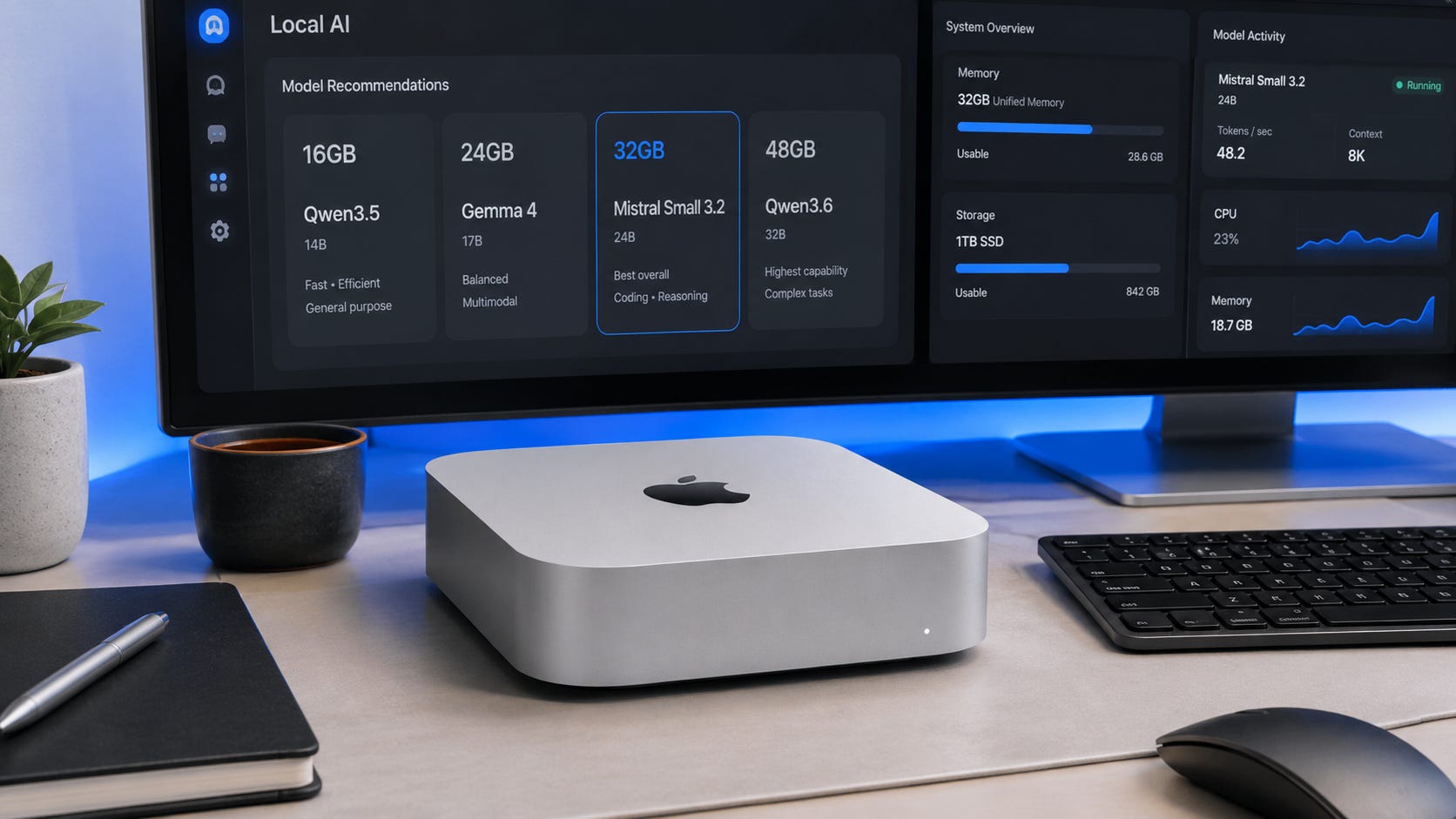
Model pages now advertise huge context windows. Qwen3.5 and Qwen3.6 list 256K context in Ollama. Gemma 4 models support long context according to Google and LM Studio. That does not mean a 16GB or 24GB Mac mini should run every model at maximum context.
Long context consumes memory through the KV cache. Ollama’s context length documentation states that larger context length increases the required memory, and it recommends at least 64K tokens for tasks such as web search, agents, and coding tools. That is useful guidance, but it also tells you why 48GB is a much more comfortable tier than 16GB or 24GB for agent workflows.
Start small:
16GB: Start at 4K to 8K context.
24GB: Start at 8K to 16K context.
32GB: Start at 16K to 32K context.
48GB M4 Pro: Start at 32K context, then test higher.
After that, check memory pressure and token speed. If the model slows down badly, reduce context before blaming the model.
This is especially important for RAG and document chat. A 24B model with a modest context can feel better than a 31B model with an overstuffed prompt. A 9B model that stays fast can be more useful for daily work than a larger model that makes you wait.
Should you buy more Mac mini RAM for local LLMs?
Yes, if local AI is the reason you are buying the Mac mini.
The regular M4 chip is fine for small models. The M4 Pro is better for serious local LLM use because Apple lists more than double the memory bandwidth. Still, memory capacity is the first buying decision. Bandwidth improves the feel once the model fits.
The real buying logic is:
Cheapest useful local AI box: 16GB M4, but use 4B to 9B models.
Better small-model desktop: 24GB M4.
Best value if you can find it: 32GB M4.
Best serious Mac mini local LLM setup: 48GB M4 Pro.
Best if you need CUDA, training, or image generation: Build or buy an NVIDIA PC instead.
The Mac mini is strongest when you want quiet, low-power, private local inference. It is weaker when you need CUDA, ComfyUI performance, LoRA training, or maximum tokens per second per dollar.
For the broader hardware decision, compare this guide with our best budget local AI PC build and local AI hardware buying guide.
More on local AI hardware:

Which model should you actually install first?
If you have a 16GB Mac mini, install Qwen3.5 9B first. It gives you the right balance of speed, usefulness, and memory headroom. Add Gemma 4 12B if you want a more quality-oriented assistant and are willing to keep context under control.
If you have a 24GB Mac mini, install Mistral Small 3.2 24B first. It is the safest model in this guide for a serious local AI workflow on that memory tier. Add Qwen3.6 27B if your work leans toward coding, tools, and agent experiments.
If you have a 32GB Mac mini, start with Gemma 4 31B and Mistral Small 3.2 24B. The first gives you higher-quality general answers. The second gives you a reliable daily driver with less memory stress. Add Qwen3.6 35B-A3B if coding is the point of the machine.
If you have a 48GB M4 Pro Mac mini, install Gemma 4 31B, Qwen3.6 35B-A3B, Mistral Small 3.2 24B, and Qwen3.5 9B. That gives you a high-quality general model, a coding model, a safe daily model, and a fast helper.
Best local LLM setup for Mac mini M4 in 2026
The best local LLM for Mac Mini M4 in 2026 is not one universal model. It is the best model that fits your memory tier without turning every prompt into a wait.
Use this:
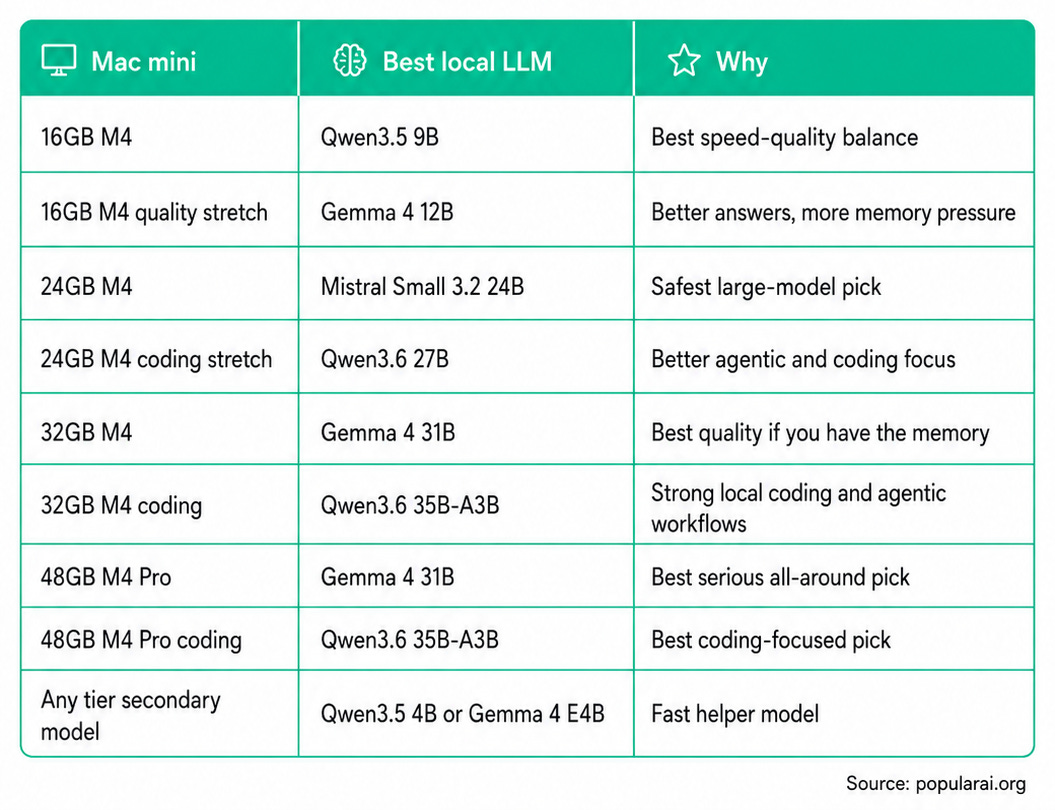
Buy the memory tier first. Pick the model second. Then tune context.
That is the whole Mac mini local LLM game in 2026.
Explore more from Popular AI:
Start here | Local AI | Builds & gear | Autonomy & policy | Fixes & guides | Popular AI podcast
What are you running local LLMs on in 2026: a base Mac mini M4, an M4 Pro, or something else entirely?