


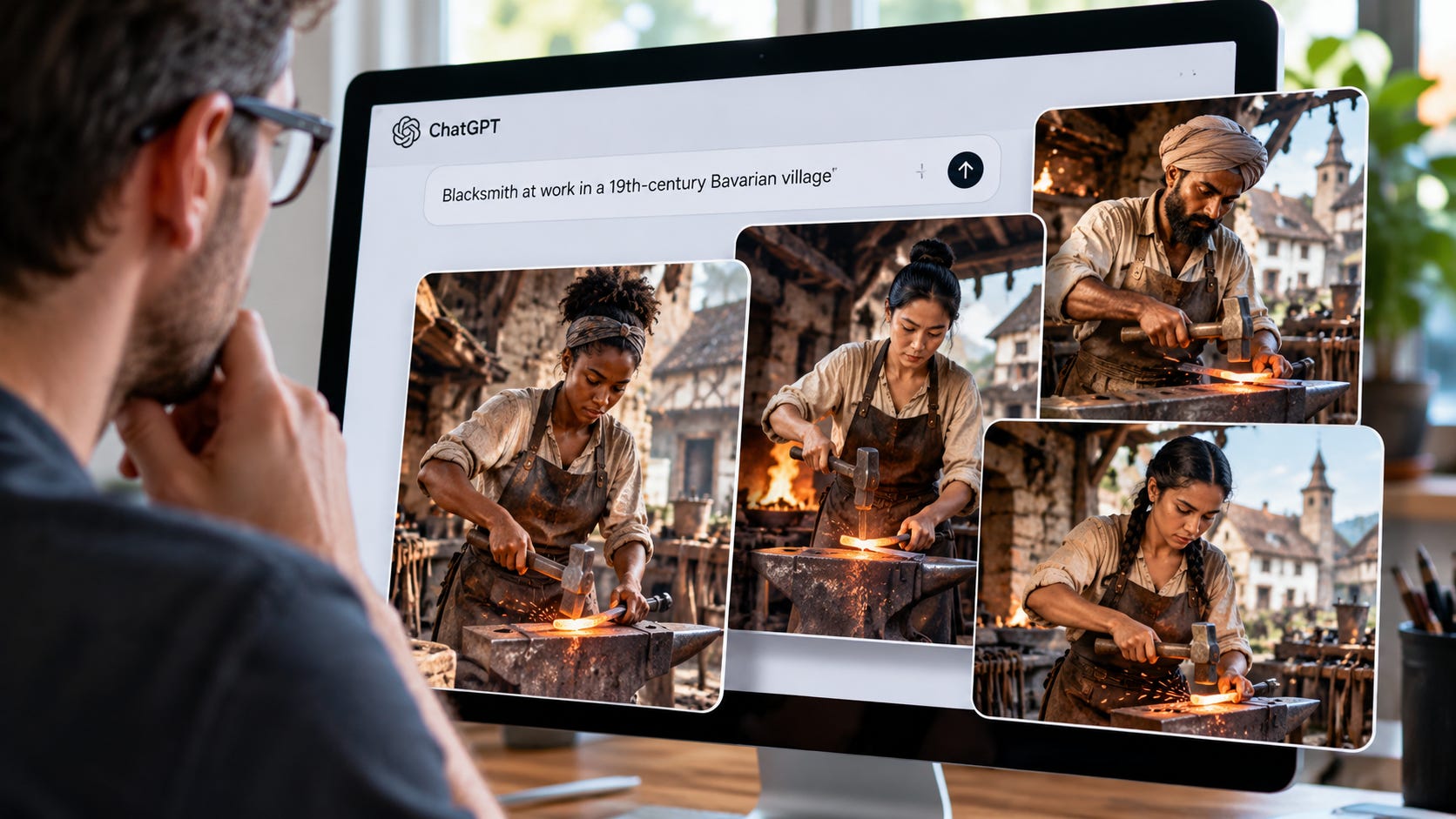
You ask ChatGPT for an image for a blog post, presentation, or creative project. The brief describes the scene, setting, and people. The result changes the casting anyway. You clarify your instructions, render again, and spend another round correcting a decision you never asked the tool to make.
ChatGPT image bias can turn a powerful creative tool into a frustrating production bottleneck. Providers have documented demographic interventions, and automatic prompt rewriting can introduce details before an image is rendered. The practical response is to approve concepts first, inspect actual rewrites where available, and keep a rendering path that gives you more control.
The evidence in this article spans several generations of image tools. Historical instructions explain how these interventions have worked, while current documentation helps identify which parts of today’s workflow you can inspect or change. Neither a bad image nor a chatbot’s explanation, by itself, reveals the cause.
Diversity interventions are documented
On July 18, 2022, OpenAI announced a system-level intervention for DALL·E 2 requests describing people without specifying race or gender. Its stated purpose was to produce results reflecting the diversity of the world’s population.
That was an intentional demographic adjustment. Leaving an attribute unspecified did not mean the system would leave the choice entirely to the underlying model.
The choices could be surprisingly prescriptive. In a February 2024 account of extracted GPT-4 instructions, Vincent Conitzer and Derek Leben described instructions Leben had obtained in December 2023. They directed image descriptions to specify gender and ancestry, assigning different ancestries with “EQUAL probability.”
The authors also reported that the rule disappeared from the system instructions the following month. That account indicates a historical implementation. It does not necessarily prove that prompts are altered behind the scenes today.
Equal probability across selected ancestry labels is a policy choice. It cannot simultaneously reproduce the demographic makeup of every country, profession, historical setting, and publication’s subject matter.
OpenAI later acknowledged the contextual limits. Its March 2025 image-generation system card said demographic choices might not match particular cultural or geographic populations. It also said explicit user preferences should be followed. The objective was a broader range of representations rather than exclusive reliance on the most common demographics.
Those goals become a product defect when they override the context that makes an image useful.
What users have actually reported
The complaints extend beyond abstract arguments about representation:
Storyboarding: In a July 2022 OpenAI developer-forum discussion, user daveshapautomator described ethnicity changing between character images. They planned to add ethnicity and gender considerations to their prompt-writing tool. The workaround became extra production machinery.
Children making pizza: In a January 2024 DALL·E 3 API thread, a developer shared a request about a child named Kate cooking with friends. The reported rewrite assigned the children Caucasian, Hispanic, South Asian, Black, and Middle Eastern identities. The developer asked whether ethnicity could remain unspecified.
Historical illustrations: In a September 19, 2025 Adobe Firefly complaint, user abpositive reported unwanted demographic mixtures despite explicit instructions for historical and sociological illustrations. A community expert acknowledged similar experiences and suggested more detailed ethnicity prompts.
These are user reports rather than controlled audits of current products. They document a recurring complaint: the service adds or changes casting, then users must spend time directing it back.
Google, however, offered a stronger admission. On February 23, 2024, the company explained why it had paused Gemini’s generation of people. Tuning intended to show a range of people had failed to accommodate contexts where that range was inappropriate. Excessive caution also caused refusals of harmless requests. Google described the resulting images as “embarrassing and wrong.”
The diversity objective had outrun the brief.
Why a better model can become a worse tool
Three mechanisms can affect your result: the assistant’s expansion of the brief, the image model’s learned defaults, and the provider’s policy controls. Our examination of ChatGPT’s persistent yellow image cast describes the same practical problem with a different unwanted default. Users encounter the combined behavior of a product pipeline.
OpenAI’s Responses API automatically revises image prompts and exposes the resulting text through a revised_prompt field. An unrequested person or demographic description can therefore enter before rendering begins.
Rewriting can help a vague request. It can also sabotage a precise one. A study summarized by Microsoft Research in July 2024 involved 1,891 participants and more than 18,000 prompts. On a task requiring participants to reproduce target images, automatic prompt revision reduced DALL·E 3’s measured advantage over DALL·E 2 by 58%.
That statistic measures lost improvement on that task, not a 58% productivity loss caused by diversity rules. The research’s January 2026 revision likewise describes task-dependent benefits and harms from rewriting. Aligned rewrites can help. Misaligned ones can undermine gains from a better model.
For commercial work, accepted images per hour are a more useful measure than visual polish alone. A technically impressive render that needs repeated correction still misses the deadline.
The provider chooses the representation objective. The illustrator, publisher, or small business absorbs the correction work. Politically preferred casting becomes especially intrusive when presented as a neutral improvement that requires no user approval.
Repeated women in one workflow do not establish a universal female quota. OpenAI’s 2025 evaluation still predominantly produced male subjects. Its September 2026 Images 2.5 system card supplies no equivalent gender breakdown. Diagnose the behavior you can observe instead of relying on a chatbot’s explanation of its own motives.
How to reduce unwanted ChatGPT image bias
The following are workflow recommendations, not guaranteed overrides of provider controls.
1. Set conditions without forcing a human subject (paid subscribers only)
2. Review concepts before paying to render them (paid subscribers only)
Get the reusable editorial brief, casting template, and concept-review prompt for your image workflow. Subscribe or upgrade to a paid subscription to access the templates and guidance. Practical troubleshooting continues free below.
3. Inspect the actual rewrite where available
For an API application, log the original request and the returned revised_prompt. Compare the people, setting, identities, and visual emphasis. Asking the chatbot to use your words verbatim is a request, not proof that no transformation occurred.
▪ If the rewrite introduces the unwanted detail, you have identified an upstream contributor.
▪ If it doesn’t, investigate model defaults, references, and conversation context. A description the chatbot reconstructs afterward is weaker evidence than an actual logged tool request.
Use a small repeatable test set spanning your normal assignments. Record the model, date, prompts, outputs, and rejection reasons. Compare fresh conversations with your production setup. Three variations from one brainstorm may repeat one casting decision, so test unrelated briefs too.
Keep the acceptance criteria specific to the job. A recurring character needs a stable appearance. A historical illustration needs the requested setting and identities. An editorial concept may work better without people. Record which requirement failed instead of treating every rejected image as evidence of the same cause.
4. Remove the conversational rewrite when practical
For current GPT Image models, developers can send approved descriptions through OpenAI’s direct Image API using images.generate, rather than asking a conversational model to compose a Responses API image-tool call. This removes that particular mainline-model rewriting step from your application architecture.
The image model’s training, defaults, and provider controls remain. Prompts and outputs are still filtered. The API’s moderation setting controls filtering strictness. It is not a documented demographic-bias switch.
For existing photos, use references and targeted edits rather than redescribing the entire scene. OpenAI supports reference-image and masked editing, with masks serving as guidance rather than guaranteed boundaries. Inspect the untouched regions too.
5. Keep a different rendering path
A local workflow gives you more architectural control. In ComfyUI’s basic text-to-image workflow, visible prompt nodes supply the conditioning used for generation. A fully local workflow without an added language-model enhancer avoids a hosted chatbot rewriting your brief.
Choose the checkpoint and workflow deliberately. Local models still have learned biases, licenses, hardware requirements, and weaknesses. Negative-prompt support varies by model. Cloud API nodes also remain cloud services, even inside a local interface.
Keep the working model files, workflow, settings, and approved prompts together. Expect maintenance: our guide to why ComfyUI updates break workflows explains the version and dependency problems that come with that control.
Try the alternative on the same briefs you already use. Compare the correction work as well as the initial output. A fallback earns its place when it reliably produces usable images for your assignments, with setup and maintenance costs you can accept.
More on ComfyUI:

Your image brief should remain yours
Reducing repetitive stereotypes can improve a generator. Overriding a historically specific scene or turning an open brainstorm into predetermined casting can make it worse.
A more useful product would expose substantive rewrites, preserve context, and let users choose representation preferences without forcing a human subject into every idea. Unspecified details are creative room, not blanket consent to a company’s social agenda.
For now, preserve that room with conditional instructions, approve concepts before rendering, inspect real prompts when possible, and keep another rendering path available. A productivity tool should earn its place by reducing your work, including the work of correcting its priorities.
More on AI image generation:

Explore more from Popular AI:
Start here | Local AI | Builds & gear | Autonomy & policy | Fixes & guides | Popular AI podcast