


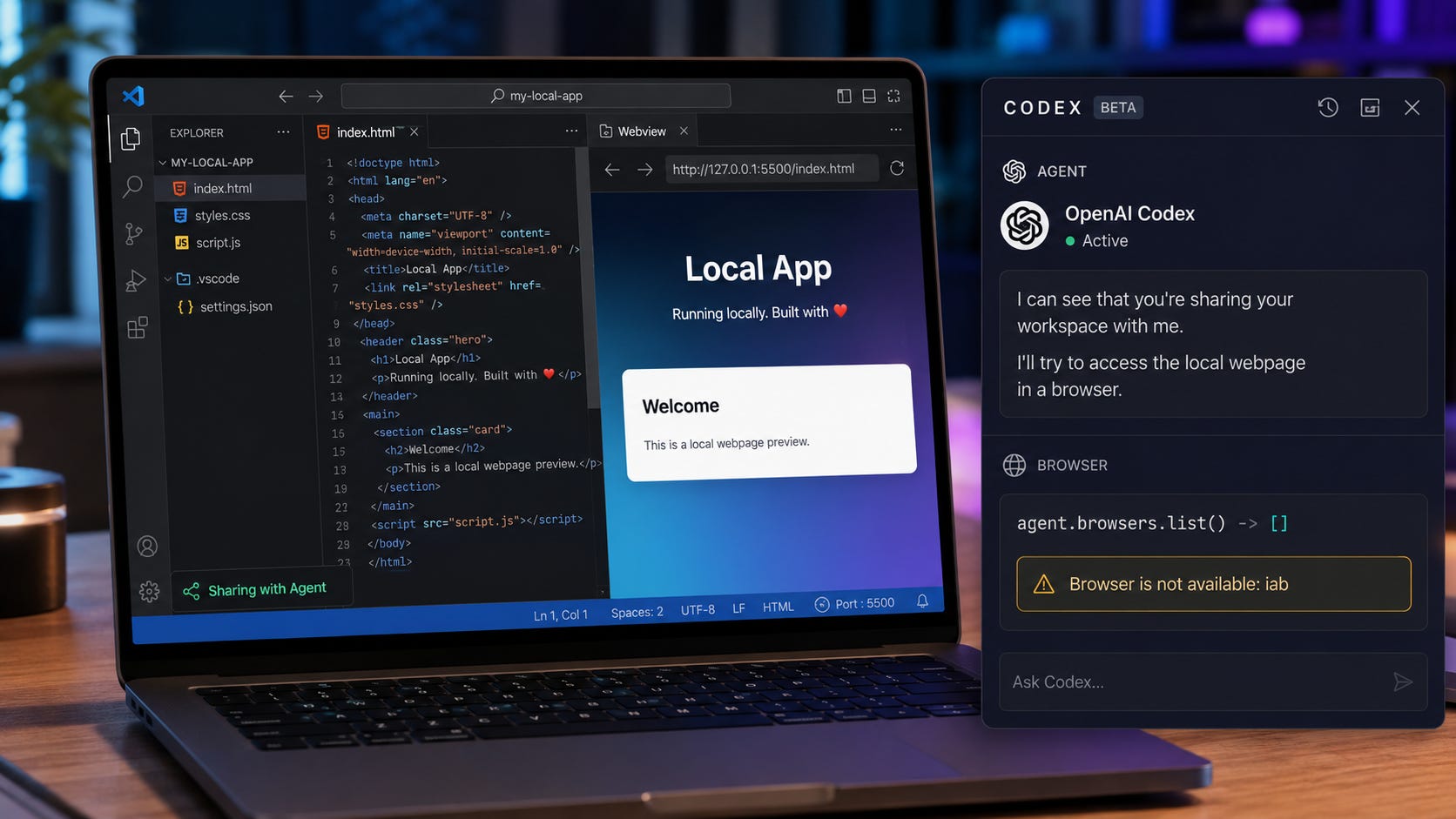
VS Code can display Sharing with Agent while the current Codex session has no usable connection to the webpage.
A Codex issue opened on July 25, 2026 documents that exact failure. The local page remained visible and functional inside VS Code, but browser discovery returned an empty list:
agent.browsers.list()      -> []
agent.browsers.get("iab")  -> Browser is not available: iab
The practical lesson is straightforward. A sharing indicator does not prove that Codex inspected the page. Before debugging CSS, selectors, the local development server, or your prompt, verify that the active agent session received a browser route.
OpenAI introduced the Codex IDE extension as a way to bring editor context directly into an agent session. That makes the visible sharing state persuasive, but it still does not prove that a controllable browser backend was attached.

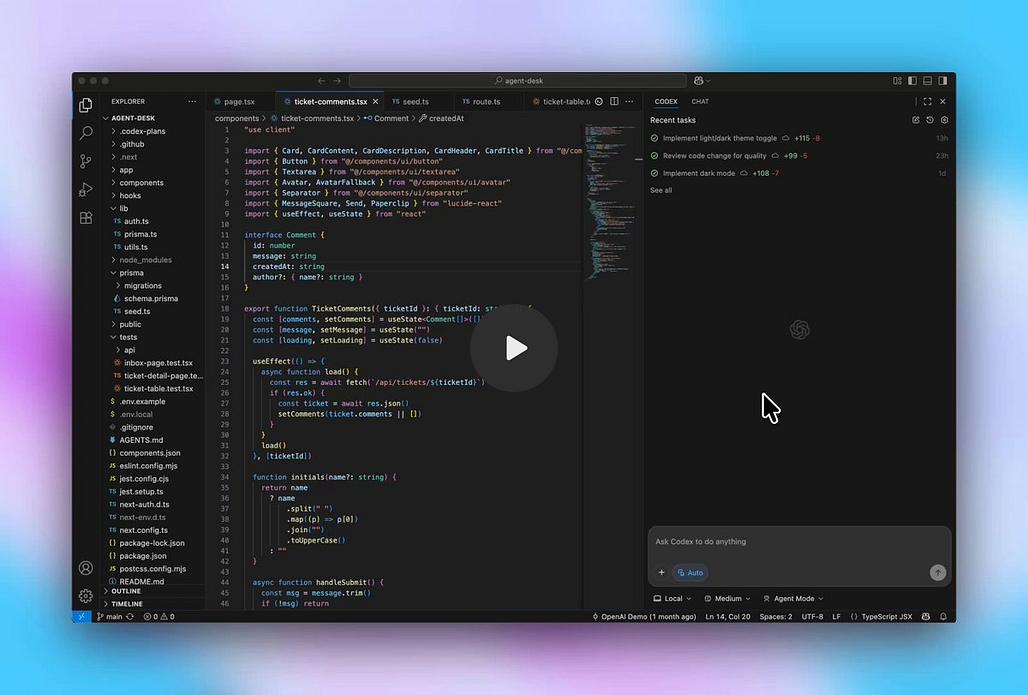
There is also a broader compatibility problem. OpenAI’s current Browser documentation says the built-in Browser is unavailable in the Codex IDE extension and directs users to the ChatGPT desktop app. That makes the VS Code sharing state an unreliable source of truth for browser access.
This is another example of why an AI coding agent must be evaluated as a complete stack. The model may be capable, but the surrounding session, tool parser, route registration, execution environment, and browser runtime must all agree. Popular AI found the same broader pattern while examining why local coding agents fail despite strong model benchmarks.
More on local AI agent benchmarking:

Quick verdict: Verify the route before debugging the page
1. Start a clean session. Enable sharing first, then create a new Codex chat so the session has a chance to initialize with the correct capabilities.
2. Require proof of browser discovery. Ask Codex to report the browser backends available to the session before it claims to inspect the page.
3. Test the local URL from the agent environment. A page that works in your ordinary browser may still be unreachable from WSL, a container, a remote workspace, or another runtime boundary.
4. Stop reconnecting when discovery stays empty. An empty browser list points to route registration rather than page rendering, DOM structure, CSS, or selectors.
5. Use the supported desktop path for built-in browser work. OpenAI currently documents the Browser through the ChatGPT desktop app, not the Codex IDE extension.
6. Run a Windows-native control test when WSL is involved. Open reports show path translation failures when a Linux-style workspace path reaches a Windows-native browser runtime.
7. Keep an independent verification path. Screenshots,
curl, Playwright, Cypress, and browser logs prevent one vendor-specific route from blocking the entire debugging workflow. This is the same resilience problem explored in AI agents become platforms in 2026.
Updating VS Code and the Codex extension remains a sensible check, but it is not a confirmed permanent fix. The July 25 report reproduced with VS Code 1.130.0 and Codex extension openai.chatgpt@26.721.41059. As of July 27, 2026, the issue is open, unassigned, and has no milestone.
What “Sharing with Agent” actually proves
The workflow contains three separate layers. Treating them as one is what makes this bug so confusing.
1. Page visibility
VS Code has opened the page and displays a sharing state.
This confirms that the editor knows which page you selected. It does not confirm that the current Codex session received a controllable browser connection.
2. Browser-route registration
The active Codex session must receive a browser backend that it can discover and control.
The current regression report fails at this layer. The page exists, and VS Code presents it as shared, but the browser list is empty. A related open report found that the Browser plugin could be installed and enabled while the VS Code session still had no registered browser backend.
That distinction matters. A plugin can be present on disk, enabled in configuration, and visible in product UI without producing a session-owned route. Installation state and session capability are separate checks.
The same principle applies across agent systems. A feature flag, installed extension, MCP server, tool manifest, or model capability does not prove that the current session can successfully call the tool. The final experience depends on the whole chain between the model and the runtime.
3. Page interaction
Only after route registration succeeds can Codex inspect the URL, read the rendered page, examine the DOM, capture a screenshot, click an element, or investigate console and network output.
When layer two fails, debugging layer three is wasted effort. Codex has not reached the page, so changing selectors, layout code, or the development server response cannot repair the missing handoff.
This is an important distinction for every agentic coding workflow. The model may correctly reason about your source files while having no access to the rendered application. A plausible explanation of the page is not evidence that the page was observed.
Common reasons Codex cannot see the shared page
▪ The browser surface is unsupported in the IDE extension
OpenAI currently states that its built-in Browser is unavailable in the Codex IDE extension. The documented interactive workflow runs through the ChatGPT desktop app.
A VS Code sharing control may still appear in the interface. Experimental, legacy, or internal route plumbing may also appear in particular builds. None of those details establish a stable, supported browser backend for the current IDE session.
This is the first distinction to make because it changes the troubleshooting goal. You may be dealing with a product limitation, a partial integration, or a regression rather than a problem in your application.
▪ The route was never attached to the current session
Browser routes appear to be session-owned. A page can remain open while the chat you are using has no route associated with it.
This explains why a fresh chat is worth testing after the page has been opened and sharing has been enabled. An older conversation may have initialized before the page was shared or before the browser capability became available.
It also explains why repeatedly toggling the sharing control may produce no change. The editor can update its visible sharing state without rebuilding the capabilities of the existing agent session.
▪ An extension regression broke route registration
The July report appeared after an earlier VS Code browser failure was closed as fixed. Continued reports suggest that the earlier repair did not cover every sharing path, did not cover every environment, or later regressed.
Earlier issues also documented Browser Use disappearing from the available session tools even when relevant feature flags were enabled, and vanishing during an active macOS session.
These reports do not prove that every missing route has the same cause. They show why UI state, feature flags, plugin installation, and actual tool availability must be tested separately.
A product interface can say a feature is active while the underlying runtime disagrees. That broader mismatch between what an AI platform displays and what the active workflow can actually use also appears in ChatGPT and Claude usage limits that feel unpredictable. In both cases, the decisive state lives deeper in the system than the visible interface suggests.
More on AI agent pricing:

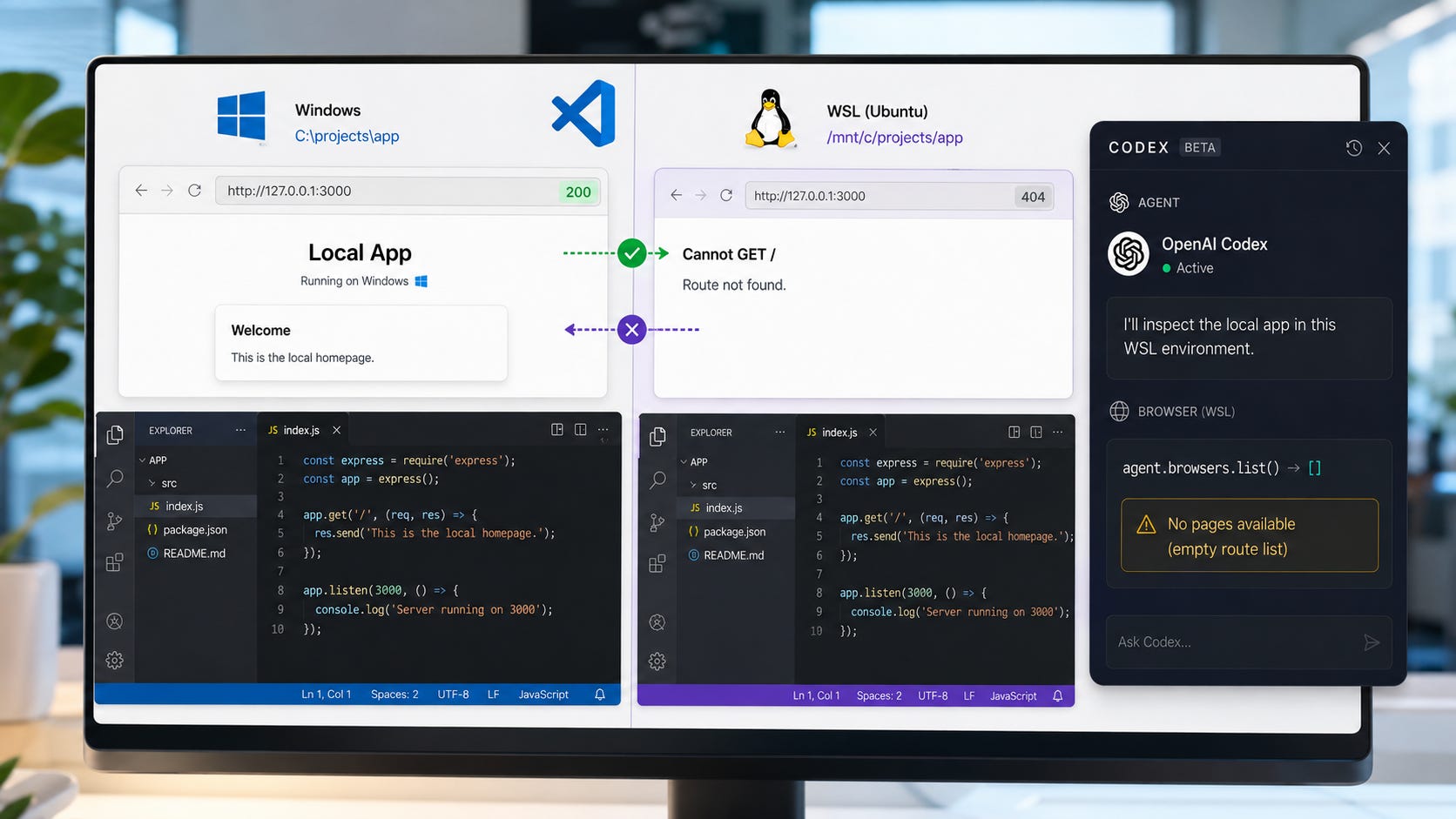
▪ Windows and WSL disagree about the workspace path
A Windows browser runtime may receive a Linux-style workspace location such as:
file:///home/user/projects/appor:
file:///mnt/c/Users/user/projects/appSeveral issues report that the Windows-side Node REPL rejects these as nonlocal file URIs before browser JavaScript executes. This has been reproduced with projects stored in the WSL filesystem and with Windows folders accessed through /mnt/c while the agent remains in WSL mode.
Moving a project to C:\ may therefore accomplish nothing when the agent still runs through WSL. The physical location of the files is only one variable. The path representation passed to the Windows-native helper also matters.
▪ The development server is unreachable from the agent environment
This is a separate problem from route registration.
Your normal Windows browser may reach 127.0.0.1:3000, while a WSL session, container, remote workspace, or sandbox cannot. The word localhost refers to the current network environment, so two processes on the same physical computer can still see different services.
Always test the URL from the same environment that is running Codex. This separates a missing browser route from a server binding, firewall, forwarding, authentication, or networking problem.
Fix 1: Make Codex prove that a browser route exists
Do not begin with a loose question such as “Can you see the page?” An agent can answer based on your prompt, source files, previous context, or assumptions.
Coding agents often search and summarize a repository before acting. Tools such as Promptscout deliberately gather the most relevant repository context before a cloud agent receives the prompt. That context can help Codex describe your application accurately, but it can also make an unsupported claim of live browser access sound convincing.
Use a preflight prompt that requires concrete discovery:
Before inspecting the webpage, verify browser access.

Report the available browser backends for this session. If the Browser runtime
is available, report the result of agent.browsers.list() and a direct lookup
for the iab backend.

If the browser list is empty or the lookup fails, stop. Do not claim that you
can see or have inspected the page.
In a session that exposes the Browser runtime, the decisive calls are:
const browsers = await agent.browsers.list();
console.log(browsers);

const browser = await agent.browsers.get("iab");
These are Browser-runtime JavaScript calls. They are not commands to paste into PowerShell, Command Prompt, Bash, or a normal Node.js process.
A result such as this means no route is attached:
[]
Browser is not available: iab
At that point, changing page code will not help. The failure occurs before the agent can inspect the page, so a CSS edit, DOM rewrite, server restart, or selector change cannot create the missing backend.
The preflight also protects against a subtler failure mode. A coding agent can read your project files and make a plausible statement about the page without observing the rendered result. Requiring backend discovery forces the session to distinguish source-code reasoning from live browser access.
This is why coding models should be judged by completed, verified work rather than the confidence of their first answer. Popular AI reached the same conclusion when assessing whether ChatGPT 5.5 actually completes difficult coding workflows.
More on AI agent task completion:

Fix 2: Retest with a completely new Codex session
Use a clean reproduction sequence:
Record the current VS Code and Codex extension versions.
Install any available VS Code and extension updates.
Fully quit VS Code. Closing one editor window may leave extension processes running.
Reopen the project.
Start the development server.
Open the intended page in VS Code.
Enable Sharing with Agent.
Create a new Codex chat.
Run the browser-route preflight before requesting visual work.
OpenAI’s official Codex onboarding walkthrough covers the CLI and IDE installation process, environment configuration, prompting patterns, and MCP setup. Use it to compare your baseline configuration with the supported workflow before deleting state or modifying generated files.
Do not resume an older chat for this test. A stale session may have been created before the page was shared, before browser capabilities were initialized, or while an earlier extension process was still active.
Keep the sequence controlled. Change one boundary at a time and write down the result. Otherwise, an update, restart, new session, server restart, and environment change can become one large test that tells you nothing about which step mattered.
Updating is still worth doing, but do not assume an update solved the problem. The current regression was reproduced on a newer extension after an earlier issue had already been marked fixed.
Fix 3: Test the URL from the agent’s environment
Replace port 3000 with the port used by your application.
Windows-native agent
Run this in the Windows terminal used by the project:
curl.exe -sS -o NUL -w "%{http_code}\n" http://127.0.0.1:3000/WSL, Linux, or macOS agent
Run:
curl -sS -o /dev/null -w "%{http_code}\n" http://127.0.0.1:3000/A response such as 200, 301, 302, 401, or 403 proves that an HTTP server is reachable from that environment. A 401 or 403 may still require authentication, but the network path exists.
A connection refusal, timeout, or status 000 points toward a server, binding, firewall, port-forwarding, or environment problem.
This test does not prove that Codex has browser access. It only separates page reachability from browser-route registration.
Use the results as a simple matrix:
If
curlfails and browser discovery is empty, you may have two separate problems.If
curlworks and browser discovery is empty, the page is reachable but the browser route is missing.If
curlworks and the route exists, continue to rendered-page verification.If the route exists but navigation fails, investigate browser permissions, authentication, URL handling, and the runtime itself.
Fix 4: Use the supported ChatGPT desktop browser path
OpenAI’s documented interactive browser workflow currently uses the ChatGPT desktop app:
Open the ChatGPT desktop app.
Select Codex.
Install Browser from the Plugins Directory when it is not already installed.
Open the local URL in the built-in browser.
Ask Codex to report the page title, URL, and one page-specific element before making changes.
OpenAI’s Browser documentation says the desktop experience can inspect rendered state, take screenshots, click, type, and work with local web apps. It recommends the Chrome extension when a task needs an existing Chrome tab or the user’s normal browser profile.
The difference becomes clearer in OpenAI’s browser debugging demonstration. Codex is shown using browser tools to examine console output, runtime errors, local storage, styling, and network activity. These are observable browser capabilities, unlike an IDE sharing badge that may not correspond to a registered route.
This gives you a useful control test:
Desktop Browser works, VS Code sharing fails: The page and server are probably fine. The VS Code handoff is the likely failure.
Both environments fail to reach the URL: Investigate the server, networking, browser permissions, or WSL bridge.
The route exists but browser actions fail: Investigate browser policy, sandboxing, authentication, or the browser runtime.
The desktop Browser reports the correct page but the IDE does not: Keep browser verification in the supported surface and use VS Code for code editing.
Do not let one broken integration become a single point of failure for the entire development loop. A more resilient approach is to build an independent AI development stack in which code, tests, logs, prompts, screenshots, and model access can move between tools.
The goal is not to abandon Codex. It is to stop a missing browser route from blocking work that could be verified another way.
More on local AI development fallbacks:

Fix 5: Isolate WSL before changing anything else
WSL adds several boundaries:
Windows paths versus Linux paths
Windows executables versus Linux executables
localhostforwardingWindows-native browser helpers
Linux sandbox metadata
UNC path translation
Separate environment variables and configuration state
Microsoft’s VS Code team treats WSL as a separate development environment with its own setup practices. That distinction matters here because the browser helper, development server, workspace path, and Codex process may not be running on the same side of the Windows and Linux boundary.


An open Windows and WSL issue reports that the built-in preview could not inspect a web app running in WSL, even though the project was accessible through \\wsl.localhost.
Run this control test:
Confirm whether the Codex agent environment is Windows native or WSL.
Confirm where the development server is running.
Run the HTTP reachability test from that same environment.
Create a small Windows-native Codex session with the agent explicitly set to Windows native.
Test a Windows-hosted local page through the desktop Browser.
Compare the result with the WSL-backed session.
The important variable is the agent environment, not merely the physical location of the project folder.
For a project that must remain in WSL, run the project’s existing Playwright, Cypress, or browser test tooling inside WSL. Then provide Codex with the resulting screenshot, console output, network failure, or test report.
This fallback does not restore live browser control. It keeps verification inside the environment where the application actually runs, which is often more useful than forcing a fragile cross-environment browser path.
A separate local coding workflow may also help when cloud access or product coupling is the larger problem. GGUF Loader Agentic Mode offers a local, account-free coding-agent path for controlled file tasks. It does not replace Codex browser inspection, but it can preserve basic repository work when a hosted integration is unavailable.
Developers who need private tool calling rather than browser control can also explore local AI agents with Ollama. Again, this is a workflow fallback, not a fix for the missing VS Code route.
Fix 6: Avoid destructive troubleshooting steps
▪ Do not delete the entire .codex directory first
That directory can contain configuration, session history, authentication state, plugins, and caches. A targeted reset may occasionally help a known state-corruption problem, but wiping everything is too aggressive for an unconfirmed route-registration failure.
Start with evidence. Record versions, confirm the environment, test the URL, inspect browser discovery, and preserve useful diagnostics before removing state.
▪ Do not edit generated Browser MCP configuration as your first move
The WSL Node REPL report found that manually added configuration was overwritten when Codex restarted. Generated runtime configuration is a poor place to build a permanent workaround.
A temporary edit may also confuse the diagnosis by adding a second unsupported state on top of the original problem. Prefer a clean control test over a configuration experiment that the application can silently replace.
▪ Do not enable Full Access to create a browser route
Filesystem or command permissions do not register a missing browser backend. Full Access increases the potential impact of a mistaken agent action without repairing the route.
Popular AI’s guide to locking down Codex with sandboxes, approvals, and recoverable workspaces explains why prompts and permission boundaries solve different problems. A browser registration bug should not become a reason to weaken the filesystem sandbox.
▪ Do not accept a generic claim that the page was inspected
Ask for evidence tied to the rendered page:
Exact page title
Current URL
Visible heading text
A specific DOM element
A screenshot
A console or network error
The state of a named control
If the agent cannot provide one of those details, it may be reasoning from source files rather than observing the live page.
That verification discipline also matters after the agent starts editing. AI-generated pull requests can shift the burden of proof onto reviewers, especially when the operator submits a change without reproducing the bug, running tests, or understanding the diff.
More on Codex sandboxes:

How to confirm that browser access really works
A successful browser handoff should pass all four checks:
Browser discovery returns at least one backend.
Direct lookup of the intended backend succeeds.
Codex reports the correct live URL and document title.
Codex returns a page-specific observation that was absent from the prompt.
For visual debugging, add a stronger test:
Report the current URL and document title. Then identify the text of the first
visible H1 and capture a screenshot. Do not edit any files during this test.
Only begin UI edits after that test succeeds.
The last requirement matters because a correct title alone may be guessable from source files, route names, or prior context. A rendered-page observation, paired with a screenshot or DOM evidence, is a stronger signal that the active browser session is real.
After Codex makes a change, repeat the same verification against the live page. Browser access at the start of a task does not prove that the route remained healthy throughout the session.
The same verification principle applies to coding-agent results more broadly. A patch is not complete because the agent says it is complete. The application must start, the relevant test must run, the bug must be reproduced, and the expected state must be observed.
What to do when the route still fails
Choose a fallback based on what you actually need to verify.
▪ For server availability
Use curl from the agent environment. This is the fastest way to determine whether an HTTP server is listening and reachable.
▪ For visual layout
Take a screenshot manually and attach it to the Codex session. Include the viewport size, operating system, exact route, and any interaction needed to reach the visible state.
Screenshot-driven frontend debugging is becoming a larger part of AI coding workflows. Popular AI’s review of Meta Muse Spark 1.1 highlights browser screenshots, layout issues, and visual-to-code tasks as useful model tests. A static screenshot cannot replace interactive browser access, but it can keep a layout investigation moving.
▪ For browser behavior
Run the project’s existing end-to-end test suite outside the broken Browser integration. A focused Playwright or Cypress test is more repeatable than manually reconnecting the same missing route.
Playwright is particularly relevant because it provides browser automation independently of the Codex sharing route. The project’s official account now describes Playwright CLI as a skill-friendly browser-automation interface, making it a practical fallback for agent-assisted testing as well as conventional test scripts.

▪ For DOM and console errors
Open the page in a normal browser and copy the relevant DOM snippet, console stack, network request, response status, or failing resource into the chat.
▪ For a product-side regression
Submit diagnostics rather than spending more usage on repeated recovery attempts. A reproducible report is more useful than a long sequence of undocumented restarts.
These fallbacks keep development moving while preserving the evidence needed to distinguish a product defect from an application defect.
They also reduce dependence on a single hosted workflow. That matters because hosted coding agents can change access, telemetry, or account rules around private repositories. Even when the immediate problem is only a missing browser route, portable testing and logging make the wider development process more resilient.
More on Meta Muse Spark:

Collect useful logs before filing an issue
OpenAI documents /feedback as the built-in way to send logs and diagnostics to the Codex maintainers. Enter /feedback in the composer and follow the prompts. The command can include diagnostic data with the report.
OpenAI’s Codex troubleshooting documentation lists session transcripts under:
$CODEX_HOME/sessionsThe default location is:
~/.codex/sessionsOn a standard Windows installation, this will usually correspond to a location under your user profile. WSL may use a Linux path or a Windows-backed CODEX_HOME, depending on the configuration.
Include the following details:
Operating system and version
VS Code version
Codex extension version
Native Windows, macOS, Linux, WSL, container, or remote environment
Workspace path format
Local URL, sanitized when necessary
Output from the same-environment HTTP test
Browser discovery result
Direct backend lookup error
Whether the test used a new session
Whether the ChatGPT desktop Browser could reach the same page
Feedback or session ID
Minimal reproduction steps
Review every log before uploading it. OpenAI’s troubleshooting guidance warns users to check shared logs for sensitive information. Session data can expose prompts, local paths, project names, private URLs, customer information, tokens, and other credentials.
The same context-minimization principle behind Promptscout’s local repository scouting applies to diagnostics. Share the smallest useful collection of files and logs rather than uploading an entire workspace or unfiltered session.
A strong issue report should also state where the failure occurred in the three-layer model. “The page is broken” is vague. “The local URL returns HTTP 200 from WSL, but agent.browsers.list() returns an empty list in a new VS Code session” is actionable.
Privacy and security notes
A browser route can expose more than a public page. It may reveal authenticated dashboards, development data, internal tools, cookies, console output, storage, and account-specific content.
OpenAI advises treating page content as untrusted context and reviewing the site before allowing browser actions. Use test accounts and development data where possible. Grant only the level of access required for the task.
That warning is not theoretical. The Friendly Fire proof of concept showed Claude Code and Codex executing attacker-controlled repository instructions. Browser pages, repository documentation, issue text, test fixtures, and copied logs can all contain instructions that an agent should not blindly trust.
The built-in browser does not automatically make every action safe. Page instructions can be misleading, and developer tooling can expose sensitive browser internals. Review requested permissions before approving broader access.
Use the regular Chrome profile only when the task genuinely needs an existing tab or authenticated browser state. Avoid exposing personal sessions to a debugging task that can be reproduced with a test account.
Do not attach a full session transcript, browser log, screenshot, HAR file, or network export publicly without checking it line by line.
For private repositories, also consider the larger data and policy path. Popular AI’s analysis of the Alibaba Claude Code ban explains why local execution does not automatically remove hosted-model, telemetry, account, jurisdiction, or provider-access risks.
More on AI agent access risks:


Prevent the same confusion in future sessions
Add a browser preflight to every visual-testing request:
Do not claim to have inspected the live page until you have:

1. Confirmed that a browser backend is registered.
2. Reported the current URL and document title.
3. Returned one observation from the rendered page.
4. Stopped and reported the missing route if browser discovery fails.
Keep automated browser tests as a fallback. A coding agent’s browser integration is useful when it works, but it should not be the only way your project verifies a page.
Also keep a small environment note in the repository. Record whether the app runs in Windows, WSL, a container, or a remote workspace, which terminal starts the server, which hostname and port are expected, and which browser-testing command provides a reliable fallback.
That note turns a vague future failure into a short checklist. It also helps separate product regressions from project-specific setup problems.
Teams building larger coding-agent workflows should go one step further. Keep prompts portable, use ordinary test runners, store changes in Git, and avoid letting one extension own the only copy of important state. AI agent platforms increasingly control execution environments, retries, state, and tool access, so recoverability must be designed into the workflow.
More on AI agent platforms:

The reliable fix is proof, not the sharing icon
Treat Sharing with Agent as a request to share the page, not confirmation that the handoff succeeded.
The decisive signal is browser discovery. If the browser list is empty, Codex has not inspected the page through that route. Start one clean session, verify the URL from the same environment, and perform a Windows-native control test when WSL is involved.
For dependable interactive browser work, use the documented Browser path in the ChatGPT desktop app. Keep curl, screenshots, console output, Git diffs, and automated browser tests available as independent verification paths.
For teams that need a broader fallback, a local-first AI development stack or a constrained tool such as GGUF Loader Agentic Mode can preserve some coding work without pretending to replace live browser inspection.
Until the VS Code sharing behavior and the supported Browser documentation agree, do not build your testing workflow around the sharing icon alone.
More on local-first AI development:

FAQ
Does “Sharing with Agent” mean Codex can see the webpage?
No. It means VS Code displays an active sharing state. The July 25 regression report shows that a Codex session can still receive no browser route while the page remains visible and functional in VS Code.
Why does agent.browsers.list() return an empty list?
It means no browser backend is registered with that session. The page may still be open and reachable, but Codex cannot control or inspect it through the Browser runtime until a route is available.
Is the built-in Browser supported in the Codex VS Code extension?
OpenAI’s current documentation says the built-in Browser is unavailable in the Codex IDE extension. The documented interactive browser workflow uses the ChatGPT desktop app.
Will restarting VS Code fix the problem?
A full restart and a new session are worthwhile tests because browser routes may be session-owned. The July 25 regression report says disabling sharing, creating a new chat, and reconnecting the page did not solve the reported case, so restarting is not a guaranteed fix.
Can WSL prevent Codex from controlling the browser?
Yes. Open issues document Linux or WSL workspace metadata being passed to Windows-native Browser components that reject the path before JavaScript runs.
Is moving the project from WSL to C:\ enough?
Not necessarily. One report reproduced the same path rejection with a Windows-hosted project accessed through
/mnt/cwhile the Codex agent remained in WSL mode. Test with the agent switched to Windows native.
Can I use the Chrome extension instead?
OpenAI recommends the Chrome extension when the desktop experience needs access to an existing Chrome tab or regular browser profile. That does not guarantee that a Codex IDE session will receive the same browser route.
Can a screenshot replace live browser access?
A screenshot can help with spacing, overflow, typography, responsive layout, and other visible problems. It cannot reproduce interaction state, inspect live network requests, test clicks, or prove that the agent has a controllable browser route.
Should I enable Full Access when the browser route is missing?
No. Full Access changes filesystem and command permissions. It does not register a browser backend, and it increases the damage a mistaken agent action could cause.
How can I prove Codex inspected the live page?
Require the current URL, document title, a rendered-page observation, and a screenshot or DOM-specific detail. Also verify that browser discovery and direct backend lookup succeed before allowing edits.
Explore more from Popular AI:
Start here | Local AI | Fixes & guides | Builds & gear | Popular AI podcast
Has Codex ever claimed it could see your shared VS Code webpage when it clearly could not? What finally exposed the problem?