


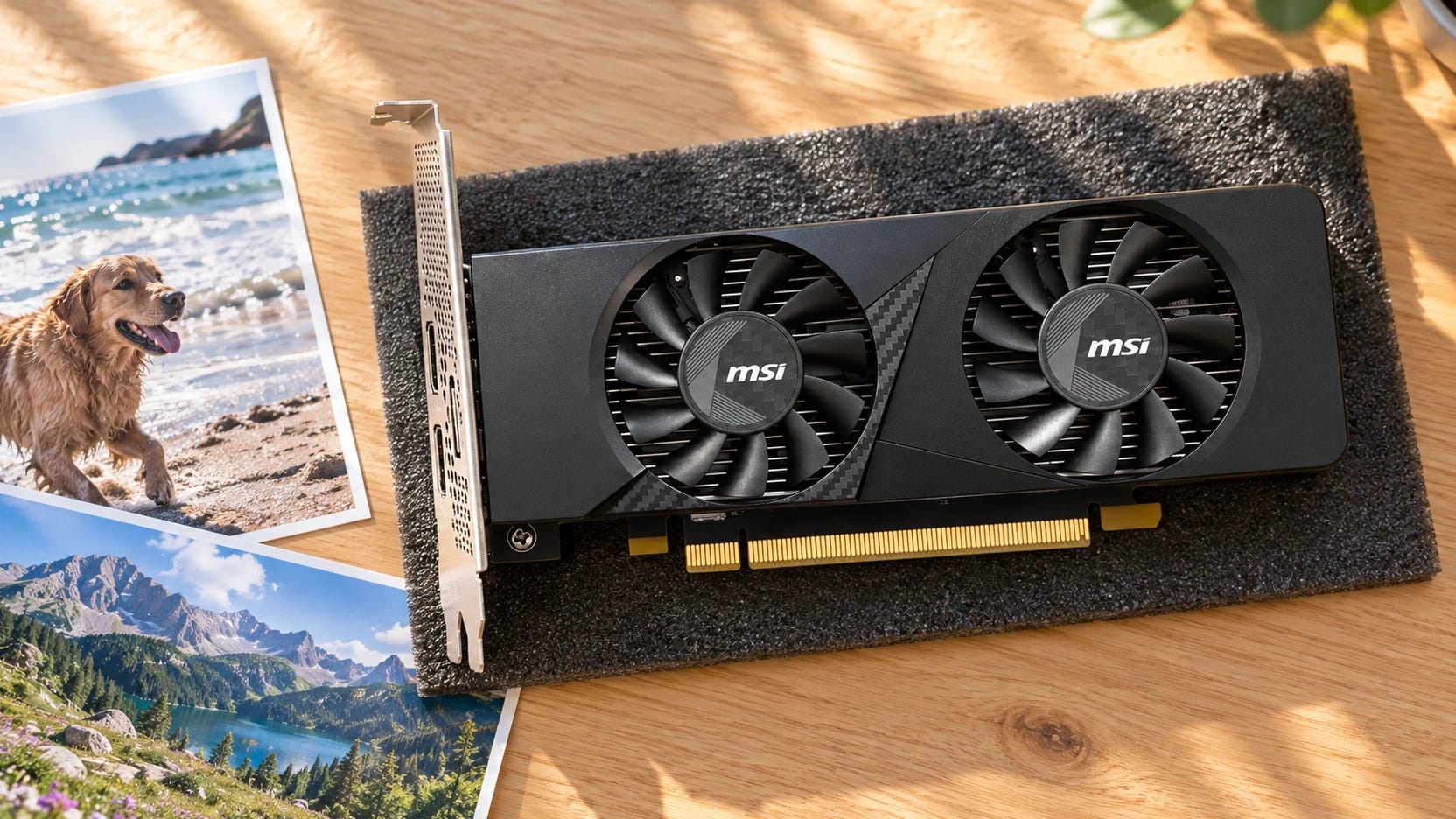
No. Immich does not need a dedicated GPU for private AI photo search. For most home libraries, start with the CPU already running your NAS or mini PC. A supported Intel integrated GPU can take work off that CPU. NVIDIA acceleration becomes attractive when you repeatedly process large imports or run other GPU-heavy services.
The expensive mistake is buying hardware to accelerate an indexing job that mostly happens once. Even a modest card such as the MSI RTX 3050 LP 6GB needs a recurring workload to justify its cost.
Disclosure: Popular AI may earn a commission if you buy through some links in this article. That does not change our recommendations.
Quick verdict: which hardware does Immich need?
Buy nothing: Start with an existing four-core CPU, sufficient RAM and the ordinary Immich machine-learning container. A slow initial import can be acceptable if daily searches work well afterward.
Use Intel graphics: If your always-on server already has compatible Intel integrated graphics, try OpenVINO before replacing the machine. Buy an Intel mini PC when you need a new server, because an iGPU alone does not guarantee faster search.
Add NVIDIA only for a sustained bottleneck: CUDA is the more dependable acceleration route for large recurring imports, shared servers and machines already equipped with a GPU. Consider an MSI RTX 3050 LP 6GB only if that workload justifies a purchase. A spare gaming PC can handle remote jobs, provided you plan for when it’s off.
What Immich actually asks the hardware to do
Immich’s Smart Search uses CLIP-style embeddings to match descriptions such as “dog on a snowy beach” with photos. During initial indexing, machine learning processes image previews and saves searchable representations in the database. Later uploads need the same treatment.
▪ Face detection is another machine-learning job, while matching and grouping already detected faces involves the Immich server and database.
An ordinary search still needs machine learning. The words you type must be encoded into a compatible embedding before Immich can search its existing image vectors. Processing all your photos in advance does not eliminate that query-time work.
A fast GPU can therefore finish the initial photo processing much sooner without producing a corresponding improvement in everyday search responsiveness. Model loading, CPU resources, storage and the chosen search model still affect the experience. Judge the upgrade by the operation you actually find slow.
Immich’s performance advice separates throughput from latency. Increasing job concurrency can improve throughput, or the number of assets processed over time. It does not automatically reduce latency, or the time required to answer a search query. Raising concurrency also consumes more memory and can overwhelm a modest server.
Think about the library in two phases. If you import 5,000 photos once and then add a handful a day, there’s little reason to optimize for peak indexing speed. If you ingest tens of thousands of new files regularly, share the machine with other containers or repeatedly rebuild indexes, acceleration becomes more compelling. These are workload examples, not benchmark-derived thresholds.
Separate machine learning from video encoding, too. Intel Quick Sync and NVIDIA NVENC are relevant to hardware video transcoding, which is a different configuration and workload. Working hardware transcoding does not establish that Immich’s OpenVINO or CUDA machine-learning backend is configured correctly.
How these Immich hardware choices were evaluated
The baseline comes from Immich’s installation requirements, machine-learning documentation and October 2026 release notes. Hardware examples were checked against manufacturer configurations and U.S. listings on October 29, 2026. The comparison emphasizes always-on availability, software support, RAM, upgrade cost, power and the difference between batch indexing and interactive queries.
There is no controlled, cross-platform Immich benchmark here establishing how much faster a specific Intel mini PC or RTX card will index the same library than an existing CPU.
In a 2024 comparison of OpenVINO and CPU processing, one i5-10500 owner reported around two assets per five seconds at two concurrent jobs using either Intel UHD 630 graphics or the CPU.
That’s an old, single-user result with a specific model and software configuration. It cannot establish that OpenVINO never helps. Newer Immich optimizations make the result even less transferable to a purchase today.
Three practical configurations for Immich
1. Existing CPU-only NAS or office PC: the starting point for most people
Immich’s minimum requirements are two CPU cores and 6GB RAM, with four cores and 8GB recommended. Those figures apply to the server, without promising quick initial indexing. For a machine running NAS services, containers and the database alongside Immich, 16GB gives useful breathing room if you already have it.
A relatively recent Intel Core i5 or AMD Ryzen machine can be a reasonable CPU-only host. Put the Postgres database on a local SSD, as Immich recommends, rather than a network-mounted database directory. Keep originals on appropriate NAS storage, maintain a separate backup and leave space for generated thumbnails and video derivatives.
Check older bargain hardware carefully. Immich 3’s x86 machine-learning image requires the x86-64-v2 instruction level. An ancient processor might boot Linux and Docker but fail at the machine-learning container. Buying a GPU does not automatically fix that CPU compatibility problem.
If you have no usable server, a refurbished office mini PC is one low-cost route. A Dell OptiPlex 7060 Micro with an i5-8500T, 16GB RAM and 256GB SSD appeared on a U.S. refurbished listing at $229.95 at the time of publication.
Verify the power adapter, storage, seller condition and warranty because refurb listings vary. The Dell works as an always-on compute node, rather than a box for several internal photo drives. A complete system at that price can make more sense than adding a GPU to a very old NAS, especially when the older machine also lacks RAM or suitable database storage.
Before spending even that, reduce competing work. Immich recommends lowering job concurrency to one during a difficult initial import and limiting transcoding threads if necessary. The backlog will take longer, but the server should remain usable. A completed index does not need to be regenerated simply because you later enable acceleration.
2. Intel OpenVINO: useful when a new compact server is already justified
Immich supports OpenVINO acceleration for Intel graphics, including Iris Xe and Arc. OpenVINO can reduce CPU load on supported hardware, although integrated GPUs, especially older ones, are more likely to encounter driver or memory problems. Immich also warns that OpenVINO can use more system RAM than CPU processing.
Check which Intel graphics unit you’re getting. A basic N150 mini PC has a much smaller graphics subsystem than higher-end Iris Xe or Arc-equipped hardware. The presence of an Intel GPU, Quick Sync or an advertised NPU does not promise a particular Immich speedup. The OpenVINO container, supported graphics driver, Linux kernel and device access must all work together.
For a concrete always-on option, the Beelink EQ14 N150 with 16GB DDR4, a 500GB SSD and dual 2.5GbE ports was listed for $385 by Beelink’s U.S. store. That configuration was marked preorder. It has a four-core N150 and 24-execution-unit Intel UHD Graphics.
Its 16GB memory ceiling limits future expansion, and the tiny chassis cannot accept a normal desktop graphics card. The EQ14 is worth considering if you need a compact NAS companion anyway. It’s a poor $385 purchase just to find out whether OpenVINO processes photos faster than your current CPU.
If you already own an Intel-based server, try the supported OpenVINO machine-learning image and confirm the GPU is actually being used. Compare the same kind of processing work before deciding whether to keep it enabled. If the work takes roughly the same time, return to CPU inference instead of spending more to chase a theoretical acceleration advantage.
3. NVIDIA CUDA: for repeated heavy machine-learning jobs
Immich’s CUDA backend is its most reliable acceleration option for model compatibility. It still requires supported NVIDIA drivers and, on native Linux, the NVIDIA Container Toolkit. The documented requirements specify CUDA compute capability 5.2 or higher and driver version 545 or newer. VRAM and model choice can impose further limits.
For a desktop with a spare expansion slot, the MSI GeForce RTX 3050 LP 6G OC at a listed $279.99 is a modest example. It has 6GB GDDR6, a 70W board-power rating, a low-profile bracket and a two-slot cooler.
The card needs an appropriate PCIe slot, clearance, ventilation and power supply. It will not fit inside the typical tiny N150 mini PC or Dell Micro chassis. “Low profile” does not make a desktop expansion card compatible with a sealed mini PC.
You can check the exact MSI RTX 3050 LP 6GB model on Amazon. At the manufacturer’s $279.99 listed price, buying one solely to speed up occasional Immich imports is difficult to defend. The purchase needs to save you time often enough to justify adding hardware and another acceleration setup to maintain.

Newer RTX 50-series cards, higher-VRAM NVIDIA workstation boards and used RTX 3060/4060-class cards can also run relevant CUDA workloads where supported. Their extra cost or power needs justification from a broader AI workload. More VRAM is not a reason by itself to replace hardware that already handles your photo library.
An existing CUDA workstation is more attractive: its GPU can serve Immich indexing alongside other local-AI work. Buying an expensive graphics card for a family’s photo searches is usually hardware shopping in search of a problem.
AMD GPUs with ROCm and certain ARM/Rockchip accelerators are also supported Immich backends. They are legitimate paths for machines you already own, but ROCm driver coverage, image size and idle behavior complicate a fresh hardware purchase. Multi-GPU systems and premium workstation cards add cost without a convincing Immich-only case.
Before upgrading, use Immich’s newer ML optimizations
The October 7, 2026 release of Immich 3.3.0 introduced machine-learning improvements for CPU and GPU backends. The team says the optimized models use less memory and often process work faster, although gains differ by backend and model.
The release also addresses some previous OpenVINO output problems and adds TensorRT RTX optimizations for NVIDIA Ampere/RTX 30-series and later hardware. These changes give existing hardware another chance before you judge it too slow.
For improvements that rely on the new optimized models, configure MACHINE_LEARNING_MODEL_REVISION=v2 on the machine-learning service. Immich says this revision produces numerically equivalent model outputs, so existing jobs do not need to be rerun. The first model load may take longer while optimization artifacts are prepared and cached.
Update compatible server and machine-learning containers together, then observe the real workload before shopping for an upgrade. Allow that first-load preparation to finish before judging the day-to-day experience.
Remote machine learning: what happens when the GPU PC is off?
Remote processing is a middle ground for a weak NAS and a gaming computer you already own. Immich can run its machine-learning container on another computer, with the main server sending image previews to it for processing.
This moves Smart Search and face-detection inference. Database work and subsequent face grouping remain on the primary server, so the NAS still has work to do.
Search terms require machine-learning inference too. In a 2026 report of Smart Search failing when a remote PC was off, an owner of an older HP MicroServer found that newly indexed photos remained in Immich while text searches failed. The previews had been processed, but the query could no longer be converted into an embedding.
Add the remote machine-learning URL while retaining the local container as fallback, instead of replacing the local endpoint. Immich tries configured URLs sequentially, allowing the slower CPU to answer queries when the gaming PC is unavailable. A fast indexing machine is less useful if shutting it down also removes everyday search.
The catch is that new uploads may then get processed on the weak NAS while the powerful machine is off. There is no built-in policy routing only large background jobs to the GPU and small interactive searches to the CPU. If you use only the remote endpoint, failed jobs can require manual retries through Job Status after it returns.
A remote ML container receives image previews and has no built-in authentication protection. Keep it on a trusted local network or behind a private VPN, never expose its port to the public internet, and keep remote and server versions aligned.
Turning on a second PC around the clock just for Immich may cost more in electricity and complexity than accepting slow background processing. Remote inference is easiest to justify when the second computer already has another reason to be running.
More on hardware sharing on your local network:

Power, storage and the real upgrade decision
A GPU’s peak power rating does not tell you its idle consumption, and a mini PC’s advertised processor TDP does not equal whole-system wall draw. The practical cost depends on what stays powered on, including whether an upgrade means running an entire second computer.
For illustration, 10W of additional continuous draw consumes 87.6kWh per year, or $17.52 at $0.20 per kWh. A second machine drawing 60W continuously would cost about $105 annually at the same rate. Those are arithmetic examples, not measurements of the products above.
Storage and RAM often deserve attention before compute. Immich recommends keeping Postgres on local SSD, and its estimated thumbnail/transcode overhead adds roughly 10–20% to library storage. Budget for the files Immich generates as well as the originals you import.
If Docker is swapping memory or the database sits on a network mount, a new GPU leaves the underlying problem untouched. Our private family AI NAS build covers a larger, expandable home-server layout. The local-AI SSD guide explains storage tradeoffs for mixed AI workloads.
For a few thousand personal photos and ordinary daily uploads, let the CPU finish indexing and leave the machine alone. For a big one-time migration, use a spare GPU computer temporarily, preferably with a local fallback. For a continuously growing multi-user collection, consider Intel acceleration on an existing server or NVIDIA CUDA on a machine with room and an ongoing reason to run it.
Start Immich on your CPU before buying a GPU
Run Immich on your existing CPU first. Use current optimized models, put the database on an SSD and tune background concurrency before buying anything. Judge the server after the initial backlog has cleared, as well as while it’s working through an import.
If you need a new always-on host, buy adequate RAM and reliable storage first, with Intel OpenVINO as an option rather than a performance guarantee. Add a card such as the MSI RTX 3050 LP 6GB only when repeated processing work or other local-AI services make its total cost worthwhile.
The best private photo server is the one that stays available when someone actually wants to find a picture.
More on local AI hardware:

Explore more from Popular AI:
Start here | Local AI | Builds & gear | Autonomy & policy | Fixes & guides | Popular AI podcast