


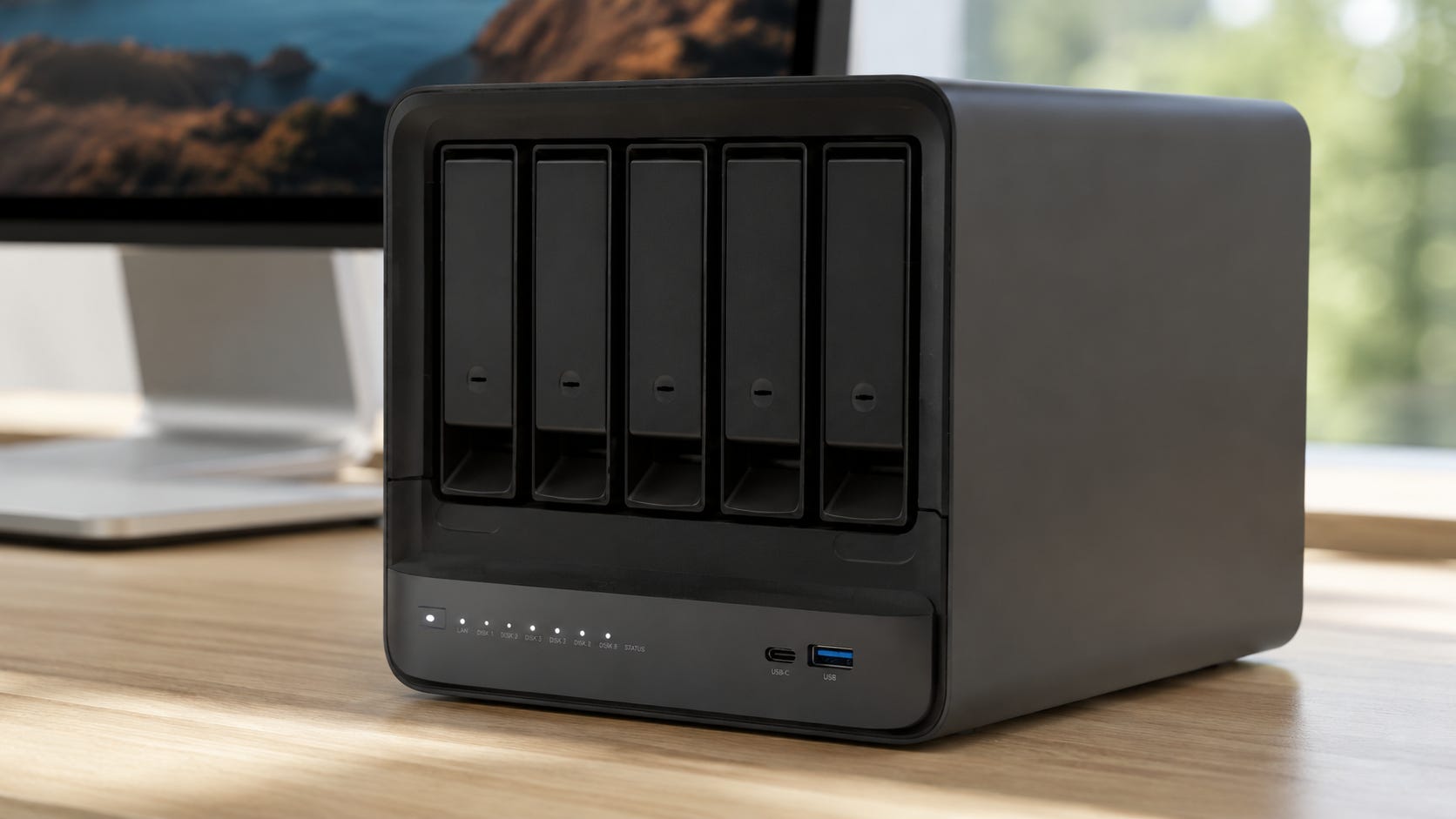
The Minisforum N5 Max is one of the most interesting local AI servers of 2026 because it combines AMD’s Ryzen AI Max+ 395, a large unified memory pool, five HDD bays, five NVMe positions, and high-speed networking in one compact NAS. It is also a machine built around a tension that matters more than its specification sheet. AI rewards experimentation. Storage rewards boring stability.
That tension defines this Minisforum N5 Max review. The hardware makes an unusually convincing case for consolidation. Models, vector databases, document stores, media libraries, embeddings, and source files can all live beside the compute that processes them. The software story is less settled, and the operational risk of combining an experimental AI stack with your primary storage server is easy to underestimate.
Our verdict: buy the N5 Max if you specifically want an all-in-one homelab and are comfortable replacing or working around immature software. If the NAS will hold data you depend on every day, keeping storage and experimental AI compute separate is still the safer architecture.
Disclosure: This article includes Amazon affiliate links. If you buy through them, Popular AI may earn a commission at no extra cost to you.
Minisforum N5 Max review: quick verdict
At the current $2,599 U.S. price for the 64GB model, the N5 Max is difficult to recommend as a normal NAS and much easier to justify as a compact homelab appliance that happens to have excellent storage hardware. The 64GB version is also available through Amazon if you prefer to buy there.

The machine itself is unusually capable. Independent testing found strong NAS performance, sound thermal management, and useful local-LLM performance, but also found MinisCloud unfinished enough that the reviewer experimented with TrueNAS and OpenMediaVault instead. The problem is the integration layer, not the basic hardware.
That changes the value proposition. You are not paying $2,599 for a polished Synology-style appliance with AI added. You are buying unusually dense homelab hardware and accepting that you may have to finish the software architecture yourself.
For some buyers, that is exactly the attraction. For anyone who wants a storage appliance that disappears into the background, it is the central reason to hesitate.
What determines whether the N5 Max makes sense
The N5 Max looks compelling because consolidation has obvious benefits. Models, document stores, media libraries, embeddings, RAG databases, and source files can live in the same machine that runs inference. There is no separate GPU tower idling nearby, and there is less reason to move large datasets between a NAS and an AI workstation before processing them.
That makes the N5 Max especially appealing for workloads where storage and inference constantly touch the same data. Private document AI, retrieval-augmented generation, semantic search, media indexing, transcription, local coding infrastructure, and home automation can all benefit from keeping data and compute physically close.
The catch is that consolidation also combines failure domains.
A BIOS change for GPU memory allocation can now affect your storage server. So can a kernel update needed for ROCm, an experimental container configuration, a Proxmox change, an AI runtime that consumes too much memory, or a reboot required to test new drivers. None of those events is automatically disastrous, but they are normal activities on an experimental AI box and undesirable surprises on a storage appliance.
That distinction is more important than whether the specification sheet says “126 TOPS.” The N5 Max can have enough compute for both roles while still giving those roles incompatible operational priorities.
64GB unified memory is useful, but it is not 64GB of VRAM
The N5 Max uses AMD’s Ryzen AI Max+ 395 with Radeon 8060S graphics and a 256-bit LPDDR5X memory interface. Minisforum pairs it with 64GB of LPDDR5X-8533 unified memory in the currently available configuration.
Unified memory is the reason Strix Halo is so interesting for local AI. The CPU and GPU can draw from the same large pool instead of forcing buyers into the 16GB, 24GB, or 32GB VRAM ceilings common on consumer graphics cards.
Capacity and speed still solve different problems.
A large unified memory pool can make a model fit. Dedicated GDDR memory on a discrete GPU can still make a fitting model run dramatically faster. That tradeoff is central to our broader Strix Halo mini PC buying guide and Ryzen AI Halo review.
IT Pro’s N5 Max testing shows the distinction clearly. Using Ollama with GPU acceleration, the reviewer measured about 44 tokens per second on a 26B mixture-of-experts model and about 9 tokens per second on a 31B dense model. The same machine exceeded 40 tokens per second on GPT-OSS 20B with ROCm, while an MXFP4/Vulkan configuration reached 72.9 tokens per second.
Those figures should not be treated as universal model rankings because the architectures and quantizations differ. They reveal something more useful for a buyer: Strix Halo performance is unusually sensitive to model architecture, quantization, and backend choice.
Level1Techs reached a similar conclusion while configuring the N5 Max as a Proxmox, Docker, and ROCm inference server. In its June testing, a Q4_K_M 35B MoE model reached roughly 50 tokens per second, while a dense 27B Q8 model managed 7.8 tokens per second. Specialized ROCmFP4 and multi-token-prediction configurations improved some dense-model results substantially.
That is impressive tinkering potential. It is not appliance behavior. The N5 Max can reward a technically curious owner who is willing to test backends and quantizations, but the same variability makes it harder to treat the machine as a predictable black box.
Related:


The 64GB model has an awkward capacity ceiling
The current U.S. product page lists the 64GB N5 Max for $2,599. A 128GB model is listed at $3,599 but remains out of stock.
That matters because 128GB is where Ryzen AI Max+ 395 becomes genuinely unusual compared with normal GPU workstations. AMD has demonstrated large-model inference on Ryzen AI Max systems with up to 128GB of unified memory, and ROCm currently lists Ryzen AI Max+ 395 in its Linux support matrix.
The 64GB N5 Max is less transformative.
IT Pro found that its review unit reserved around 30GB for graphics by default and allowed a maximum BIOS allocation of 48GB. That 48GB ceiling made a 4-bit 70B-class model difficult once context and runtime overhead were included.
The memory is soldered, so this is not a situation where you can buy 64GB now and install another 64GB next year. You need to decide at purchase time whether the N5 Max is primarily a compact server that can also run useful local models or a large-model machine whose storage bays happen to be unusually capable.
If local LLM capacity is the main reason you want Strix Halo, the 128GB configuration is much more interesting than the 64GB version currently on sale. The problem is that the more desirable configuration is also more expensive and, for now, unavailable from Minisforum’s U.S. store.


The storage hardware is much more convincing than the software
As hardware, the N5 Max is unusually dense. Minisforum specifies five SATA bays, five M.2 NVMe positions, dual 10GbE, USB4 v2 connectivity, a slide-out compute module, and an internal 250W power supply. The enclosure measures roughly 199 × 202 × 252 mm.

That density is the real appeal of the design. Bulk storage, SSD working sets, model files, vector databases, caches, and compute can share one small appliance without requiring a rack, a tower GPU workstation, or a separate shelf of storage hardware.
IT Pro fitted five 2TB WD Red Plus hard drives and additional SSDs. If you want to reproduce the HDD side of that test setup, the 2TB WD Red Plus WD20EFPX is the same capacity and product family used in the review. Under MinisCloud, the reviewer measured transfers above 590MB/s, then about 202MB/s for an 11GB mixed-file write after moving the HDD volume to TrueNAS. The reviewer also reported no detectable storage-performance penalty while AI workloads were running.

That is strong evidence for the hardware design. It also undercuts the simplest argument against an AI/NAS combo box. The problem is not that inference automatically starves the NAS of storage performance.
The physical design is not flawless. The same review praised the cooling and packaging but reported that one drive-caddy release lever broke under relatively light force. At this price, a mechanical weakness in a part you may touch every time you change a drive deserves to be part of the buying decision.
MinisCloud is the biggest reason to wait
Minisforum has made significant promises around MinisCloud. The current product page advertises ZFS snapshots, LZ4 compression, Docker support, local AI features, multi-user isolation, remote access, and virtualization.

It also labels MinisCloud as beta.
That qualifier changes how the N5 Max should be judged. A beta photo-organizing feature on a consumer gadget is an inconvenience. Beta storage administration, permissions, backup configuration, and power-management behavior on a machine intended to hold terabytes of important data deserve much more caution.
IT Pro found no conventional web-based administration interface, no app ecosystem, no configuration backup and restore feature, and inconsistent account handling between SMB access and other remote functions.
Minisforum’s current page also says some storage-adjacent functionality remains unfinished. UPS protection and one-click permission control are still listed as planned for a software update by the end of Q3 2026.
There is a straightforward escape route: do not use MinisCloud.
IT Pro successfully tested TrueNAS and OpenMediaVault on the machine. Level1Techs went further and documented Proxmox VE with containers and ROCm on the N5 Max.
Every escape route, however, moves the N5 Max further away from an appliance and further toward a systems project. That can be a feature for a homelab buyer. It is a liability for a household or small business that wants the NAS to be boring.
TrueNAS fixes part of the problem, then creates another choice
Installing TrueNAS makes sense if storage reliability and administration take priority.
TrueNAS gives you a mature ZFS environment with snapshots, replication, applications, virtual machines, and established UPS shutdown support. Its hardware guide also explains why memory sizing matters when storage, apps, virtual machines, sharing services, and read caching share one host.
That last point becomes especially important on the N5 Max.
The machine’s unified 64GB pool is simultaneously attractive to:
the Radeon GPU running your LLM
the host operating system and containers
ZFS caching and storage services
virtual machines and other server workloads
A large GPU allocation therefore has a real opportunity cost.
On a dedicated AI workstation, allocating 48GB toward inference is mostly an AI decision. On an all-in-one storage server, the same memory decision changes how much headroom remains for the operating system, ZFS, containers, and VMs. The hardware can perform both jobs, but it cannot pretend they use separate memory.
This is another reason the 128GB model fits the all-in-one concept more comfortably. With 64GB, the N5 Max asks you to budget memory across two demanding roles. With 128GB, there is much more room to be generous to both.
ROCm support is no longer the problem it used to be
The AMD software story deserves some credit.
Ryzen AI Max+ 395 is no longer dependent entirely on community workarounds. AMD’s current ROCm compatibility material includes Ryzen AI Max+ 395 for Linux, and AMD has published Ollama and ROCm examples for large-model inference on Ryzen AI Max.
That makes the N5 Max far more defensible as an AI server than an AMD NAS would have been when Ryzen integrated graphics had much weaker first-party compute support.
The problem has moved up a layer.
Basic inference can work. Getting the best inference performance can still lead you toward backend comparisons, specialized quantizations, kernel requirements, environment variables, custom llama.cpp builds, container GPU access, and hypervisor decisions. Level1Techs’ benchmark spread is useful precisely because it shows how much performance can move when the model format and runtime path change.
If those words sound entertaining, the N5 Max is aimed at you.
If they sound like activities that should never be required before the family photo archive becomes available again, keep the jobs separate.
One AI/NAS box versus two machines
The cleanest way to judge the N5 Max is to compare architectures rather than specifications. The question is not whether one machine can technically serve files and run local models. It clearly can. The question is whether you want storage availability, AI experimentation, upgrades, memory allocation, and reboots tied to the same host.
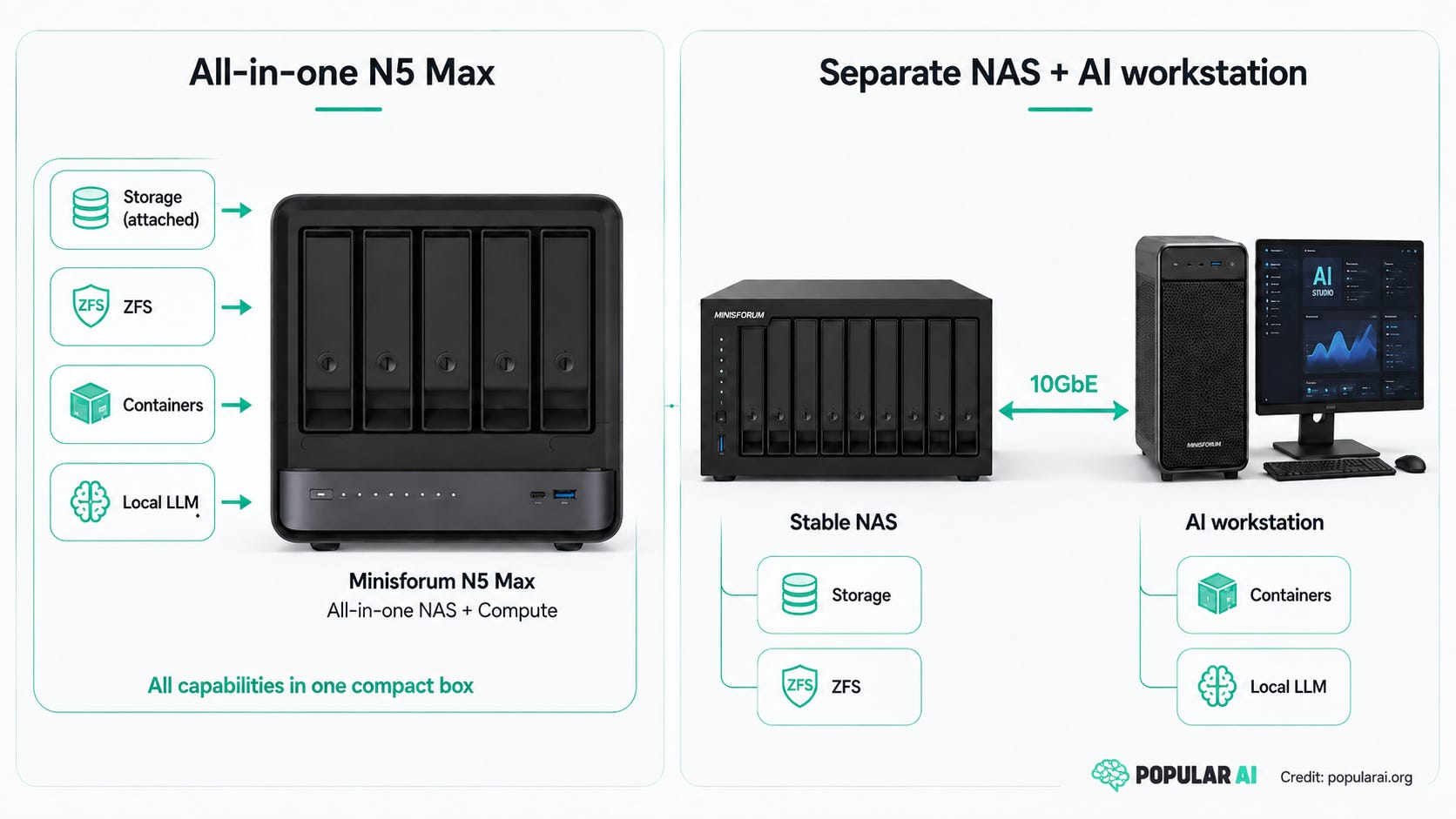
N5 Max is best when consolidation is the goal
Choose the N5 Max when you want one compact server that can stay online continuously, directly access a large private dataset, run VMs and containers, serve files over fast networking, and provide reasonably capable local inference.
RAG is an especially natural use case. Your source documents, embeddings, database, model, and application can all remain inside the same physical machine. That reduces the architectural distance between data and inference without sending private data to a cloud service.
The same applies to private media indexing, semantic search, local coding infrastructure, home automation, transcription queues, and other workloads where storage and AI interact constantly. Popular AI’s private family AI NAS build explores the same idea from the DIY side.
The N5 Max also makes sense where space matters enough to rule out a conventional GPU server and a separate multi-bay NAS. Its value increases when physical consolidation is itself a requirement rather than a nice-to-have.
Related:

Separate NAS plus Strix Halo is best when model capacity matters
A separate NAS and 128GB Strix Halo mini PC preserve most of the privacy benefits without tying storage availability to your AI environment.
The NAS can run conservative updates, ZFS, snapshots, replication, SMB, and UPS management. The Strix Halo machine can run whatever Linux kernel, ROCm version, container image, or experimental inference backend you feel like breaking that weekend.
The two boxes can communicate over 5GbE or 10GbE.
You pay with more hardware, more cabling, another power supply, and potentially a higher total purchase price. In return, you gain cleaner fault isolation and independent upgrade cycles. You can replace the AI worker without migrating your storage pool, and you can maintain the NAS without caring whether a new ROCm release wants a different kernel.
For many serious homelabs, that is a good trade.
Separate NAS plus NVIDIA is best when AI performance comes first
If your main workloads are ComfyUI, AI video, model training, CUDA-first repositories, or high-throughput inference, the N5 Max’s unified-memory capacity becomes less compelling.
A discrete Nvidia GPU gives up the elegance and memory capacity of Strix Halo but gains the CUDA ecosystem and much higher dedicated memory bandwidth. That matters when software support and throughput matter more than fitting the largest possible model into one shared pool.
A used RTX 3090 24GB GPU remains particularly interesting for this role because the article’s comparison is about a CUDA-capable card with 24GB of VRAM rather than a specific board partner model. Our dual RTX 3090 analysis covers the point where that approach becomes a much larger power and cooling project.

There is no reason the NAS has to participate in any of that. It can sit somewhere boring and keep serving files while the GPU machine is rebooted, rebuilt, or upgraded as often as your AI stack demands.
Related:

Reliability is a stronger separation argument than performance
It is tempting to argue that the N5 Max is a bad idea because AI steals resources from storage.
The available evidence does not support that conclusion. IT Pro specifically tested simultaneous storage and AI use and did not observe a storage-performance hit. The Ryzen AI Max+ 395 also has enough CPU resources that ordinary NAS workloads are unlikely to be its main bottleneck.
The better objection is operational.
AI software changes quickly. ROCm changes. llama.cpp changes. Quantization support changes. GPU drivers change. Containers get replaced. Models sometimes require different runtimes. Homelab users experiment because experimentation is part of the reason to own local AI hardware.
A good storage server should have almost the opposite personality. Once it works, you want to disturb it as little as practical.
That is the strongest reason to separate the machines. You are separating change rate, not merely CPU utilization. The benefit is less about benchmark isolation and more about keeping routine AI tinkering from becoming a storage maintenance event.
Backups still matter either way
Combining storage and AI does not make the N5 Max inherently unsafe for data. ZFS, snapshots, redundancy, and replication can make it a strong storage platform when configured and administered properly.
Snapshots and RAID still do not remove the need for another copy of important data.
A motherboard failure, electrical event, theft, fire, catastrophic administrator mistake, or compromised machine can still take the primary system offline. OpenZFS supports creating snapshot streams that can be sent to another system for replication, which gives you a clean path toward keeping another copy elsewhere.
That becomes especially important with an AI NAS because the machine is being asked to do more than store files. More software, more containers, more services, and more experimentation create more reasons the box may eventually need maintenance or a recovery window.
A UPS should also be treated as part of the system rather than an optional afterthought. TrueNAS supports automated UPS monitoring and shutdown, while MinisCloud’s own integrated UPS support is still listed as forthcoming. The architectural need for protected shutdown remains.
Who should buy the Minisforum N5 Max?
Buy it if you actively want an all-in-one homelab.
The ideal N5 Max owner is already comfortable with Linux, Docker, ZFS, containers, and probably Proxmox or TrueNAS. They want a compact server that can store a large private dataset and perform inference directly against it. They are willing to tune ROCm, compare Vulkan and HIP backends, and replace the factory NAS software if necessary.
It also makes sense where space and power constraints rule out a conventional GPU server plus a separate NAS. For that buyer, there is very little else packaged quite like the N5 Max. Five HDD bays, five NVMe positions, Ryzen AI Max+ 395, and fast networking in one enclosure create a genuinely distinctive homelab platform.
The key is to buy it for that identity. If you see the N5 Max as a systems project that can become an excellent private AI and storage server, its rough edges are manageable. If you see it as a finished appliance, the same rough edges become much harder to excuse.
Who should wait?
Wait if you want the concept without becoming an early software tester.
MinisCloud is still officially beta, several storage-adjacent features remain scheduled for later in Q3 2026, and the independent testing published so far suggests that replacing the factory OS is the more attractive route for demanding users.
The 128GB model is another reason to wait. At $3,599 it is expensive, but 128GB better exploits the reason to buy Strix Halo in the first place. As of this review, Minisforum still lists that configuration as out of stock.
Firmware and software updates could improve the N5 Max more meaningfully than another benchmark ever will. A more mature MinisCloud, complete UPS support, cleaner permissions, and a more comfortable memory configuration would change the buying proposition more than a few extra tokens per second.
Who should skip it?
Skip the N5 Max if your first priority is a storage appliance that other people expect to work without you.
Skip it if the NAS contains business-critical data and rebooting it because an inference backend needs another kernel sounds absurd.
Skip the 64GB version if the main attraction is running models that need dramatically more memory than ordinary consumer GPUs offer. The fixed memory capacity and BIOS GPU-allocation ceiling narrow the very advantage that makes Strix Halo special.
And skip Strix Halo entirely if your actual workload is primarily CUDA, ComfyUI, AI video, training, or high-concurrency model serving. Capacity is useful, but it does not replace the software ecosystem and memory bandwidth that best match the workload.
Minisforum N5 Max FAQ
Can the Minisforum N5 Max run TrueNAS?
Yes. IT Pro installed and tested TrueNAS on the N5 Max and reported strong storage performance. That is currently one of the most attractive paths for buyers who care more about mature NAS administration than MinisCloud’s integrated AI features. If you are buying the hardware for that kind of build, the 64GB N5 Max is also listed on Amazon.
Can the N5 Max run Proxmox and local AI?
Yes. Level1Techs documented a Proxmox VE setup with Docker, LXC GPU access, ROCm, llama.cpp, and Strix Halo-specific optimization. The guide also demonstrates why this is a power-user path rather than a plug-and-play NAS configuration.
Is 64GB enough for local LLMs?
It is enough for many useful models, including substantial 20B to 35B-class quantized models. The limitation appears when buyers expect 64GB of unified memory to behave like 64GB of freely available VRAM. The operating system, context, runtime, containers, storage services, and any VMs also need memory.
Is the N5 Max good for dense models?
It can run them, but current testing shows that dense models expose Strix Halo’s memory-bandwidth limitations more clearly than efficient mixture-of-experts models. Backend and quantization choices can also produce large performance differences, which is why benchmark results on this platform need more context than a single tokens-per-second figure.
Does putting AI and storage in one machine make your data less safe?
Not automatically. The N5 Max can run ZFS, snapshots, replication, and mature NAS software. The architectural concern is that AI experimentation and storage now share hardware, memory, updates, and reboots. Proper independent backups remain necessary whether AI runs on the NAS or somewhere else.
Minisforum N5 Max review verdict: buy the hardware, question the architecture
The Minisforum N5 Max is a fascinating homelab computer and a premature storage appliance.
▪ Buy the 64GB Minisforum N5 Max if you want one compact box for ZFS, containers, VMs, private document AI, RAG, media processing, and mid-sized local models, and you are comfortable administering the system yourself.
▪ Wait for the 128GB configuration if model capacity is the real attraction. The larger memory pool fits the Strix Halo value proposition better and reduces the conflict between GPU allocation and the memory needs of storage services, containers, and VMs.
For important household or business storage, the better long-term architecture is still a stable NAS plus a separate AI worker. Connect them over fast Ethernet and let each machine specialize. Your AI server can spend Saturday afternoon experimenting with a new ROCm build without taking the file server along for the ride.
That is the central lesson of the N5 Max. It proves that an AI server can also be a very capable NAS. It does not prove that those two jobs always belong in the same box. If you buy it, buy it because you want the consolidation and the systems project, not because the hardware makes the operational tradeoff disappear.
Explore more from Popular AI:
Start here | Local AI | Builds & gear | Autonomy & policy | Fixes & guides | Popular AI podcast
Would you trust the Minisforum N5 Max to run your local AI stack and hold your primary NAS data, or would you keep AI compute and storage separate?