


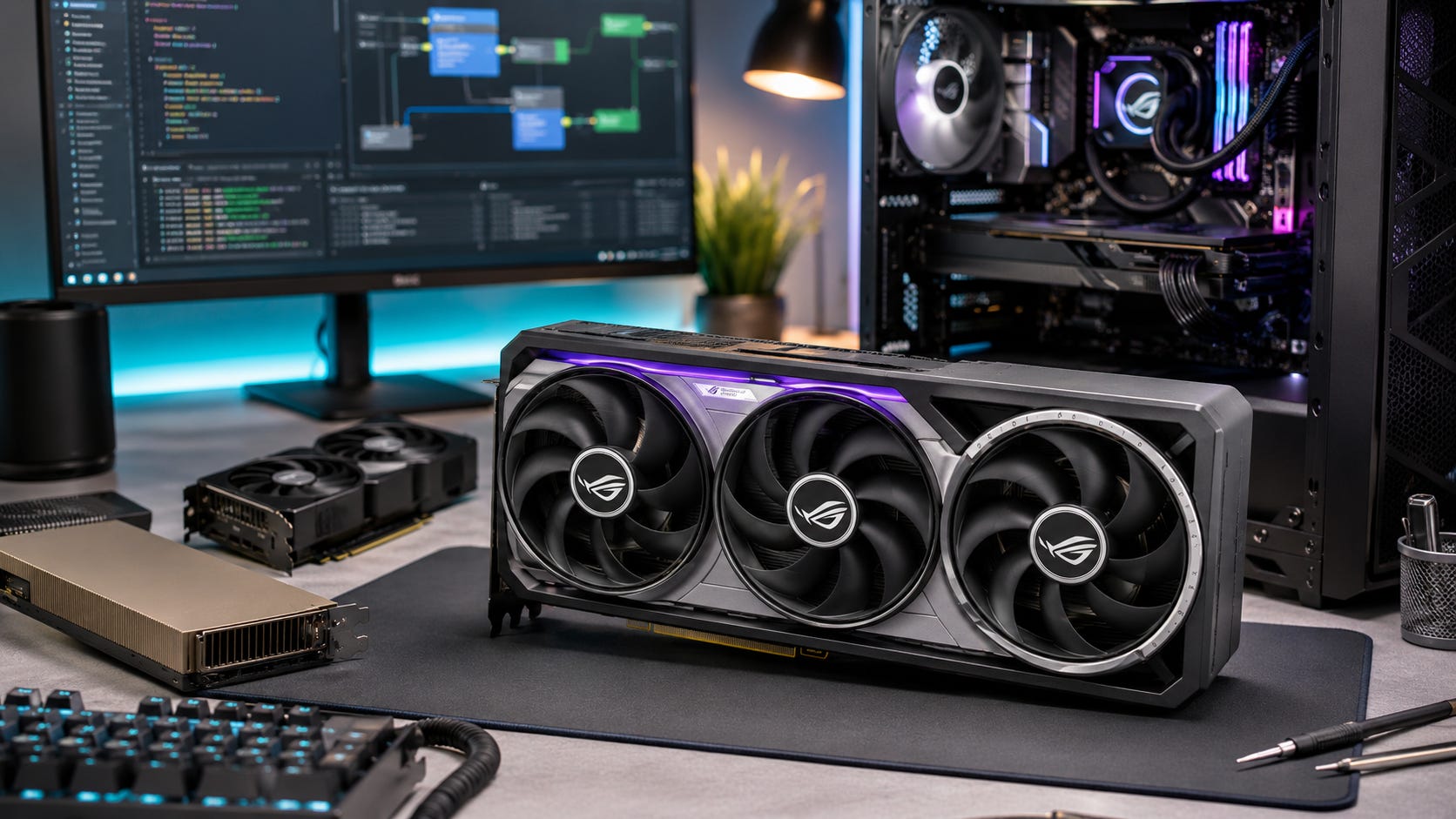
The RTX 5090 changes the local AI conversation because it makes memory bandwidth feel less like the first bottleneck. According to NVIDIA’s RTX 5090 specifications, the GeForce flagship gives local users 32GB of GDDR7, a 512-bit memory bus, PCIe Gen 5, fifth-generation Tensor Cores, and 1,792 GB/s of memory bandwidth.
That is a major step forward for local LLM inference, ComfyUI, AI video, small fine-tunes, coding assistants, and creator workflows that used to punish consumer GPUs for slow memory movement.
The catch is simple. The RTX 5090 is still a 32GB card.
For local AI, that number matters more than the AI TOPS figure on the box. Bandwidth decides how quickly the GPU can move model weights and cache data. VRAM decides whether the model can run at all without spilling into system RAM, splitting awkwardly across GPUs, or crashing before the first useful token appears.
That is the new shape of the high-end local AI market.
The RTX 5090 gives independent developers, creators, and power users much more speed inside the 32GB envelope. The RTX PRO 6000 Blackwell moves into a different class with 96GB of ECC GDDR7. The H100 remains datacenter hardware because it combines large HBM memory, higher bandwidth, NVLink, MIG, enterprise software, and server-class deployment behavior.
The mistake is treating these cards as if they sit on one simple speed ladder. They do not. They sit in different memory tiers.
The short answer
Buy or build around an RTX 5090 if you want the fastest practical consumer GPU for local AI workloads that fit inside 32GB of VRAM.
That makes it a strong card for fast 7B, 8B, 14B, 27B, 30B, and 32B local LLM inference, depending on quantization and context length. It is also a strong choice for high-throughput single-user coding assistants, local RAG with moderate context, ComfyUI, SDXL, FLUX-style image workflows, some local video workflows, and local testing before moving bigger jobs to workstation or cloud hardware.

It is a weaker fit if your main target is uncompressed 70B-class inference, large MoE models, heavy multi-user serving, serious training, or multi-GPU scaling where PCIe becomes the communication path. In those cases, the RTX PRO 6000 Blackwell, H100, H200, B200, or rented cloud GPUs make more sense.
The RTX 5090 is best understood as the new consumer king for local AI inside 32GB. Once your workload needs more memory than that, the buying decision changes fast.
RTX 5090 vs RTX PRO 6000 vs H100
Here is the practical comparison for local AI users.
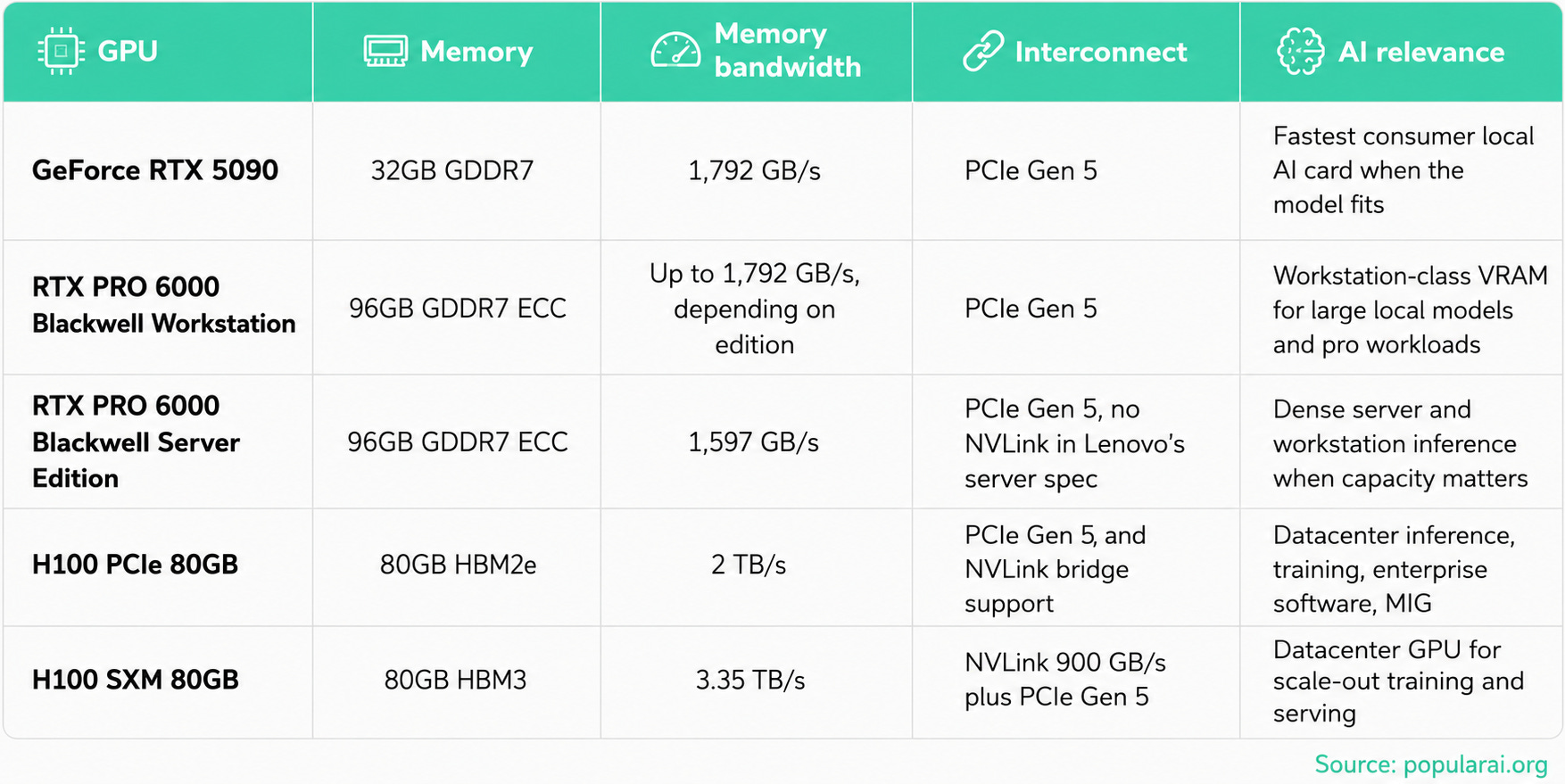
NVIDIA’s H100 product page lists the H100 SXM at 80GB of memory, 3.35 TB/s of memory bandwidth, and NVLink bandwidth up to 900 GB/s. Lenovo’s H100 PCIe Gen5 product guide lists the 80GB H100 PCIe adapter with HBM2e memory, 2 TB/s bandwidth, PCIe Gen 5 x16, NVLink bridge support, and up to seven MIG instances.
For the RTX PRO 6000 Blackwell Server Edition, NVIDIA lists 24,064 CUDA cores, 96GB of GDDR7, FP4 Tensor Core performance of 4 PFLOPS, FP8 Tensor Core performance of 2 PFLOPS, FP16/BF16 Tensor Core performance of 1 PFLOP, and 1,597 GB/s memory bandwidth on the official RTX PRO 6000 Blackwell Server Edition page. Lenovo’s RTX PRO 6000 Blackwell server guide also lists 96GB GDDR7 ECC, 24,064 CUDA cores, PCIe 5.0 x16, 600W power consumption, and no NVLink support.
That table tells the story. The RTX 5090 is a consumer Blackwell card with huge bandwidth for its class and a hard 32GB memory ceiling. The RTX PRO 6000 Blackwell is a larger memory tier with ECC, pro packaging, and a pro price. The H100 is a datacenter platform with HBM, NVLink, MIG, server validation, and deployment features that consumer cards do not try to replace.
Why memory bandwidth matters for local LLM inference
Autoregressive LLM inference has two very different phases.
The first phase is prefill. The model processes the prompt and builds the KV cache. Long prompts, RAG chunks, code repositories, documents, and chat history make prefill expensive.
The second phase is decode. The model generates one token at a time. For batch-1 local use, decode often spends much of its time moving model weights and cache data rather than doing pure arithmetic.
That is why bandwidth matters.
A GPU can have enormous theoretical compute and still feel underused if each token requires reading a large chunk of model data from VRAM. The RTX 5090’s 1,792 GB/s GDDR7 bandwidth is the most important improvement over the RTX 4090 for local LLM use because it helps the card feed the cores faster.
This is also why raw AI TOPS can mislead buyers. AI TOPS tells you something about peak low-precision math. It does not tell you whether your 70B model fits, whether the KV cache fits at 32K context, whether your inference runtime uses the newest Tensor Core formats, or whether your second GPU is stuck behind a weak PCIe slot.
For a local AI workstation, the priority order is clear. First, the card needs enough VRAM to fit the model, KV cache, and working memory. Then it needs enough memory bandwidth to generate tokens quickly. After that, software support, PCIe layout, cooling, and raw compute throughput decide how much performance you can actually unlock.
The RTX 5090 is excellent on bandwidth. It is strong on the software path when the stack supports Blackwell well. It is limited by capacity.
The 32GB VRAM ceiling is the real product boundary
NVIDIA gave consumer buyers a huge bandwidth jump with the RTX 5090, but the card stops at 32GB. The RTX PRO 6000 Blackwell jumps to 96GB. That gap is not a small upsell. It is a different class of local AI system.
A 32GB card can run many useful models. It cannot comfortably run every serious model.
The simplest way to think about model memory is weight size plus context plus runtime overhead. FP16 or BF16 needs about 2 bytes per parameter. FP8 needs about 1 byte per parameter. 4-bit quantization needs roughly 0.5 bytes per parameter before overhead. KV cache then grows with context length, layers, KV heads, head size, and precision. Temporary buffers, CUDA graphs, attention kernels, and runtime overhead also consume memory.
That means a model that looks as if it fits by weight size can still fail once context is included.
NVIDIA’s multi-GPU AI PC guide gives useful real-world tiers. It says a 30B-class 4-bit LLM needs at least 24GB of VRAM, a 70B-class model needs 40GB or more, and a 120B-class model needs roughly 70GB once context is included.
Those numbers match what local users feel. The RTX 5090 moves high-end consumer PCs from the 24GB era into the 32GB era. That opens more 30B and 32B workflows, gives smaller models more room for long context, and reduces the need for painful CPU offload.
It still does not make 70B a comfortable single-GPU target.
Practical model-size limits on RTX 5090
Here is the practical way to size local LLMs on a 32GB RTX 5090.
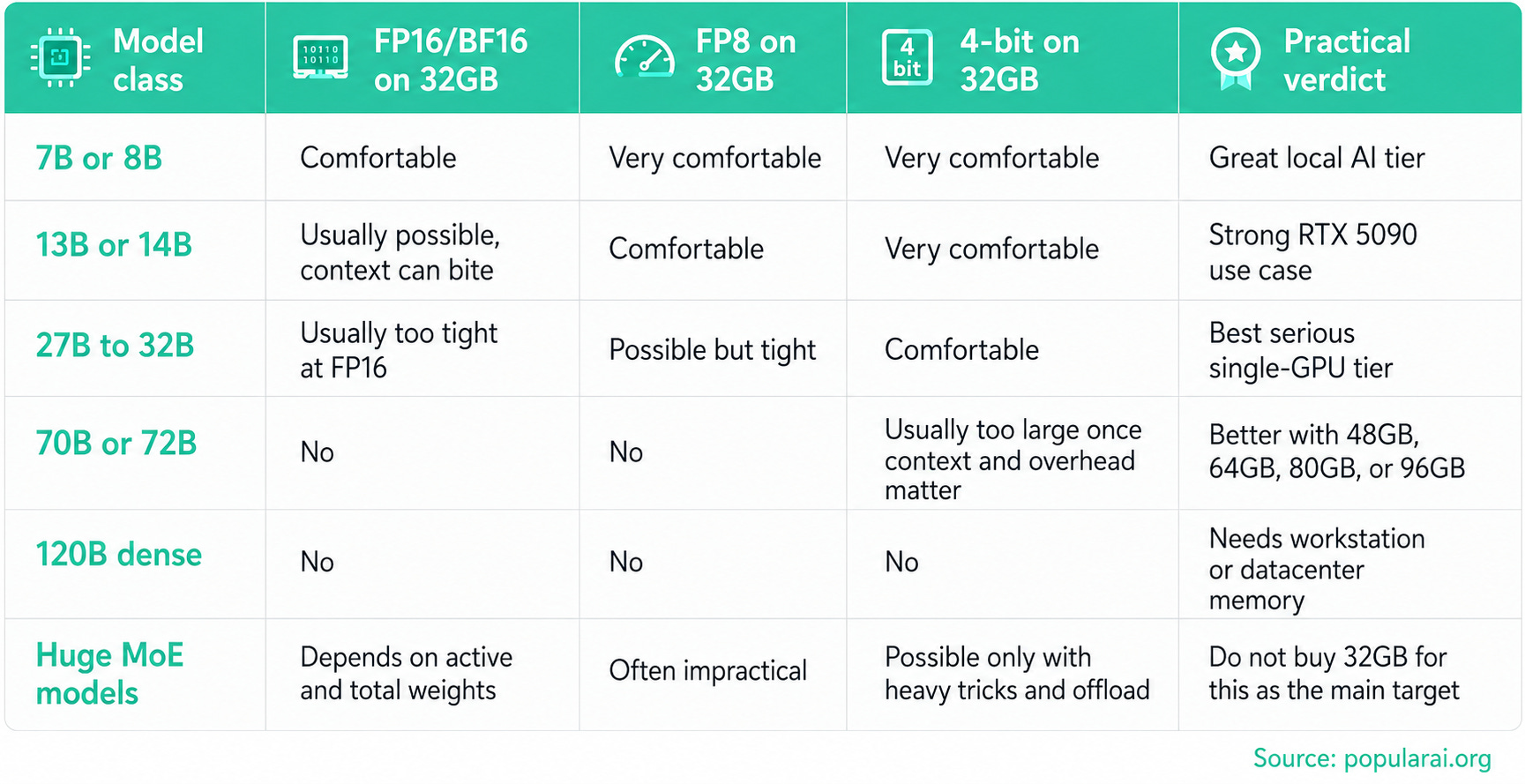
The sweet spot is obvious. The RTX 5090 is a monster for 8B through 32B-class local work. It is especially attractive for coding models, writing models, local assistants, document workflows, moderate RAG, and private automation where a smaller strong model beats a larger slow model.
It is the wrong card if the whole point of the build is running 70B models cleanly at large context.
A dual RTX 5090 build gives 64GB total VRAM, but that does not behave like one simple 64GB GPU. It depends on model splitting, runtime support, motherboard lane layout, PCIe bandwidth, and how often the GPUs need to communicate. For a deeper build comparison, our dual GPU local LLM build guide explains why slot spacing, airflow, power, and PCIe lanes matter as much as the cards themselves.
More on dual GPU AI hardware:

FP8 and FP4 help, but software decides the gain
Blackwell’s fifth-generation Tensor Cores matter because they improve the low-precision path. NVIDIA markets the RTX 50 series around fifth-generation Tensor Cores and FP4 support on its GeForce RTX 50 series page.
That is useful, but buyers should be careful.
Many local LLM users are not running pure FP4 or FP8 Tensor Core inference in the same way an NVIDIA demo or optimized enterprise stack does. A lot of local LLM work still runs through GGUF, EXL2, GPTQ, AWQ, bitsandbytes paths, llama.cpp, Ollama, LM Studio, vLLM, TensorRT-LLM, or custom kernels. Each stack has its own support curve.
The hardware may support a precision mode before your preferred local tool uses it well.
FP16 and BF16 are straightforward, but they are memory hungry. FP8 can make mid-size models more practical when the runtime supports it well. FP4 is promising for Blackwell, although it is different from the 4-bit quantized model files that many local users already run. GGUF Q4, Q5, and Q6 remain important because they are widely available and easy to run locally.
For RTX 5090 buyers, the best-case path should improve as Blackwell support matures. The practical warning is just as important. Do not assume every benchmark, model file, or local frontend will immediately hit the hardware’s fastest path.
Where RTX 5090 helps image and video AI
Local image generation cares about VRAM differently than LLMs.
The model weights matter, but so do resolution, batch size, ControlNet-style additions, LoRAs, upscalers, video frames, temporal modules, and the size of the ComfyUI graph. A workflow that fits at 1024px can fail at higher resolution. A video workflow can fail because it needs to hold too many frames or latents in memory at once.
The RTX 5090’s 32GB gives real breathing room compared with 16GB or 24GB cards.
That extra space helps with larger ComfyUI graphs, higher image resolutions, more LoRAs and conditioning modules loaded together, local video generation experiments, heavier upscaling, post-processing, and running image tools while other GPU tasks stay active.
For ComfyUI users, the RTX 5090 is a stronger premium consumer choice than the RTX 4090 because the extra 8GB matters. The RTX 4090 and used RTX 3090 remain relevant because price often matters more than theoretical performance. Popular AI’s RTX 3090 ComfyUI performance guide is still useful if you are comparing high-VRAM value instead of buying the current flagship.
The RTX 5090 is the cleaner premium card. The used RTX 3090 is still the budget VRAM card. The RTX PRO 6000 is the workstation memory card.
More on the RTX 3090 for local AI:

Why H100 still matters
The H100 is expensive because it solves problems the RTX 5090 does not try to solve.
The first difference is HBM. H100 SXM offers much higher memory bandwidth than the RTX 5090. NVIDIA lists H100 SXM memory bandwidth at 3.35 TB/s on its H100 specs page, while Lenovo lists H100 PCIe 80GB at 2 TB/s in its ThinkSystem H100 product guide.
The second difference is memory capacity. H100 PCIe and H100 SXM configurations commonly sit around 80GB, with H100 NVL variants oriented around larger LLM inference. That places H100 in a different model tier than a 32GB consumer card.
The third difference is interconnect. H100 platforms can use NVLink. Lenovo’s H100 PCIe guide lists NVLink support for the PCIe adapters and integrated NVLink for SXM boards. This matters for multi-GPU training and large inference workloads where GPUs must exchange activations, gradients, or tensor-parallel shards frequently.
The fourth difference is MIG. H100 can be split into multiple isolated GPU instances. That matters for cloud providers, labs, and enterprises serving multiple users or workloads. It is not a feature most home local AI users need.
The fifth difference is reliability and software packaging. ECC memory, server validation, enterprise support, and datacenter thermal design matter when the GPU is running production workloads around the clock. Those features are part of what H100 buyers are paying for.
That is why “RTX 5090 vs H100” is often the wrong framing. The RTX 5090 is the best consumer-owned local AI accelerator when the workload fits. The H100 is a datacenter accelerator for larger, shared, and more reliability-sensitive workloads.

RTX PRO 6000 Blackwell is the real upgrade path above RTX 5090
The RTX PRO 6000 Blackwell is the more direct answer to the question, “What if the RTX 5090 had enough memory?”
It keeps the NVIDIA Blackwell software and CUDA ecosystem, but raises the memory ceiling to 96GB GDDR7 ECC. NVIDIA’s RTX PRO 6000 Blackwell family page positions the series for AI, scientific computing, rendering, 3D graphics, and video workloads.
For local AI, 96GB changes the decision.
With 96GB, you can target 70B-class models with more comfortable context, 32B-class models at higher precision, bigger multimodal models, larger ComfyUI and video workflows, local serving with more headroom, and fine-tuning workflows that choke on 32GB. You also get more room to run multiple GPU-heavy applications without constantly unloading models.
The RTX PRO 6000 does not automatically beat H100 in datacenter serving. H100 still has HBM bandwidth and NVLink advantages. For a workstation owner who wants one GPU with a large local memory pool, though, the RTX PRO 6000 Blackwell is the cleanest NVIDIA answer below datacenter hardware.
The cost, however, is brutal. Tom’s Hardware reported on June 13, 2026 that RTX PRO 6000 Blackwell pricing had climbed sharply, with NVIDIA marketplace pricing listed at $13,250 and major retailers varying around that level in its RTX PRO 6000 Blackwell pricing report.
That makes it a business purchase for most people, not an enthusiast splurge.

Where PCIe Gen 5 helps local AI
PCIe Gen 5 matters, but not in the way many buyers expect.
Once a model is loaded into VRAM and running on one GPU, PCIe bandwidth is often not the main bottleneck. The GPU is mostly working inside its own memory system. A single RTX 5090 does not become twice as fast simply because it sits in a PCIe Gen 5 slot instead of a strong PCIe Gen 4 slot.
PCIe Gen 5 helps when data has to move across the bus. That includes model loading from system memory or storage into VRAM, CPU offload, multi-GPU model splitting, GPU-to-GPU communication through PCIe, large RAG pipelines moving embeddings or cache data, multi-GPU prefill and decode experiments, and workstations with heavy NVMe, capture, and GPU traffic happening at the same time.
NVIDIA’s multi-GPU AI PC guide recommends x8/x8 PCIe Gen 5 as a good dual-GPU target and x16/x16 PCIe Gen 5 as the best option. The same guide warns that consumer boards can hide lane-sharing problems where M.2 drives reduce GPU slot bandwidth.
That is the practical point. PCIe Gen 5 helps multi-GPU local AI builds avoid obvious bottlenecks. It does not make two RTX 5090s behave like an H100 NVLink system.
Where PCIe Gen 5 can disappoint
PCIe Gen 5 can also mislead buyers.
The danger is building a dual RTX 5090 machine and assuming 64GB total VRAM solves large-model inference cleanly. It may work for some models and runtimes. It may disappoint if the model needs frequent cross-GPU communication.
A 70B model split across two RTX 5090s can be useful for private experimentation. It is still different from a single 80GB H100 or 96GB RTX PRO 6000. Every split adds scheduling, communication, and software complexity.
The motherboard matters more than the marketing page. Many consumer boards give you one true x16 slot and a second slot wired through the chipset at x4 or worse. That can be fine for a capture card. It is a poor match for two flagship GPUs moving AI workloads.
Cooling also becomes a serious constraint. Two RTX 5090 cards can overwhelm a normal case, PSU, and room. NVIDIA’s own multi-GPU guide suggests 1600W to 1800W-class power supplies depending on the build tier. That is before noise, heat, connector clearance, and card spacing enter the picture.
For readers weighing dual RTX 5090s against used multi-GPU setups, Popular AI’s guide to 4x and 8x RTX 3090 local AI servers is a useful comparison. More GPUs can give more total VRAM, but the build complexity rises fast.
More on multi-GPU local AI machines:

The buying decision
Choose the RTX 5090 if you want the best consumer GPU for local AI and your target workloads fit inside 32GB.
This is the right choice for one-person local AI workstations, fast coding agents, private document tools, ComfyUI, local image workflows, smaller model serving, and serious experimentation. It gives you owned compute, CUDA support, high memory bandwidth, and a real jump over 24GB consumer cards.
Choose the RTX PRO 6000 Blackwell if you need one local workstation GPU with a large memory pool.
This is the right choice when 32GB is the problem and 96GB solves it. It is especially relevant for 70B-class models, heavier multimodal work, AI video, professional graphics plus AI, and workstation deployments where ECC matters.
Choose H100 if you need datacenter behavior.
This is the right choice for high-concurrency serving, training, multi-GPU scaling, MIG, NVLink-heavy workloads, enterprise support, and infrastructure where downtime costs more than the GPU.
Skip all three if you are just starting local AI and do not know your workload yet.
A used RTX 3090, RTX 4090, RTX 5060 Ti 16GB, or cheaper 24GB card may teach you more per dollar. Ours budget local LLM PC guide remains a better starting point if the goal is learning rather than buying the fastest consumer card on day one.
More on building a local AI PC on a budget:

The real lesson
The RTX 5090 moves local AI forward because it gives consumer users a bandwidth tier that used to feel far away. For models that fit, that matters. Tokens generate faster. Image workflows breathe better. FP8 and future Blackwell-optimized paths become more practical. High-end local AI feels less compromised.
The 32GB ceiling is still the control point.
NVIDIA has made the consumer card much faster while keeping the large-memory tier in professional and datacenter products. That creates a clear buying boundary.
Disclosure: This post includes Amazon affiliate links. If you buy through them, Popular AI may earn a small commission at no extra cost to you.
Conclusion
The RTX 5090 is for fast local work inside the 32GB range. The RTX PRO 6000 Blackwell is for large local work inside 96GB. The H100 is for datacenter work where memory, bandwidth, interconnect, reliability, and serving features matter together.
That is the decision readers should make before spending thousands of dollars. Do not buy a GPU because its AI TOPS number looks huge. Buy the memory tier your workload actually needs, then care about bandwidth, then care about the software path.
If your models fit, the RTX 5090 is the new consumer king for local AI.
If they do not fit, the RTX 5090 is a very fast way to hit the same wall.
Explore more from Popular AI:
Start here | Local AI | Fixes & guides | Builds & gear | Popular AI podcast
What matters more for your local AI setup right now: faster RTX 5090-class performance, or enough VRAM to run bigger local LLMs without compromises?