


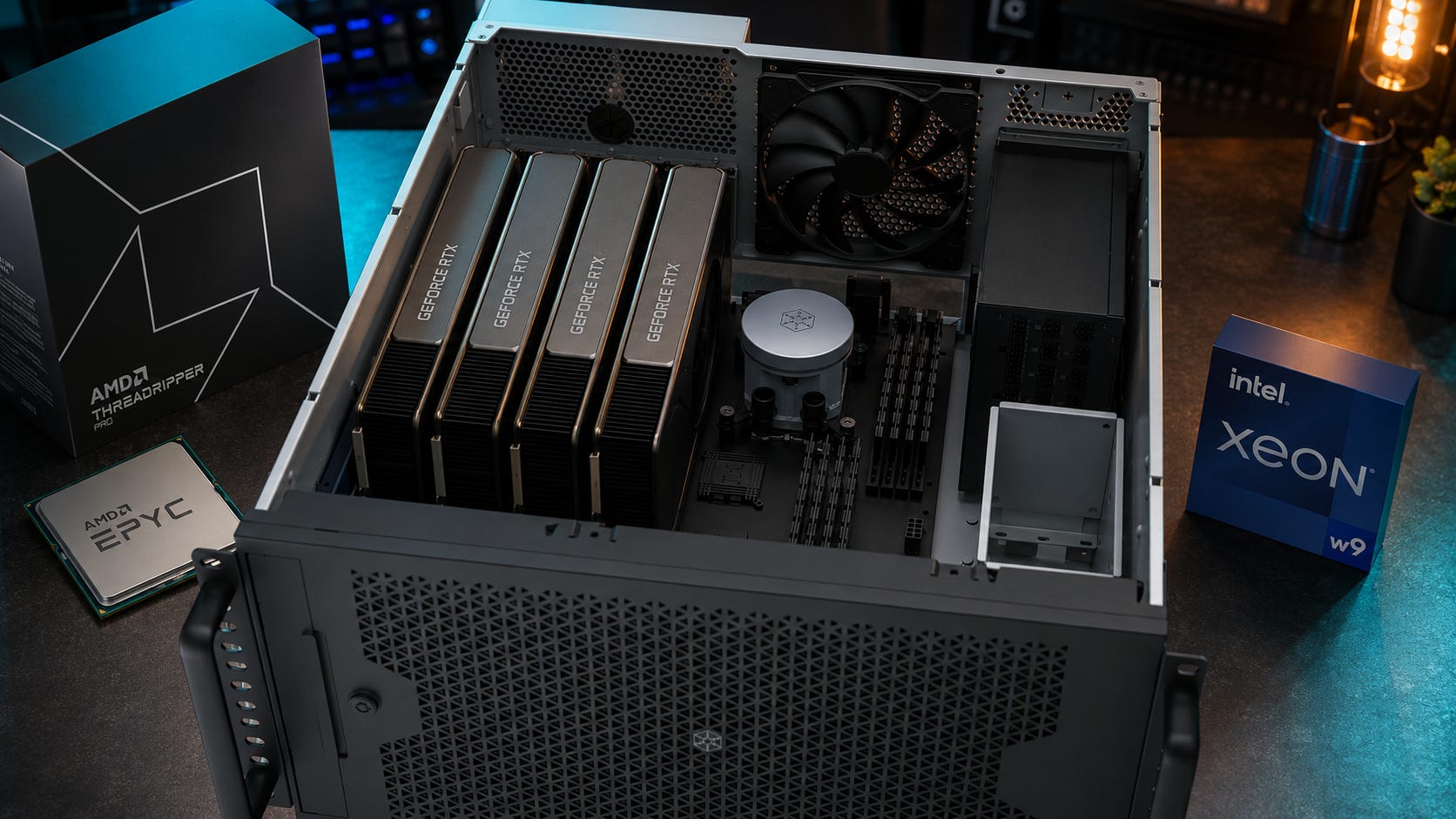
A 4x RTX 3090 server can still be worth building for local AI in 2026, but only for the right buyer. Four cards give you 96GB of total GPU memory, mature CUDA support, and enough headroom for serious local LLM, ComfyUI, image generation, and batch inference work.
The hard part is everything around the GPUs. A multi-GPU local AI server lives or dies by the platform, PCIe layout, power delivery, chassis, cooling, noise, used-card condition, and software stack. The cards are only the beginning.
An 8x RTX 3090 server belongs in another category. That is a loud, hot, power-hungry server project that should be compared against used enterprise GPUs, cloud rental, or two smaller nodes before anyone starts buying parts.
The Reddit thread that kicked off this question asks about starting with 4x RTX 3090s, later scaling to 8x, and using the box for coding agents, open-source coding models, ComfyUI, Stable Diffusion, video models, and multi-GPU inference. The poster’s concerns are exactly the right ones: PCIe bandwidth, power, cooling, NVLink, and framework support.
More on the RTX 3090 for local AI builds:

Disclosure: This post includes Amazon affiliate links. If you buy through them, Popular AI may earn a small commission at no extra cost to you.
Update, July 21, 2026: This guide has been revised to clarify GPU size and chassis compatibility. The SilverStone RM44, RM52, and RM53-502 recommendations apply only to verified dual-slot or compatible water-blocked RTX 3090 configurations. We also added guidance for thicker cards that require remote mounting, an open frame, or separate GPU nodes. These corrections do not change the article’s overall buying conclusion.
Quick verdict
Best answer for most serious local AI users: Build 2x RTX 3090 first. It is far easier to cool, power, debug, and actually use.
Best 4x option: Choose the exact GPU form factor before choosing the motherboard or chassis. An eight-slot chassis can directly accommodate four cards only when each card occupies no more than two rear expansion slots. Use verified dual-slot blower cards, custom-water-blocked cards with suitable brackets, or remote-mount thicker cards with full-length PCIe risers. Four RTX 3090s can still be rational if you need 96GB aggregate VRAM, but four ordinary 2.7-slot or 3-slot gaming cards will not fit directly into an eight-slot case.
Best 8x answer: Skip it unless you already understand server chassis, risers, 240V power, Linux, remote management, and multi-GPU inference stacks. Eight RTX 3090s mean 192GB aggregate VRAM, but the surrounding build is the real product.
Best platform for 4x: Used AMD EPYC 7003 if value matters, Threadripper Pro WRX90 if you want a workstation experience, and modern EPYC 9004 or 9005 if you are building a real server from scratch.
Best platform for 8x: A real GPU server platform, not a normal workstation board. Think EPYC or Xeon server chassis with risers, high-airflow fans, redundant power, and a plan for noise.
Skip the build if: You expect the GPUs to behave like one giant 96GB or 192GB card, need quiet office use, want plug-and-play Windows workflows, or plan to run it on a normal household circuit.
⚠ GPU fit warning: Count occupied expansion slots, not merely PCIe connectors on the motherboard. Four dual-slot cards require eight rear slots. Four 2.5-slot cards require roughly ten slots. Four 3-slot cards require twelve slots. Card length, height, power-connector clearance, cooler design, and airflow still need to be checked separately.
Who should build a multi-GPU RTX 3090 server?
This guide is for local AI users who are past the single-GPU stage and are considering a serious multi-GPU server. A 4x RTX 3090 box can make sense when you already know why 24GB or 48GB of VRAM is too tight for your workflow.
The strongest use cases are local LLM inference with larger quantized models, coding agents that need private repo access, ComfyUI image workflows with large graphs, batch image generation, some LoRA training and fine-tuning, and local serving stacks such as llama.cpp, vLLM, TabbyAPI, or ExLlamaV2. It can also make sense when you want several smaller models or workers running at the same time.
It is a poor fit for casual Ollama use, quiet desktop inference, basic Stable Diffusion, or a first local AI PC. Start with a single used RTX 3090 local LLM PC, then look at dual GPU local AI builds before jumping into 4x or 8x territory.
The biggest mistake is treating a multi-GPU box like a normal desktop with more cards. A serious 4x RTX 3090 local AI server is closer to a home-lab appliance. You will manage drivers, CUDA versions, model placement, remote access, power limits, temperatures, logs, and failed jobs. That can be worth it, but only when the workload justifies the hassle.
Why the RTX 3090 is still tempting
The RTX 3090 is old, inefficient by current standards, and awkward to cool in dense builds. But it remains tempting for one reason: 24GB of VRAM on a CUDA card.
NVIDIA’s official RTX 3090 specs list 10,496 CUDA cores, 24GB of GDDR6X memory, a 384-bit memory interface, and third-generation Tensor Cores. Gigabyte’s RTX 3090 Gaming OC spec page lists 936GB/s memory bandwidth, PCIe 4.0 x16, 24GB GDDR6X, a 55mm card thickness, a 750W recommended PSU for a single-card system, and 2-way NVLink support.
That makes the basic VRAM math attractive. One RTX 3090 gives you 24GB. Two cards give you 48GB aggregate VRAM. Four cards give you 96GB aggregate VRAM. Eight cards give you 192GB aggregate VRAM.

The catch is that aggregate VRAM does not behave like one transparent memory pool. Multi-GPU inference can split model weights across cards, but the software stack and interconnect decide whether the result is pleasant or painful.
The llama.cpp multi-GPU guide says multi-GPU can help when a model does not fit in one GPU’s VRAM or when distributing compute improves throughput, while warning that performance depends on split mode and interconnect speed. The vLLM parallelism and scaling documentation recommends single-GPU inference when the model fits on one GPU, then tensor parallelism when the model is too large for one GPU but still fits inside one multi-GPU node.
That is the decision in practical terms. Buy multiple RTX 3090s when you need to fit or serve workloads that one 24GB card cannot handle. Do not buy them expecting perfect linear scaling.
Is 4x RTX 3090 still worth it?
Yes, but only under specific conditions.
A 4x RTX 3090 server gives you enough aggregate VRAM to experiment with larger local models, run multiple inference workers, and keep heavy image workflows local. It can be a good private AI server if you buy the cards well, power-limit them, and build around airflow rather than desktop looks.
The 4x build is most defensible when you can buy tested RTX 3090 24GB cards at a good used price, you are comfortable running Linux, you need more than 48GB aggregate VRAM, and you will use the box often enough to justify the power and noise. It also makes more sense if the server can live away from your desk and if you care about keeping private code, documents, prompts, and image workflows off hosted accounts.
The 4x build gets weaker when you only need one model loaded for personal chat, expect frontier-model quality from local coding agents, need quiet office use, or want easy Windows desktop behavior. It also stops looking smart when used RTX 3090 cards are priced close to newer flagship GPUs.
Used RTX 3090 pricing is the swing factor. As of June 6, 2026, BestValueGPU’s EU tracker listed used RTX 3090 pricing around €842.72 on eBay and a much higher current Amazon price, which shows the used-market gap and the danger of overpaying. Recent LocalLLaMA users are still debating RTX 3090 prices around $850 local deals and much higher eBay listings.
A practical U.S. rule: a clean, tested RTX 3090 around $800 to $900 can still be interesting. At $1,100 or above, the argument weakens unless it is a known-good blower, water-cooled card, or warranty-backed unit that solves a specific build problem.
Is 8x RTX 3090 still worth it?
Usually, no.
An 8x RTX 3090 server gives you 192GB aggregate VRAM, which sounds fantastic until the rest of the machine appears. Eight reference-class 350W RTX 3090s mean up to 2,800W for GPUs alone before the CPU, motherboard, RAM, storage, fans, networking, and PSU demands even enter the picture. That is a server-room power problem.
Using the EIA’s March 2026 all-sector U.S. electricity average of 14.18 cents per kWh as a rough national reference, a system that averages 2kW under sustained load costs about $204 per 30-day month if it runs 24/7. At 3kW, that rises to about $306 before cooling overhead.
The bigger problems are physical and operational. Eight consumer cards need serious airflow. Most RTX 3090 models are too thick for dense slots. Consumer open-air coolers recycle each other’s heat in server chassis. Risers add failure points. NVLink will not turn eight cards into one memory pool. Used cards may already have years of thermal stress. Multi-GPU scaling depends heavily on model size, backend, batch size, split strategy, PCIe layout, and interconnect.
The machine will also be loud. A normal 120V household circuit is the wrong assumption for a fully loaded 8x build. If you are thinking about 8x RTX 3090, you should also be thinking about a 240V PDU, a real rack or open-frame plan, and a room where fan noise is acceptable.

At that point, compare the project against alternatives. NVIDIA’s RTX PRO 6000 Blackwell Workstation Edition has 96GB of GDDR7 ECC memory, 1,792GB/s bandwidth, and a 600W max power rating in a dual-slot professional card. A card like RTX PRO 6000 Blackwell will not be cheap, but it shows why the 8x RTX 3090 idea gets dangerous. Once chassis, power, cooling, risers, replacement cards, and setup time are included, cheap VRAM can stop being cheap.

The 8x RTX 3090 build makes sense only when the build itself is part of the project, you have the power and space, and you are deliberately choosing used consumer GPUs over enterprise hardware.
Platform choice: Threadripper, EPYC, or Xeon?
For a 4x or 8x RTX 3090 server, the CPU matters less than the platform. You are buying PCIe lanes, slot layout, memory capacity, stability, remote management, and a chassis path that will keep the GPUs alive.
A fast desktop CPU with a gaming motherboard can run local AI well with one GPU, and sometimes two. Four GPUs changes the conversation. Eight GPUs ends the workstation fantasy unless the board, chassis, risers, power, and cooling were designed for that density.
AMD EPYC is the best value for server-style builds
AMD EPYC is the most practical answer if this machine is a server rather than a desk workstation.
Used EPYC 7003 platforms are especially attractive because they offer lots of PCIe lanes, ECC memory, and server boards at prices that can make sense for home labs. Supermicro’s H12SSL-i supports a single AMD EPYC 7003 or 7002 CPU, up to 2TB registered ECC DDR4, and has five PCIe 4.0 x16 slots plus two PCIe 4.0 x8 slots. A Supermicro H12SSL-i is not automatically a perfect 4x RTX 3090 board because physical GPU thickness still matters, but it shows why EPYC is attractive. The platform has the lanes and server features.

Modern EPYC 9004 and 9005 platforms push the server route further. Supermicro lists EPYC 9005 processors with up to 160 PCIe Gen 5 lanes and 12 DDR5 channels, while EPYC 9004 models list 128 PCIe Gen 5 lanes and 12 DDR5 channels. That is the kind of platform to consider when 8 GPUs are a serious plan.

Use EPYC if you want a headless Linux server, care about PCIe lanes, need ECC RAM, want IPMI, and can tolerate server noise and setup friction.
Threadripper Pro is the clean workstation path
Threadripper Pro is the better fit if the machine needs to behave like a powerful workstation rather than a rack server.
AMD’s Threadripper Pro 7995WX page lists PCIe 5.0 support, 148 native PCIe lanes with 128 usable PCIe 5.0 lanes, 8 memory channels, and DDR5 RDIMM support up to 5200 MT/s. AMD’s workstation platform guidance also distinguishes TRX50 with up to 80 PCIe lanes and 4-channel memory from WRX90 with 8-channel memory and enterprise-class expandability.

For a 4x RTX 3090 workstation, WRX90 is the cleaner Threadripper Pro choice. TRX50 can be excellent for one or two GPUs, but four or more GPUs push you into lane and slot-layout compromises.

Use Threadripper Pro if you want a high-end workstation, strong single-thread performance, modern platform support, and less server friction than EPYC.
Intel Xeon W can work, but compare it hard
Xeon W is a legitimate workstation platform, especially if you are buying a prebuilt system or working inside a vendor-certified environment. Xeon W-3400 and W-2400 systems can offer workstation-class memory and PCIe expansion.

The problem is value and ecosystem. For this specific multi-RTX-3090 build, AMD EPYC and Threadripper Pro usually offer a cleaner path. Xeon W makes more sense if you already have Intel workstation parts, need a certified vendor workstation, or are buying a complete system with known thermals and support.
Start with the motherboard and chassis, not the CPU
Do not buy the CPU first. Start with the GPU layout.
For 4x RTX 3090, the motherboard and chassis need to answer basic physical questions before the spec sheet matters. Can four cards physically fit? Are the cards open-air, blower, or water-cooled? Do the slots provide useful PCIe bandwidth? Will the cards pull fresh air, or will they recycle each other’s exhaust? Is there clearance for power connectors? Can the motherboard boot headless? Does it have IPMI or another remote-management path? Does the chassis actually support the motherboard and GPU layout?
Make a compatibility sheet before buying anything. Record the exact model number, cooler thickness, occupied slot count, card length, card height, power-connector location, and cooling design of every GPU. Then compare those measurements with the motherboard slot pitch and the chassis rear openings.
⚠ Four physical PCIe x16 connectors do not prove that four graphics cards will fit.
For 8x RTX 3090, a normal tower is the wrong mental model. Use at least a 4U GPU server chassis, riser backplane, or open-frame lab setup with a real airflow plan. If the build has to live near humans, do not build 8x.
Chassis options for four dual-slot or water-blocked RTX 3090s
The three chassis below have eight rear PCIe expansion slots. That is enough for four dual-slot cards. It is not enough for four ordinary 2.5-slot or 3-slot RTX 3090s mounted directly to the motherboard. Treat these as chassis recommendations for verified dual-slot blower cards or custom-water-blocked cards, not universal recommendations for any RTX 3090 model.
1. Best custom-loop option: SilverStone RM52 5U rackmount chassis

The SilverStone RM52 is the strongest option here for a custom-water-cooled four-GPU build. SilverStone lists SSI-EEB motherboard support, dual 360mm radiator compatibility, and eight rear PCIe expansion slots. Those eight slots can accommodate four dual-slot cards. They cannot directly accommodate four stock 2.7-slot or 3-slot RTX 3090s. Check radiator thickness, GPU length, tubing routes, pump placement, and power-supply clearance before buying.
2. Best dual-PSU option for dual-slot cards: SilverStone RM53-502

The RM53-502 is the more specialized option if dual-power-supply support and additional GPU airflow provisions matter. It still exposes only eight rear expansion slots, so the same physical rule applies: four cards must each fit within a two-slot allocation. SilverStone’s product material lists SSI-EEB support, 8 PCI expansion slots, 360mm radiator support, dual PSU support, and additional cooling support for graphics cards. Do not buy it for four stock Gaming OC, Gaming X Trio, Founders Edition, or similarly thick cards unless the GPUs will be remotely mounted or converted to compatible water blocks.
3. Best lower-cost option for four dual-slot cards: SilverStone RM44

The RM44 is the lower-cost option if you have four verified dual-slot cards. SilverStone explicitly describes it as supporting up to four dual-slot graphics cards across its eight rear expansion slots. That does not include four ordinary thick open-air RTX 3090s. Use this chassis with dual-slot blower models, compatible custom water blocks, or fewer GPUs. Do not infer compatibility from card length alone.
What if your RTX 3090s are thicker than two slots?
Do not buy an eight-slot chassis expecting four 2.5-slot or 3-slot cards to fit directly. Use one of these layouts instead:
An open-frame build that mounts the GPUs separately and connects them through full-length PCIe riser cables.
A specialized PCIe expansion chassis designed for four triple-width cards.
Two separate 2x GPU nodes.
The open-frame route is usually the least expensive, but it requires secure GPU mounting, directed airflow, short and reliable riser connections, dust management, and careful cable routing. Two 2x nodes are usually easier to power, cool, troubleshoot, and maintain.
Specialized products also exist. For example, Netstor describes its NA265A-G4 as supporting four triple-width PCIe 4.0 x16 cards. That is an enterprise expansion chassis, not an ordinary PC case, and it should be treated as an example of the required product class rather than a casual buying recommendation.
⚠ Avoid treating USB-style x1 mining risers as equivalent to an x8 or x16 GPU connection. They may be acceptable for workloads that barely use the PCIe link, but they are not the default recommendation for a multi-GPU AI server.
Risers deserve extra caution. A flaky GPU link can ruin an inference or training job after hours of work. Use short, shielded, full-length PCIe 4.0 x16 riser cables from an established manufacturer, and connect them only to motherboard slots intended for the required x8 or x16 GPU link.
The Thermaltake TT Premium PCIe 4.0 300mm riser is one reasonable single-card example. It is not proof that a complete four-GPU arrangement will work. Measure the required cable path, secure each GPU independently, and test every card and riser under sustained load before trusting the server.

Cooling is the part people underestimate
RTX 3090 cards were not designed for quiet, dense 8-GPU inference boxes.
Many consumer RTX 3090s are thick open-air cards. The Gigabyte RTX 3090 Gaming OC is listed at 320 x 129 x 55mm. The MSI RTX 3090 Gaming X Trio is listed at 323 x 140 x 56mm with 370W board power. That is roughly a triple-slot problem before airflow is considered.
Neither model can be installed four-across directly in the RM44, RM52, or RM53-502 because those cases provide only eight rear expansion slots. Four cards of this thickness need roughly twelve slot positions, plus enough space for airflow.
For 4x, choose one of three physical layouts. Use verified dual-slot blower RTX 3090s in an eight-slot server chassis. Convert compatible cards to full-cover RTX 3090 water blocks with appropriate single-slot or dual-slot brackets. Or remote-mount thick cards in an open-air four-GPU frame using properly tested PCIe risers.
“Water-cooled” is not specific enough. A factory AIO card may still use a thick rear bracket and creates additional radiator and hose-placement problems. Full-cover blocks must match the exact card PCB, and rear-memory cooling still needs attention.
For 8x, random triple-slot open-air cards are a maintenance trap. They can work in an open-frame lab rig if you accept noise, dust, cable clutter, and hands-on maintenance. They are the wrong choice for a tidy office workstation.
NVLink is useful in narrow cases
RTX 3090 is one of the rare consumer GeForce cards with NVLink support. Some board-partner specs list 2-way NVLink support, including the Gigabyte RTX 3090 Gaming OC.
That does not make 4x or 8x RTX 3090 behave like one big GPU. NVLink bridges can help certain workloads and card pairs, but modern local LLM workflows more often rely on tensor parallelism, layer splitting, or multiple workers. vLLM and llama.cpp can use multiple GPUs without NVLink, but performance depends on the workload and communication pattern.

Treat NVLink as a bonus for specific two-card cases. Do not make it the foundation of the build.
RAM and storage recommendations
For a 4x RTX 3090 local AI server, start with 256GB ECC RAM if the budget allows. You can run with less, but a serious local AI server tends to collect model files, containers, vector databases, datasets, temporary outputs, and CPU-side services over time.

For 8x, 512GB ECC RAM should be the practical starting point, with 1TB or more making sense for heavier experiments.

System RAM does not replace VRAM. It helps when loading, serving, caching, preprocessing, and avoiding system-level choking. Once a model spills from GPU memory into system RAM, performance can collapse. Popular AI’s guide to why Ollama and llama.cpp crawl when models spill into RAM explains that failure mode in more detail.
Storage should be boring and generous. A 2TB NVMe drive is the minimum for a 4x experimentation box, while a 4TB NVMe SSD is much more comfortable. Go to 8TB NVMe storage or more if you store many models, datasets, generated images, video outputs, and checkpoints. Add separate backup storage if the server holds work you cannot recreate.

Power and noise are build-defining constraints
For 4x RTX 3090, assume the GPUs alone can demand around 1,400W at stock. For 8x, assume around 2,800W for GPUs alone.
That does not mean the machine will constantly sit at maximum draw. It means the build must be safe when it does.
Power-limit the 3090s. For inference-focused use, 250W to 300W per card can be a good target. Use high-quality 1600W power supplies, server power supplies, or a carefully planned multi-PSU arrangement with enough headroom. Avoid cheap adapters. Plan cable routing before buying parts. Measure wall power after the build is running.
For a more conventional 1600W ATX build, the safest reader-facing option is the be quiet! Dark Power Pro 13 1600W.

For open-frame lab builds or server chassis work, a used HPE 1600W Flex Slot PSU can be cheap power, but it is not a normal desktop PSU and generally requires 200 to 240V input plus the right breakout hardware.

Power limiting is one reason RTX 3090 servers still survive in local AI communities. You give up some peak speed, but you reduce heat, noise, and electrical stress. A stable, slightly slower server is more useful than a fast one that throttles, crashes, or trips a breaker.
Noise matters too. A real GPU server chassis can sound like network closet hardware. That may be fine in a basement, garage, lab, or rack room. It is miserable next to a desk. If silence is a requirement, build a smaller dual-GPU workstation or use fewer higher-VRAM cards.
Best 4x RTX 3090 build direction
A sensible 4x build starts with either a used EPYC 7003 server board or a Threadripper Pro WRX90 workstation platform. The goal is 96GB aggregate VRAM without turning the system into a fragile science project.
For GPUs, choose the physical layout before buying the cards. The cleanest direct-mount option is four verified dual-slot blower RTX 3090s. A custom-loop build can use compatible RTX 3090 full-cover water blocks. Thick open-air cards require an open frame and full-length risers, or they should be divided between two nodes. Test each card alone before installing the complete set.
For memory, target 256GB ECC RAM, with 512GB if you run many services, larger datasets, or CPU-side workloads. For storage, use a 4TB NVMe SSD for models and active work, plus backup storage.
For software, use Linux. llama.cpp is useful for flexible local inference. vLLM is strong for serving and tensor parallelism. TabbyAPI or ExLlamaV2 can be excellent for fast quantized model serving where appropriate. ComfyUI remains the image workflow hub for many local AI users.
For chassis, use an eight-slot RM44, RM52, or RM53-502 only with four verified dual-slot cards. Use a four-GPU open-air frame for remotely mounted thick cards. If neither layout gives each GPU a secure mount and a clean airflow path, build two 2x GPU nodes instead.
Best 8x RTX 3090 build direction
A sensible 8x build starts by questioning itself.
If you still want it, the realistic direction is EPYC 9004, EPYC 9005, or a proven multi-GPU server platform. The chassis should be a purpose-built 4U GPU server chassis or an equivalent open-frame lab setup. The GPUs should be eight two-slot blower or water-cooled cards. Avoid random triple-slot open-air cards unless the layout is built around them.
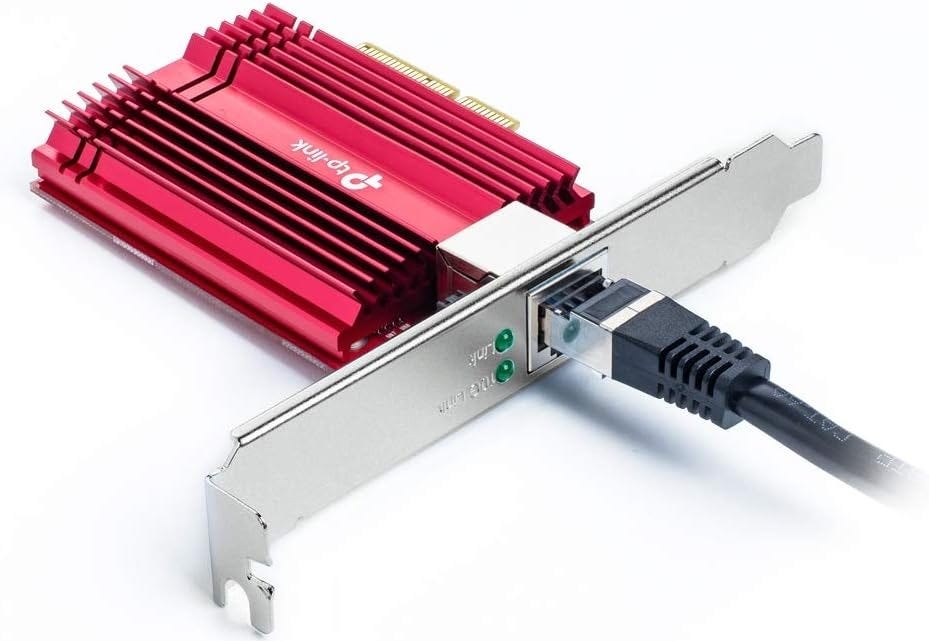
For memory, 512GB ECC RAM is the minimum target, with 1TB or more if the workloads justify it. For power, plan on server-grade delivery, likely 240V, with measured draw and thermal monitoring. For networking, use at least a 10GbE network card if the box serves other machines or stores datasets on a NAS.
Most readers who just need a simple 10GbE RJ45 upgrade should start with the TP-Link TX401. It is cheap, widely available, and avoids the fake-server-card lottery.
Linux is the only sane operating system choice here. Use containers, monitoring, reproducible model-serving configs, and remote management from day one.
For a Linux AI server, a single-port Intel X550-based card such as this 10Gtek X550-T1-style adapter is the cleaner pick than a bargain-bin no-name NIC.

If you need two 10GbE RJ45 ports, use a dual-port Intel X550-based card like the 10Gtek X550-T2-style adapter, but do not buy dual-port just because it looks more serious.”

The honest alternative is two 4x nodes. That can be easier to power, cool, move, maintain, and recover when one card or riser fails.
How RTX 3090 servers compare with newer GPUs
Newer GPUs are faster and more efficient. That does not automatically make them better buys for this specific job.
The RTX 4090 still has 24GB of GDDR6X like the RTX 3090, but it offers much higher performance and better efficiency. NVIDIA’s RTX 4090 page lists 24GB GDDR6X and 16,384 CUDA cores. A GeForce RTX 4090 is better if you need speed, but it does not solve the 24GB ceiling.
The RTX 5090 moves to 32GB GDDR7, which is a real improvement for single-GPU local AI headroom. NVIDIA lists the RTX 5090 with 32GB of GDDR7 memory. A GeForce RTX 5090 is attractive for a high-end single-GPU or dual-GPU box, but it does not create a cheap 96GB VRAM server.
Professional GPUs change the discussion. A single RTX PRO 6000 Blackwell gives 96GB ECC VRAM at 600W. That is the same memory capacity as 4x RTX 3090 in one professional card, with ECC and a cleaner form factor. The price will decide whether it is realistic, but for businesses and professional labs, it may be less painful than maintaining a used 4x RTX 3090 rig.
What to buy
Buy four RTX 3090s only after choosing one of three physical layouts: four verified dual-slot blower cards, four compatible custom-water-blocked cards, or four remotely mounted cards in an open frame. The 4x route remains viable for 96GB aggregate VRAM, but buying four random gaming cards first is how the project turns into an expensive fit problem.
Buy 2x RTX 3090 if you want the best balance of value, sanity, and local capability. This is the stronger recommendation for most power users.
Buy 1x RTX 5090 if you want a cleaner high-end desktop and 32GB VRAM is enough.
Buy RTX PRO 6000 Blackwell or used enterprise GPUs if uptime, ECC, dense deployment, warranty, and fewer moving parts matter more than bargain hunting.
Skip 8x RTX 3090 unless you know exactly why you need it and where it will live.
FAQ
Can 4x RTX 3090 run a 70B model?
Yes, depending on quantization, context length, backend, and how the model is split. A 70B model that is uncomfortable or impossible on one 24GB card can become practical across multiple cards. Do not expect the experience to feel like one giant GPU.
Can 8x RTX 3090 run huge models locally?
It can run larger workloads than 4x, but “can load” and “pleasant to serve” are different things. For very large models, interconnect, tensor parallelism, KV cache, context length, and backend support matter as much as aggregate VRAM.
Do RTX 3090s need NVLink for local LLMs?
No. Multi-GPU local inference can work without NVLink in tools such as llama.cpp and vLLM. NVLink can help specific workloads, but it is not a magic memory-pooling switch.
Will four RTX 3090s fit in the SilverStone RM44, RM52, or RM53-502?
Only when each GPU fits within a two-slot allocation, or when the coolers have been replaced with compatible water blocks and brackets. All three cases have eight rear expansion slots. Four ordinary 2.5-slot or 3-slot RTX 3090s will not fit directly. Thick cards require remote mounting with risers, a specialized expansion chassis, or two separate 2x GPU systems.
Is EPYC better than Threadripper Pro for this build?
EPYC is usually better for a server. Threadripper Pro is usually better for a workstation. For 4x GPUs, both can work. For 8x, EPYC or a real GPU server platform is the cleaner answer.
Is PCIe x8 enough for RTX 3090 local AI?
Often yes for inference, especially when the model stays resident on the GPUs. PCIe bandwidth matters more when the workload constantly moves data between CPU and GPU or when multi-GPU communication becomes the bottleneck. Do not assume gaming PCIe benchmarks answer this.
Should this run Windows or Linux?
Linux. Windows can work for smaller local AI setups, but a 4x or 8x GPU server should be built around Linux, remote management, reproducible environments, and stable CUDA tooling.
Final recommendation
A 4x RTX 3090 server is still worth building for local AI in 2026 when you are deliberately buying inexpensive VRAM and have chosen a workable physical layout first. Build it on EPYC or Threadripper Pro, use Linux, and choose between verified dual-slot blower RTX 3090s, custom-water-blocked cards, or remotely mounted cards in an open frame. Do not buy four arbitrary RTX 3090s and assume an eight-slot motherboard or case makes them compatible.
An 8x RTX 3090 server is usually the wrong next step. If 4x is not enough, compare two smaller nodes, newer 32GB consumer GPUs, used enterprise cards, RTX PRO 6000-class hardware, or burst cloud rental before committing to a 3kW used-GPU heat machine.
Explore more from Popular AI:
Start here | Local AI | Fixes & guides | Builds & gear | Popular AI podcast
Would you rather build a 4x or 8x RTX 3090 local AI server for maximum VRAM, or keep things simpler with a smaller workstation that is easier to cool, power, and maintain?
How the hell would you ever fit 4x 3090 FE in any of the recommended cases? That simply doesn't fit. A card takes up minimum 3 PCIE slots.