


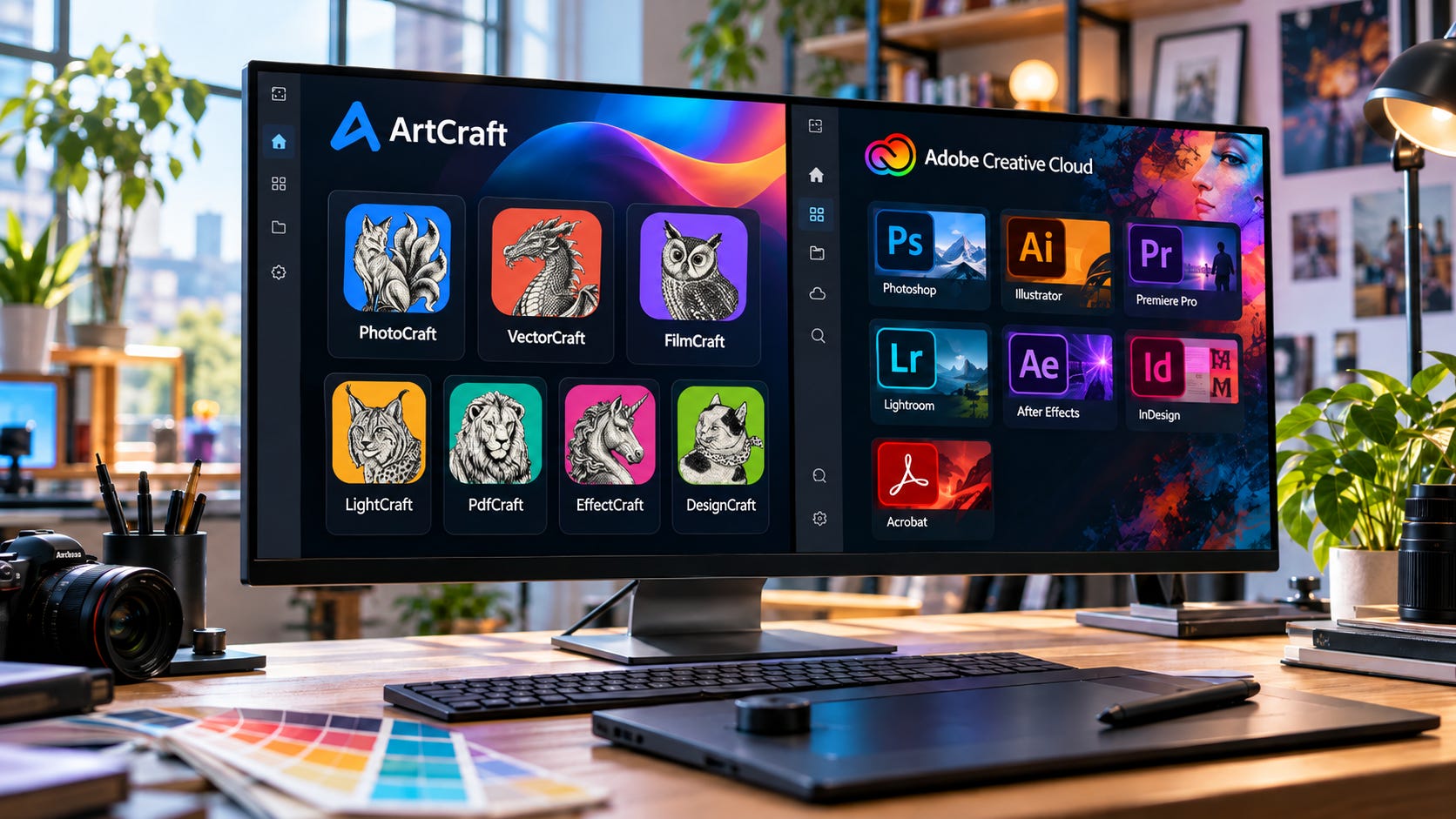
If you are looking at ArtCraft because Adobe Creative Cloud is expensive, unavailable on Linux, or simply more software than you want to rent, the key question is practical: can these free, open-source replacements do your actual work?
After testing the applications ourselves, our answer is not yet for most professional users.
That answer still leaves plenty of room for ArtCraft to be useful. PhotoCraft performed real image-editing work in our testing. VectorCraft already felt capable enough for ordinary vector jobs. PdfCraft handled useful everyday PDF tasks. We also reproduced the rough edges reported by early users, including uneven performance, incomplete professional features, fragile interoperability, and workflows that look finished until you push them beyond a simple demo.
The project’s own documentation now tells much the same story. PhotoCraft has implemented a large portion of Photoshop’s visible feature surface, yet its developers estimate professional readiness at only around 45%. Having the command is not the same as having Photoshop’s behavior, file compatibility, performance, and reliability behind it.
ArtCraft is real software, and some of it is already useful. It is not yet a dependable drop-in replacement for Adobe Creative Cloud.
Key takeaways: where ArtCraft can replace Adobe today
ArtCraft is much more than a visual clone. Our testing confirmed working layers, masks, filters, vector tools, timelines, page-layout features, PDF operations, and other substantial functionality across the suite.
PhotoCraft is already useful for basic and moderate image editing. Its biggest professional weakness is still dependable PSD interoperability, especially when files contain complex Adobe-specific structures.
We reproduced the same pattern early users have described: simple tasks often work surprisingly well, while more demanding workflows expose bugs, lag, missing behavior, or interoperability failures.
VectorCraft is one of the strongest applications in the suite today. It makes the best case for real self-contained creative work where SVG, PDF, and other open formats are acceptable.
EffectCraft and DesignCraft show why feature counts can mislead. Both expose many familiar commands, but core professional workflows still break down under real use.
Linux users have an unusually strong reason to try ArtCraft. Adobe’s mainstream desktop suite still centers on Windows and macOS, while ArtCraft explicitly supports Linux.
Do not cancel Adobe before testing copies of your actual projects. A familiar interface cannot guarantee that a client PSD, motion project, publication, or export will survive intact.
What ArtCraft actually is
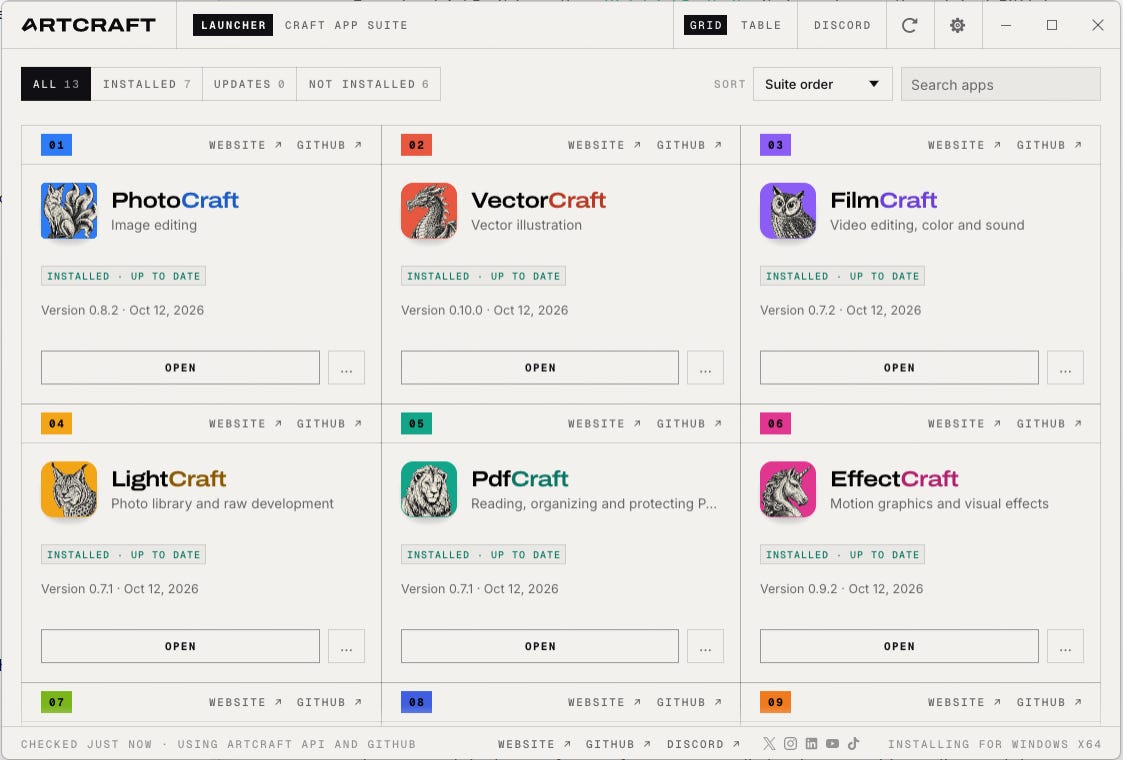
The official ArtCraft application directory now spans the seven Adobe-oriented tools covered here plus a growing set of apps for other creative and productivity work.
Seven correspond closely to major Adobe workflows:
PhotoCraft for Photoshop
LightCraft for Lightroom and Lightroom Classic
VectorCraft for Illustrator
FilmCraft for Premiere Pro
EffectCraft for After Effects
DesignCraft for InDesign
PdfCraft for Acrobat Pro
The directory also includes WordCraft, GridCraft, DeckCraft, SoundCraft, and CADCraft, which push the same approach into documents, spreadsheets, presentations, audio, and CAD.


These are native applications rather than browser mockups. The project says the Crafting Apps are written largely in Rust, operate on local files, are open source, and expose automation through command-line interfaces, JSON, and the Model Context Protocol.
Development has also been extremely fast. As of our October 13 research, PhotoCraft had reached v0.8.2, VectorCraft v0.10.0, EffectCraft v0.9.2, and several of the other applications received new releases on October 12 alone.
That pace is one reason today’s verdict can become stale quickly.
ArtCraft’s own developers have already revised their expectations downward after real users began hammering on the applications. PhotoCraft’s earlier estimates emphasized how many Photoshop features had been implemented. Its newer assessment distinguishes feature breadth from readiness for real work, producing a much lower readiness score.
Our testing supports that change in methodology.
A feature can exist and still behave differently. An application can render a file without preserving everything needed to edit it. An export can finish successfully and still fail in the next program. A brush can draw while feeling terrible under sustained use.
Those differences separate a convincing demo from production software.
ArtCraft vs Adobe Creative Cloud at a glance
The readiness percentages below come from ArtCraft’s own current assessments. They are not independent benchmark scores. Our hands-on work broadly agrees with the relative picture they paint.
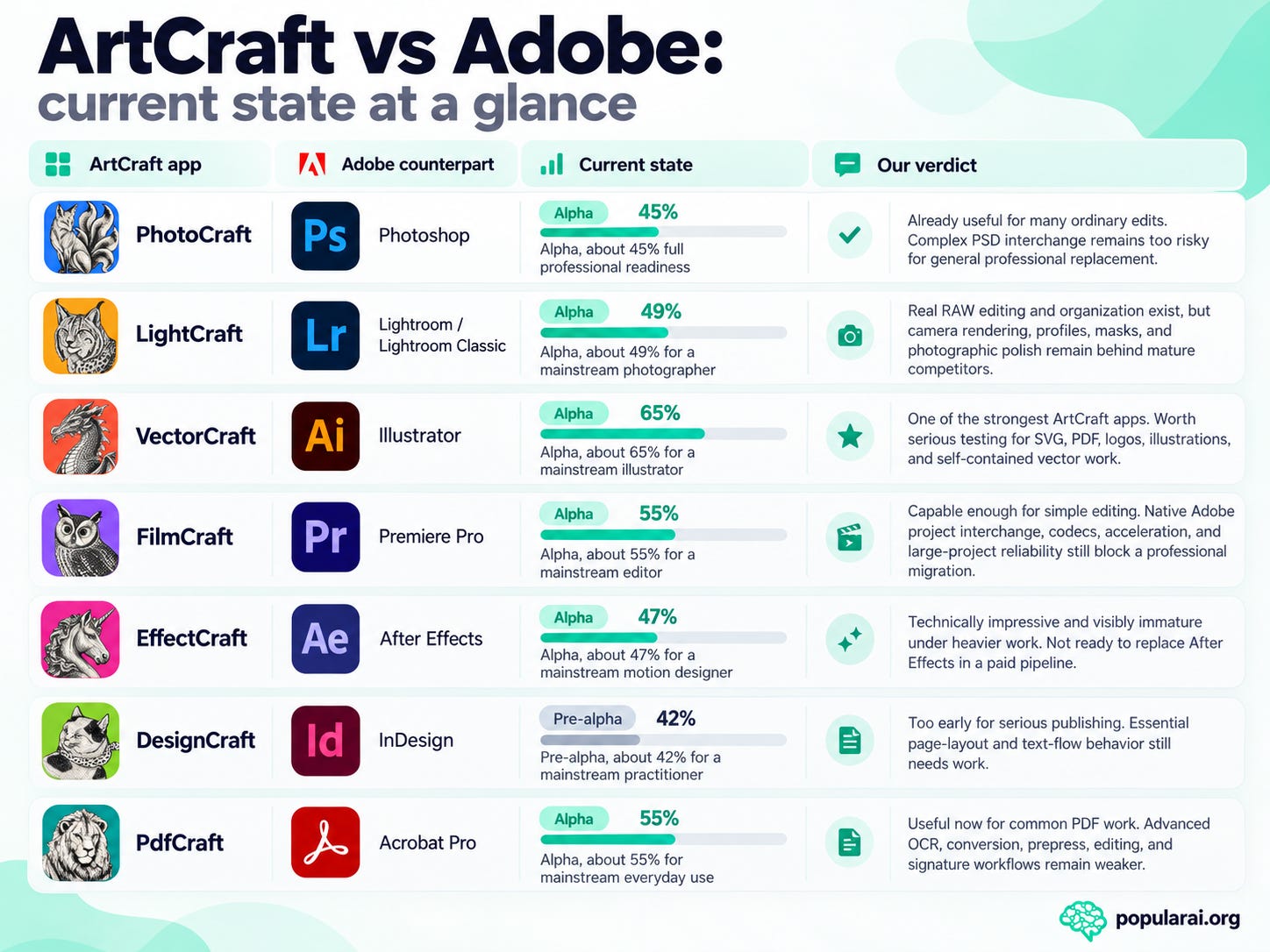
The important number is rarely the number of implemented commands. It is how often the application completes the work you need without creating a new problem downstream.
The readiness figures are best treated as migration-risk signals, not grades. A lower-scoring application can still be enough when your work is self-contained and ends in an open format. A higher feature count can be misleading when one missing interchange feature blocks a client handoff. That pattern shows up repeatedly across ArtCraft. VectorCraft benefits from workflows that can stay in SVG or PDF, while PhotoCraft, FilmCraft, EffectCraft, and DesignCraft face much harder compatibility tests when the next person expects a native Adobe file.
Before switching, test the parts of your workflow that can fail expensively. Use copies of representative files, make the edits you perform every week, export to the formats your collaborators expect, and reopen the result in the application that receives it. That exercise tells you more than a toolbar comparison. ArtCraft’s strongest current use cases are the ones where you control the file from start to finish.
PhotoCraft vs Photoshop: surprisingly capable until compatibility gets complicated
PhotoCraft is the centerpiece of ArtCraft and the application most likely to convince someone that Adobe has suddenly become optional.
Our testing explains why.
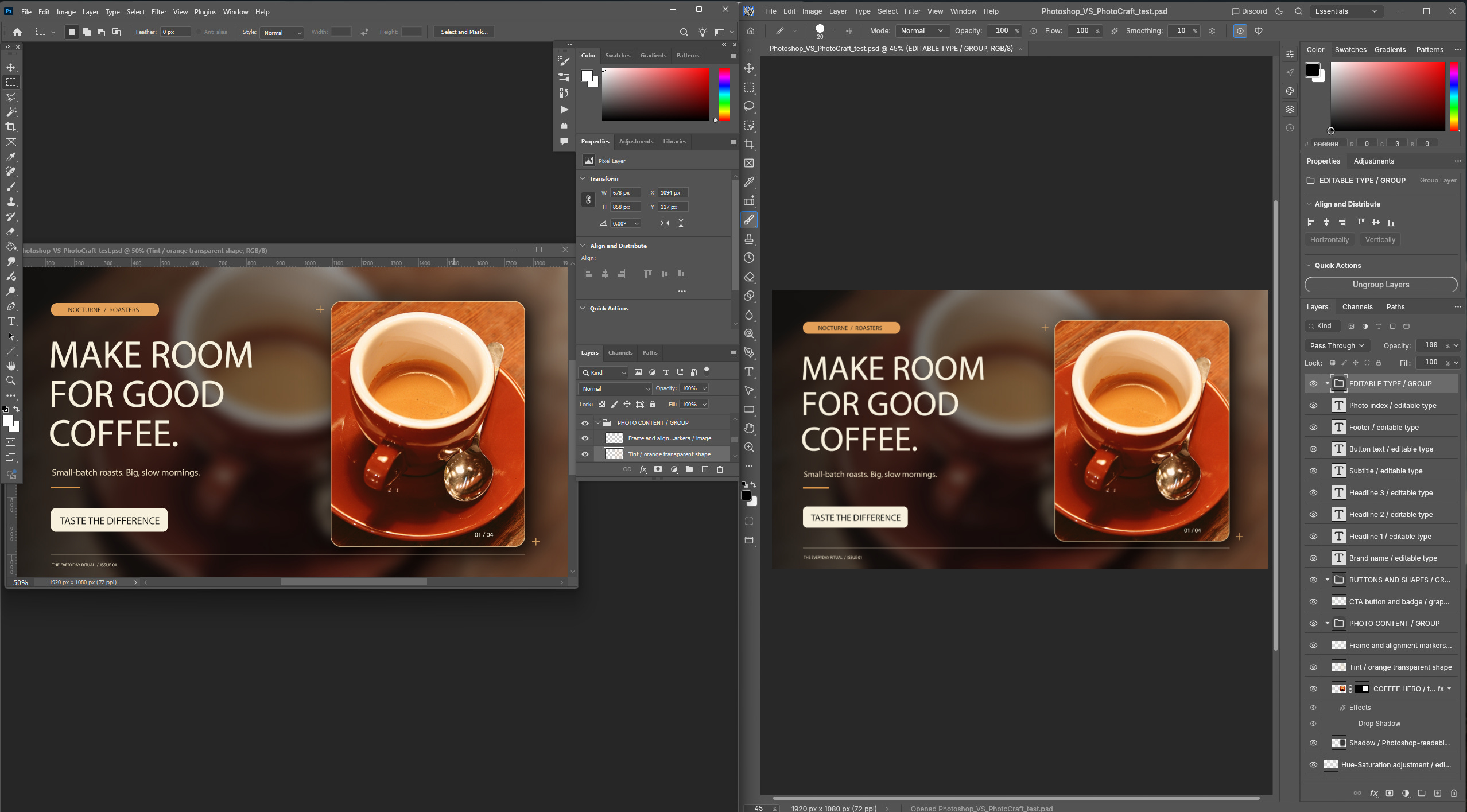
For ordinary raster editing, PhotoCraft already feels like software rather than a prototype. Familiar tools are where you expect them. Layers work. Masks work. Filters and adjustments work. Basic compositing is practical. You can edit images rather than merely admire a Photoshop-shaped interface.
That also matches what independent testers and early users have reported.
But the question professionals need answered is harder:
Can PhotoCraft accept arbitrary real-world Photoshop files, preserve their structure, let you edit them, and return them to Photoshop without damaging the workflow?That answer is still no.
We confirmed that opening a PSD does not prove PSD compatibility
There are several levels of “PSD support.”
▪ An application can display the flattened appearance of a PSD.
▪ It can go further and expose layers, groups, masks, text, blend modes, effects, and Smart Objects.
The much harder test is round-trip interoperability: open a Photoshop-created document, edit it, save it from PhotoCraft, reopen it in Photoshop, and retain enough appearance and editable structure that another person can continue working normally.
Our testing reinforced the project’s own warning that these are very different standards.
PhotoCraft already understands a surprising amount of PSD structure. Its current parity assessment reports support for layers, masks, Smart Objects, effects, adjustment layers, blend modes, and other Photoshop concepts. Yet its Photoshop-authored rendering corpus recorded only 133 passing cases out of 256, roughly 52%, in the October 10 assessment.
Other project-controlled PSD tests score much better. That makes sense. PhotoCraft is naturally better at round-tripping structures it already knows how to create and preserve than at correctly interpreting every strange thing Photoshop can place inside a file.
We saw the practical version of that gap. Simple and moderately layered documents can work remarkably well. Once the file depends on increasingly Photoshop-specific behavior, confidence drops quickly.
That makes PhotoCraft viable for some people and inappropriate for others without contradiction:
A social-media designer working in relatively simple layered documents may be perfectly happy. A retoucher inheriting arbitrary client PSDs, on the other hand, cannot assume the same thing.
Basic image editing has crossed the usability threshold
PhotoCraft’s most important achievement is that you can stop discussing it purely in terms of future potential.
There is enough working software here to perform actual edits.
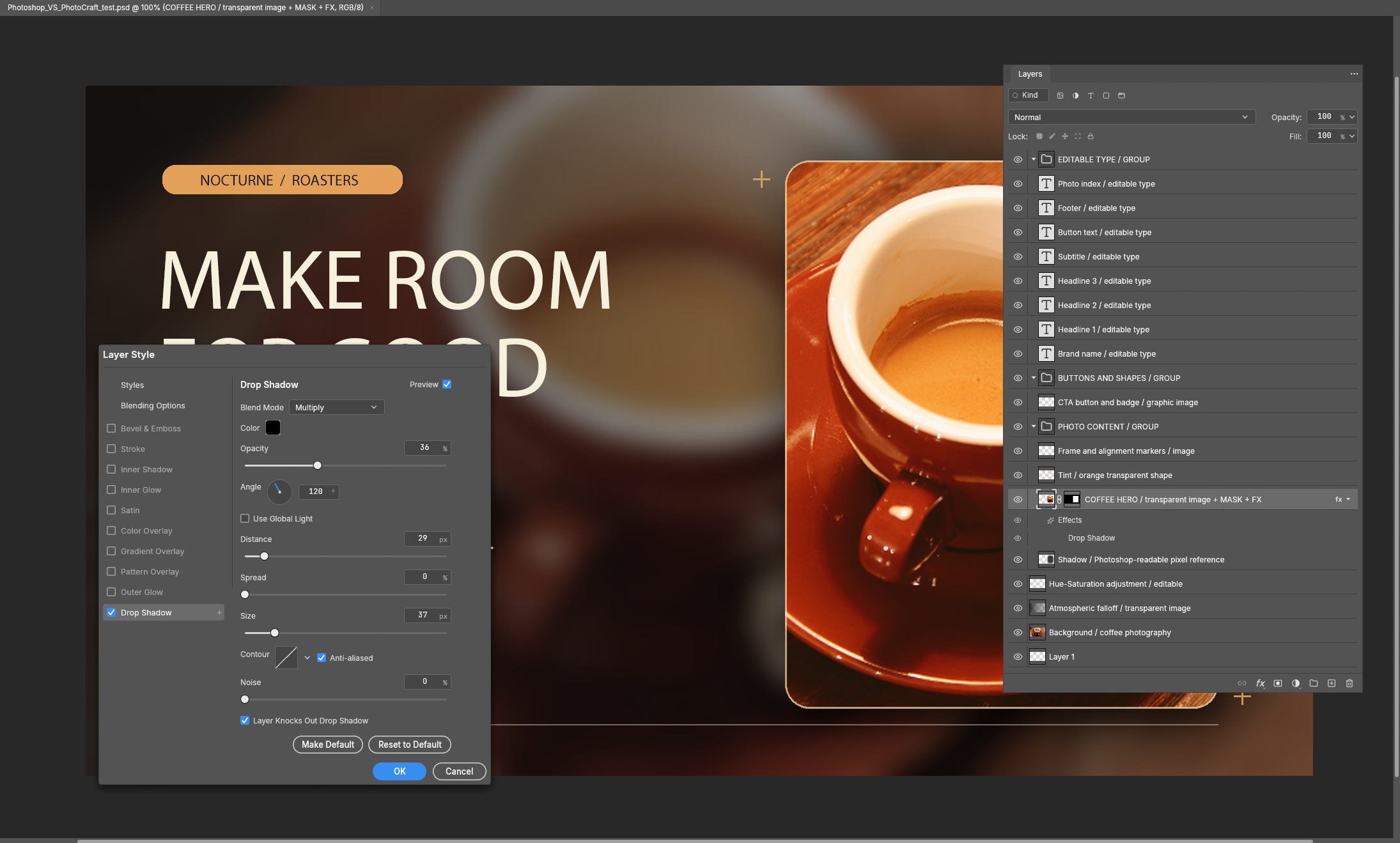
The project currently estimates roughly 65% readiness for layers and Smart Objects, around 70% for adjustments and filters, about 55% for painting, and around 50% for retouching.
Our hands-on use broadly matched that hierarchy.
The basics are the convincing part. Opening images, working with layers and masks, applying ordinary adjustments and filters, transforming content, and performing straightforward editing tasks already feel plausible for day-to-day work.
The weaknesses appear as workflows become more specialized.
Creative Bloq reached a similar conclusion in its independent testing. Joe Foley found PhotoCraft much more usable than a superficial clone, with working PSD, TIFF, JPEG, and PNG support and familiar layer, mask, blend-mode, and filter workflows. Selection precision, healing tools, content-aware operations, filter previews, and generative functionality proved much less convincing.
Our tests support the same broad conclusion.
Brush tools exist, but painting exposes performance problems
Painting is a good example of the difference between a feature and a mature implementation.
PhotoCraft has brush tools. That does not automatically make PhotoCraft a good painting application.
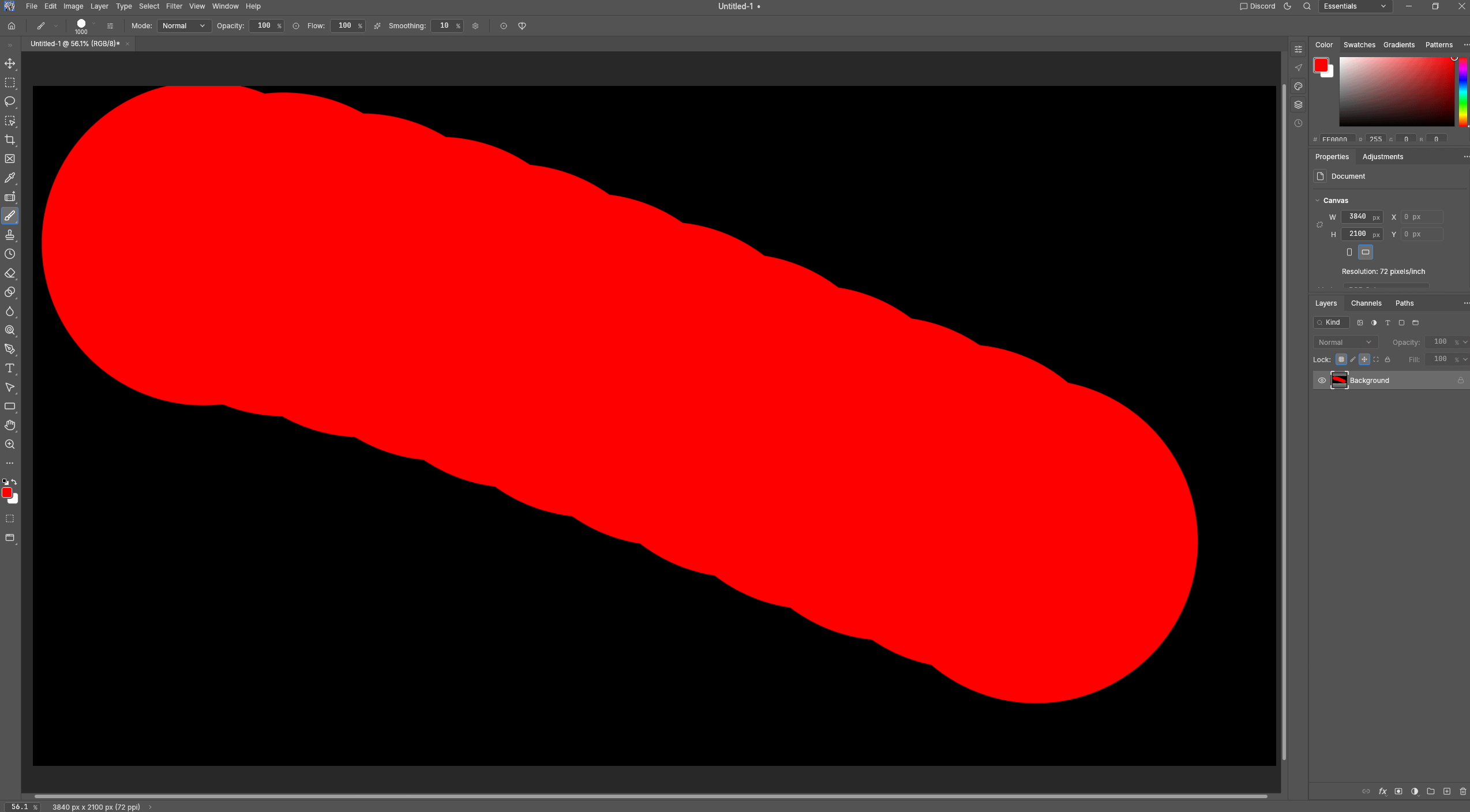
We reproduced the same general problems reported by an artist and painting-software developer on the Ziggit forum. Large brush work can expose lag and rough input behavior that would be annoying in casual use and unacceptable during sustained professional painting.
The forum test used a 3840 × 2100 canvas and a 1000-pixel round brush and reported undersampled strokes, heavy lag, and freezing under heavier interaction.
PhotoCraft’s own October 10 performance assessment reinforces that concern. Only 3 of 25 measured scenarios met the project’s then-current performance budgets.
To be fair, all of these things did not happen in our workstation test instance. Even the lag, which is apparent (see screenshot) could possibly be attributed to brush smoothing settings, which can’t be easily altered like Photoshop. That being said, we did run PhotoCraft on a machine with 48GB VRAM and did not spend hours painstakingly painting artwork.
Artists running PhotoCraft with less VRAM and who build up an extensive brush stroke history tab over the hours may have a different experience.
For artists primarily who prioritize painting over Photoshop compatibility, Krita remains the much safer free and open-source option today.
Color management is much deeper than expected, but still incomplete
PhotoCraft deserves credit here.
It already includes ICC-based color management, CMYK, Lab, high-bit-depth workflows, and soft-proofing concepts. This is far beyond the feature set of a toy Photoshop clone.
Professional color is also unforgiving.
The project’s own assessment still places color-management readiness around 70%. It notes missing Adobe CMYK profiles, incomplete monitor-profile detection outside macOS, and no HDR/EDR display output in the assessed build.
Our testing gave us no reason to overrule the project’s caution.
For ordinary web graphics and general editing, the current color capabilities are encouraging.
For packaging, prepress, controlled proofing, or a print workflow built around specific profiles and Adobe behavior, test your actual output chain before migrating.
Camera Raw remains a weak replacement case
PhotoCraft includes RAW-related functionality, but it is nowhere near replacing Adobe Camera Raw as a professional photographic subsystem.
The project estimates Camera Raw readiness around 45%. Its assessment also notes incomplete format support, generic rather than comprehensive lens profiling, and missing depth in calibration and masking.
ArtCraft’s Lightroom-oriented application, LightCraft, makes a more direct attempt at RAW workflows. That application is farther along in catalog and development features, but still has image-quality and camera-specific gaps of its own.
Photoshop’s ecosystem is much harder to clone than Photoshop’s toolbar
Plug-ins, actions, scripts, Firefly features, neural filters, studio automation, typography behavior, third-party integrations, and established file exchange make Photoshop far harder to replace than its visible interface suggests.
PhotoCraft still has no Photoshop .8BF plug-in hosting and no UXP or ExtendScript compatibility. The project added .atn action load and save support on October 12, but that does not make it compatible with an existing Photoshop automation stack. Its own assessment puts the broader plug-in and scripting area at roughly 15% readiness and generative AI functionality around 10%.
ArtCraft does have its own powerful automation system, which we will come back to. That could eventually become an advantage.
It does not preserve an existing Photoshop automation stack.
PhotoCraft verdict
PhotoCraft is already good enough to recommend installing.
It is not good enough to recommend blindly replacing Photoshop.
▪ For web images, ordinary compositing, simple and moderate layered files, masks, adjustments, graphics, and casual editing, PhotoCraft can already be useful.
▪ For professional work based on arbitrary incoming PSD files, complex typography, specialist plug-ins, Camera Raw, prepress, client handoffs, or flawless round-tripping, keep Photoshop available.
The sensible migration strategy is to run both for a while. Duplicate real production files, perform the edits you actually make, export them, reopen them in Photoshop, and inspect what survives.
Do that before canceling anything.
That dual-install period is also a useful way to separate convenience from dependency. If PhotoCraft handles most daily edits but Photoshop is still required for one client template, one plug-in, or one round-trip handoff, you have learned exactly where the remaining lock-in sits. You can move routine work first without pretending the compatibility problem has disappeared.


LightCraft vs Lightroom: the image can open and still be wrong
LightCraft illustrates why photography software is deceptively difficult to recreate.
Its current roadmap estimates roughly 77% weighted feature breadth and about 49% readiness for a mainstream working photographer.
A lot already exists: cataloging, importing, global adjustments, presets, synchronization, metadata, exporting, and RAW development.
The weak areas include camera-specific color rendering, verified RAW coverage, lens profiles, masking, and healing.
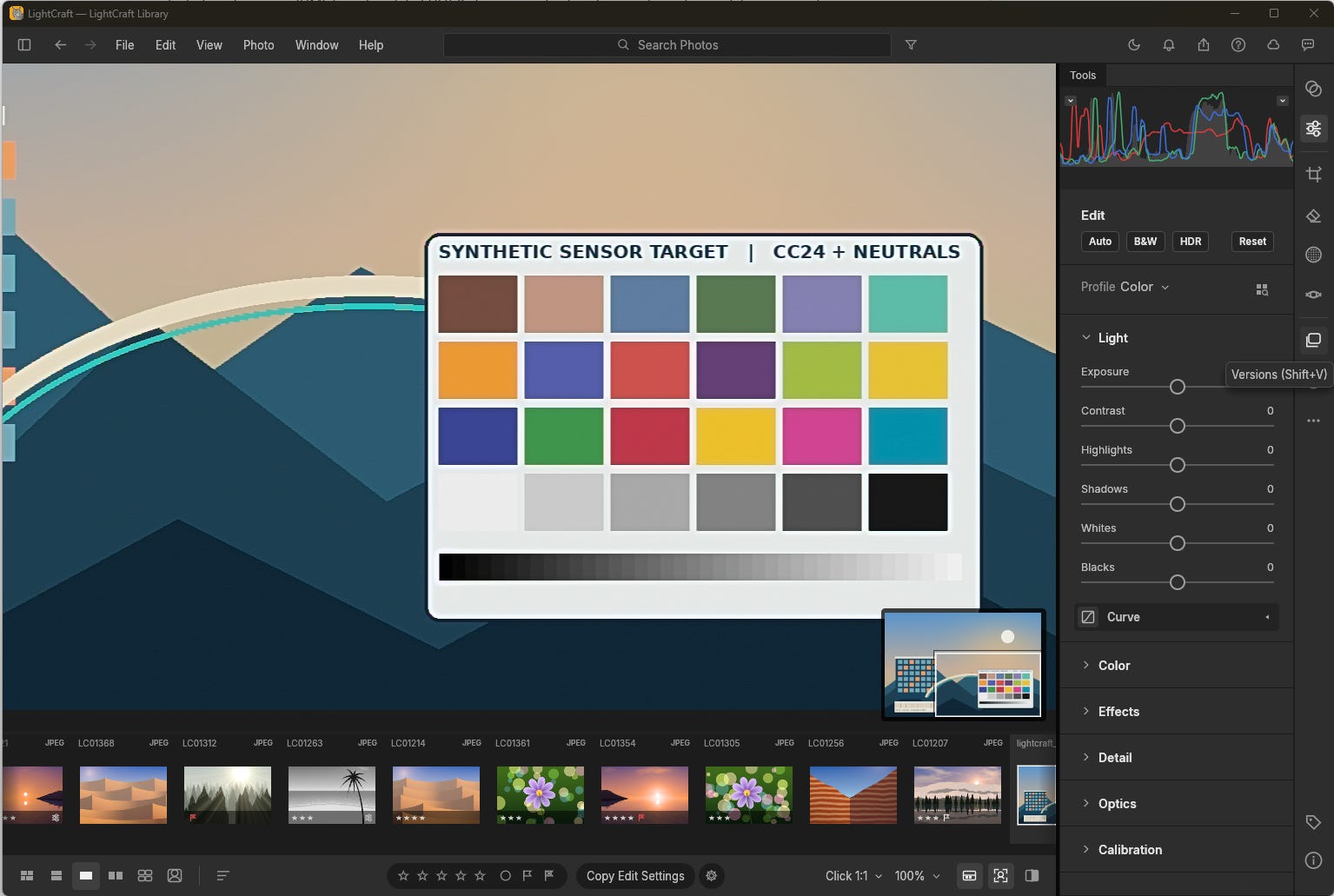
We found the same general pattern during testing. The application works. The problem is whether its interpretation of your camera’s files is good enough and predictable enough to replace the software you already trust.
Creative Bloq found particularly visible weaknesses when testing Canon CR3 files. Camera-matched profiles and lens profiles were absent, sharpening produced ugly artifacts, and subject masking behaved incorrectly in its test.
Verdict: worth experimenting with for supported cameras and ordinary development. Professional photographers should keep Lightroom, Capture One, or another mature RAW processor until camera rendering, profiles, lens data, masking, and consistency improve substantially.
VectorCraft vs Illustrator: the easiest ArtCraft app to take seriously
VectorCraft may be the strongest Adobe-oriented ArtCraft application today.
The current project assessment puts it around 88% feature breadth, roughly 75% feature depth, and approximately 65% ready for a mainstream illustrator.
Our testing supports the general impression that VectorCraft can already do useful work rather than merely demonstrate Illustrator-like controls.
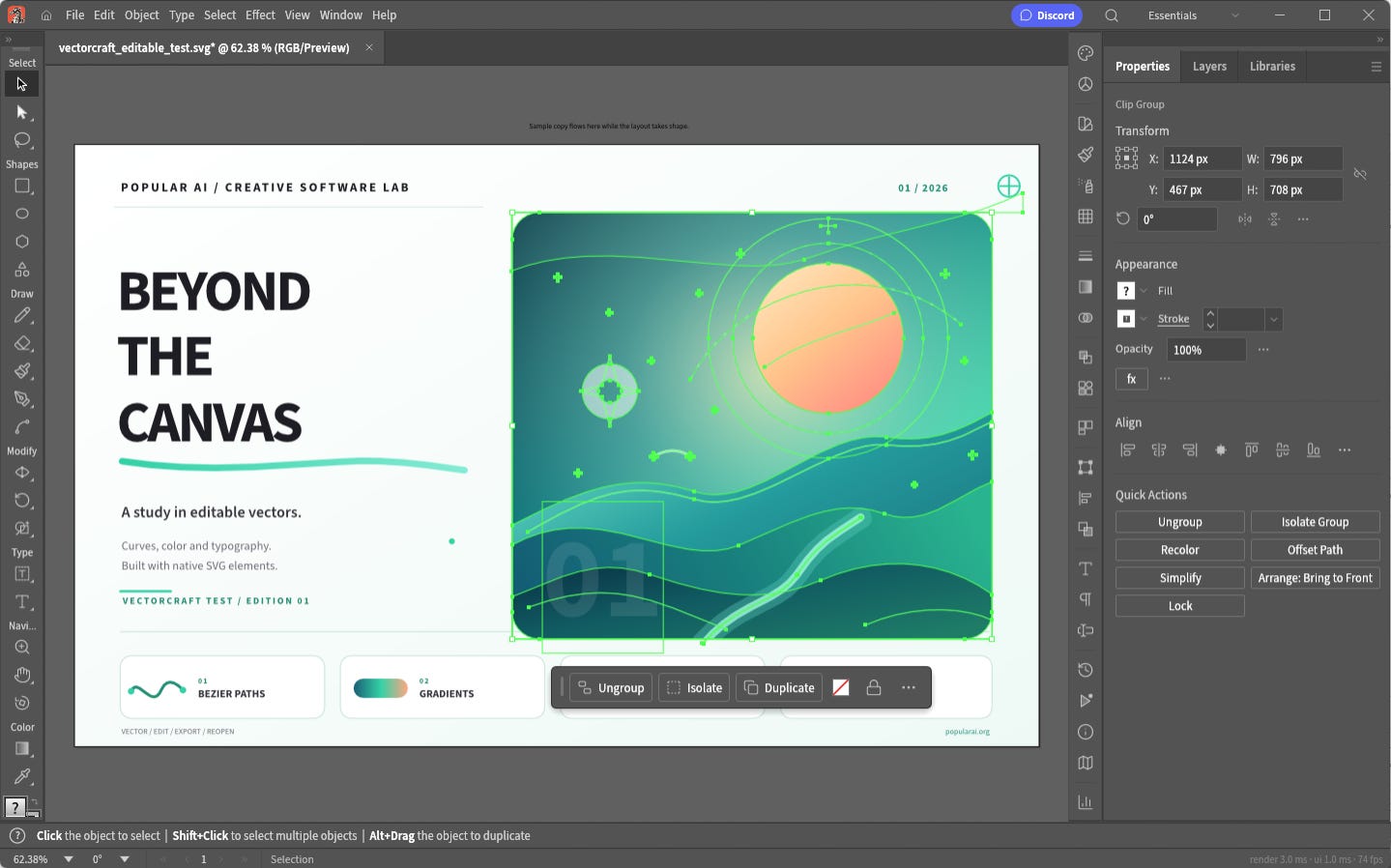
Paths, Bézier editing, Pathfinder operations, Shape Builder, gradients, transparency, text, SVG, PDF, EPS, DXF, and PDF-compatible Illustrator workflows are already present.
The catch is native Adobe interoperability.
A PDF-compatible .ai file is not the same thing as complete Illustrator compatibility. Photoshop-origin PSD and PSB documents imported into VectorCraft also do not preserve the entire Photoshop editing model.
That matters less if your workflow is built around open formats such as SVG.
Verdict: VectorCraft is already worth serious consideration for logos, diagrams, icons, web illustration, and other vector work that does not depend on a complex Illustrator-native collaboration chain.
If your actual problem is raster-to-vector conversion rather than Illustrator replacement, our guide to the best AI vectorizer tools and local alternatives covers that workflow separately.
More on AI vector tools:

FilmCraft vs Premiere Pro: basic editing works, professional migration does not
FilmCraft’s roadmap says trimming, timeline editing, multicam, color controls, keyframes, titles, captions, audio mixing, effects, and export already exist. The project currently estimates about 55% readiness for a mainstream editor.
We found enough functionality to treat FilmCraft as a real editor.
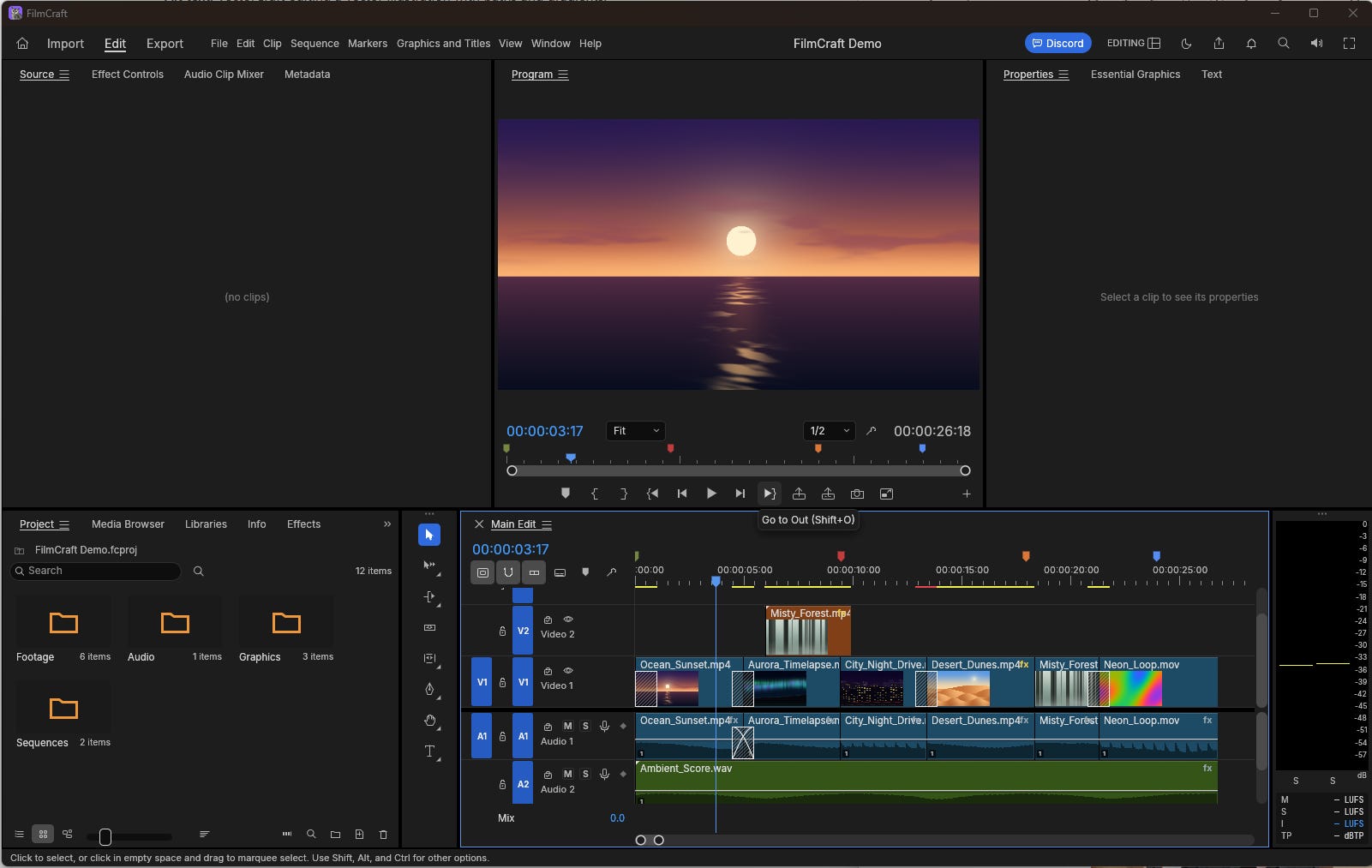
We did not find enough maturity to recommend moving a paid video workflow onto it.
Native Premiere .prproj interoperability remains a major missing piece. The roadmap also identifies large-media performance, 10-bit and 4:2:2 camera decoding, hardware acceleration, plug-in support, and codec depth as unfinished.
Those are not exotic edge cases for working editors.
They are routine requirements in paid editing work.
Verdict: FilmCraft is already interesting for straightforward self-contained edits. Professional editors should stay with Premiere Pro or move to a mature alternative such as DaVinci Resolve before betting paid work on FilmCraft.
Resolve 21 currently offers a free version on Windows, macOS, and Linux, with editing, color, Fusion motion graphics, and Fairlight audio in one mature package.
EffectCraft vs After Effects: feature breadth hides the biggest risks
EffectCraft may be ArtCraft’s most dramatic example of a program that can look much more finished than it is.
Its roadmap estimates around 91% feature breadth, yet only about 45% overall readiness and 47% for a mainstream motion designer.
We found the same mismatch.
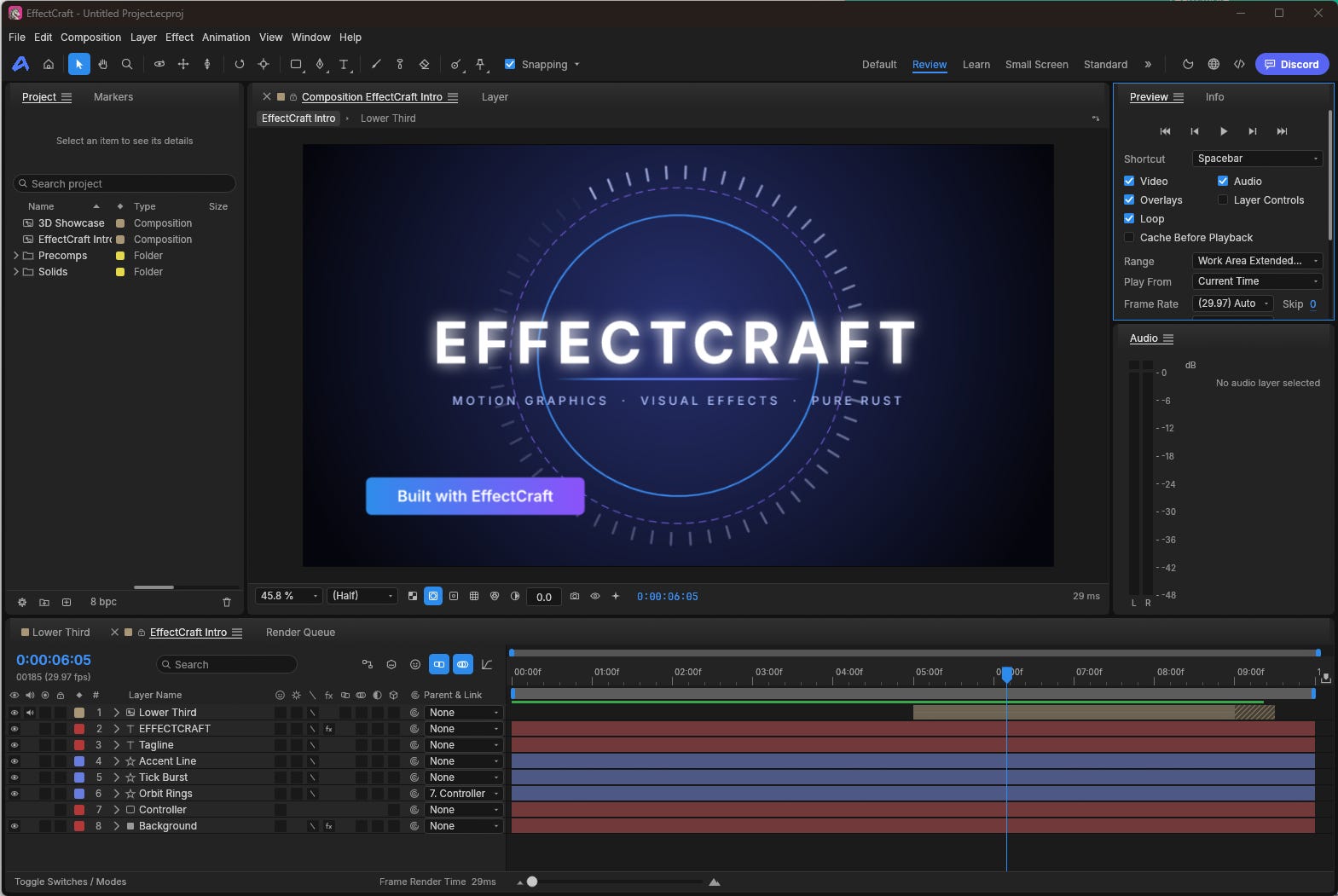
There is a lot here: compositions, layers, keyframes, effects, masks, animation tools, timeline controls, and rendering functionality.
There are also major professional blockers.
EffectCraft currently cannot open native After Effects .aep or .aepx projects. If you exchange After Effects projects with clients or colleagues, that alone prevents a straightforward migration.
Performance under heavier work is another concern. A user working with a 45-minute video reported several-second delays when moving around the timeline. We reproduced the same kind of responsiveness problem under demanding timeline work. The associated GitHub issue remained open when we checked.
We also confirmed the broader export/interoperability concerns described in issue #293. That report came from an M1 Pro Mac user exporting material for DaVinci Resolve. A malformed filename problem was fixed almost immediately, but ProRes alpha interoperability remained troublesome during follow-up testing.
The rapid fix rate is encouraging, but bugs inside basic cross-application workflows are why we would not trust EffectCraft with an important motion-graphics delivery yet.
Verdict: use EffectCraft for experiments, learning, automation, simple motion work, and watching an unusually ambitious project mature. Keep After Effects for serious client workflows.
DesignCraft vs InDesign: publishing punishes missing details
DesignCraft is currently pre-alpha, and that description fits our experience.
Its roadmap estimates around 42% readiness for a mainstream publishing professional.
The interface makes rapid progress look convincing. Pages, text frames, layout controls, styles, and familiar publishing concepts are present.
Then you try to build a real publication.
Professional layout software depends heavily on behavior that barely appears in feature summaries: text threading, parent-page behavior, precise margins and dimensions, reflow, typography, output standards, anchored objects, long-document consistency, and reliable PDF production.
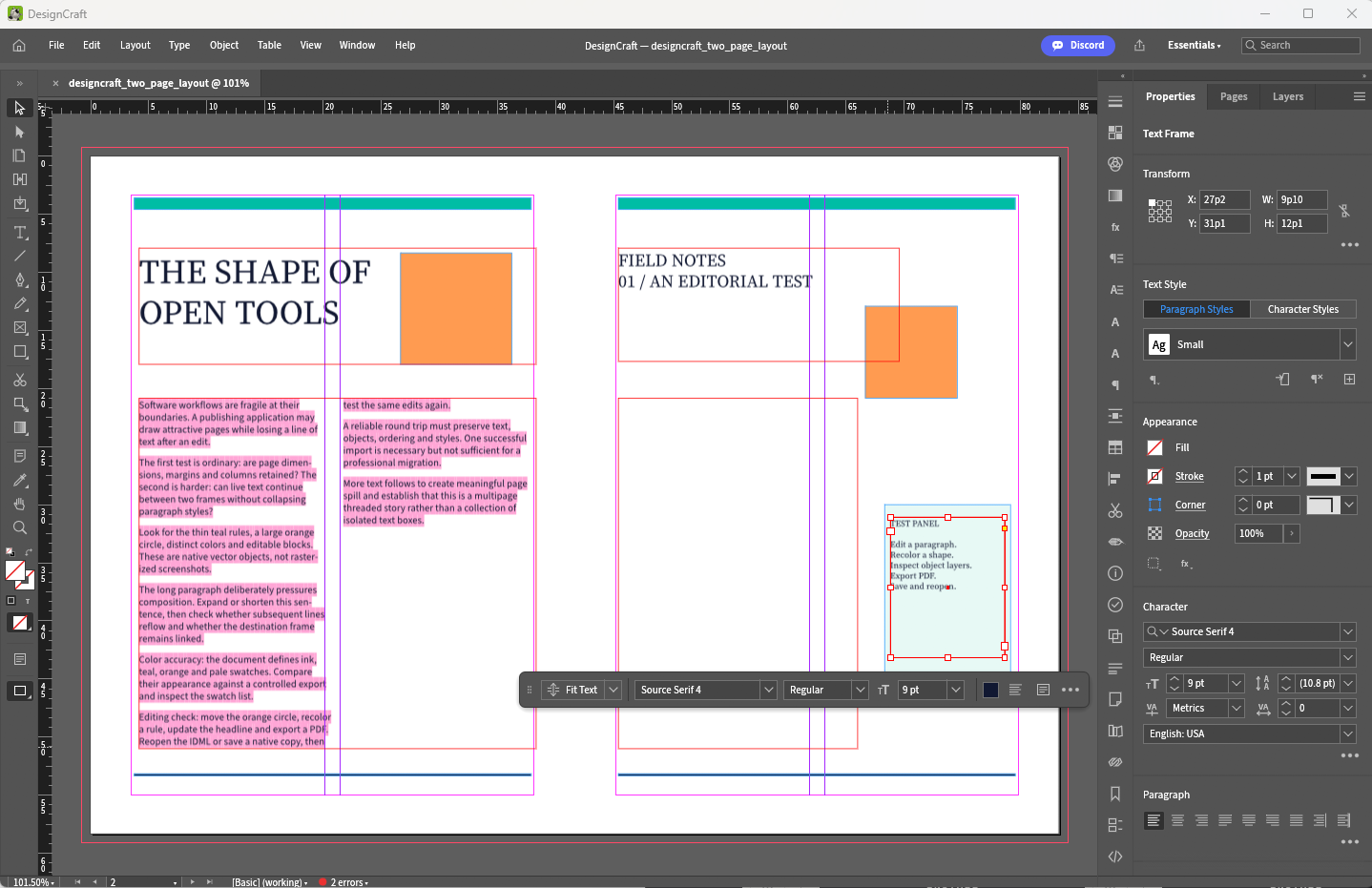
We confirmed the same kind of problems reported by early book and publication designers. The tools exist in recognizable form, but important publishing workflows still require workarounds or fail to behave as expected.
The project’s own roadmap acknowledges one particularly large gap: normal manual text threading between frames is not yet complete. Native INDD opening also remains unfinished, while IDML compatibility still needs broader validation against real documents.
Verdict: DesignCraft is fascinating to test. It is not where we would build an important book, magazine, catalog, or long publication today.
PdfCraft vs Acrobat Pro: the easiest subscription to question
PdfCraft has a stronger immediate replacement case because many Acrobat subscribers use only a fraction of Acrobat Pro.
In our testing, everyday PDF tasks were among the more convincing ArtCraft workflows.
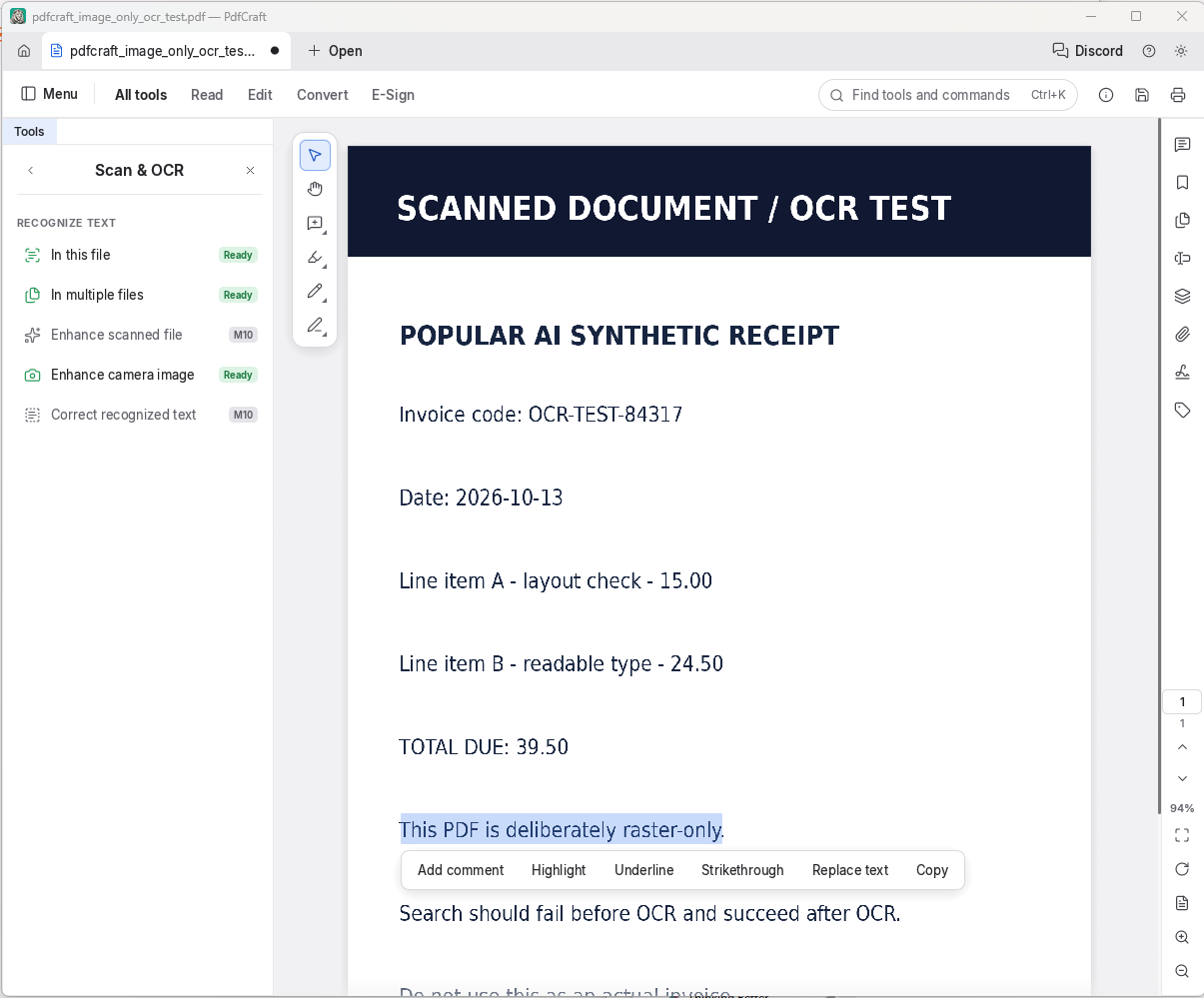
The current roadmap includes viewing, searching, page organization, splitting and combining, annotations, forms, passwords, redaction, sanitization, basic digital signatures, printing, and accessibility checking. The project estimates about 55% readiness for a mainstream user and 66% for someone with relatively basic PDF requirements.
The remaining gaps are concentrated in harder professional areas: editing arbitrary existing content, deep OCR coverage, Office conversion, layout-preserving export, advanced signature infrastructure, preflight, and specialized PDF standards.
Verdict: if you mainly pay for Acrobat to rearrange pages, annotate, fill forms, redact, combine documents, and handle ordinary PDFs, try PdfCraft before renewing. For regulatory documents, prepress, advanced OCR, complex forms, or institutional signing, Acrobat still has a much deeper toolchain.
Our testing explains why ArtCraft reviews seem contradictory
One of the most useful things we learned from testing ArtCraft is that wildly different user reactions can all be legitimate.
We reproduced basic PhotoCraft edits that would make a casual user wonder why anyone says the application is unusable. We also pushed into workflows where rough performance, incomplete behavior, or compatibility suddenly made the limitations obvious.
The same pattern appeared elsewhere in the suite.
This is why asking whether “ArtCraft works” produces such bad answers.
A Linux user opening an image, adding a mask, applying a filter, and exporting it can truthfully report success. A professional retoucher working on a complicated layered PSD can truthfully reject the same application.
A hobbyist can complete a short FilmCraft edit. A working editor depending on camera codecs, proxies, third-party plug-ins, client project exchange, and predictable exports can still find FilmCraft unsuitable.
EffectCraft can animate graphics correctly while falling apart under a long or complicated composition.
DesignCraft can create pages while still lacking the behavior a professional book designer needs to manage an actual book.
The dividing line is workload complexity, not whether the application launches.
That is also why ArtCraft’s newer “readiness” assessments are more meaningful than its older feature-parity percentages.
Linux support is one of ArtCraft’s strongest arguments
ArtCraft becomes more compelling if you use Linux.
Adobe’s current Creative Cloud desktop requirements center on Windows and macOS. There is no equivalent native Linux Creative Cloud suite.
ArtCraft explicitly supports Linux across its Crafting Apps.
Our testing, combined with reports from Linux Mint and Debian users, shows that this is real rather than a theoretical build target. Basic editing and importing/exporting can work today.
It is not frictionless.
Early Linux reports include stylus, touch-navigation, packaging, and desktop-integration quirks. Different display servers, GPU stacks, tablet drivers, and font environments give Linux creative software more combinations to survive than Windows or macOS.
Still, an Adobe-style suite that actually targets Linux is inherently valuable.
For a Linux user deciding between “learn a completely different application” and “try a familiar Photoshop-like or Illustrator-like workflow,” ArtCraft’s appeal is obvious.
Is ArtCraft safe to download?
Open source does not make ArtCraft automatically safe, just as AI-assisted development does not make it automatically dangerous.
Download ArtCraft from the official ArtCraft site, its Launcher, or the original GitHub repositories.
PhotoCraft’s release process documents signed packaging and publishes SHA-256 checksums. The project also maintains security documentation describing some of its current trust boundaries.
That is good practice. It is simultaneously not a security audit either.
These applications parse complex untrusted file formats, load media, interact with the file system, and increasingly expose automation interfaces. All of those surfaces can contain vulnerabilities regardless of whether a human or an AI assistant wrote the code.
ArtCraft’s local-first design does reduce one important category of exposure. Ordinary editing does not inherently require sending the document to a cloud service. Indeed, none of the apps triggered any Netlimiter alerts on our test workstation.
Local does not mean magically private or secure. It means one major dependency has been removed.
For important work, keep backups, use copies when experimenting with Adobe-format round trips, install updates, and avoid random unofficial builds.
ArtCraft’s MCP support could become more important than Adobe mimicry
The most original part of ArtCraft may eventually be the part with no direct Adobe equivalent.
PhotoCraft exposes application control through CLI, JSON, and MCP. Its documentation shows how an AI coding agent can connect to PhotoCraft, operate on files, invoke editing functionality, and save results while the application runs locally.
This gives ArtCraft a very different automation model from adding generative AI features inside a traditional editor.
An agent can potentially become part of the editing workflow itself.
Batch modifications, asset preparation, repetitive corrections, template population, conversions, or complex scripted operations could be performed through an open control interface rather than a vendor-specific automation system.

The power comes with a security warning.
PhotoCraft’s own control documentation describes bearer-token access for the control surface, and the current implementation does not offer fine-grained per-tool authorization.
Give agents access only to directories they actually need. Do not casually expose the control server over a network. Prefer local connections and isolated working folders.
For a broader look at this kind of local automation, see our guide to building an independent AI development stack with Claude Code.
More on local AI coding agents:

How much can ArtCraft actually save?
ArtCraft’s Crafting Apps are free. Adobe is not.
As of October 13, 2026, Adobe’s U.S. site lists Creative Cloud Standard at $54.99 per month on an annual plan billed monthly and Creative Cloud Pro at a regular $69.99 per month, with a promotional introductory offer for new subscribers. The Photography plan is $19.99 per month, while Premiere alone is $22.99 per month.
At unchanged regular prices, Creative Cloud Standard costs about $659.88 per year and $1,979.64 across three years before tax.
Creative Cloud Pro at $69.99 works out to about $839.88 per year and $2,519.64 across three years.
For a hobbyist, student, independent creator, or small business, that is real money.
A free replacement can still become expensive if it costs billable time.
If a freelancer spends an afternoon repairing an incompatible file, keeps Adobe installed for client handoffs, loses plug-ins, rebuilds templates, or discovers that an export fails just before a deadline, the theoretical savings shrink quickly.
The economics favor ArtCraft most strongly when your workflow is self-contained.
The fewer native Adobe files, specialist plug-ins, collaborators, and institutional processes you depend on, the easier the switch becomes.
The better Adobe alternative may not be ArtCraft yet
Leaving Adobe does not require choosing the youngest alternative available.
▪ For general raster, vector, and page-layout work, Affinity is now free for individual users and offers a considerably more mature environment. It does require a free Canva account for activation, which creates an account dependency ArtCraft avoids.
▪ For painting, Krita remains a mature free and open-source option with years of specialized brush and illustration work behind it.
▪ For raster editing, GIMP is less Photoshop-like but dramatically more mature.
▪ For vector illustration, Inkscape is a long-established open-source SVG editor on Linux, Windows, and macOS.
▪ For video, DaVinci Resolve is currently the obvious mature alternative for users who want to leave Premiere without volunteering to beta-test their editor.
These alternatives make ArtCraft’s current role more interesting.
It does not need to be the best mature replacement today to be important.
ArtCraft is building something the open creative-software world has rarely had: a broad family of applications with familiar cross-app design, native Linux support, permissive source access, local operation, and agent-friendly automation.
If the development pace continues, that could become much more valuable than reproducing Adobe’s menus.
Who should switch, experiment, or stay with Adobe?
▪ ArtCraft makes the most sense for hobbyists, beginners, and casual Photoshop users. Try it now, keep backups, and put PhotoCraft through a few of your real PSD and export workflows. If those files survive cleanly and you do not depend on Adobe-specific plug-ins or handoffs, you may already have enough to stop paying for Photoshop.
▪ Freelance designers and photographers should be more cautious. Run ArtCraft beside your existing tools and test copies of representative paid projects from import through final export. Do not cancel Adobe, Lightroom, or another mature RAW processor until the files you actually bill for survive the whole workflow.
▪ Vector illustrators working mainly in SVG or PDF have one of the strongest cases for moving sooner. VectorCraft is among the most convincing apps in the suite, especially when the job stays in open formats and does not need a complex Illustrator-native collaboration chain.
▪ Professional video editors and motion designers should keep mature tools in place. FilmCraft is not ready to replace Premiere in workflows that depend on codecs, acceleration, large projects, or native project exchange. EffectCraft is even harder to recommend for paid pipelines while .aep compatibility and heavy-project reliability remain unresolved. Resolve is the more practical non-Adobe option for editors who want to leave Premiere today.
▪ Book and publication designers should stay with InDesign or another mature layout application. DesignCraft is too early for publications that depend on reliable text threading, reflow, typography, and long-document behavior.
▪ Ordinary Acrobat users and Linux creatives have more reason to experiment now. PdfCraft can already cover many everyday PDF jobs, and Linux support gives ArtCraft a use case Adobe does not serve natively. For lighter workflows, the subscription savings may justify some rough edges.
▪ Agencies and teams exchanging Adobe-native files should keep Adobe available. Interoperability remains the largest practical barrier across the suite. Even when ArtCraft can do the edit itself, the handoff can still be the part that breaks.
Frequently asked questions
Is ArtCraft really free and open source?
Yes. The official Crafting Apps directory describes the applications as free and open source, with source code hosted on GitHub. ArtCraft’s trademarks and branding remain separate from the software licenses.
Is ArtCraft safe to download?
Use the official ArtCraft site, Launcher, or original GitHub repositories. The project documents signed releases and checksums for PhotoCraft and publishes security information. We would still treat these as rapidly changing alpha applications rather than audited security products.
Can PhotoCraft replace Photoshop?
For some users, yes already.
Our testing confirmed that ordinary editing, masks, layers, adjustments, filters, and other common operations are usable.
For arbitrary professional PSD exchange, advanced RAW work, heavy painting, plug-in-dependent workflows, complex typography, or production environments where Photoshop compatibility is mandatory, no.
Does PhotoCraft really open PSD files?
Yes, and sometimes impressively well.
The difficult question is whether every editable Photoshop feature survives the complete round trip. Our testing reinforced the project’s own conclusion that complex PSD interoperability remains inconsistent.
Is ArtCraft faster than Adobe?
We would not make that claim.
Some operations feel fast, and native Rust applications can be lightweight in certain circumstances. Our testing also reproduced performance problems under heavier creative workloads. There is no independent, controlled benchmark basis for claiming that ArtCraft is generally faster than Adobe.
Does ArtCraft work on Linux?
Yes. Linux is an explicit supported platform, and we confirmed functional desktop workflows ourselves. Some platform-specific rough edges remain.
Can AI agents control ArtCraft?
Yes. PhotoCraft exposes MCP, CLI, and structured automation interfaces. That is one of the suite’s most interesting distinguishing features. Access should be constrained because an authenticated agent can perform substantial operations inside the application.
ArtCraft can replace parts of Creative Cloud, not the whole workflow
We started testing ArtCraft expecting to find the usual gap between a viral software story and a usable application.
The gap exists, but not where we expected.
ArtCraft is already usable. PhotoCraft can perform real image edits. VectorCraft can produce real vector work. PdfCraft can handle ordinary PDF tasks. FilmCraft, LightCraft, EffectCraft, and DesignCraft contain far more functional software than their age has any right to suggest.
The problem appears when “can do this” becomes “can I trust this?”
▪ Can the PSD go back to a client intact?
▪ Can the RAW file render predictably?
▪ Can the video editor cope with the camera format you use every week?
▪ Can the motion project survive a deadline?
▪ Can the book reflow correctly after three chapters change?
▪ Can another Adobe user pick up the file tomorrow?
Our testing confirmed the same answer that appears across the project’s current roadmaps and the more useful community reports: sometimes yes, not reliably enough yet.
That makes ArtCraft easy to recommend as an experiment and difficult to recommend as a wholesale professional migration.
Casual creators may already find enough here to stop paying Adobe. Linux users should pay particularly close attention. Vector and PDF users have some of the strongest immediate replacement cases. Anyone whose income depends on Adobe-native interchange should keep the incumbent software available.
ArtCraft has already proved something important, though. AI-assisted development can reproduce an extraordinary amount of mature desktop software functionality at a pace that would have sounded absurd a few years ago.
The next phase is harder: it has to reproduce the boring parts.
File fidelity. Edge cases. Color consistency. Performance. Plug-ins. Typography. Hardware support. Recovery after something goes wrong. The tiny behaviors professionals have spent twenty years assuming will work.
That is where Creative Cloud’s real moat still survives.
ArtCraft is attacking it surprisingly fast, but It has not crossed it yet.
Explore more from Popular AI:
Start here | Local AI | Builds & gear | Autonomy & policy | Fixes & guides | Popular AI podcast
Could you see yourself replacing Adobe Creative Cloud with ArtCraft if the apps become good enough, or is there something Adobe does that you simply can’t give up?