


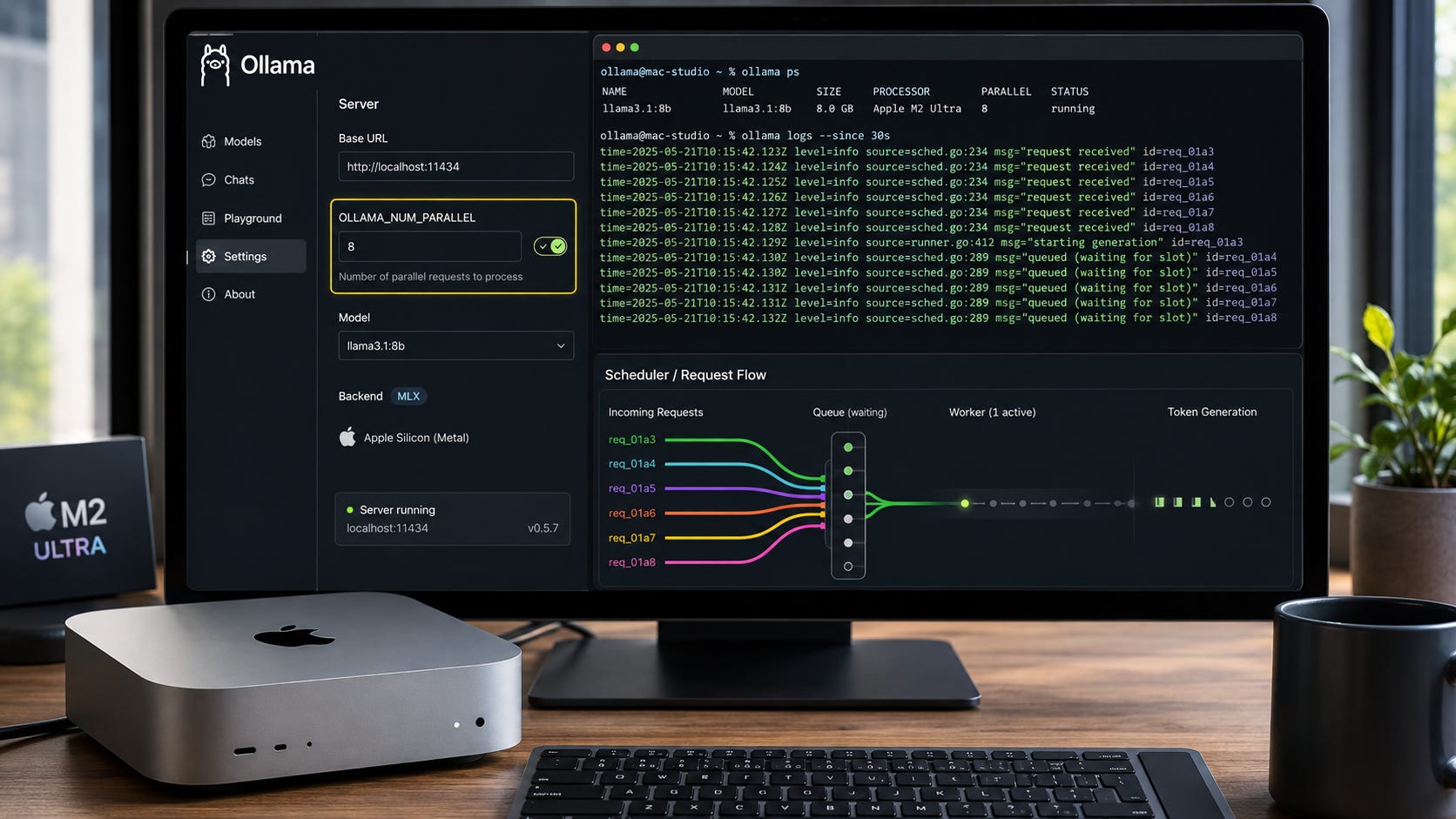
You set OLLAMA_NUM_PARALLEL=4 or 8, restart Ollama, send several requests at once, and they still run one after another. On Apple Silicon, that does not necessarily mean you configured Ollama incorrectly.
Ollama’s FAQ says OLLAMA_NUM_PARALLEL controls the maximum number of parallel requests a loaded model can process. Yet a July 21, 2026 Ollama issue documents the newer MLX runner serializing requests even with OLLAMA_NUM_PARALLEL=8. The reporter reproduced parallel behavior with a GGUF model on the same server, which points to the MLX serving path rather than the top-level Ollama scheduler.
As of August 14, 2026, the proposed MLX continuous-batching fix in PR #17317 remains open. That distinction matters. The pull request shows what a fix may look like, but it is still development work rather than behavior you can assume is present in a released Ollama build.
If concurrency matters to your local RAG pipeline, coding agents, extraction jobs, multi-user setup, or other multi-client workload, the practical goal is to identify which layer is forcing requests into a queue before you change hardware or keep increasing the parallel setting.
Quick fix for OLLAMA_NUM_PARALLEL on Mac
First, make sure OLLAMA_NUM_PARALLEL actually reached the Ollama server process. On macOS, setting an environment variable in an ordinary terminal does not configure an already-running Ollama app. Ollama documents launchctl for environment variables used by the macOS application and requires the app to be restarted after changing them.
If the setting is present but the log shows the model running through ollama runner --mlx-engine, increasing OLLAMA_NUM_PARALLEL again will not solve the specific serialization limitation reported for the MLX path.
The safest released workaround when concurrency matters is to use a GGUF version of the model through Ollama’s non-MLX path, then verify that parallel requests actually overlap. The July issue reports a GGUF model honoring the setting on the same server where the MLX model serialized requests.
If MLX itself is a requirement, use a serving layer that already has released continuous-batching support rather than assuming Ollama’s open MLX pull request is already available in your installation.
The key is to separate configuration failure from backend capability. An environment variable can be correct while the active inference runner still has no released mechanism to honor it.
That layered model is the most important idea in the whole diagnosis. OLLAMA_NUM_PARALLEL is a server setting, but the actual request has to pass through a scheduler, a model-specific restriction if one applies, and the runner that performs inference. A value can survive the first step and still fail to change the last one.
This is also why repeating the same configuration change can be misleading. Raising the value from 4 to 8 does not tell you whether four-way parallelism ever existed. The useful evidence is whether the server saw the variable, which runner loaded, whether Ollama forced Parallel:1, and whether two real requests overlap in wall-clock time.
Once those pieces are separated, the troubleshooting path becomes much shorter. You can stop treating every queued request as a generic performance problem and focus on the layer that is actually limiting concurrency.
What OLLAMA_NUM_PARALLEL is supposed to do
Ollama supports concurrency at two levels. It can keep several models loaded at once, and it can process multiple requests against one loaded model in parallel when the serving path and available memory allow it.
The setting relevant to this problem is:
OLLAMA_NUM_PARALLELOllama documents it as the maximum number of parallel requests each model processes at the same time. The documented default is 1. The same documentation warns that parallel request processing increases memory requirements because the effective context allocation grows with the number of parallel requests.
That memory cost matters, but it is a different failure mode from the MLX serialization problem.
If a backend can process four concurrent sequences but your Mac cannot fit the resulting KV-cache requirements, reducing context length or concurrency may be necessary. That is a capacity problem.
If the active runner effectively has only one sequence in flight, adding more unified memory does not create continuous batching. That is a serving-path problem.
The July MLX issue describes the second case. This is why treating every Parallel:1 result as a memory problem can send troubleshooting in the wrong direction.
What is actually broken in the MLX path
Ollama introduced its Apple Silicon MLX engine in preview on March 30, 2026, presenting it as an Apple-specific inference path built on Apple’s MLX framework and focused on faster performance on Apple Silicon.

The concurrency issue is narrower than saying that MLX itself cannot handle parallel work.
In the reported Ollama case, the affected model is launched through a runner command resembling:
ollama runner --mlx-engine --model <model> --port <port>The report shows that the MLX runner is launched without the equivalent parallel configuration that Ollama passes into its GGUF serving path. With OLLAMA_NUM_PARALLEL=8 set, concurrent requests still fail to overlap and instead wait behind one another.
The open MLX pull request makes the missing pieces unusually clear. It proposes passing OLLAMA_NUM_PARALLEL into the MLX runner, adding multi-sequence caches, and adding a continuous-batch decode loop. A later commit extends that approach to rotating and recurrent caches used by Qwen3.5-style hybrid models.
That is why the environment variable can be visible to the Ollama server while the active MLX runner still does not behave like the GGUF path. The server-level setting and the runner-level implementation are separate pieces of the same request pipeline.
Diagnose the cause before changing anything
Start with the server process. If you run Ollama through the normal macOS application, configure the variables the way Ollama documents:
launchctl setenv OLLAMA_NUM_PARALLEL "4"
launchctl setenv OLLAMA_DEBUG "1"
Then quit Ollama completely and start it again.
If you run ollama serve yourself, quit the GUI server first so you do not collide with the existing process. Then start the server from the same shell:
OLLAMA_NUM_PARALLEL=4 OLLAMA_DEBUG=1 ollama serveThis first check prevents a common misdiagnosis. There is no reason to investigate MLX batching if the server never received your setting.
Next, inspect the active runner. On macOS, the server log is the most useful place to look:
grep -E 'OLLAMA_NUM_PARALLEL|starting runner|mlx-engine|parallel requests|Parallel:' \
  ~/.ollama/logs/server.log | tail -n 100
The exact wording can change between Ollama versions, so focus on the useful signals rather than expecting every line to match an older example.
If you see:
--mlx-engineyou have confirmed that the model is using the MLX runner.
If you also see something like:
model architecture does not currently support parallel requestsyou may have a second restriction involving the model architecture. That warning should be treated separately from the broader MLX continuous-batching issue.
Qwen35MoE has a second parallelism problem
Qwen3.5-family architectures have also been affected by a scheduler restriction that forces numParallel back to 1.
A March report from a user building a multi-agent Codex workflow shows qwen35moe being rejected for parallel requests:
model architecture does not currently support parallel requests
architecture=qwen35moe
followed by a load configuration with Parallel:1, even though OLLAMA_NUM_PARALLEL=2 was present in the server environment.
A separate report shows the same scheduler warning with Qwen3.5 models and OLLAMA_NUM_PARALLEL=8, while the actual parallel value remained at one.
There is also a separate PR #17144 proposing removal of qwen35 and qwen35moe from that scheduler blocklist. Its author says the llama.cpp crash behind the restriction was fixed upstream and reports successful testing on CUDA. As of August 14, 2026, that pull request also remains open. Its validation did not cover Metal, and it is a scheduler-level change rather than the MLX continuous-batching implementation discussed above.
More importantly, removing the Qwen scheduler block does not solve the general MLX batching problem. The MLX issue explicitly distinguishes the blocklist work from the missing continuous-request implementation in the MLX runner.
That separation is useful when reading logs. A Qwen architecture warning can explain why Ollama forces one slot before inference starts. An MLX runner can also serialize concurrent requests for a different reason. Seeing one does not automatically prove that you have the other.
Test whether requests are really serializing
Do not judge concurrency from CPU percentage or Activity Monitor alone. Measure the workload.
First warm the model so initial load time does not contaminate the comparison:
ollama run YOUR_MODEL ""Ollama documents an empty request as a way to preload a model.
Then send two equivalent requests at the same time. The following script uses only Python’s standard library and the local generate endpoint:
import concurrent.futures
import json
import time
import urllib.request

SCHEME = "http"
HOST = "localhost:11434"
URL = f"{SCHEME}://{HOST}/api/generate"
MODEL = "YOUR_MODEL"

def request():
    body = json.dumps({
        "model": MODEL,
        "prompt": "Write a detailed 500-word explanation of TCP congestion control.",
        "stream": False
    }).encode()

    req = urllib.request.Request(
        URL,
        data=body,
        headers={"Content-Type": "application/json"},
    )

    started = time.perf_counter()

    with urllib.request.urlopen(req) as response:
        json.load(response)

    return time.perf_counter() - started

single = request()
print(f"Single request: {single:.1f}s")

started = time.perf_counter()

with concurrent.futures.ThreadPoolExecutor(max_workers=2) as pool:
    durations = list(pool.map(lambda _: request(), range(2)))

wall = time.perf_counter() - started

print(f"Concurrent request durations: {durations}")
print(f"Concurrent wall time: {wall:.1f}s")
Ollama’s /api/generate documentation says the endpoint accepts generation requests and streams partial responses by default. Setting "stream": false in the request makes this test easier to time because the client waits for the normal completed response.
Do not expect perfect scaling. Continuous batching can make each individual request slower while still improving aggregate throughput.
The failure pattern you are looking for is much simpler. If one request usually takes about 40 seconds and two simultaneous requests consistently take about 80 seconds before both finish, they are probably being serialized. Use the runner log to confirm that interpretation rather than relying on timing alone.
The goal of this test is not to produce a universal performance benchmark. It is to distinguish obvious queueing from actual execution overlap on your own machine, model, and serving path.
Fix the MLX serialization problem
▪ Fix 1: Use a GGUF model when concurrent Ollama serving matters
This is the least invasive workaround described by the evidence in the article.
The July MLX issue reports that a GGUF model on the same Ollama server honored OLLAMA_NUM_PARALLEL while the MLX model did not. That makes the non-MLX model path the logical first fallback before replacing the entire local stack.
Choose a GGUF version of the model you need, restart or reload it, and inspect the server log again. Then repeat the two-request timing test. You want evidence that the requests overlap, not merely proof that the environment variable exists.
The tradeoff is straightforward. Ollama has been investing in MLX because it can deliver strong Apple Silicon performance. Moving away from that backend may reduce single-request performance for some models. The benefit is using a serving path where Ollama’s established parallel-request machinery is already present.
For more background on model formats and runners, Popular AI’s Mac mini M4 local LLM guide compares Ollama, MLX-based options, and GGUF-oriented workflows. That broader runner choice is worth considering when concurrency is part of the workload rather than an occasional edge case.
The fallback should also be verified with the same test rather than assumed from the model format alone. The useful comparison is one server, one workload, and two serving paths. If the GGUF path shows overlapping requests while the MLX path does not, you have evidence that the difference is in the serving path rather than in the client script or the top-level parallel setting.
That comparison is more useful than chasing a single throughput number. The question here is whether concurrent jobs make progress together. A backend can be fast for one request and still be a poor fit for a workload that regularly sends several requests at once.
Related:

▪ Fix 2: Do not confuse more memory with missing batching
If a supported backend is running out of memory, reducing OLLAMA_NUM_PARALLEL, context length, or both can be appropriate. Ollama’s own concurrency documentation ties required memory to the parallel setting and context length.
But if the logs confirm the affected MLX path described above, tuning context cannot add a continuous-batch decode loop that the runner does not yet provide in released behavior.
That distinction matters because buying a larger Mac is an expensive way to troubleshoot the wrong layer.
A memory-bound setup and a serialization-bound setup can look similar from the outside. Both may process fewer requests than you expected. The logs tell you whether you are dealing with a capacity limit, an architecture restriction, or the MLX serving path.
For broader cases where Ollama falls back to a slower execution path, Popular AI’s guide to fixing Ollama CPU offloading and slow inference covers the separate memory-pressure and CPU-fallback problem.
Related:

▪ Fix 3: If you require MLX and concurrency, change the serving layer
Apple’s MLX framework is not inherently limited to serving one request at a time.


For example, the open-source oMLX project documents continuous batching through mlx-lm’s BatchGenerator and configurable concurrent-request limits. That is useful evidence that MLX-based serving can support concurrent work when the serving engine implements the required scheduling and batching machinery.
That does not make oMLX a drop-in recommendation for every Ollama installation. Changing servers means checking API compatibility, model formats, agent integrations, update behavior, and any automation that depends on the current stack.
Still, if your requirement is specifically MLX inference plus multiple concurrent local clients, changing the serving layer is more defensible than treating an open Ollama pull request as though it were already a released feature.

The decision is therefore about requirements. If Ollama compatibility matters most, the GGUF fallback keeps you inside Ollama. If MLX itself matters most, use a serving engine that already implements the concurrency behavior you need.
Do not install PR #17317 as though it were an Ollama update
PR #17317 is useful because it shows where the missing implementation belongs. It is not an ordinary user update.
As of August 14, 2026, GitHub still marks the pull request open. It proposes passing the parallel setting into the MLX runner and implementing continuous batching, but it has not been merged into Ollama mainline according to the current pull-request status.
Building an unmerged branch can make sense when you are testing the feature, contributing results, or operating a development environment where source builds are expected.
It is a poor default recommendation for somebody who needs a reliable local RAG server, coding-agent backend, or other everyday local serving setup. A development branch creates a different support and maintenance burden from using a released build.
Keep the distinction simple: an open PR is a proposed fix, not a released fix.
Confirm the fix
After changing the backend or serving setup, verify three things:
The server process actually sees your requested
OLLAMA_NUM_PARALLELvalue.The logs no longer show the affected MLX serialization path or an architecture restriction forcing
Parallel:1.Two simultaneous requests show real execution overlap instead of taking roughly twice the single-request wall time.
Do not stop at checking that the environment variable exists. That proves the configuration reached Ollama. It does not prove that the active inference engine can use it.
The timing test and runner log answer the more important question: did the serving behavior actually change?
If it still fails
Capture the smallest useful diagnostic bundle before opening another issue. Include your Ollama version, exact model tag, Mac model and unified-memory size, OLLAMA_NUM_PARALLEL, OLLAMA_CONTEXT_LENGTH if set, the runner-start line, any Parallel: value or architecture warning, and your single-versus-concurrent timing.
On a Mac, Ollama documents the primary server log at:
~/.ollama/logs/server.logThat log is the best place to confirm which runner launched and whether Ollama forced a lower parallel setting.
Review the log before posting it publicly. Debug logs can contain local usernames, filesystem paths, model locations, environment settings, and details about applications talking to your server.
If the log contains --mlx-engine and the serialization pattern from the July issue, a new generic report that only says “OLLAMA_NUM_PARALLEL does not work” adds less information than a report containing the exact runner, model, environment, and timing evidence.
Good diagnostics should make it possible to distinguish an MLX runner limitation from the Qwen scheduler block, memory pressure, or a configuration variable that never reached the server.
Prevent the problem from returning
If concurrent local inference is part of a production workflow, test it after Ollama updates instead of assuming the behavior remains unchanged.
Keep one known-good GGUF model available as a fallback. Record a simple two-request benchmark for the model you normally serve. Keep context lengths realistic because supported parallel execution still carries a KV-cache memory cost.
This matters most for workloads that create concurrency naturally, including RAG pipelines, local coding agents, batch extraction, multiple users, and multi-agent systems. A setup can look healthy in a single interactive chat while turning into a FIFO queue as soon as several requests arrive together.
A small repeatable benchmark gives you a baseline for catching that regression. It also keeps performance troubleshooting tied to observed request behavior rather than assumptions about a configuration value.
Privacy and security note
There is no need to expose the Ollama API to your LAN or the internet to diagnose this problem. Keep the test against localhost:11434 unless remote access is already part of your workflow.
If you temporarily enable verbose logging, turn it back off afterward:
launchctl unsetenv OLLAMA_DEBUGYou can also restore the parallel setting to Ollama’s default behavior with:
launchctl unsetenv OLLAMA_NUM_PARALLELRestart the Ollama application after changing its launchctl environment.
This keeps the troubleshooting scope local and avoids introducing a networking change that is unrelated to the batching problem you are trying to diagnose.
FAQ
Why does OLLAMA_NUM_PARALLEL=8 still result in Parallel:1?
There are at least two documented causes in the cases covered here. Some architectures such as
qwen35moehave been forced back to one slot by Ollama’s scheduler blocklist, while the Apple Silicon MLX path has a separate continuous-batching limitation. Check the runner and warning messages before deciding which one you have.
Is this an Apple MLX limitation?
The evidence in these sources says no. Other MLX-serving software implements continuous batching, and Ollama’s open PR is attempting to add that behavior to its own MLX runner. The problem described here is the current Ollama serving integration rather than a fundamental inability of MLX to handle concurrent work.
Will more unified memory make OLLAMA_NUM_PARALLEL work?
More memory helps when the backend already supports several parallel sequences and their KV caches need room. It does not implement continuous batching in a runner that currently lacks it. Memory capacity and runner capability are separate constraints.
Is PR #17317 the fix?
It is the most directly relevant proposed fix for the MLX problem described here. As of August 14, 2026, it remains open, so it should be treated as development work rather than a released Ollama feature.
The practical fix for OLLAMA_NUM_PARALLEL on Mac MLX
If OLLAMA_NUM_PARALLEL appears to do nothing on an Apple Silicon Mac, troubleshoot from the outside in.
First confirm that the environment variable reached the Ollama process. Then inspect server.log and identify the active runner. If you see --mlx-engine and simultaneous requests serialize, increasing the parallel value again is unlikely to change the specific behavior documented in the MLX issue.
For a stable Ollama setup, use a GGUF model through the non-MLX path when concurrent serving matters more than the MLX performance advantage. Then rerun the same timing test and confirm that requests overlap.
If you specifically need MLX plus concurrent serving, use a serving engine that already implements continuous batching or treat Ollama’s open PR as development code that requires its own testing.
The setting itself may be present and valid. The active backend can still be the reason it has no effect.
Explore more from Popular AI:
Start here | Local AI | Builds & gear | Autonomy & policy | Fixes & guides | Popular AI podcast
Has OLLAMA_NUM_PARALLEL actually worked for you with Ollama’s MLX runner on Apple Silicon, or are your requests still getting queued?