


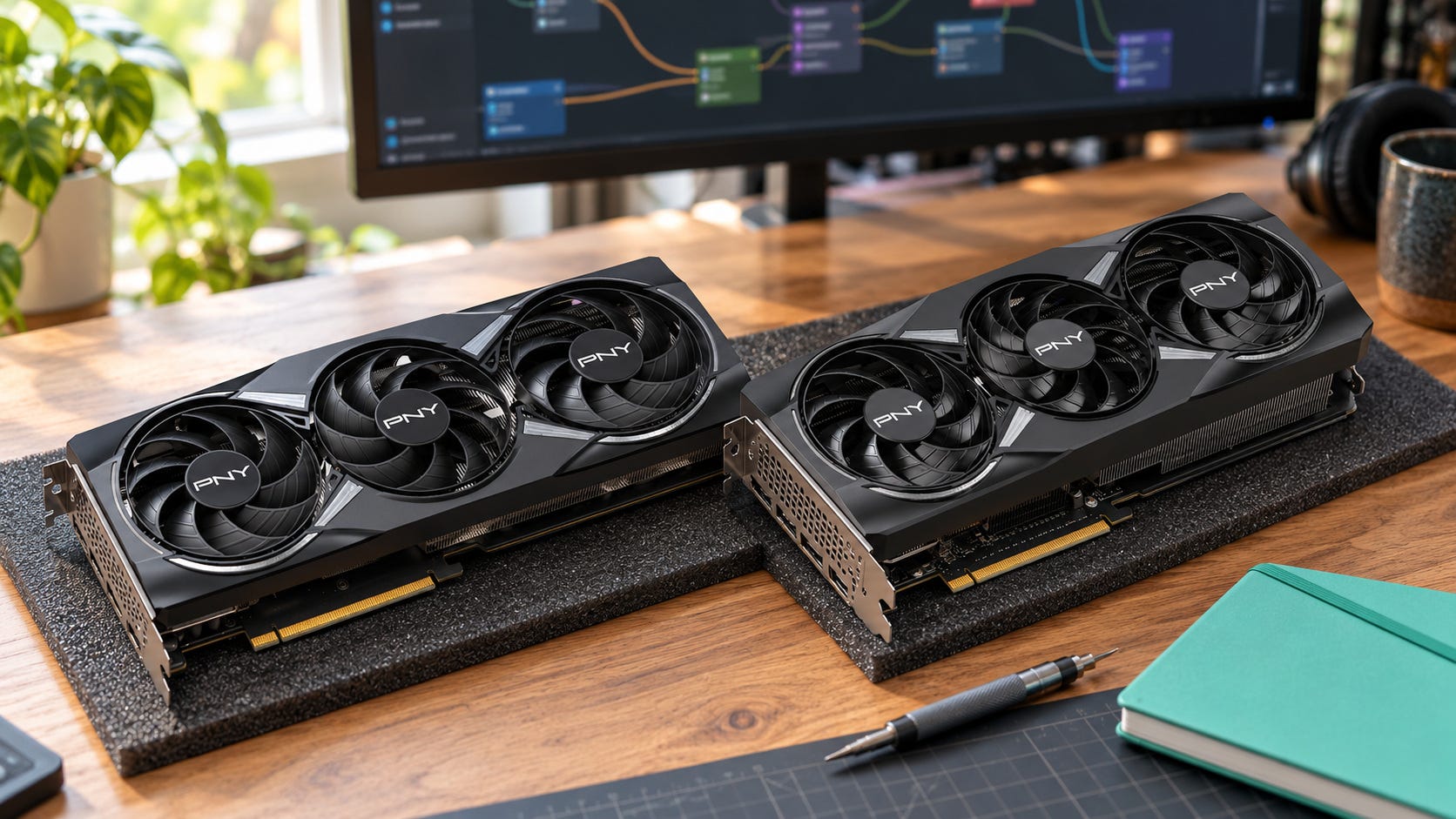
Choosing between the RTX 5060 Ti 16GB and RTX 5070 12GB for ComfyUI starts with the workflow you run most often. The RTX 5070 processes images faster when the models and intermediate data fit into 12GB. The RTX 5060 Ti gives you another 4GB of VRAM, useful for heavier FLUX graphs, layered image editing, and video generation that would otherwise spend more time offloading weights.
For regular SDXL image generation, choose the RTX 5070. If your ComfyUI graphs regularly press against a 12GB limit, the RTX 5060 Ti 16GB may serve you better despite its slower processor.
However, October 2026 retail prices complicate those recommendations.
The 5060 Ti 16GB has lost much of its launch-price appeal, while the 5070 and 5070 Ti also carry substantial markups in the U.S. listings checked for this guide. Before you buy either smaller card, compare the actual price of the 16GB RTX 5070 Ti and decide whether your workload justifies the jump.
The evidence here combines independent Stable Diffusion benchmarks, documented ComfyUI runs, official specifications, and firsthand troubleshooting reports. It does not include an original, controlled head-to-head ComfyUI test. That limitation is important when interpreting the times below.
Disclosure: This post includes Amazon affiliate links. If you buy through them, Popular AI may earn a small commission at no extra cost to you.
Quick verdict for ComfyUI buyers
Buy the RTX 5070 12GB if you mostly generate SDXL images, run smaller diffusion models, or value faster output from graphs that stay within 12GB. Check current pricing before committing.
Buy the RTX 5060 Ti 16GB if you repeatedly load larger image models, combine conditioning components, or generate quantized video with enough memory pressure that less offloading is worth more than higher raw compute speed.
Consider the RTX 5070 Ti 16GB when its premium is reasonable. It offers the same VRAM capacity as the 5060 Ti alongside much higher compute throughput and memory bandwidth.
Consider a used RTX 3090 24GB only at a genuinely attractive price from a trustworthy seller. The extra memory is valuable for heavy local AI, but high asking prices, power demand, and aging hardware make it a conditional purchase.
RTX 5060 Ti vs RTX 5070 specifications for ComfyUI
NVIDIA lists 4,608 CUDA cores, 16GB or 8GB of GDDR7, and a 180W graphics power rating for the 5060 Ti. Its 5070 family specifications show a 12GB RTX 5070 and a 16GB RTX 5070 Ti. For ComfyUI, these are the differences worth comparing:
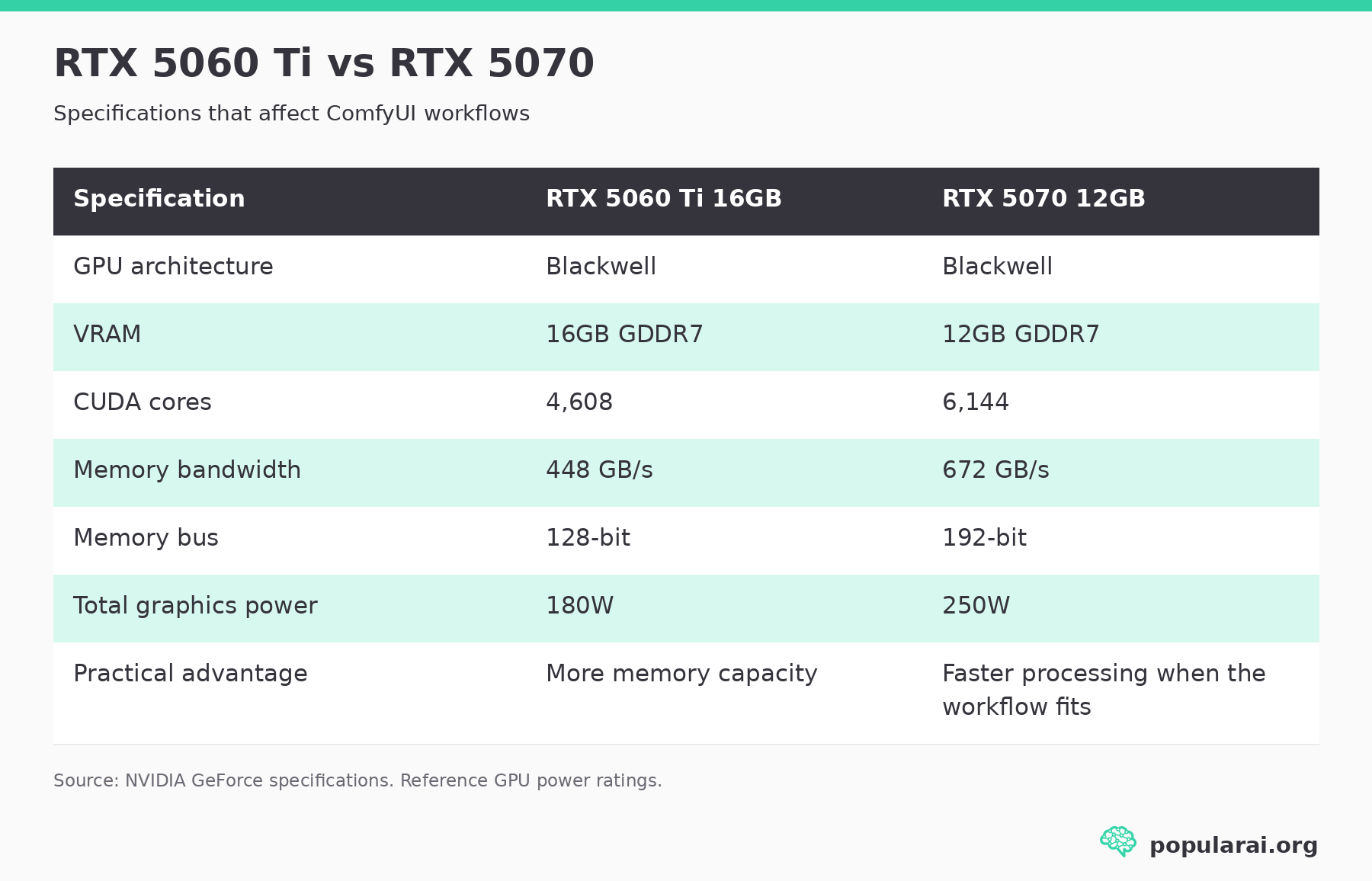
The RTX 5070 has one-third more CUDA cores and 50% greater memory bandwidth. Its higher power budget also allows more performance headroom.
Those advantages are reflected in AI image-generation benchmarks. They do not guarantee a similar advantage in every ComfyUI graph.
The 5060 Ti’s 16GB supplies approximately 33% more VRAM capacity than the 5070’s 12GB. That extra room can accommodate more model weights and intermediate data before ComfyUI needs to move data between GPU memory and other storage.
VRAM capacity determines how much work can remain in fast local memory. Compute performance and bandwidth determine how quickly the GPU can process that work.
For ComfyUI, both sides of that equation affect generation time.
RTX 5060 Ti vs RTX 5070: independent AI image benchmarks
The clearest like-for-like numbers come from StorageReview’s April 2025 UL Procyon testing of the PNY RTX 5060 Ti 16GB against an RTX 5070.
The disclosed RTX 5060 Ti test system ran Windows 11, 64GB of RAM, an AMD Threadripper 7980X, and NVIDIA driver 571.86. The results compare the two GPUs under a standardized image-generation benchmark, not under the same complex ComfyUI graph.
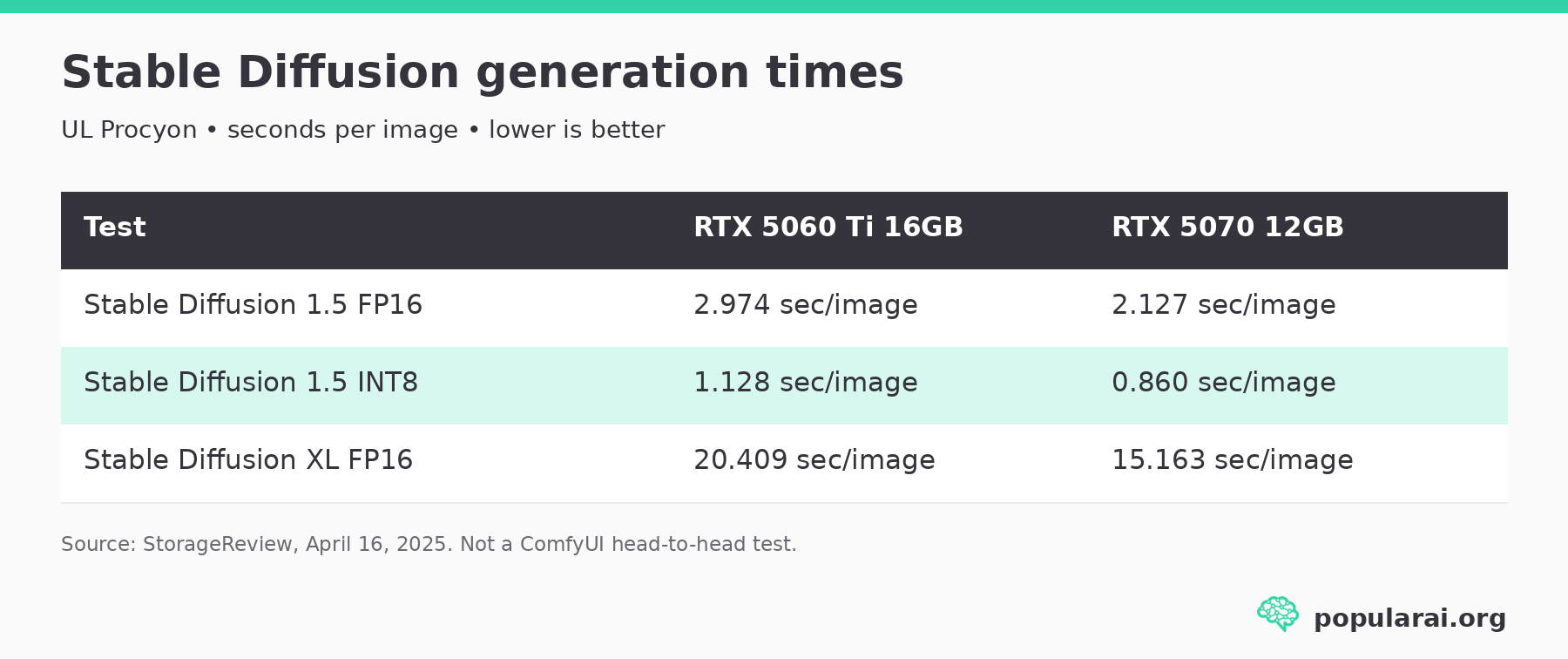
Lower image-generation times are better.
In the SDXL FP16 test, the RTX 5070 finished an average image approximately 5.25 seconds sooner, a reduction of about 26% in generation time. Its SDXL benchmark score was approximately 35% higher.
A separate June 2026 Tom’s Guide GPU review reported UL Procyon SDXL scores of 2,438 for the RTX 5070 and 1,811 for the RTX 5060 Ti. That review did not specify the 5060 Ti memory variant in its comparison table.
The independent results support a straightforward conclusion: when memory capacity is not the limiting factor, the RTX 5070 is the faster image-generation GPU.
Why UL Procyon scores don’t predict every ComfyUI graph
UL Procyon is designed to provide repeatable AI inference measurements. Its AI image-generation benchmark can use different inference engines depending on the tested hardware.
A ComfyUI workflow can behave differently because its performance depends on the exact checkpoint, sampler, precision, resolution, node implementation, attention backend, caching, and memory management.
The benchmark results do not establish how much faster the 5070 will be when a complex graph starts offloading weights. They also do not show whether the two GPUs can execute the same video workflow with identical settings and similar amounts of system RAM.
Actual ComfyUI runs help show what happens in more demanding graphs.
SDXL image generation: the RTX 5070 is faster
If your regular workload consists of SDXL image generation at around 1024 × 1024, without a particularly large collection of extra models or conditioning components, the RTX 5070 is the stronger buy.

The benchmark’s 20.409-versus-15.163-second result gives the RTX 5070 a substantial SDXL FP16 speed advantage. Use it as a starting point when comparing this kind of image workload.
Many common SDXL workflows fit within 12GB. When they do, the extra 4GB on the 5060 Ti provides little immediate benefit. The faster GPU produces images sooner.
That advantage becomes especially useful when generation is repetitive. Someone producing hundreds of variations, testing prompts, or repeatedly changing seeds will run the same model again and again. Saving seconds on each pass is more useful than VRAM that sits idle.
Neither GPU is automatically the fastest option for every SDXL installation. Different attention implementations, sampling configurations, and memory-management modes can change results. Still, the available evidence strongly favors the 5070 for ordinary image-generation throughput.
Verdict: RTX 5070 12GB wins.
FLUX, image editing, and ControlNet: why 16GB helps
More complicated ComfyUI graphs can load several large components, sometimes at different stages of execution.
Consider a workflow combining a large diffusion checkpoint with text encoding, an image-conditioning model, one or more ControlNets, a VAE, and an upscaling stage.
The exact VRAM requirement depends on whether those components remain resident simultaneously, their precision, and how ComfyUI schedules them. Loading three models during one graph does not necessarily mean that their full sizes must fit in VRAM at once.
Even so, heavier workflows leave less room for memory-hungry intermediate tensors, higher resolutions, and additional models.
The 5060 Ti’s 16GB gives you more flexibility before ComfyUI has to move weights out of GPU memory.
A practical example comes from November 2025 RTX 5060 Ti 16GB ComfyUI testing that ran FLUX and Wan2.2 models on the card. The tester used an MSI RTX 5060 Ti 16GB on Windows 11 with Python 3.13, PyTorch 2.8 with CUDA 12.8, and SageAttention.
For a FLUX Krea Dev run at 992 × 1440 and 20 steps, the reported sampling portion took approximately 53 seconds. The first full execution took 121.71 seconds because it included model loading.
A separate FLUX Art Fusion run at 992 × 1440 and 25 steps reported 34 seconds of sampling and 38.36 seconds for a subsequent complete execution. The tester also used WaveCache and explored different precision settings.
These figures demonstrate that a 16GB RTX 5060 Ti can handle useful FLUX-class workflows, including fairly high image resolutions.

They cannot tell us how quickly an RTX 5070 would complete exactly the same runs. The model variants, optimization settings, and loading conditions all affect performance.
For image editing, the 16GB recommendation becomes stronger when your preferred model and graph are already putting pressure on a 12GB card. If you only use a lightweight quantized model that fits within 12GB, the RTX 5070 can remain faster.
Verdict: RTX 5060 Ti 16GB for memory-heavy graphs. RTX 5070 for smaller, well-optimized workflows.
Check that the listing is for the 16GB model. The 8GB version loses the capacity advantage that makes this card worth considering for heavier graphs.
Wan2.2 video: 16GB offers more room, not instant output
AI video is the workload most likely to make buyers regret purchasing too little VRAM.
Video diffusion models must process information across multiple frames. Resolution, frame count, model size, attention implementation, and latent dimensions can all raise memory pressure.
The official ComfyUI Wan2.2 tutorial describes multiple configurations, from smaller models to heavier video workflows.
Wan2.2 covers several workloads with different VRAM requirements.
A quantized 5B configuration can behave very differently from a 14B workflow using separate high-noise and low-noise models.
Documented RTX 5060 Ti Wan2.2 generation times
In the same documented 5060 Ti tests, a Wan2.2 image-to-video graph used SmoothMixWan22 models with Q8 and Q6 quantization, WanVideoBlockSwap, SageAttention, and other optimizations.
At 496 × 720 resolution, the tester reported:
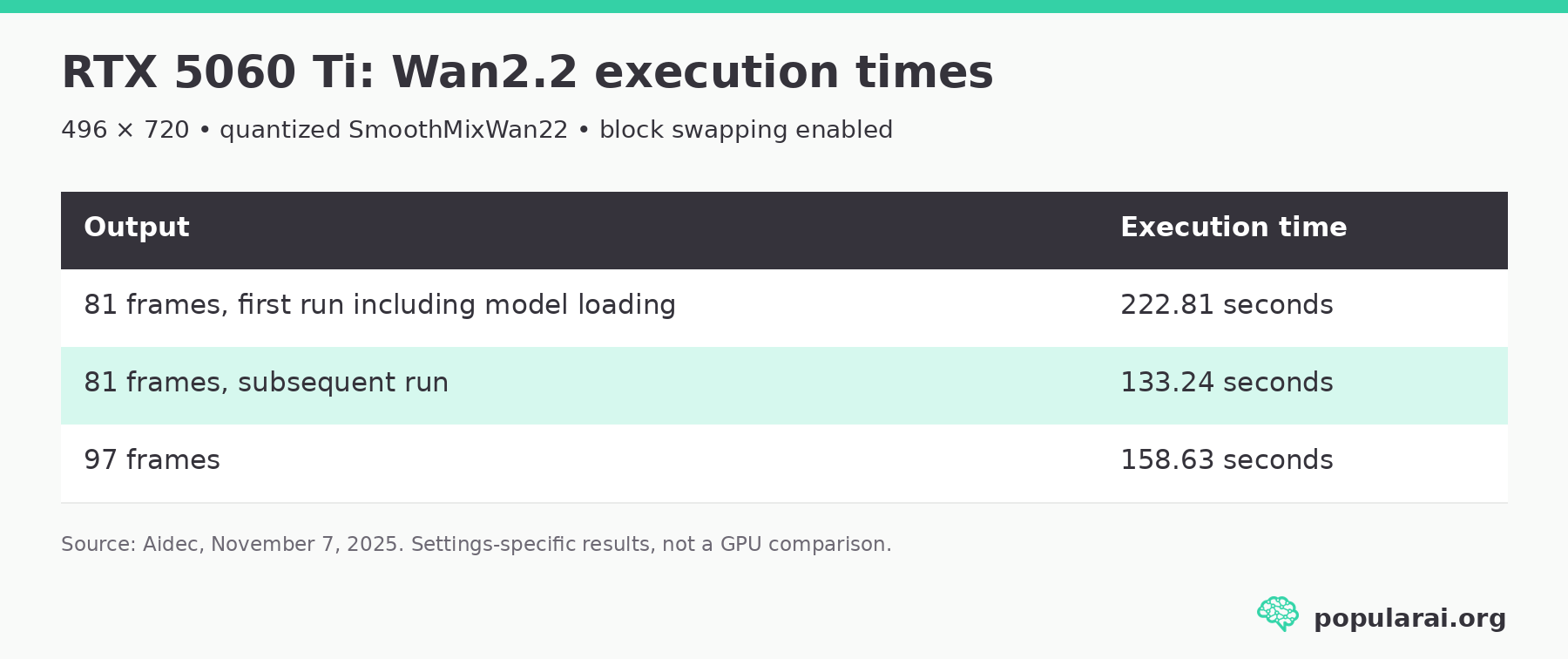
These are actual reported ComfyUI execution times on the 16GB card.
They also show why reading a video benchmark without its settings is dangerous.
The workflow used block swapping to reduce VRAM requirements. As the tester explained, moving blocks out of VRAM can allow a workflow to run at the cost of longer execution times.
The RTX 5060 Ti can generate useful short video clips. That does not mean it can load every Wan configuration entirely into VRAM, or that generation will be quick when the graph becomes more demanding.
A 12GB RTX 5070 can also run video workflows with appropriate model choices and memory management. Its compute advantage may help on smaller configurations. As memory pressure increases, the card’s reduced capacity makes more offloading likely.
Verdict: RTX 5060 Ti 16GB if video is a regular part of your workflow. Consider 24GB or more for heavier, less compromised video work.
Why a 12GB RTX 5070 may offload more often
A 12GB RTX 5070 reaches its physical memory ceiling sooner, although ComfyUI’s software can change what happens next.
A workflow that uses 13GB or 14GB of resident GPU allocations cannot fit entirely within the 5070’s physical VRAM. A 16GB card has more room for those allocations before offloading becomes necessary.
But exceeding physical VRAM does not automatically mean the workflow fails.
ComfyUI’s memory-management system can load and unload components, move model weights through system memory, and use other techniques to reduce the amount of data that must remain on the GPU.
In March 2026, ComfyUI described Dynamic VRAM, which loads model weights on demand and evicts lower-priority weights as memory pressure changes.
ComfyUI also documents asynchronous weight offloading, VRAM reservations, and GPU memory modes.
This changes the meaning of the 12GB-versus-16GB decision.
A workflow might complete on either card while using system RAM to store some of its model weights. Yet the 12GB card may spend more time transferring data into GPU memory, particularly when a large model repeatedly needs weights that cannot all remain resident.
PCIe transfers and system RAM are much slower than accessing the GPU’s local GDDR7 memory. Frequent transfers can reduce or overwhelm the benefit of the 5070’s faster processor.
The crossover point depends on the actual graph.
More VRAM cannot fix every ComfyUI memory problem
An important counterexample comes from a June 13, 2026 ComfyUI report of aggressive offloading on an RTX 5060 Ti 16GB.
A user running an RTX 5060 Ti 16GB with 64GB of system RAM reported aggressive offloading in a Wan2.2 image-to-video workflow. The environment included Windows 11, a PyTorch nightly build, CUDA 13.0, ComfyUI 0.24.0, and additional custom nodes.
The user reported that memory allocation became increasingly aggressive as output resolution increased, despite substantial physical VRAM being available.
That is one user’s software-specific report, not evidence that all RTX 5060 Ti cards behave that way.
The report exposes a limit of buying advice based on VRAM alone: a card’s advertised memory capacity does not guarantee that every ComfyUI version or custom node will use it effectively.
ComfyUI users encountering strange OOM errors should test whether the error actually comes from physical VRAM exhaustion before spending money on a replacement GPU.
More on ComfyUI memory problems:

Can quantization and Dynamic VRAM make 12GB work?
You can reduce the memory requirement of a workflow, but you cannot create another 4GB of physical VRAM through a setting.
Quantization is often one of the most useful adjustments. FP8, GGUF, and other reduced-precision model variants can substantially lower model weight storage requirements, although output quality, compatibility, and performance depend on the implementation.
Reducing resolution, frame count, batch size, or the number of simultaneously required components can also help.
The practical approach is to start with ComfyUI’s current memory-management defaults and change settings only when you have identified a problem.
The official startup-flags reference contains an easily missed detail: on versions with Dynamic VRAM enabled, --lowvram has no effect. Older advice recommending that flag as a universal fix may no longer apply.
Similarly, --highvram is intended to keep models in GPU memory, while --gpu-only forces GPU residency. Neither is a sensible way to solve a workflow that genuinely exceeds the available physical VRAM.
If the same workflow runs slowly on both GPUs because of extensive offloading, a bigger card may be a more effective upgrade than another round of startup-flag experiments.
RTX 5070 Ti 16GB: faster and less compromised, at a price
Anyone considering spending a substantial amount on the RTX 5060 Ti 16GB should check the RTX 5070 Ti first.

The RTX 5070 Ti includes 16GB of GDDR7, 8,960 CUDA cores, and a 256-bit memory bus.
Its theoretical memory bandwidth is 896 GB/s, twice that of the 5060 Ti.
The RTX 5070 Ti has the same 16GB memory capacity as the 5060 Ti while offering substantially more compute resources and memory bandwidth. It also draws more power, with a 300W reference total graphics power.
For someone who regularly uses ComfyUI, the 5070 Ti is a more balanced long-term card. It can handle the same general VRAM tier while reducing processing time in many compute-intensive workloads.
The question is how much extra it costs.
At a modest premium, the 5070 Ti is preferable. At a very large premium, the slower 5060 Ti may still be reasonable for someone primarily trying to fit a particular model or workflow.
Compare the final seller price and verify that the listing is for a desktop graphics card.
Used RTX 3090 24GB: more VRAM with real drawbacks
The RTX 3090 remains relevant because its 24GB of GDDR6X is genuinely useful for large ComfyUI models, especially when avoiding offloading is the priority.
That is 50% more VRAM than the RTX 5060 Ti 16GB and twice the capacity of the RTX 5070 12GB.
The RTX 3090 also has 936 GB/s of memory bandwidth, though its older Ampere architecture lacks some of the newer Blackwell hardware capabilities and optimizations.
For memory-heavy local AI, the additional capacity can outweigh architectural age.
The RTX 3090 still offers strong ComfyUI value when a workflow actually uses its full 24GB of VRAM, but its age and power needs change the buying calculation. If your budget stretches to newer high-end GPUs, our RTX 3090 versus RTX 4090 versus RTX 5090 comparison for local AI places the older card in that wider context.
More on the RTX 3090 for ComfyUI:


Used RTX 3090 pricing weakens the value case
The RTX 3090 was once an attractive recommendation because buyers could obtain 24GB of NVIDIA VRAM at a significant discount to modern high-end cards.

By October 2026, that assumption deserves a fresh price check.
U.S. eBay results for used RTX 3090 24GB cards include asking prices around $1,400 to $1,650, alongside more expensive listings and substantial shipping charges on some imports. These are asking prices, not confirmed completed sales.
At those prices, the used RTX 3090 is much harder to recommend.
The RTX 3090 also carries a reference 350W power rating. Many factory-overclocked versions consume more, and some require three 8-pin PCIe power connections. A suitable power supply, case clearance, and cooling are essential.
An aging 3090 can also have worn fans, thermal-pad problems, or a history of prolonged heavy use.
Buy a used RTX 3090 when the additional 8GB over a 16GB card solves a real problem and the purchase price is attractive. Avoid paying a premium merely because it has 24GB.
Compare the exact card’s condition, return terms, shipping, and total cost. Old premium Amazon listings can cost far more than a sensible used-card purchase.
AMD and Intel GPUs for ComfyUI: compatibility comes first
The broader market contains some attractive memory-capacity alternatives.
AMD’s Radeon RX 9060 XT 16GB and RX 9070 XT 16GB offer the same nominal VRAM capacity as the RTX 5060 Ti 16GB. Intel’s Arc B580 provides 12GB, while some Arc Pro models target higher-memory professional workloads.
For general computing and gaming, those cards can present compelling alternatives.
ComfyUI changes the buying calculation.
The official ComfyUI project supports multiple hardware backends, but individual model implementations and custom nodes can still depend on NVIDIA CUDA-specific features.
That is especially relevant when following ComfyUI tutorials that assume CUDA, using experimental attention implementations, or installing video custom nodes that depend on particular GPU kernels.
AMD ROCm support and Intel backends continue to improve, but compatibility needs to be checked against the exact nodes and models you intend to use. An inexpensive 16GB AMD card is poor value if your preferred ComfyUI workflow requires significant modification or cannot run through your chosen backend.
For a Windows user who wants broad compatibility with existing ComfyUI workflows, NVIDIA remains the easier recommendation. Linux users comfortable checking ROCm support may find AMD more competitive.
October 2026 GPU prices: the RTX 5060 Ti is no longer cheap
U.S. retail check: October 20, 2026. The figures below come from retailer listing pages and can change with inventory, seller, and checkout availability. They are examples, not a promise that a particular card will still cost the same when you order.
▪ At launch, the RTX 5060 Ti 16GB had a $429 suggested price, and the RTX 5070 launched at $549. A $120 gap made the slower card an appealing way to buy more NVIDIA VRAM. That original comparison is a poor guide to October 2026 purchases.
▪ A Newegg ASUS Dual RTX 5060 Ti 16GB listing shows $799.99. In other RTX 5060 Ti 16GB listings, MSI models appear near $800 to $830. These asking prices are well above the card’s launch positioning.
▪ The RTX 5070 12GB listings on Newegg show several Gigabyte, MSI, ASUS, and PNY cards roughly in the $860 to $900 range, with higher-priced versions also present. That is considerably more than the roughly $630 to $650 examples used in earlier comparisons. The RTX 5070 is still faster in the relevant image benchmarks, but its real retail premium over an $800 5060 Ti can be only $60 to $100, depending on the exact models.
▪ The RTX 5070 Ti 16GB listings include a Gigabyte WindForce at $1,169.99 and the PNY EPIC-X at $1,299.99. Compared with an $800 RTX 5060 Ti, those examples add roughly $370 to $500. Compare cooler variants and sellers before treating $1,300 as the entry price for the GPU.
These examples change the advice. An $800 RTX 5060 Ti 16GB can make sense for workloads that need the extra 4GB, especially when the available RTX 5070 is almost $900. A $900 RTX 5070 is still the throughput choice for SDXL, though its value is weaker than it would be at launch pricing. The RTX 5070 Ti makes sense for frequent, compute-heavy work if you can absorb the much larger outlay.
Compare actual listings rather than GPU names. A price gap of $60 calls for a different decision from a gap of $250. Seller reputation, return options, shipping, and the exact 8GB or 16GB configuration can overturn a seemingly good deal.
Test your own ComfyUI graph before buying another GPU
When you’re deciding between these GPUs, a successful run is only half the evidence. Compare how much time your regular workflow spends sampling, loading models, decoding, and waiting for weights to move between RAM and VRAM.
Start with the graph you use most. Record its model and quantization variant, image dimensions or video frame count, sampler, step count, and ComfyUI version. Note both first-run and subsequent-run times. The first run may include substantial model loading, while the next run can benefit from models or components already resident in memory.
Then try one controlled change if you suspect a memory limit. Reduce image resolution or video frames without changing the checkpoint or optimization stack. If the graph becomes much easier to execute and VRAM pressure falls, capacity may be an important constraint. If the graph still spends most of its time sampling while fitting comfortably in memory, a faster processor is the more plausible upgrade target.
Check the same behavior when using a quantized model you would actually be happy to keep. A model that technically runs only after several compromises isn’t the same as one that supports your preferred output resolution and workflow. Conversely, buying 16GB just in case makes little sense if your regular graphs remain comfortably under 12GB.
Don’t compare one creator’s optimized Wan setup with someone else’s unoptimized FLUX run and treat the times as GPU rankings. The settings differ too much. Choose based on the workload and behavior you can observe on your own system.
Check system RAM, PCIe, storage, and power before upgrading
The GPU is only one part of a local AI workstation. Our local AI hardware and builds guides cover the wider tradeoffs, but several checks are especially relevant to this comparison.
▪ For lighter image generation, 32GB of system RAM is a reasonable starting point. For regular video work and workflows relying on substantial CPU offloading, 64GB is a more comfortable target. These are practical build recommendations, not fixed ComfyUI minimum requirements.
▪ An NVMe SSD is preferable to slow storage for large model files, repeated loading, and disk-backed memory behavior. Video models and their multiple precision variants can consume substantial disk space before you save a single output.
▪ Power and physical dimensions also affect the upgrade. The 180W RTX 5060 Ti is comparatively easy to accommodate. The 250W RTX 5070 and 300W RTX 5070 Ti require more PSU and cooling headroom. A used 3090 generally deserves the most careful power, thermal, and clearance checks.
Connector requirements vary by board partner. Some 5060 Ti cards use a conventional 8-pin connector, while others use a 16-pin connector. Check the exact product specifications rather than relying on the GPU name alone.
If you’re upgrading an older PC, also check the motherboard’s PCIe configuration. The 5060 Ti uses eight PCIe 5.0 lanes, which can affect available transfer bandwidth on older systems. The impact on ComfyUI will be workload-dependent, particularly when offloading is involved.
⚠️ Finally, don’t assume that two GPUs with 12GB and 16GB automatically behave like a single 28GB card. Multi-GPU memory is not pooled transparently for ordinary ComfyUI workflows.
More on local AI hardware builds:

FAQ: RTX 5060 Ti vs RTX 5070 for ComfyUI
Is 16GB of slower VRAM better than 12GB of faster VRAM for Stable Diffusion?
For ordinary Stable Diffusion and SDXL graphs that fit into 12GB, the RTX 5070’s faster processor and memory bandwidth will usually do more for generation speed than another 4GB of unused VRAM. The standardized benchmark results back that up.
The RTX 5060 Ti 16GB has the advantage when a specific graph repeatedly offloads on 12GB but can keep substantially more of its active data resident on 16GB. The model, precision, resolution, and memory-management mode determine where the result changes.
Is 12GB enough for ComfyUI in 2026?
Yes. A 12GB GPU can run many useful image-generation graphs and some video workflows with quantization and offloading. If SDXL is your main use case, a reasonably priced RTX 5070 12GB is a strong fit.
A 16GB card gives more headroom for larger models, higher resolutions, and multi-component graphs. It does not guarantee that every model will stay fully in VRAM, and a 12GB card does not automatically fail when a workflow’s total model files are larger than 12GB.
Will the RTX 5060 Ti 16GB run Wan2.2 14B?
Some quantized Wan2.2 14B configurations can run on an RTX 5060 Ti 16GB with block swapping, offloading, and other optimizations. The firsthand Wan2.2 example earlier in this guide shows a 16GB RTX 5060 Ti producing short clips with specific SmoothMixWan22 models and settings.
That result doesn’t mean every 14B graph will run unchanged, or that output will arrive quickly. Resolution, frame count, model variants, system RAM, and custom nodes can change the memory and processing requirements.
Is the RTX 5070 Ti worth paying extra for ComfyUI?
It can be, particularly when you generate enough images or video for faster processing to save serious time. It gives you the 5060 Ti’s 16GB capacity alongside much higher compute resources and bandwidth.
At the October 2026 listing examples of about $800 for a 5060 Ti 16GB and about $1,300 for a 5070 Ti 16GB, the $500 difference is substantial. A capacity-focused buyer with an occasional demanding graph may be better served by keeping that money.
Should you buy a used RTX 3090 instead?
Buy a used RTX 3090 when its 24GB is genuinely useful and the card’s total cost, cooling, condition, and power requirements are acceptable. That much VRAM can reduce offloading in workflows that overwhelm 16GB.
With asking prices for many used units still elevated, a newer 16GB card may offer the better overall purchase unless your graph specifically needs the additional capacity. Inspect the exact used card rather than buying only on the promise of 24GB.
RTX 5060 Ti 16GB vs RTX 5070 12GB: which to buy for ComfyUI
▪ Choose the RTX 5070 12GB for ordinary SDXL and smaller image workflows. Its measured Stable Diffusion advantage is substantial, and the card will pay that advantage back with every batch that stays within its memory. The PNY RTX 5070 12GB is one product-specific option to compare against current retailer prices, not a reason to pay any price.
▪ Choose the RTX 5060 Ti 16GB for workflows that actually stress 12GB. If larger FLUX graphs, image editing, stacked conditioning, or quantized Wan video are a regular part of your work, keeping more data in VRAM may matter more than finishing a simple benchmark faster. Check the PNY RTX 5060 Ti 16GB against other listings, and make sure it is the 16GB variant.
▪ Around $800 for a 5060 Ti versus $860 to $900 for a 5070, you’re choosing between another 4GB of capacity and faster processing. The checked 5070 Ti examples start around $1,170, with the PNY EPIC-X near $1,300. That buys both 16GB and more compute, but the additional $370 to $500 needs to earn its place in your budget.
▪ For frequent, complex video work, investigate 24GB and higher-memory options before spending heavily on either 12GB or 16GB. And if your present ComfyUI setup reports memory errors despite free VRAM, diagnose that software behavior first. Buying a new GPU will not automatically fix a broken offloading path.
Use your own graph, your real memory pressure, and the checkout price to decide. The right card is the one that runs your work without making you pay for performance or VRAM you rarely use.
Explore more from Popular AI:
Start here | Local AI | Builds & gear | Autonomy & policy | Fixes & guides | Popular AI podcast
If you were building a local AI PC today, would you choose the RTX 5060 Ti's 16GB VRAM or the RTX 5070's extra speed? Curious what everyone prioritizes for Ollama, ComfyUI, and local LLMs.