


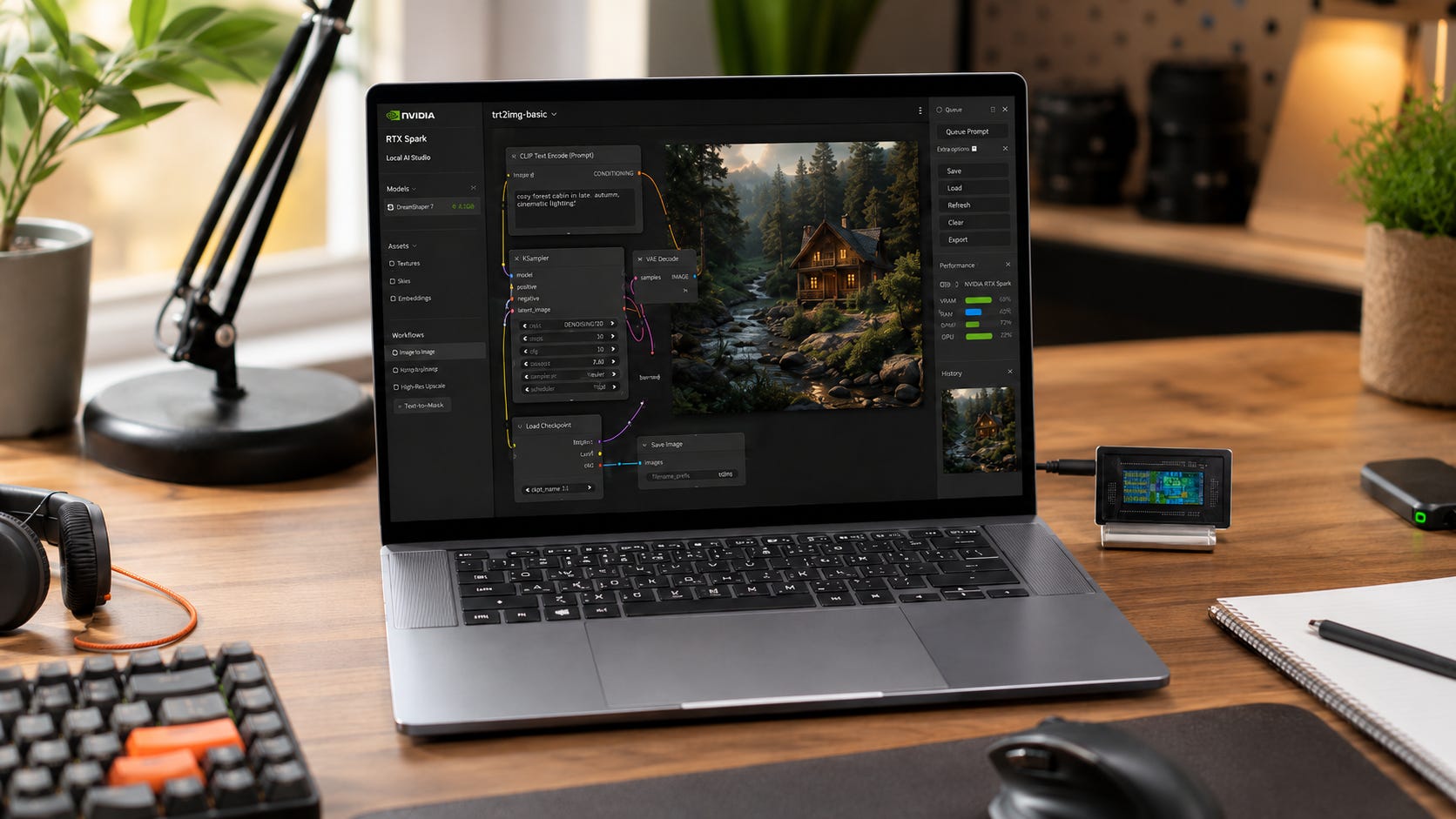
NVIDIA’s RTX Spark platform could solve one of the most irritating local-AI hardware problems. Windows laptops with CUDA usually have too little GPU memory, while laptops with large unified-memory pools usually lack CUDA.
The important correction is that NVIDIA is not putting 128GB of dedicated VRAM into a laptop. RTX Spark supports up to 128GB of unified system memory shared by its Grace CPU, Blackwell GPU, Windows, and applications.
That is still a significant development. It could allow CUDA software to run models and creative workflows that cannot fit on conventional 16GB or 24GB laptop GPUs. Capacity alone, however, does not tell us how quickly RTX Spark will run a 70B model, generate video in ComfyUI, or sustain a long training job.
For anyone preparing to spend several thousand dollars on a local-AI laptop or compact workstation, the sensible answer is to wait for independent reviews. Keep using your current machine unless it is already blocking real workloads.
The buying question is therefore less about whether RTX Spark matters and more about what kind of buyer should delay a purchase until it is released. Its strongest case is model fit: a large shared memory pool could remove the hard capacity ceiling that defines current CUDA laptops. Its weakest case is uncertainty: memory bandwidth, sustained thermals, Arm compatibility, configured pricing, and real application performance remain unproven.
More on dedicated VRAM vs unified memory:

Disclosure: This post includes Amazon affiliate links. If you buy through them, Popular AI may earn a small commission at no extra cost to you.
RTX Spark buying verdict
Most prospective RTX Spark buyers should wait. The first systems are expected later in 2026, but final prices, memory configurations, bandwidth, software compatibility, and sustained AI performance remain unclear.
That does not mean every local-AI buyer should stop purchasing hardware. If 32GB is enough and throughput matters more than extreme model capacity, a desktop RTX 5090 remains the strongest conventional CUDA option. NVIDIA gives the desktop card 32GB of GDDR7 memory, backed by the mature x86 Windows and Linux software ecosystem.
Buyers who need portable CUDA support now can consider an RTX 5090 laptop. The mobile GPU has 24GB of GDDR7 memory, which is enough for many ComfyUI workflows, local coding models, creator applications, and smaller quantized LLMs. Its weakness is straightforward: 24GB remains 24GB, regardless of how expensive the laptop is.
When model capacity matters more than CUDA compatibility, a 128GB Ryzen AI Max+ 395 mini PC offers a buy-now alternative. AMD supports 128GB of LPDDR5X-8000 memory with 256GB/s of bandwidth. One concrete option is the GMKtec EVO-X2 with 128GB, which combines the Ryzen AI Max+ 395 with a 2TB SSD and two M.2 storage slots.
The current 128GB CUDA alternative is DGX Spark. It offers coherent unified memory and NVIDIA’s Linux-based development stack, but its specialist pricing makes it a development appliance rather than an obvious general-purpose home computer.
The configuration to avoid is a low-memory RTX Spark machine sold at a premium. The platform’s unusual value comes from combining CUDA with 64GB or 128GB of accessible memory. A 16GB or 32GB version would retain the uncertainty of a new Windows-on-Arm platform without providing the capacity advantage that makes RTX Spark interesting.
What RTX Spark actually is
RTX Spark is a laptop and compact-desktop platform built around an Arm-based NVIDIA Grace CPU and an integrated Blackwell GPU.
The platform can be configured with up to 20 Grace CPU cores, 6,144 Blackwell CUDA cores, fifth-generation Tensor Cores, and as much as 128GB of unified memory. NVIDIA also advertises up to one petaflop of theoretical FP4 AI performance and NVLink-C2C communication between the CPU and GPU.
NVIDIA’s official RTX Spark overview presents the platform’s architecture and intended AI, creative, and gaming use cases:
RTX Spark is a platform rather than a single computer, and NVIDIA plans to place it in laptops and compact desktops from Microsoft, Asus, Dell, HP, Lenovo, MSI, Acer, and Gigabyte. Announced systems include the Surface Laptop Ultra, Surface RTX Spark Dev Box, Asus ProArt models, a Dell XPS 16 Creator Edition, HP OmniBooks, Lenovo systems, and MSI laptops:
The platform runs Windows 11 on Arm rather than conventional x86 Windows.
Microsoft says its Prism compatibility layer has been optimized for RTX Spark. Prism translates x86 and x64 applications that lack native Arm builds. Microsoft is also preparing CUDA support, WSL integration, PyTorch tooling, llama.cpp, TensorRT, ComfyUI, Unsloth, and other development frameworks.
The Surface RTX Spark Dev Box will include Windows 11 Pro, Visual Studio Code, WSL, PowerShell 7, and other development tools.
This software commitment is more substantial than earlier attempts to turn Windows on Arm into a credible workstation platform, although the ecosystem remains under active development rather than reaching full retail maturity.
Why RTX Spark could change local-AI laptops
Local-AI buyers repeatedly face the same compromise.
An RTX laptop gives you CUDA, mature NVIDIA drivers, and broad application compatibility. Its GPU usually has 8GB, 12GB, 16GB, or 24GB of dedicated memory. That works well until a model or workflow no longer fits.
Apple Silicon and AMD Strix Halo systems can provide 64GB or 128GB of unified memory. They can load much larger models, but many AI projects still prioritize CUDA. Some applications work well through Apple MLX, Vulkan, ROCm, DirectML, or other backends. Others require additional troubleshooting, lose important optimizations, or do not support the hardware properly. For a direct comparison of the two mature unified-memory alternatives, see our article on M4 Max versus Ryzen AI Max+ 395 for local AI.

The closest buy-now comparison is covered in Popular AI’s Strix Halo mini-PC buying guide, which asks the same central question: is 128GB of unified memory worth accepting weaker software support and lower bandwidth than dedicated NVIDIA VRAM?
RTX Spark promises to combine a large memory pool with NVIDIA’s CUDA, TensorRT, OptiX, and RTX ecosystem. It also offers Windows applications alongside a Linux development environment through WSL. For buyers who want a portable machine rather than a multi-GPU tower, that combination is unusually attractive.
NVIDIA says RTX Spark can run 120B-parameter LLMs with up to a one-million-token context, render scenes larger than 90GB, edit 12K video, and generate 4K AI video locally.
Those are vendor claims based on selected configurations and optimized software. They should be treated as targets until retail machines are tested independently.
The basic hardware idea remains sound. Local models fail immediately when they cannot fit into available memory. A large shared pool removes that hard ceiling, even when the resulting workload runs more slowly than a smaller model on dedicated GDDR7.
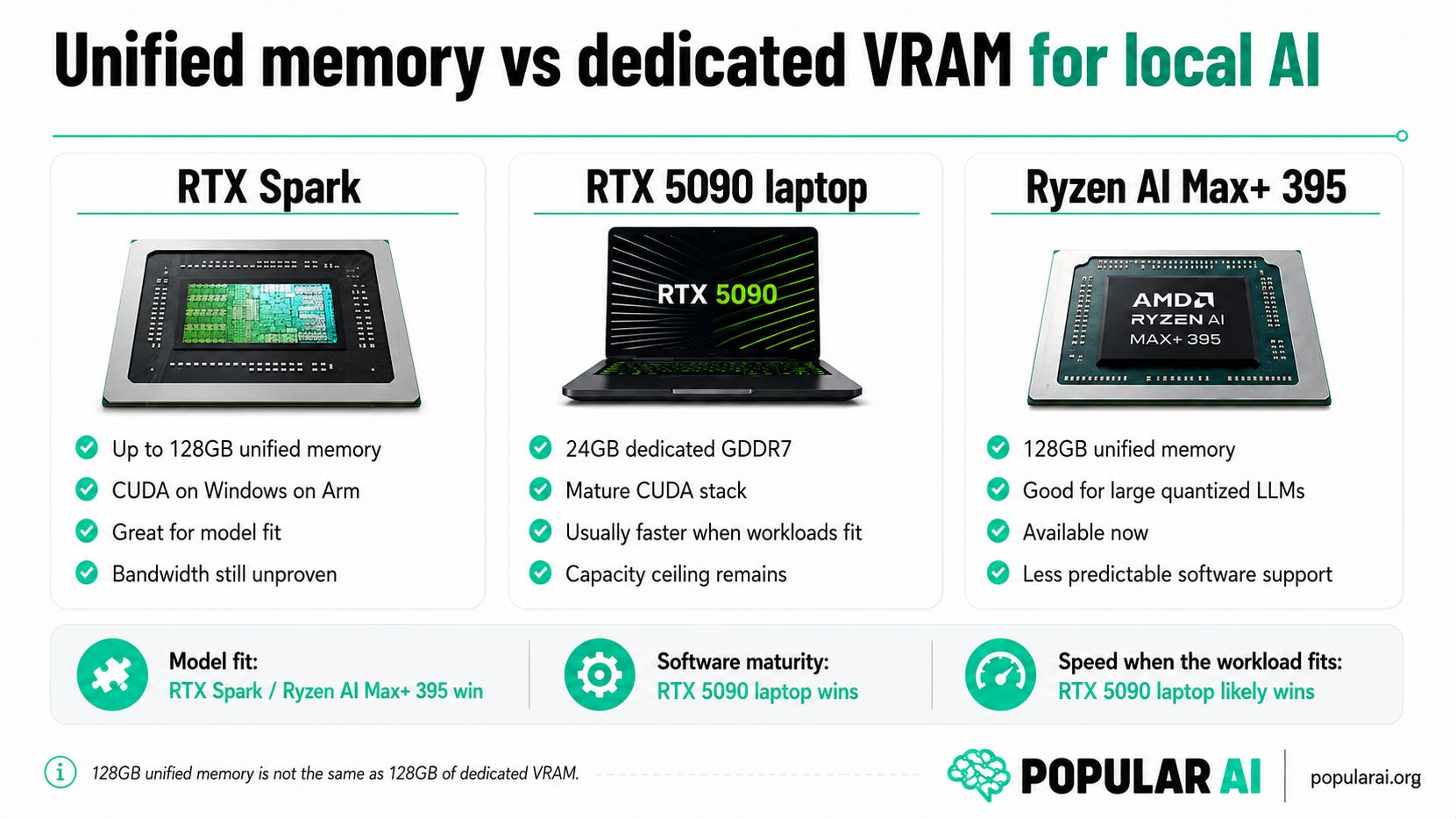
RTX Spark promises the strongest combination of model capacity and CUDA support, while an RTX 5090 laptop offers the most mature software path and Strix Halo provides 128GB today. Actual RTX Spark speed still depends on memory bandwidth, power limits, and software support.
Unified memory is not the same as dedicated VRAM
RTX Spark’s 128GB unified memory capacity will attract buyers who have spent years fighting 8GB, 12GB, 16GB, and 24GB GPU limits. However, it should not be interpreted as a 128GB graphics card placed inside a thin laptop.
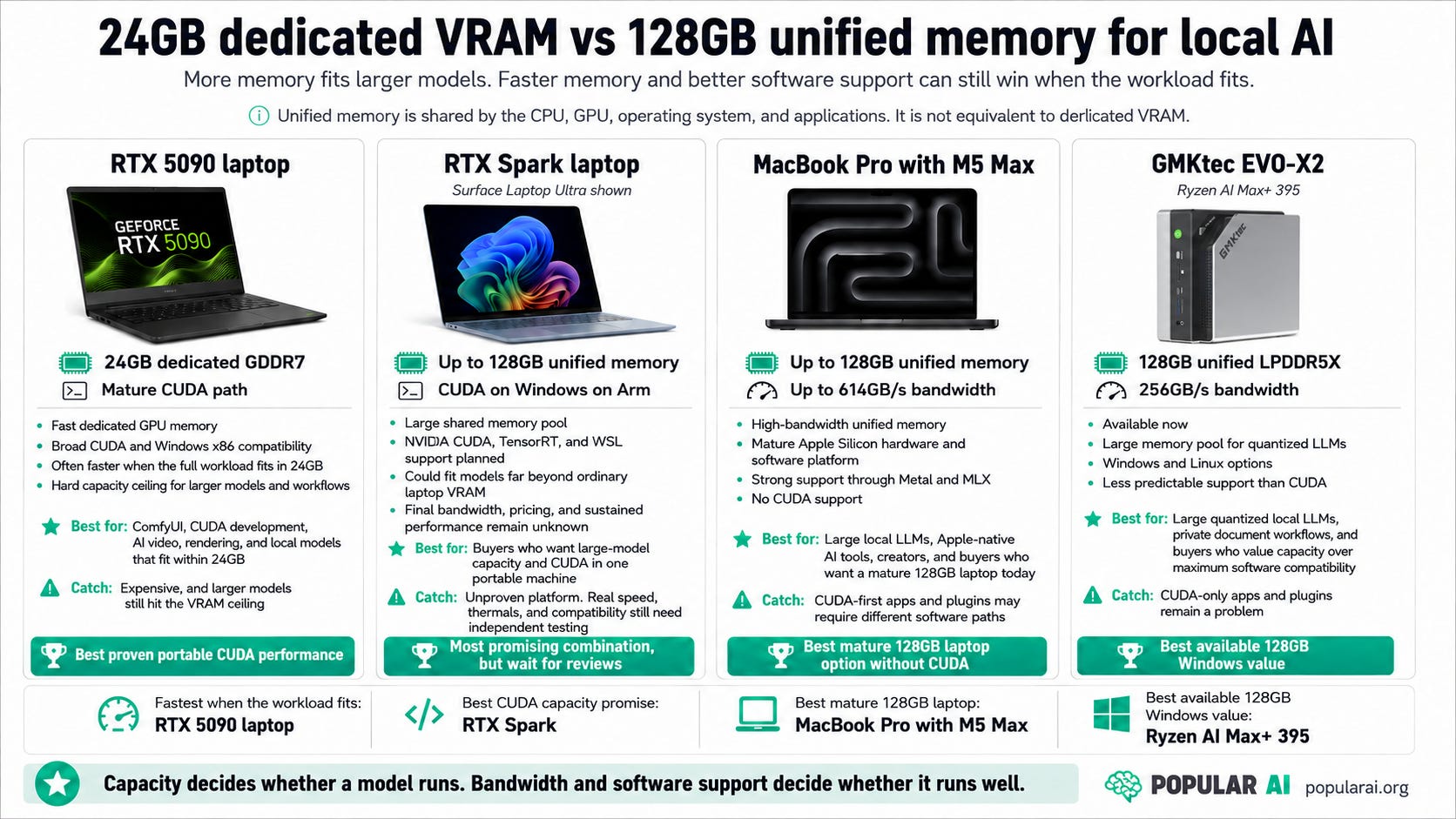
Unlike a dedicated GPU, the unified memory pool will serve Windows, background services, the CPU, the GPU, applications, model weights, KV cache, context, and temporary buffers. The amount available to an AI workload will depend on the configuration, Windows memory policy, NVIDIA drivers, software backend, and what else the machine is running.
Dedicated VRAM also tends to offer higher and more predictable bandwidth.
An RTX 5090 laptop has only 24GB of memory, but that GDDR7 memory is designed for high-throughput GPU workloads. Apple’s M5 Max supports up to 128GB of unified memory with as much as 614GB/s of bandwidth. AMD’s 128GB Ryzen AI Halo platform provides 256GB/s.
NVIDIA has not published a final RTX Spark memory-bandwidth figure on its main product page. Until that number appears and reviewers test real models, buyers cannot estimate generation speed from capacity alone.
It is, after all, possible for a computer’s memory to fit a model and still run it too slowly to become useful.
The one-petaflop claim tells buyers very little
NVIDIA and Microsoft advertise up to one petaflop of AI performance. That figure refers to theoretical low-precision FP4 compute.


It does not reveal LLM prompt-processing speed, output tokens per second, ComfyUI generation time, LoRA training speed, BF16 performance, FP16 performance, or sustained performance after a laptop’s cooling system becomes saturated.
It also says nothing about how much memory remains available after Windows loads, whether an application is running natively, or whether the required kernels have been optimized for the architecture.
The RTX Spark GPU has 6,144 CUDA cores. The RTX 5090 laptop GPU has 10,496 CUDA cores and 24GB of GDDR7.
RTX Spark may therefore behave like a midrange or upper-midrange GPU connected to a very large memory pool. That would still make it valuable. It would make the platform a capacity specialist rather than the fastest option for every AI workload.
What independent reviews need to prove
▪ Memory bandwidth and real LLM speed
Large-model inference is often limited by memory bandwidth. The GPU must repeatedly move model weights through memory while generating tokens.
RTX Spark’s memory capacity is confirmed. Its final bandwidth is not.
Useful reviews should test dense 32B and 70B models, 100B-plus models, mixture-of-experts architectures, several quantization levels, and both short and long contexts. The tests should include common backends such as llama.cpp, PyTorch, and TensorRT-LLM.
The measurements that matter are prompt-processing speed, output tokens per second, usable memory, power consumption, and performance consistency. A theoretical FP4 figure cannot replace them.
▪ Sustained performance
A laptop can produce an impressive two-minute benchmark and then reduce its clocks once the chassis becomes hot.
The pre-release Surface Laptop Ultra has an operating envelope of up to 80 watts. Microsoft gives the desktop Surface RTX Spark Dev Box a 100-watt thermal envelope designed to maintain performance during longer development and training workloads.
A pre-release hands-on found that Microsoft was using two fans in the laptop and expected the Dev Box to sustain heavier work.
Independent testing should run inference, generation, and training jobs for at least 30 minutes. Multi-hour workloads would be even more useful. Short demonstrations do not represent fine-tuning, video generation, batch image production, or local server use.
▪ Windows-on-Arm compatibility
Microsoft says Prism has been optimized for RTX Spark, and NVIDIA is preparing the CUDA software stack. Compatibility still needs to be tested application by application.
NVIDIA’s developer preview tells developers to inspect third-party dependencies, decide how to port them to Arm64, test installation and performance, and validate again on final hardware. It also documents known issues, including possible instability during some PyTorch build workflows.
This does not mean RTX Spark will fail. CUDA support does not guarantee that every Python package, compiled extension, plugin, custom node, installer, or kernel will work perfectly on release day.
A buyer who relies on one specific ComfyUI node, Python package, video encoder, or proprietary application should not assume compatibility from the RTX Spark logo alone.
Final prices and memory configurations
As of late July 2026, NVIDIA, Microsoft, and HP had not published final U.S. prices for their RTX Spark laptops.
HP says pricing for its RTX Spark OmniBooks will be announced closer to availability.
The comparison points are already expensive. DGX Spark sits in specialist workstation territory. A 128GB M5 Max MacBook Pro costs several thousand dollars. Premium RTX 5090 laptops remain expensive despite having only 24GB of dedicated GPU memory. Current 128GB Ryzen AI Max+ 395 mini PCs are available through Amazon and specialist retailers.
A 128GB RTX Spark laptop around $4,000 would be disruptive. A model approaching $6,000 would need excellent bandwidth, thermals, battery behavior, display quality, storage, and repairability.
The phrase up to 128GB also leaves room for several memory tiers. Buyers should ignore the advertised entry price until they see the price of the configuration they actually need.
A 64GB version could be attractive for quantized models, image generation, coding, and mixed creative work. A 32GB version would be harder to justify because it would retain the risk of a new Windows-on-Arm ecosystem without fully delivering the capacity advantage.
Storage and repairability
Local AI consumes storage quickly. Model weights, alternative quantizations, ComfyUI checkpoints, LoRAs, video models, datasets, caches, container images, and generated media can fill a 2TB drive without much effort.
Before buying an RTX Spark system, confirm whether the SSD is replaceable, whether standard M.2 2280 drives are supported, whether a second storage slot exists, and whether opening the machine affects warranty coverage. Battery replacement, fan access, heatsink cleaning, and long-term parts availability also deserve attention.
The pre-release Surface Laptop Ultra had clearly labeled internal components and appeared more repairable than older Surface devices. A formal repairability assessment and service manual are still needed.
Performance relative to DGX Spark
DGX Spark is the closest existing reference because it combines a Grace CPU, Blackwell GPU, CUDA, and 128GB of unified memory.
NVIDIA says DGX Spark can work with models up to 200B parameters. That claim does not automatically transfer to an RTX Spark laptop.
DGX Spark runs NVIDIA’s Linux-based environment and has its own thermal design, drivers, networking, and development focus. RTX Spark laptops will run Windows on Arm at lower power.
The most useful reviews will compare the same models and software backends on DGX Spark, the Surface RTX Spark Dev Box, an RTX Spark laptop, a desktop RTX 5090, an RTX 5090 laptop, a Ryzen AI Max+ 395 system, and an M5 Max MacBook Pro.
DGX Spark compared with AMD:

Who should wait for RTX Spark
Buyers planning to spend $3,000 or more on a laptop primarily for local AI should wait. Current CUDA laptops top out at 24GB of dedicated memory, while RTX Spark could make much larger models practical in a portable machine.
That makes waiting especially sensible for ComfyUI users whose workflows fail because they exceed 16GB or 24GB. Large unified memory could help with high-resolution generation, multiple loaded models, video pipelines, large batches, and complex multimodal graphs.
An RTX 5090 laptop may still be substantially faster when a workflow fits within 24GB. RTX Spark becomes interesting when memory capacity is the reason the current laptop cannot complete the job.
Developers who want CUDA, Windows, and 128GB in one machine also have a strong reason to wait. AMD already offers 128GB Windows systems. Apple offers 128GB laptops. DGX Spark offers 128GB with CUDA. RTX Spark is positioned to combine those characteristics in a mainstream Windows laptop or compact desktop.
The catch is dependency support. Buyers should wait until their actual Python packages, compiled extensions, applications, and plugins have native Arm64 support or have been shown to work acceptably through WSL or Prism.
The Surface RTX Spark Dev Box could also be worth waiting for if DGX Spark is appealing but Windows remains important. It combines Windows 11 Pro, WSL, CUDA, preconfigured developer tools, 128GB of unified memory, and a 100-watt thermal envelope. Final price and performance will determine whether that combination is genuinely competitive.
Who should buy current hardware instead
▪ Buy a desktop RTX 5090 when speed matters more than capacity
Waiting makes little sense when current hardware limitations are already costing billable hours.
A desktop RTX 5090 is the safer choice when your workload fits within 32GB and throughput matters more than loading the largest possible model. When throughput matters more than extreme model capacity, cards like the GIGABYTE GeForce RTX 5090 WINDFORCE OC 32G are a viable desktop CUDA option with 32GB of GDDR7.

The RTX 5090 offers mature x86 CUDA support, high-bandwidth GDDR7, and broad compatibility across local-AI applications. It is a strong option for ComfyUI, AI video, model training, rendering, CUDA development, and local models that stay within its memory limit.
The card is only part of the cost. A suitable power supply, large case, adequate cooling, compatible motherboard, system RAM, storage, and electricity all belong in the buying calculation.
Portability is absent, but this remains the proven performance choice for established CUDA workflows.
▪ Buy an RTX 5090 laptop when you need portable CUDA now
An RTX 5090 laptop makes sense when portability and software maturity are more important than fitting the largest models. Buyers who need portable CUDA support now can consider an ASUS ROG Strix Scar 18 with RTX 5090 as one current high-end option:

It is a better-established choice for ComfyUI, Stable Diffusion, CUDA development, Blender, video editing, AI coding, and quantized local LLMs that fit within 24GB.
Do not buy one under the assumption that 24GB will somehow behave like a 128GB local model machine. Expensive cooling, premium displays, and flagship branding do not remove the memory limit.
Popular AI’s guide to the best laptops for local LLMs covers the current portable choices by memory class.
More on RTX 5090 laptops for local AI:

▪ Buy Strix Halo when large models matter more than CUDA
A 128GB Ryzen AI Max+ 395 system can be the better buy when model capacity matters more than universal CUDA compatibility.
The GMKtec EVO-X2 with 128GB of LPDDR5X is one available option. Its configuration includes a 2TB SSD and two M.2 storage slots, although the memory is soldered and cannot be upgraded.

Buyers can also compare other 128GB Ryzen AI Max+ 395 systems before choosing a manufacturer.
AMD’s official specifications confirm a 128GB maximum memory capacity, LPDDR5X-8000, a 256-bit memory interface, 256GB/s of bandwidth, and Radeon 8060S graphics with 40 compute units.
These machines can load models that cannot fit on a 24GB or 32GB NVIDIA GPU. That makes them rational local LLM systems for large quantized models, private document work, and memory-heavy experimentation.
The tradeoff is software support. Some projects work well through llama.cpp, Vulkan, ROCm, LM Studio, or application-specific AMD backends. Others still treat CUDA as the primary path.
Popular AI has covered the Strix Halo mini-PC buying decision in more detail.
More on unified memory for local AI:

▪ Upgrade storage when the rest of the computer is adequate
Do not replace an entire machine when storage is the actual problem.
A 4TB NVMe SSD can remove an immediate bottleneck caused by model files, training data, caches, and generated media. The Samsung 990 Pro 4TB is one high-performance option, although buyers should compare its current price against drives from WD, Crucial, Solidigm, and other established manufacturers.

Check the motherboard or laptop documentation before ordering. Some systems support limited capacities, slower PCIe generations, one-sided drives, or unusual heatsink clearances.
Storage will not solve insufficient GPU memory or poor inference performance. It is still the cheapest useful upgrade when the computer already runs the desired models and merely lacks room to store them.
▪ Keep the current machine when it already works
The cheapest upgrade is the one you do not make.
A functioning RTX 3090, RTX 4090, RTX 5090, Apple Silicon, or Strix Halo system should not be replaced merely because RTX Spark looks new.
Popular AI’s local LLM hardware guide by memory tier explains why matching the model to the available hardware often provides more value than buying a premature replacement.
Wait for RTX Spark reviews to prove a meaningful improvement for your actual workload.
More on matching hardware to local AI demands:

How we evaluated RTX Spark
This recommendation is based on official specifications, software documentation, current alternatives, NVIDIA’s developer preview, and pre-release hands-on reporting.
No retail RTX Spark machine was available for independent testing as of late July 2026. NVIDIA’s model-size, rendering, and creative-workload claims should therefore be treated as targets rather than verified buying evidence.
The buying decision ultimately depends on six practical numbers: configured price, usable GPU memory, memory bandwidth, sustained power, output tokens per second, and generation time.
Native Arm64 software support, Prism translation performance, storage expansion, repairability, performance per watt, and reliability during long jobs will decide whether RTX Spark is merely interesting or genuinely worth buying.
Gaming benchmarks are secondary here. A 1440p frame-rate demonstration does not tell you how quickly a 120B quantized model will generate text.
Cloud versus local cost while you wait
Waiting for RTX Spark does not require abandoning larger models.
For occasional experiments, a cloud GPU or hosted model may cost less than purchasing an unproven premium computer. Renting large hardware for occasional jobs can be more rational than owning a costly machine that remains idle most of the week.
Local hardware becomes easier to justify when it is used heavily, cloud bills recur every month, source files should remain private, network latency interrupts the workflow, or account restrictions would create an operational problem.
Ownership still has costs. Hardware depreciates. Electricity, storage, backups, cooling, maintenance, setup time, and failed experiments all belong in the calculation.
“No token bill” does not mean free inference.
Mistakes to avoid before buying
The first mistake is purchasing from the announcement alone. NVIDIA has presented an appealing architecture, but the final buying proposition depends on prices, configurations, bandwidth, thermals, and retail software support.
The second mistake is treating 128GB of unified memory as 128GB of isolated VRAM. The shared pool must also serve Windows, the CPU, applications, and model overhead.
The third mistake is comparing the one-petaflop headline with ordinary GPU benchmarks. The figure refers to theoretical FP4 performance and does not replace tokens-per-second measurements, generation times, training throughput, power use, or sustained clocks.
Buyers should also avoid assuming every CUDA project will work immediately. The GPU may support CUDA while a Python package, compiled extension, installer, custom node, or proprietary application still lacks proper Arm64 support.
A low-memory RTX Spark configuration deserves particular skepticism. The platform’s defining advantage is memory capacity. Buyers should compare 16GB or 32GB models directly against conventional RTX laptops rather than paying for the platform name.
Waiting can also become a mistake when today’s hardware would pay for itself. A future machine should not delay revenue-producing work when a current product solves a known and measurable limitation.
FAQ
Is RTX Spark’s 128GB unified memory the same as 128GB of VRAM?
No. It is a shared memory pool used by the CPU, GPU, operating system, applications, and model data.
The GPU should be able to access far more memory than a conventional laptop GPU, but the full 128GB will not behave like an isolated 128GB graphics card.
Can RTX Spark run CUDA on Windows?
NVIDIA and Microsoft are building CUDA support for Windows on Arm, including CUDA workflows through WSL.
A developer preview is available. Its known issues and porting instructions show that compatibility work is still underway.
Can RTX Spark run 120B models locally?
NVIDIA says the platform can run 120B-parameter LLMs, including configurations with very long context.
Model architecture, quantization, context length, backend, usable memory, and thermal limits will determine the actual experience. Independent tokens-per-second results are still needed.
Is RTX Spark better than an RTX 5090 laptop for ComfyUI?
RTX Spark should be more useful when a workflow cannot fit inside the RTX 5090 laptop GPU’s 24GB of memory.
The RTX 5090 laptop may remain substantially faster when the workflow fits because it has high-bandwidth dedicated memory and more CUDA cores.
Wait for matched ComfyUI tests before assuming one is universally better.
Is the Surface RTX Spark Dev Box better than the laptop?
It is likely to sustain higher performance during long jobs because Microsoft gives the Dev Box a 100-watt thermal envelope, compared with up to 80 watts for the pre-release Surface Laptop Ultra.
Final benchmarks, prices, noise measurements, and configurations are still unavailable.
Should you buy a Ryzen AI Max+ 395 system instead?
Buy one now when you mainly need 128GB for large quantized LLMs and can tolerate a less predictable software environment.
A 128GB Ryzen AI Max+ 395 mini PC provides the capacity today. RTX Spark remains more attractive for buyers whose software is built around CUDA.
Should you buy an RTX 5090 instead of waiting?
Buy a desktop RTX 5090 when your workload fits within 32GB and speed is more important than loading very large models.
Wait when memory capacity is the reason the current NVIDIA system fails.
When will RTX Spark computers be available?
NVIDIA says the first laptops and compact desktops are planned for later in 2026. Exact dates will vary by manufacturer and region.
Should you preorder an RTX Spark laptop?
No.
Wait for reviews of the exact configuration. The 128GB label does not reveal memory bandwidth, usable GPU memory, sustained performance, battery behavior, software compatibility, or value.
When RTX Spark is worth the wait
Wait for RTX Spark if you are planning a premium local-AI laptop, a 128GB Windows workstation, or a compact CUDA development machine. The platform is important enough to delay a discretionary purchase until independent reviews arrive.
Do not wait when hardware is already blocking paid work.
Buy a desktop RTX 5090 when 32GB is enough and throughput is the priority.
Buy an RTX 5090 laptop when portable CUDA support matters and 24GB is sufficient.
Buy a 128GB Ryzen AI Max+ 395 system when model capacity matters more than perfect CUDA compatibility.
Upgrade to a 4TB NVMe SSD when storage is the actual bottleneck.
RTX Spark should be judged on configured price, usable GPU memory, memory bandwidth, sustained power, tokens per second, and generation time.
Everything else is launch theater until those results arrive.
RTX Spark could become the first convincing answer to the CUDA-or-capacity problem in a laptop but it has not yet earned a preorder.
Explore more from Popular AI:
Start here | Local AI | Builds & gear | Autonomy & policy | Fixes & guides | Popular AI podcast
Would you wait for an RTX Spark system, or buy proven local AI hardware now?