


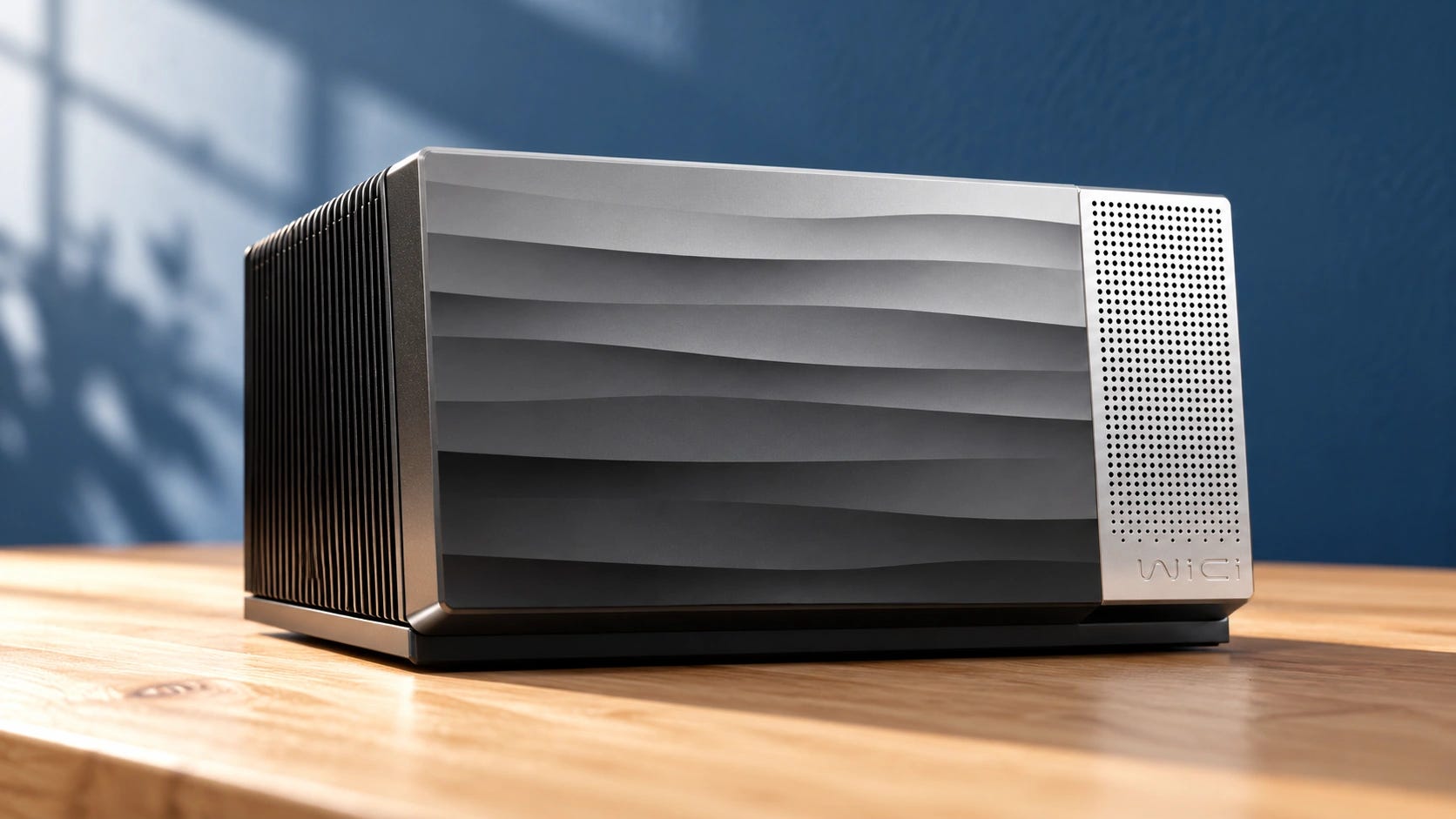
WiCi One promises something ordinary external GPUs cannot do: make a powerful NVIDIA GPU available to nearby devices over Wi-Fi, potentially even to software expecting a locally attached graphics card. For local AI, the idea is appealing. Whether that makes it worth buying is a harder question.
At $2,599 for a 16GB RTX 5060 Ti system and $9,999 for a 32GB RTX 5090 version, we would not preorder WiCi One for most local AI workflows. A conventional GPU computer or networked inference server offers more established software support and often better memory value. WiCi’s wireless runtime is promising, but buyers still lack independent retail tests that establish how it performs across everyday AI applications.
Quick verdict: clever technology, difficult purchase
WiCi One deserves attention if you need a GPU to appear attached to several different mobile or lightweight computers, cannot use cables, and have software that benefits from GPU-level redirection instead of an inference API.
Most people who want private chat, coding assistance, transcription, image generation, or local document search can run those jobs on a normal desktop and access them over their existing network.
Our recommendation as of October 30, 2026: wait on WiCi One. Buy an established GPU or a complete local AI computer for workloads you run regularly. Rent GPU time if your large-model experiments are occasional. Reconsider WiCi after independent tests establish app compatibility, sustained throughput, multiuser behavior, and failure recovery on actual retail units.
What exactly is WiCi One?
According to the official WiCi One product page, there are two preorder configurations.
▪ WiCi One 5060 Ti edition: $2,599
NVIDIA RTX 5060 Ti with 16GB GDDR7, Intel Core 3 100U processor, and a 1TB PCIe 4.0 NVMe SSD.
▪ WiCi One 5090 edition: $9,999
NVIDIA RTX 5090 with 32GB GDDR7, Intel Core Ultra 7 255H processor, and 4TB PCIe 5.0 NVMe storage.
Both advertise Wi-Fi 7 with 4x4 MIMO and 320MHz channels.
WiCi One is effectively a small networked GPU computer. Its wireless connection cannot give a laptop the physical PCIe bandwidth of a desktop motherboard, regardless of how convincingly the software presents it as a locally attached device.
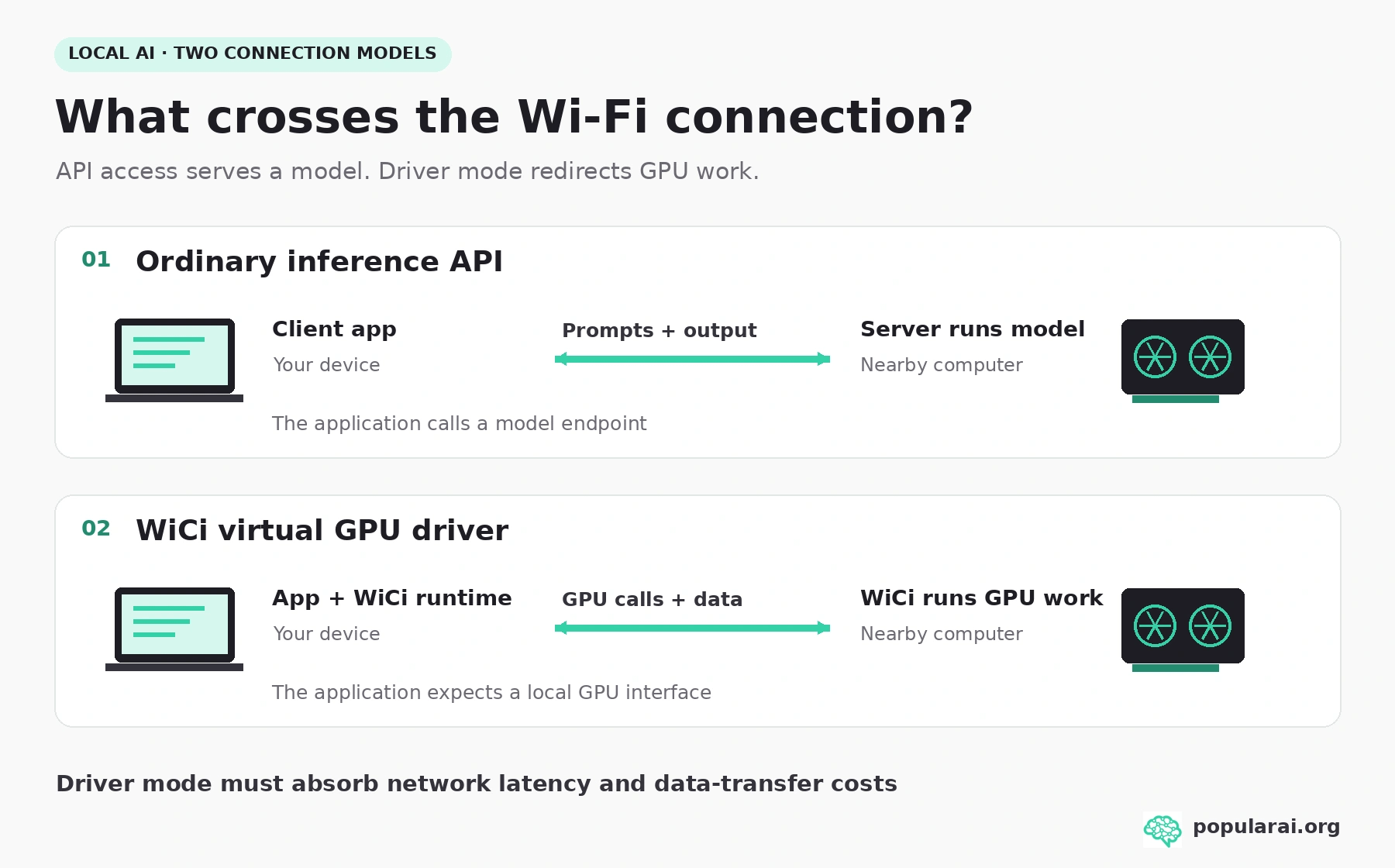
The manufacturer describes three ways to use it. API mode exposes an OpenAI/Ollama-compatible endpoint. SDK mode provides application integrations. Driver mode attempts the ambitious part: a virtual GPU interface for supported Windows, Linux, and macOS workloads.
The preview documentation does not establish universal compatibility with PyTorch extensions, ComfyUI custom nodes, training scripts, or other GPU applications.
Why Wi-Fi is a different problem from an external GPU cable
When an LLM sits in GPU memory and produces tokens, the host mainly needs to send prompts and receive text. That traffic is small. Ollama already provides an OpenAI-compatible API, so a standard desktop in another room can serve multiple clients on a local network without pretending its GPU is physically attached to them. For many AI users, an inference server already provides the practical benefit they want from a GPU over Wi-Fi.
WiCi’s harder ambition is transparent GPU access. Conventional GPU programs make repeated calls to drivers and move tensors between the host and accelerator. Wi-Fi adds latency to those calls and offers far less usable bandwidth than an internal PCIe connection.
WiCi proposes caching repeated state, reducing blocking calls, and keeping models close to the accelerator to reduce that penalty. Results will vary by application.
Ordinary local inference already works over Wi-Fi. WiCi’s extra promise is redirecting lower-level GPU work, so applications can keep running on the client while another machine handles their GPU calls.
A wired eGPU has fewer network-translation problems because the host accesses PCIe over USB4, Thunderbolt, or OCuLink. Our guide to eGPUs for local AI explains why even those connections can slow model loading and partially offloaded inference.
WiCi adds a wireless hop, additional software, and more opportunities for driver compatibility trouble. For users who mainly want remote inference, that complexity buys little.
What do WiCi’s local AI benchmarks actually prove?
There is legitimate systems research behind the product. The August 2026 WiCi wireless GPU research paper measured a prototype using Wi-Fi 6, a Raspberry Pi 5 client, and an NVIDIA RTX 4090D with 48GB.
Its authors reported up to roughly 80% of native GPU performance on selected tasks, and a 39-fold token-rate improvement over running the same model on the Raspberry Pi itself.
They do not establish that a retail Wi-Fi 7 RTX 5060 Ti WiCi One achieves 80% of desktop speed in ComfyUI, nor that the $9,999 configuration is competitive with a directly attached RTX 5090.
The paper tested different hardware, networking, and workloads. It was also written by the system’s researchers, rather than being a controlled independent retail review. Results vary by task and sharing pattern.
WiCi’s current product benchmarks provide striking numbers, but require context.
WiCi reports Gemma 4 26B generation at 140 tokens per second on the 5060 Ti edition and more than 500 on the 5090 edition. For Kimi K3 2.8T, it reports 2.5 and 5 tokens per second, respectively. The current page labels its third LLM comparison DeepSeek V4.1 Flash 748B, at 8 and 20 tokens per second. These are manufacturer-reported results, not independently replicated retail benchmarks.
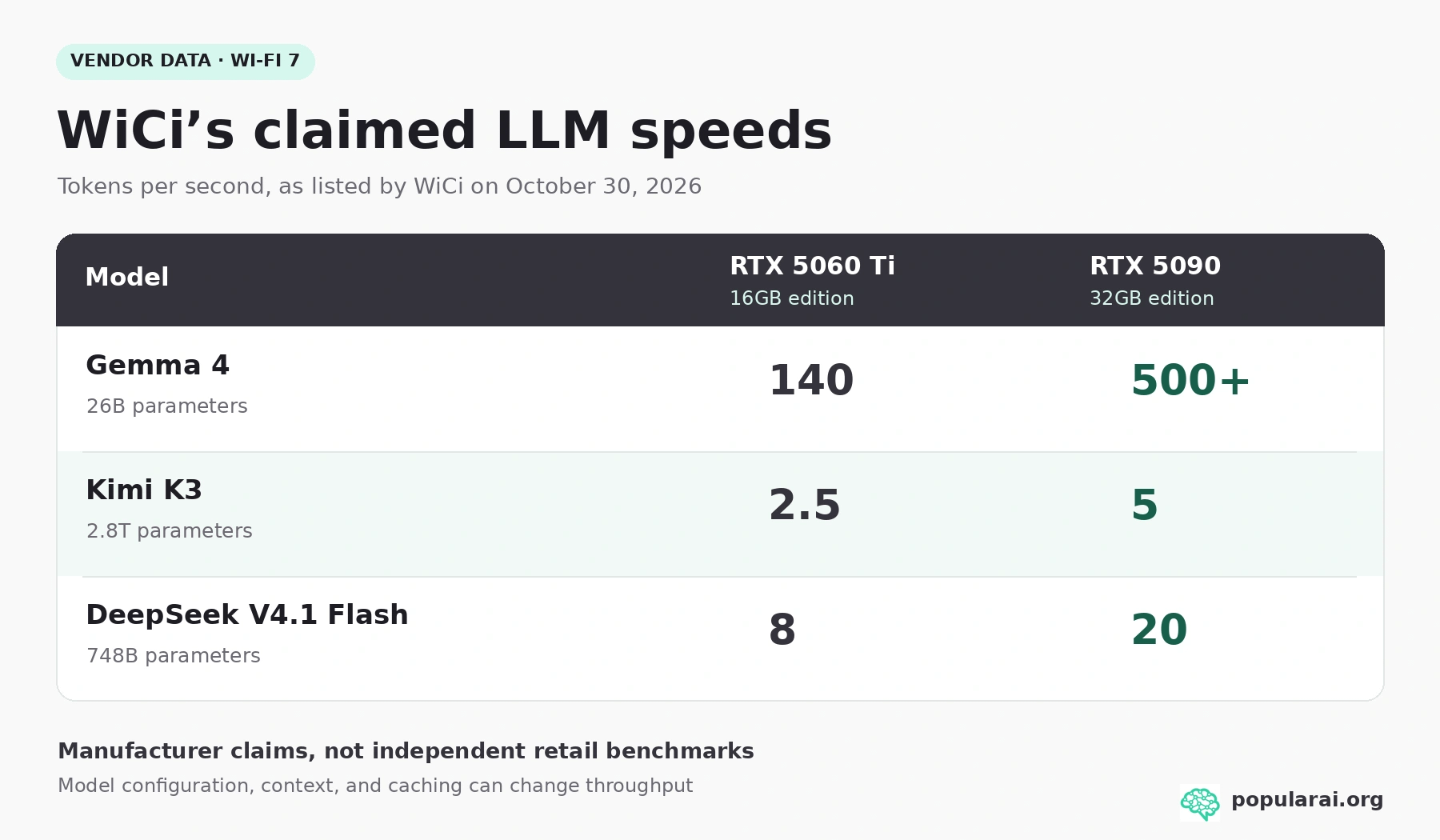
Those numbers are informative as manufacturer claims, but the page does not provide enough independently reproducible detail about quantization, context, active weights, prompt processing, output lengths, caching, and concurrent users to price the hardware on them alone.
Image and video claims need similar care. WiCi quotes FLUX.2 Klein at approximately 0.49 versus 0.92 images per second, but the two editions use different model sizes in that comparison. Its Wan 2.2 results likewise refer to different video model variants.
There is no substitute for matched-model tests in ComfyUI, with identical precision, resolution, steps, and workflow.
The SSD-backed trillion-parameter claim
WiCi also proposes streaming model weights from NVMe storage. Sparse mixture-of-experts models could then exceed GPU VRAM.
But an SSD is storage, not a replacement for the GPU’s high-bandwidth working memory. Even WiCi’s technical explanation contrasts around 14GB/s rated SSD throughput with roughly 1.8TB/s of GPU memory bandwidth in the high-end configuration. Realized throughput may be substantially below a drive’s peak rate.
A 2.8-trillion-parameter model stored at a straightforward four bits per parameter would require roughly 1.4TB just for raw weights, before format overhead.
WiCi’s advertised 1TB base unit and 2.8T inference result therefore need model-specific clarification about weight format, storage arrangement, and caching. Sparse activation reduces what must move per token, but it does not make the full model disappear from disk.
For everyday coding, chat, and document assistance, a well-quantized model that stays in VRAM will often offer a better experience than a headline-sized model paging constantly from an SSD.
What should you buy instead for local AI?
The relevant comparison is the total working system, not the WiCi GPU’s sticker price alone.
We reviewed current consumer and professional options from NVIDIA, AMD, and Intel, plus used 24GB cards, complete unified-memory computers, conventional eGPUs, and rented GPU servers. Retail figures below are U.S. listings checked at the time of publication.
Availability and prices can change quickly, and these machines do not all run the same software.
Disclosure: This post includes Amazon affiliate links. If you buy through them, Popular AI may earn a small commission at no extra cost to you.
▪ For straightforward local AI: an RTX 5060 Ti 16GB in a normal PC
If 16GB VRAM meets your needs, the simplest comparison is an ordinary RTX 5060 Ti 16GB. ASUS lists its Dual RTX 5060 Ti 16GB OC around $800, versus $2,599 for the WiCi system.

Compare the exact variant and current offer rather than treating either quoted price as permanent.
NVIDIA’s CUDA support remains a straightforward route for many popular local AI packages. Sixteen gigabytes handles smaller quantized LLMs and many ComfyUI workflows, but not every large image pipeline or long-context model.
▪ For more VRAM per dollar: Intel Arc Pro B60 or AMD Radeon AI PRO R9700
The Intel Arc Pro B60 24GB has a U.S. Newegg listing at $999.99, offering 50% more VRAM than the WiCi 5060 Ti edition for about 38% of its appliance price. That comparison covers the card alone, so allow for the rest of the PC if you do not already own one.

Intel’s newer Arc Pro B70 moves to 32GB. They suit users prepared to choose compatible inference backends and accept rougher software support than CUDA, especially for specialized image-generation nodes.
The AMD Radeon AI PRO R9700 supplies 32GB, and a Sapphire U.S. listing is listed at $1,799.99, although that listing is currently sold out.

For Linux users comfortable with ROCm, that capacity is useful. It is not a drop-in CUDA replacement on every Windows or ComfyUI workflow. Our Arc Pro B60 versus RTX 5060 Ti analysis explores why memory capacity and software maturity pull in different directions.
A used RTX 3090 24GB remains attractive for established CUDA workflows, but the old assumption that it is always a cheap bargain is obsolete. A completed U.S. eBay sale from October 6 was $1,325. That isolated transaction is a data point, not a reliable budget for every used 3090.
Compare the actual offer with newer cards, check the seller’s returns, test VRAM and hot-spot temperatures, and account for its substantial power draw.
More on the Arc Pro B60 for local AI:

▪ For a complete larger-memory computer: Mac Studio
Apple’s M5 Max Mac Studio starts at $2,499 with 36GB unified memory, including the CPU, GPU, storage, enclosure, and operating system.

It can be an appealing quiet standalone inference box for compatible MLX or Metal workloads and some larger quantized models. Unified memory is shared with the OS and applications, so 36GB is not 36GB of freely available model memory.
macOS also does not offer ordinary NVIDIA CUDA compatibility. It is a serious alternative to a $2,599 WiCi 16GB unit for Mac-friendly local inference, not a universal replacement for an RTX workstation.
The NVIDIA DGX Spark provides a larger 128GB unified-memory AI environment, but it belongs in a different purchasing tier from a bare GPU. The manufacturer page confirms its memory capacity without displaying a current purchase price.
Its bandwidth and GPU characteristics differ from a high-end discrete RTX, and its cost makes sense only for specific memory-heavy development work.
▪ For remote use: reuse a desktop, or rent GPU time
If the appeal is that your phone, MacBook, or lightweight laptop can call a GPU elsewhere in the house, run Ollama or another supported inference server on an existing desktop. Configure client access over the trusted LAN or a properly secured VPN.
The noisy computer can stay in another room.
If you want an attached GPU instead, follow our wired eGPU buying guide and budget for the card, dock, PSU, cable, and host compatibility.
For occasional large-model work, Runpod’s listed RTX 5090 rental rates include approximately $1.19 per hour for Secure Cloud, with a less expensive Community Cloud tier.
Ten hours a week at that Secure Cloud compute rate works out to roughly $52 per month, excluding storage and other charges. Cloud rental does not meet an offline or strict local-data requirement, but it can prevent a five-figure purchase that sits idle most of the year.
The ownership and compatibility costs WiCi’s price hides
WiCi One’s attraction is the convenience of an appliance: compact enclosure, integrated cooling, storage, Wi-Fi networking, and one system intended to service several client devices.
Integration saves component-selection work, especially if you do not already own a suitable desktop.
Before relying on WiCi for production work, establish whether your exact application uses API mode or virtual-driver mode, whether the target operating system is supported now rather than planned, whether CUDA kernels or extensions operate correctly, and whether simultaneous clients cause substantial slowdown.
Check sleep/wake recovery, network interruptions, firewall behavior, firmware updates, and whether model downloads or telemetry ever leave the local network. An advertised Wi-Fi PHY maximum is not a guaranteed application transfer rate.
A particularly consequential purchasing detail is the manufacturer’s posted return and warranty language. It says buyers may cancel before shipment for a refund, but describes post-shipment sales as final, with defects to be reported within seven days for replacement and a one-year limited defect warranty.
Review the actual checkout terms and applicable consumer rights before placing a preorder, especially for the $9,999 edition. A novel driver product is a difficult place to discover that your favorite application is unsupported after the ordinary return window is gone.
Who should buy, wait, or skip WiCi?
▪ Consider WiCi One if wireless, device-level GPU access is essential to a specific mobile or multi-client deployment, you can validate your actual software stack before committing, and the integrated appliance saves enough engineering work to justify its premium. A developer experimenting with GPU disaggregation may rationally pay for capabilities that an ordinary inference server does not expose.
▪ Wait if you want WiCi for ComfyUI, PyTorch development, video generation, or local coding and have not seen reproducible tests for your applications on retail hardware. At $9,999, the RTX 5090 edition demands especially strong proof of reliable sustained use and a reason not to buy a conventional high-memory workstation or rent accelerators as needed.
▪ Skip it if your purpose is private chat, RAG, home automation, transcription, occasional local image generation, or serving models to other devices over Wi-Fi. Standard LAN inference already covers that central requirement, and its software and purchasing options are far less restrictive.
WiCi One is worth revisiting after independent retail tests
WiCi’s strongest idea is that a GPU could become a nearby shared resource without forcing every device to use a conventional remote API. The research suggests that reducing driver-call latency can work. But buyers cannot safely assume the research prototype’s results, the vendor’s impressive small-model figures, or its trillion-parameter demos will generalize to their own applications.
For most local AI users in October 2026, a supported desktop, a compatible Mac Studio, or intermittent cloud rentals remain better purchases.
For a conventional 16GB CUDA setup, an RTX 5060 Ti 16GB remains the more straightforward starting point, provided the rest of your PC can accommodate it. WiCi becomes worth another look when independent retail tests show a clear advantage over an ordinary LAN GPU server, with mature drivers and dependable post-purchase support. Until then, its wireless novelty carries a substantial price premium and compatibility risk.
More on external GPUs for local AI:

Explore more from Popular AI:
Start here | Local AI | Builds & gear | Autonomy & policy | Fixes & guides | Popular AI podcast