



If your AI setup has a cheap model for routine prompts, a coding model for code, a reasoning model for hard problems, and perhaps a local fallback, something still has to decide where each request goes.
Using another full generative LLM for that decision can be wasteful. You are paying for a model capable of writing paragraphs when the application only needs an answer such as fast, coding, or reasoning.
Supersonic Labs built Julia 1 around that smaller job. Julia 1 is a 144.3-million-parameter decision model that runs on a CPU. Instead of generating text, it receives context, a question, and between 2 and 20 possible answers. It selects one and returns scores for the options. The same interface also supports classification, ordered scoring, and yes-or-no decisions.
That makes Julia 1 interesting for a reason that has little to do with chatbot intelligence. It could serve as a cheap local traffic cop in front of much larger models, handling the small dispatch decision before you spend money or time on the model that does the actual work.
Key takeaways
Model routing is the obvious Julia 1 use case. Let a small local model decide whether a request belongs on a cheap, expensive, coding, reasoning, or specialist model.
Julia does not generate prose. It chooses among supplied answers, which makes its output much easier for software to consume.
You do not need a GPU. Supersonic has demonstrated Julia on an Apple M4, an Intel Core i5-1235U, and even a Samsung tablet.
Simple decisions can be fast, but large label sets are a problem. Supersonic measured about 33 ms for a simple 4-option request on an M4, while its 72-label banking test took seconds on an i5.
The released artifacts use Apache 2.0, but this is not a fully open training project. The weights and inference code are available, while Supersonic has not released its private training pipeline.
What Supersonic Labs actually released
Julia 1 starts from mmBERT-small, a multilingual encoder, and adds decision-specific components for a 144.3M-parameter model. Supersonic kept the language foundation and tokenizer, then adapted the model to score answer options supplied alongside a state and question.


That architecture changes the job the model is doing.
A normal generative LLM predicts tokens and produces text. Julia evaluates candidate answers supplied by the application. The application defines the possible outcomes first, then Julia scores them.
The input effectively looks like this:
State:
"Please refactor this Python authentication function and add tests."

Question:
"Which model should handle this request?"

Options:
1. Cheap general model
2. Coding model
3. Expensive reasoning model
Julia returns a selected option and probabilities corresponding to those choices. Software gets a bounded result instead of free-form prose that needs another parsing step.
The official Python interface exposes three decision types:
choiceselects between named alternatives.scoreranks an input against ordered levels.noulproduces a probability for a yes-or-no decision.
Julia can accept 2 to 20 options in a native request. Its runtime supports up to 8,192 combined tokens, while the historical accuracy benchmarks used 1,024-token inputs and do not establish 8K task accuracy.
The FP32 checkpoint occupies about 550.5 MiB. Python 3.11 or later is required for the official runtime. CPU inference works through PyTorch, and CUDA is supported on suitable hardware.
There is also an ONNX release for browser WebGPU inference. That opens a different local deployment path for applications that want the decision step to stay in the browser rather than running through a Python service.
What a decision model is actually good for
Think of Julia as a flexible classifier whose possible answers can change with each request.
That puts it between hard-coded routing rules and asking a general-purpose LLM what to do.
Hard-coded rules are excellent when the distinction is deterministic:
if file_extension == ".py":
    use_coding_model()
You do not need AI for that.
The harder cases depend on meaning. Consider this prompt:
“I need help cleaning up this authentication system. There are occasional race conditions and I think my token refresh logic may be wrong.”
Is that ordinary coding, difficult debugging, security-sensitive analysis, or something that deserves the expensive reasoning model?
You can keep adding keywords and regular expressions until the router becomes a pile of exceptions. Or you can ask a generative model to classify every request, which means spending generative-model compute before the real task has even started.
Julia offers a third path. Give it descriptions of the available destinations and let a small encoder choose among them locally.
That approach is especially attractive when routing happens before every expensive model call. Popular AI’s AI API comparisons guide explains why premium models can be wasteful on classification, formatting, and other routine work. Julia is a possible local mechanism for making that workload decision before the paid inference starts.
More on AI tokenomics:

Five practical Julia 1 use cases
1. Route prompts between cheap and expensive models
This is the strongest use case.
Imagine an application with four destinations:
fast:
Routine chat, rewriting, extraction and simple questions

coding:
Programming, debugging and repository work

reasoning:
Complex analysis, difficult planning and multi-step problems

local:
Sensitive requests that should remain on the user's machine
Julia can inspect the incoming prompt and choose among them.
The router itself does not need to know how to write code or solve the reasoning problem. It only needs to recognize what kind of problem arrived and match it to the destinations you supplied.
That can save real resources when classification sits in front of every request.
One recent user described almost exactly this problem. They wanted to classify prompts as reasoning or chat, but Qwen 2.5 3B was too slow on an old CPU and using OpenRouter for classification would consume the same limited free allowance reserved for actual answers.
That is close to a textbook Julia use case. The classification has to happen every time, the output space is tiny, and using a larger generative model for the gate creates overhead before useful work begins.
2. Send incoming messages to the right workflow
Model routing is only one form of routing.
A support request might need to go to:
Billing
Shipping
Technical support
Account access
Human review
An email assistant might choose between:
Reply now
Archive
Send to sales
Send to support
Needs human attention
A document pipeline could choose:
Invoice
Contract
Receipt
Correspondence
Unknown
Supersonic’s own example gives Julia a customer message about being charged twice and asks it to choose among billing, shipping, and account access. The useful part is that the choices are supplied at inference time. You are not necessarily locked into one permanent label set for every workflow.
For applications with several bounded destinations, that is more flexible than a fixed classifier and more constrained than a chatbot.
3. Score requests before spending expensive inference on them
Julia also supports ordered scores.
Suppose your workflow has three levels:
0. Routine
1. Difficult
2. Expert review
You could score a request first and use that result to control downstream compute.
Routine work goes to the cheap model. Difficult work gets more reasoning effort. The highest tier goes to a frontier model or a human.
This is cleaner than sending every request to the expensive model so the expensive model can decide whether the expensive model was necessary. Popular AI has used the same workload-routing logic when comparing premium and cheaper models, recommending that teams escalate difficult jobs deliberately instead of replacing every cheaper-model call with the premium option.
Julia does not decide the policy for you. It can provide the bounded score that your policy uses.

4. Put a yes-or-no gate in front of an agent
Julia’s Boolean decision mode can answer questions such as:
Does this request need human review?

Is the supplied context sufficient to answer the question?

Should this task be escalated to the reasoning model?

Does this message belong to the supported workflow?
That can be useful inside an agent loop because the output is constrained from the start.
The agent does not need to ask a chatbot to analyze whether human review is needed, return exactly YES or NO, and avoid adding anything else. Anyone who has built enough automation has eventually met the model that responds with YES plus three paragraphs of helpful explanation.
A constrained decision output removes that parsing problem.
It does not make Julia an authorization system. Permissions, spending limits, destructive actions, and security-sensitive operations should still be enforced with deterministic application logic. A probabilistic model can provide a signal. Code should keep the hard authority.
5. Build multilingual routing without a large multilingual LLM in front
Julia inherits a multilingual encoder, and Supersonic tested it across all 52 locales in the MASSIVE dataset, reaching 71.50% scenario-classification accuracy overall, 86.75% on U.S. English, and 86.25% on European Portuguese.
Those results do not establish that Julia will correctly route your multilingual workload. MASSIVE tested selection among 18 scenarios, and Supersonic says the benchmark did not test intent classification or slot filling.
Still, multilingual routing is one of the more interesting uses for a model this small. A local service could make an initial dispatch decision without sending every foreign-language message to a larger hosted model first. The sensible next step is evaluation on the actual languages, labels, and ambiguity your application sees.
More on AI model routing:

Why use Julia instead of another small LLM?
A small generative LLM can classify things. Sometimes it will be the better choice.
A generative model can reason through an ambiguous request, use more world knowledge, explain its choice, and potentially recover when none of your supplied labels fits well.
Julia gives up that flexibility for a tighter job description.
Julia skips the prose-generation stage. The application does not have to coax a chatbot into a rigid output format or parse a generated paragraph back into an enum.
For high-volume bounded decisions, that is appealing.
The comparison gets sharper on CPU hardware. Popular AI’s guide to CPU-only local LLMs explains how generation slows down and how larger contexts increase memory and latency pressure. Julia is solving a smaller problem than a 3B or 7B generative model, and its output does not require token-by-token prose generation.
The catch is simple: the decision really does need to be small enough.
If choosing the correct route requires solving the user’s problem first, the router has lost much of its advantage. At that point, a stronger model may be necessary because the classification problem has become a reasoning problem.
More on AI hardware:

Julia’s CPU performance looks useful, with one big catch
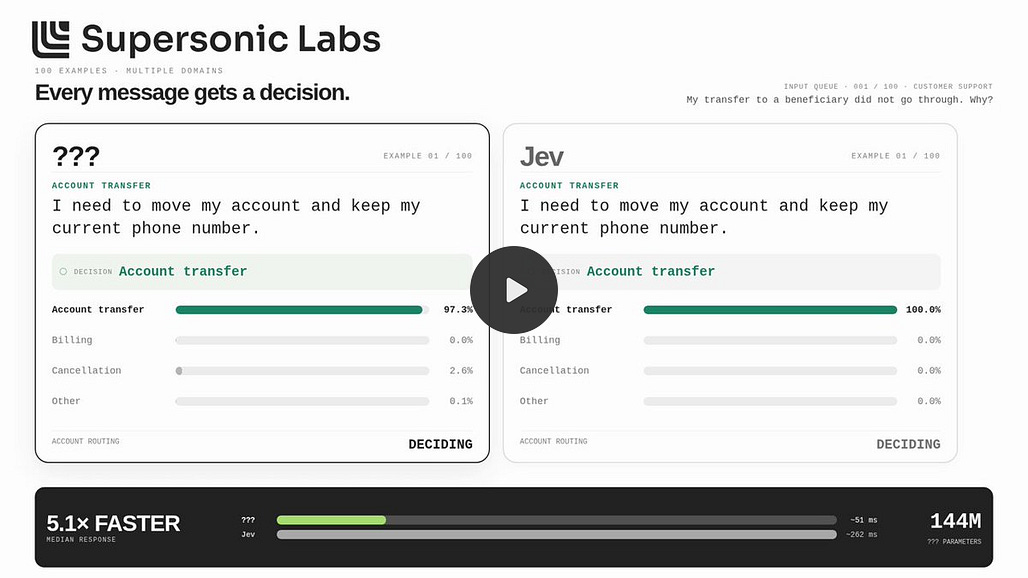
On an Apple M4, a request containing 100 context words and four options took a median 33.15 ms when processed individually. Batches of 16 reached 51.2 decisions per second.
On an Intel Core i5-1235U, median times varied sharply by workload:
AG News: 107.83 ms
Emotion: 89.83 ms
Typed decisions: 294.81 ms
Banking77: 3,713.54 ms
Supersonic also ran an ONNX version on a Samsung SM-X510 tablet at about 203 ms per decision.
The Banking77 result is why “runs on a CPU” should not be translated into “every routing problem is instant.”

That benchmark involved 72 possible banking labels. Julia accepts at most 20 options natively, so the larger routing process had to reduce the candidate set before the final selection.
More routing work means more latency. Candidate reduction also creates another failure point because the correct answer can disappear before the final step.
For the 2-to-5-way model router many people actually want, Julia’s hardware profile looks much more attractive than the large-category banking case. Production latency still needs to be measured on the real machine, with the real prompts and option descriptions the application will use.
Julia’s benchmarks show where it breaks
The September 24 headline evaluation reported these results:
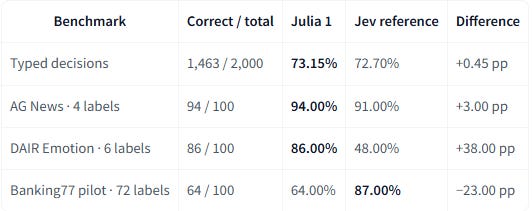
The published benchmark table lists Jev protocol references of 72.70%, 91%, 48%, and 87% for those four tests. Those Jev figures are supplied reference values, not a fresh same-hardware head-to-head run.
The last row is the warning.
Julia performed much better when the alternatives were limited and reasonably distinct than when it had to work through a large collection of similar labels.
Supersonic says the limitation more directly. Julia should not be counted on to supply missing outside knowledge, solve algebra, or carry long multi-step calculations simply because the right answer is present among the choices. Ambiguous wording, unfamiliar domains, and long label lists can also cause errors.
Even the returned probabilities need restraint. The model card describes them as softmax probabilities and says they are not guaranteed certainty.
That points toward a production cascade rather than blind trust in the first answer.
Julia can make the cheap first decision. Low-confidence or consequential cases can fall through to something stronger, such as a larger local model, a hosted reasoning model, deterministic application logic, or a human.
The key is to treat Julia as a routing signal, not as a source of authority.
Julia 1 is local in the useful sense
Julia’s released model artifacts use Apache 2.0, the weights can run locally without a GPU, and the repository says Julia adds no telemetry or extra tracking requests.
Once the model and dependencies are on the machine, the decision request does not need to go through Supersonic’s servers.
That fits the broader case for local AI as a way to keep more inference, data, and fallback capacity under your own control. A front-door router is especially attractive locally because every downstream request passes through it.
There is an important qualification. Supersonic released the model weights and inference code, but not the private training pipeline used to produce Julia 1.
So “Apache-licensed model artifacts” is more precise than describing the whole development process as open.
Supersonic is also preparing a hosted Julia API. The company says access is coming soon and lists a planned launch price of $0.025 per million input tokens and $0 for output tokens.
For this model, though, the local version may be the more interesting deployment.
A router is infrastructure. If every request has to reach a cloud router before the cloud router can decide which cloud model gets the request, you have added another remote dependency at the front of the stack.
A roughly 550 MiB local decision model avoids that dependency. It can sit close to the application and handle the dispatch step before any hosted model sees the prompt.
More on local AI:

Who should test Julia 1
Julia looks worth testing if you already have a multi-model setup and repeatedly make the same small semantic decision before inference.
The clearest candidate is a system routing among a few well-defined destinations such as cheap chat, coding, reasoning, local processing, and human review. That keeps the choice set small and gives each label a clear job.
It also makes sense for local applications that process many messages and want basic classification without keeping a multi-billion-parameter generative model in memory purely for dispatch work.
Skip Julia when deterministic rules already solve the problem reliably. A 20-line rules engine is cheaper, faster, easier to audit, and easier to debug than any neural model. Do not add model inference where an if statement already gives the right answer.
Also skip Julia as the sole decision-maker when a mistake can authorize payments, delete files, expose secrets, grant permissions, make medical decisions, or trigger similarly consequential actions. Models can provide signals for those workflows. The application should enforce the final limits in code.
And if your router needs 70 subtly different categories, Julia’s own Banking77 result is warning you before you start. Large, overlapping label spaces are exactly where this first release looks least convincing.
Julia 1 makes the most sense as a cheap local router
Julia 1 becomes easier to understand once you stop evaluating it as a tiny chatbot.
Its useful question comes before the chatbot call: Which path should this request take?
For a local multi-model stack, that can be surprisingly valuable. Running a 3B model or spending an API request merely to decide between chat, coding, and reasoning is wasteful when a 144M model may be able to make that bounded decision on the CPU sitting idle beside your GPU.
The model has not proved that it is accurate enough for every router. Its own benchmarks show a serious drop once the choice set becomes large and messy, and its published evaluations do not establish general accuracy for a new domain.
That is also why Julia 1 is worth paying attention to. Supersonic is treating routing as its own inference problem rather than assuming every AI problem needs another text generator.
For small, bounded, repeated decisions, that is a sensible design. Test it against your real routes, keep consequential authority in deterministic code, and let a stronger model handle the cases where the routing question itself requires real reasoning.
Explore more from Popular AI:
Start here | Local AI | Builds & gear | Autonomy & policy | Fixes & guides | Popular AI podcast
Would you trade a general-purpose LLM for a much smaller CPU-friendly AI model if it could make the decisions your workflow actually needs?