


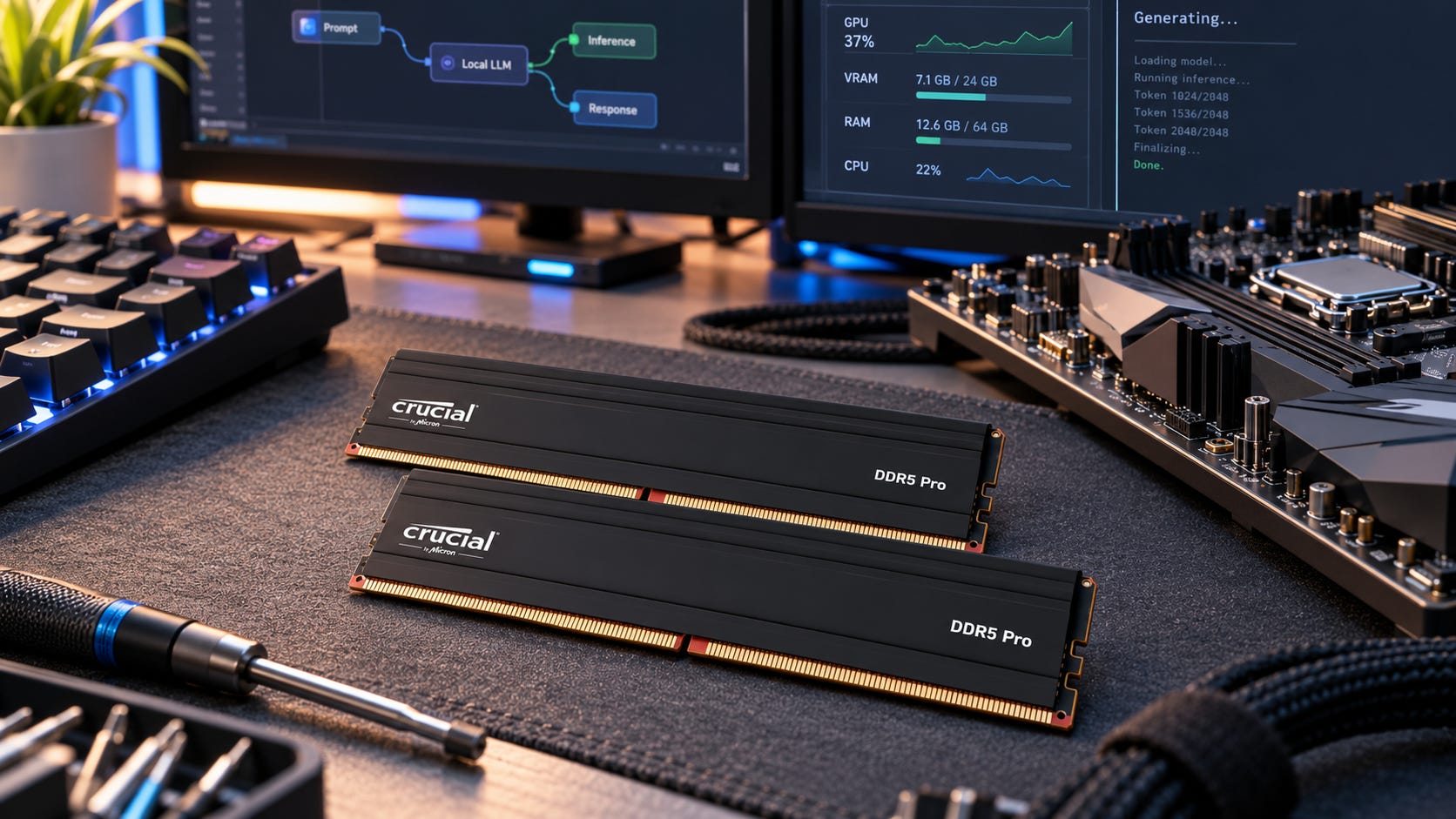
If you are choosing between 64GB of fast DDR5 and 96GB, 128GB, or 192GB of slower RAM for local LLMs, buy enough capacity to fit the workload first. Once the model, context, cache, operating system, and other software fit with reasonable headroom, memory bandwidth becomes the next question.
That order matters because RAM speed does not affect every local LLM workload in the same way. If a model lives entirely in GPU VRAM, faster DDR5 should have little effect on steady-state token generation. If part of the model lives in system RAM, DDR5 bandwidth enters the active inference path. For CPU-only inference, memory bandwidth can become one of the main performance limits.
llama.cpp makes these different arrangements explicit. Its current CLI includes GPU-layer controls plus CPU placement options for dense and Mixture-of-Experts weights, so a local model can be mostly GPU-resident, split between GPU VRAM and system RAM, or run primarily on the CPU.
That is why apparently contradictory advice about RAM speed and local AI can all be correct. A builder running a model entirely inside a large GPU is measuring a different bottleneck from someone keeping MoE experts in host memory, and both are measuring something different from a CPU-only system.
Disclosure: This post includes Amazon affiliate links. If you buy through them, Popular AI may earn a small commission at no extra cost to you.
Quick verdict: faster RAM vs more RAM for local LLMs
64GB, preferably 2x32GB: Buy this when your normal models fit comfortably in GPU VRAM or 64GB of system memory. If CPU inference or offload is significant, a stable DDR5-6000 configuration can outperform slower DDR5.
96GB, preferably 2x48GB: This is the strongest general-purpose consumer configuration for many serious local LLM builders. A representative option is the Corsair Vengeance 96GB DDR5-6000 CL30 kit. The extra capacity provides substantially more model headroom than 64GB without automatically moving to four DIMMs.
128GB, preferably 2x64GB where your platform supports it: This is a strong step up when 96GB is becoming restrictive and you want to preserve a two-DIMM topology. At this capacity, motherboard compatibility and stability matter more than chasing an ambitious memory overclock.
192GB, commonly 4x48GB: Buy it because your workload needs more than 128GB, not because it is fast. Four DIMMs make high memory clocks harder to sustain on dual-channel consumer platforms, so this is fundamentally a capacity-first configuration.
The purchase order is simple: capacity first, enough memory channels second, stable transfer rate third, timings last.
Why RAM speed matters only when the model uses system RAM
Local LLM inference is often described as memory-bandwidth bound. That description is useful only after answering one more question: which memory is serving the model weights during generation?
A GPU-resident model stresses GPU memory. A hybrid model can stress both GPU VRAM and host memory. A CPU-only model depends heavily on the system-memory subsystem. Faster DDR5 becomes valuable only to the degree that the workload is actually waiting on that RAM.
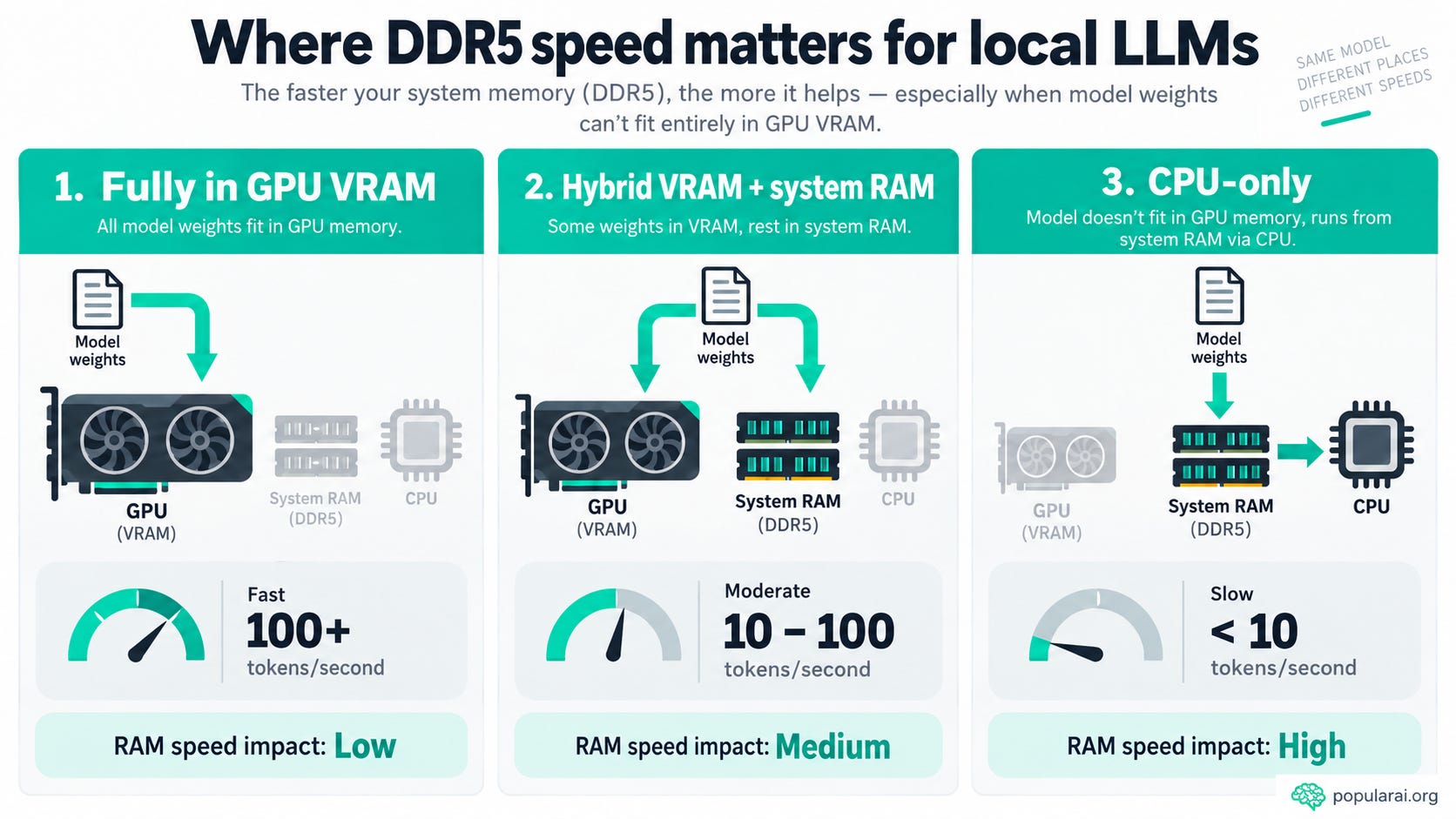
▪ Case 1: The model fits completely in GPU VRAM
When llama.cpp stores the model layers in VRAM, the GPU repeatedly reads those weights from its own local memory during generation. GPU VRAM bandwidth is therefore far more relevant to token generation than whether the PC uses DDR5-4800 or DDR5-6000.
The distinction is visible in llama.cpp’s placement controls, but it is also reflected in performance testing. A llama.cpp developer’s notes explain that GPU performance becomes significantly worse when the entire model cannot fit in VRAM and part of the model has to run on the CPU. In other words, the important transition is often the point where the workload stops being fully GPU-resident.
System RAM still matters in a GPU-first PC. The operating system, inference software, model loading, caches, other applications, and any host-side portions of the workload all need memory. The key difference is that adequate system RAM capacity does not automatically mean higher DDR5 frequency will materially improve steady-state generation.
If you have a 24GB or 32GB GPU and the model fits comfortably inside it, replacing adequate DDR5-4800 with premium DDR5-6400 should usually sit far down the upgrade list. More useful VRAM, a faster GPU, or enough total RAM to avoid capacity pressure is generally the more important part of the system.
Hardware requirements should therefore be considered model by model. Our Qwen3.8-27B hardware requirements guide shows the same sizing mindset: start with the model’s practical GPU and memory requirements instead of assuming that system RAM speed determines local LLM performance by itself.
This is the first major answer to the question, does RAM speed matter for local LLMs? If the active model is fully inside GPU VRAM, usually not very much for token generation.
More on system RAM in local AI builds:

▪ Case 2: The model is partly offloaded into system RAM
The calculation changes when some weights stay on the CPU side.
llama.cpp can deliberately keep dense feed-forward weights or MoE expert weights on the CPU while other parts of the model remain on the GPU. Once those CPU-resident weights are used during token generation, the system has to fetch them through host memory. At that point, DDR5 bandwidth can become a genuine bottleneck rather than a background specification.
Kartikey Chauhan’s gpt-oss-120b experiments provide a useful real-world example. On a system with an Intel Core i5-12600K, RTX 4070 12GB, and 64GB of DDR5, the installed DDR5-6000 memory had accidentally been configured at only 2000 MT/s. With MoE expert weights in system RAM, he reported about 10 to 11 tokens/s at DDR5-2000 and about 30 tokens/s after enabling the DDR5-6000 XMP profile.
That result should not be interpreted as evidence that DDR5-6000 will triple the speed of DDR5-4800. The starting point was an extreme memory misconfiguration, and the broader testing history included software changes as well. The useful lesson is the mechanism. When large portions of an MoE workload are actively served from host RAM, severely restricting host-memory bandwidth can severely restrict generation speed.

This case is increasingly relevant to builders who intentionally run models larger than their GPUs can hold by combining VRAM with system RAM. The more work that spills to the CPU side, the more important the host memory subsystem becomes.
It also explains why a 16GB or 24GB GPU paired with substantial system RAM can behave very differently from a 24GB or 32GB GPU running a smaller model entirely in VRAM. Both machines may have the same DDR5 kit, yet one workload can care greatly about host bandwidth while the other barely notices it.
▪ Case 3: CPU-only inference
CPU-only inference gives faster system memory its clearest argument.
llama.cpp developer Johannes Gaessler describes memory bandwidth as especially important for CPU inference, with generation performance becoming almost proportional to memory frequency once enough CPU threads saturate dual-channel memory. Consumer system RAM provides far less bandwidth than modern GPU VRAM, so CPU inference can run into the memory subsystem quickly.
That does not make the CPU itself irrelevant, nor does it make RAM frequency the only performance factor. It does explain why a memory upgrade can matter much more in a CPU-only local LLM machine than in a GPU-first desktop where the model is already fully resident in VRAM.
For readers deliberately running models without a discrete GPU, our CPU-only local LLM guide covers the other half of the decision. Model choice and quantization still determine whether the resulting speed is useful, even when memory bandwidth is strong.
In a CPU-only machine, paying for DDR5 bandwidth can therefore make considerably more sense than it does in a gaming PC that happens to run a few local models. The more consistently the CPU is responsible for reading model weights during generation, the easier it is to justify spending on stable memory throughput.


More on CPU-only LLMs:

What public DDR5 benchmarks actually show
Popular AI did not perform the RAM benchmark used here, so the useful approach is to examine public testing with enough methodology to understand what changed.
One of the cleaner DDR5 comparisons comes from Maxim Saplin, who tested CPU inference on the same Core i5-13600KF system across several memory configurations. His published headline comparison found a 20.3% generation-speed gain for Mistral 7B and 23.0% for Llama 3.1 8B when moving from 4800 MT/s to 6000 MT/s.
There is an important wrinkle in those headline figures. The 4800 MT/s baseline used four DIMMs totaling 96GB, while the 6000 MT/s result used two DIMMs totaling 64GB. That means the headline result changes more than memory frequency alone.
The same published results allow a cleaner two-DIMM comparison. Mistral increased from 9.66 tokens/s at 4800 MT/s to 11.34 tokens/s at 6000 MT/s, which is about 17.4% faster, while Llama 3.1 increased from 4.00 to 4.74 tokens/s, or 18.5% faster. In the same test, measured memory read, write, and copy bandwidth rose alongside generation speed.
That is a much better expectation than saying faster RAM makes local LLMs 20% faster. The benchmark describes a specific CPU-only workload on a specific platform, not a universal multiplier.
On that workload, the theoretical dual-channel transfer rate rose by 25%, from about 76.8 GB/s at DDR5-4800 to 96 GB/s at DDR5-6000. The two-DIMM generation results improved by roughly 17% to 19%. That is substantial enough to matter, but it is still smaller than the theoretical bandwidth increase.
Different CPUs, quants, backends, model architectures, context sizes, thread counts, and memory timings can change the result. Some workloads can also become compute-limited before they fully exploit more memory bandwidth.
The evidence supports a practical principle rather than a fixed percentage: when CPU-accessed weights dominate token generation, more usable system-memory bandwidth can translate into more tokens per second.
Capacity is a hard gate, while bandwidth is a multiplier
This is the central buying rule.
Imagine that 64GB of DDR5-6000 is 18% faster than 64GB of DDR5-4800 for your particular CPU inference workload. That sounds attractive while both configurations can hold everything you want to run.
Now suppose the model, context, KV cache, operating system, and applications need 75GB. The faster 64GB configuration has already lost the practical comparison because the workload does not fit.
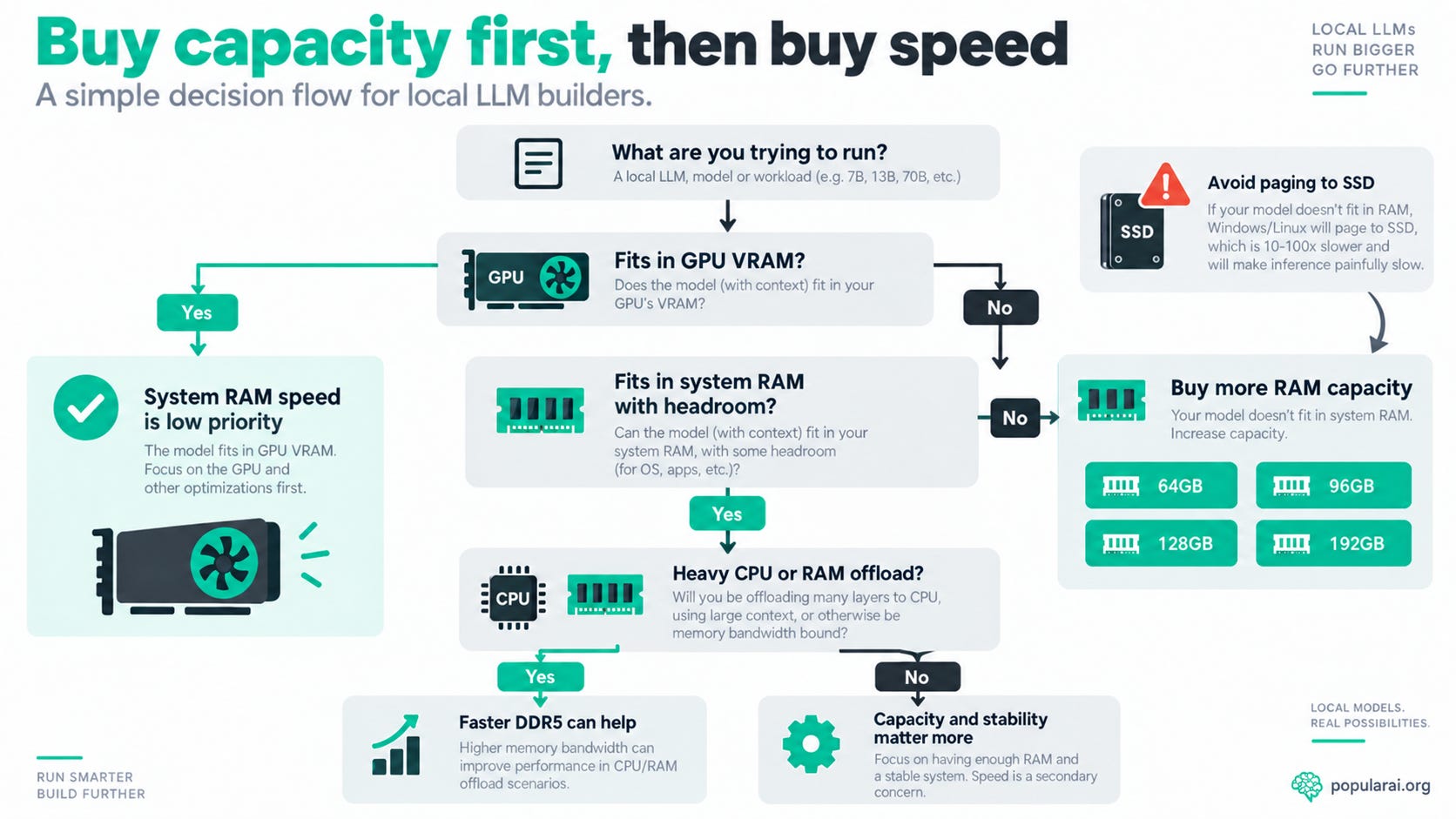
You would have to use a smaller model, more aggressive quantization, a shorter context, another placement strategy, or allow the operating system to page memory to storage. An NVMe SSD is excellent for model storage and loading, but it is no substitute for enough DRAM in the active inference path. Our local AI SSD storage guide covers that storage-versus-memory distinction in more detail.
So when the real choice is 64GB DDR5-6000 versus 96GB DDR5-4800, ask the capacity question first: can every workload you actually care about run inside 64GB with reasonable headroom?
If the answer is yes, and a meaningful portion of inference occurs on the CPU, the faster 64GB configuration can be the better performer. If the answer is no, buy 96GB.
That is why capacity and speed cannot be compared as if they were interchangeable benchmark numbers. Capacity determines whether the workload can run in the intended form. Bandwidth then influences how quickly CPU-served weights can be moved once the workload fits.
A model that loads and runs at 8 tokens/s is more useful than a theoretically faster configuration that cannot run it at all.
More on storage for local AI:

64GB vs 96GB vs 128GB vs 192GB for local LLMs
The useful capacity tiers each solve a different problem. The right choice depends less on the number printed on the memory box and more on which models you run, how much VRAM you have, and how often the CPU side becomes part of generation.
▪ 64GB: buy speed once you know 64GB is enough
A 2x32GB DDR5-6000 configuration makes sense for GPU-first machines where system RAM mainly supports the GPU, as well as CPU-only or partially offloaded models that remain comfortably inside the capacity limit.

A representative kit for this class is the Corsair Vengeance 64GB 2x32GB DDR5-6000 CL30 configuration linked in the introduction. Its role in this comparison is straightforward: it represents the higher-speed, lower-capacity side of the buying decision.
Do not choose 64GB simply because DDR5-6000 looks faster on a specification sheet. Choose it when 64GB genuinely holds the workloads you care about. If your normal model, context, and background software fit with room to spare, then the additional memory bandwidth can become useful during CPU-heavy inference.
If 64GB forces compromises you do not want to make, the speed advantage is secondary.
▪ 96GB: the consumer sweet spot for many local LLM builders
Two 48GB DIMMs solve an unusually useful problem. You get 50% more capacity than 64GB while keeping only two DIMM slots populated.
That makes 96GB especially attractive for a system with 16GB to 24GB of VRAM where larger models regularly spill into host RAM. It creates more room for model weights and context while avoiding the four-DIMM topology that can make high memory clocks more difficult to maintain.
The Corsair Vengeance 96GB DDR5-6000 CL30 kit linked in the quick verdict is one representative example. The point is not that every platform will run that exact profile, but that 2x48GB combines a substantial jump in capacity with a two-DIMM layout.

For a new mainstream local LLM PC, 96GB is the configuration I would target first when the premium over 64GB is reasonable and the extra capacity will actually be used. It gives more breathing room than 64GB without immediately jumping to the electrical and compatibility considerations of four populated slots.
▪ 128GB: favor two DIMMs when the platform supports them
If 96GB is too restrictive, 2x64GB has an obvious appeal. You gain another 32GB of capacity while preserving a two-DIMM topology on platforms that support those modules.
The tradeoff is compatibility. Large, high-density DIMMs place their own demands on the memory controller, and the speed printed on a memory kit is not a guarantee that every CPU and motherboard combination will sustain that setting.

A conservative representative option is the Crucial Pro 128GB 2x64GB DDR5-5600 kit. At this capacity, I would choose a boring, stable 5600 MT/s setup over an unstable 6000+ MT/s profile every time.
The reason follows the same hierarchy as the rest of the article. A local LLM machine has to be stable under sustained memory use before a higher benchmark number becomes useful. Extra transfer rate has no value if the memory configuration cannot run reliably.
▪ 192GB: buy it when the model requires it
A 192GB consumer configuration is fundamentally a capacity purchase.
Four 48GB DIMMs can give a dual-channel desktop enough DRAM for workloads that simply do not fit in 128GB, but populating all four slots makes aggressive memory clocks harder to sustain. The advertised memory profile is also not a promise that a particular CPU memory controller and motherboard will run it at that setting.
If 128GB cannot hold the model and 192GB can, the buying argument changes immediately. Take the capacity, accept the lower attainable clock if necessary, and benchmark what the complete machine can sustain.

This is the tier where protecting model choice matters more than protecting a synthetic memory score.
Why four DIMMs can cut your DDR5 speed
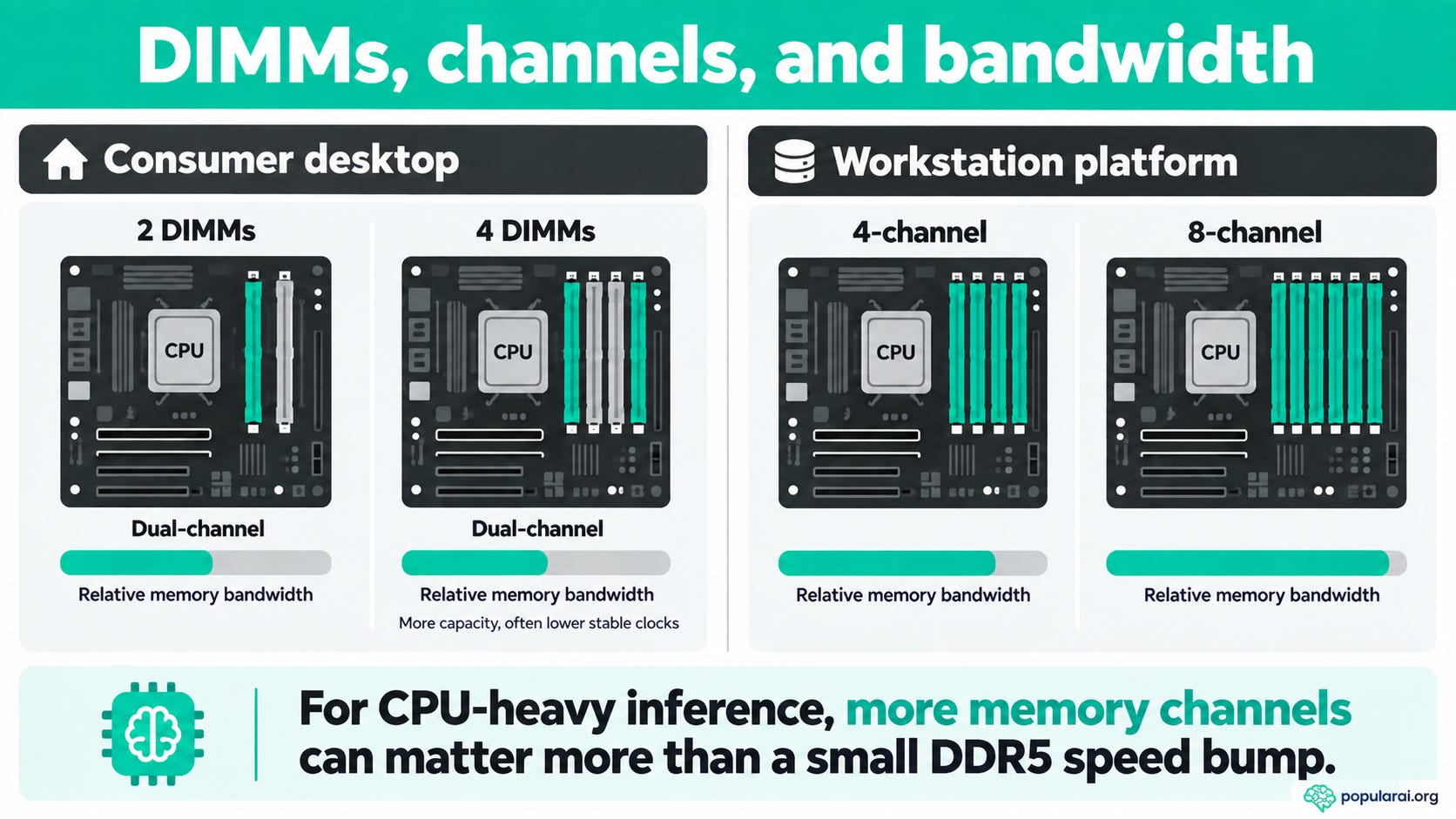
Four physical memory sticks do not give an ordinary desktop CPU four memory channels.
AMD’s Ryzen 9 9950X, for example, has two memory channels, supports up to 256GB, and is officially specified for DDR5-5600 with two DIMMs but DDR5-3600 with four DIMMs.
Intel’s Core Ultra 9 285K likewise supports two memory channels, up to 256GB, and DDR5 speeds up to 6400 MT/s in Intel’s published specifications.
The broader point is electrical loading. Four DIMMs place more demand on the memory controller, and the exact stable frequency depends on CPU generation, motherboard layout and BIOS, DIMM density and rank, and the specific memory kit.
Saplin encountered the four-DIMM limitation directly in the same DDR5 test. His four-DIMM configuration could not maintain the higher XMP frequencies and topped out at a stable 4800 MT/s, while two DIMMs reached 6000 MT/s. An attempted 6200 MT/s overclock failed an OCCT stability test.
This is also why XMP and EXPO ratings need the right interpretation. Intel describes XMP as a profile-based way to overclock memory on tested platform combinations, while AMD describes EXPO as DDR5 memory overclocking through Ryzen-optimized profiles for Socket AM5. Neither label should be treated as a promise that every advertised kit speed will work on every motherboard and CPU combination.
For an expensive local AI build, check the motherboard memory QVL before buying very large DIMMs. Stability is more valuable than another 200 MT/s printed on the box.
Memory channels can matter more than another DDR5 speed bin
If CPU-only or host-RAM-heavy inference is one of the machine’s main jobs, there is a point where tweaking consumer DDR5 stops being the largest available memory upgrade.
A dual-channel DDR5-6000 system has 96 GB/s of theoretical peak memory bandwidth. Raising frequency within the same dual-channel architecture can improve that number, but adding memory channels changes the available bandwidth much more dramatically.
AMD’s Ryzen Threadripper 9980X supports four DDR5 memory channels at up to 6400 MT/s, which works out to 204.8 GB/s of theoretical peak bandwidth before real-world efficiency is considered. Threadripper PRO 9995WX supports eight DDR5 channels at up to 6400 MT/s, for a theoretical 409.6 GB/s.
Those platforms use RDIMMs and cost far more to build. They are not sensible upgrades for someone who runs a CPU-offloaded model only occasionally. The comparison is useful because it shows the scale of the architectural difference.
If a system genuinely needs more host-memory throughput for inference, memory-channel count can be a much larger lever than choosing DDR5-6400 instead of DDR5-6000 on the same dual-channel desktop platform.
Our best CPUs for local LLMs guide and broader AI hardware and builds hub cover the rest of that platform decision, including when it makes sense to look beyond an ordinary consumer desktop.
More on local AI hardware:


What about DDR5 latency?
Latency matters, but CAS latency should not be the first buying criterion for local LLM inference.
The public DDR5 test discussed above cannot cleanly isolate frequency from timings because changing the memory configuration also changed measured bandwidth and latency. In that test, the most useful relationship for this buying question was that memory throughput and generation speed moved together as the system changed from DDR5-4800 to DDR5-6000.
That does not mean CL30 and CL40 are identical. It means the hierarchy still matters. For local LLM purchasing, think in this order:
capacity → memory channels → stable transfer rate → timings.
Paying a large premium to shave a few nanoseconds from latency makes little sense if the same money would buy the capacity required to run the model, context, or quantization you actually want.
Latency tuning becomes a refinement after the more consequential constraints are already solved.
Benchmark your own workload before replacing working RAM
The most useful answer is measurable on the exact models and placement strategy you run.
llama.cpp includes llama-bench for controlled performance testing, including prompt processing, text generation, repeated runs, average tokens per second, and standard deviation. Its documented measurements exclude tokenization and sampling time, which helps keep the benchmark focused on the inference work it is designed to measure.
A simple starting point is:
./llama-bench -m model.gguf -p 512 -n 128 -r 5Keep the model, quantization, context, llama.cpp build, thread count, GPU offload, GPU clocks, and background workload unchanged. Then change only the memory configuration you are trying to evaluate.
If possible, repeat the benchmark with the model fully GPU-resident, with your normal hybrid offload, and CPU-only. Those three runs can tell you much more about whether expensive RAM will help your machine than a generic DDR5 comparison can.
The GPU-resident run shows how little system-memory changes matter when the GPU owns the active model. The hybrid run reveals whether your normal offload strategy is sensitive to host bandwidth. The CPU-only run gives the memory subsystem its largest opportunity to affect token generation.
Also verify the configured memory speed rather than trusting the number printed on the DIMM. A DDR5-6000 kit running at a conservative default setting is not actually delivering DDR5-6000 transfer rates.
The gpt-oss-120b example is a strong reminder of why that check belongs in the benchmark process. Before replacing working RAM, make sure the existing kit is running at the intended configuration and is stable there.
Who should buy faster RAM, more RAM, or neither?
▪ If you mostly run models that fit completely inside a discrete GPU’s VRAM, keep enough system RAM and stop treating premium DDR5 timings as a major local LLM upgrade. In that workload, GPU capability and VRAM are more central to steady-state generation.
▪ If you have 16GB to 24GB of VRAM and routinely stretch into 70B-class models, large MoE models, long contexts, or other configurations that leave substantial weights in system RAM, 96GB or 128GB with good stable bandwidth is the more balanced target. The capacity gives the workload room to exist, while the transfer rate helps when the CPU side remains active during generation.
▪ If you run CPU-only inference every day, DDR5 bandwidth deserves much more weight in the buying decision. At the high end, CPU-heavy users should compare memory-channel count as well as memory frequency, because moving beyond dual-channel consumer hardware changes the available bandwidth more dramatically.
▪ If you are considering 192GB because a particular model needs it, buy the capacity and accept the lower attainable clock if that is what the platform requires. Do not shrink the model, context, or intended workload purely to protect a memory benchmark number unless that compromise is actually acceptable to you.
And if 64GB already holds every model you use while the GPU does nearly all the work, buying new RAM solely to move from DDR5-5600 to DDR5-6000 is unlikely to be the upgrade you notice most.
Best RAM choice for local LLMs: capacity first, bandwidth when it matters
The answer to whether RAM speed matters for local LLMs is conditional. Capacity comes first because it determines whether the workload fits. Bandwidth matters after that, and its value rises as more inference work moves into system RAM.
If 64GB fits your entire workload with headroom, stable DDR5-6000 can be meaningfully faster than slower DDR5 during CPU-only or CPU-heavy inference. Public testing shows that a high-teens generation gain from DDR5-4800 to DDR5-6000 is plausible in a strongly memory-bound CPU workload. That result should be treated as a workload-specific example, not a universal local LLM speedup.
The moment 64GB forces paging, a shorter context, a harsher quantization, or a model you did not actually want, buy the larger configuration. Capacity is the gate. Bandwidth is the multiplier.
For a new consumer local AI build, 96GB in a 2x48GB configuration is the best balance for many serious users. It provides considerably more room than 64GB while preserving the easier two-DIMM topology. Move to 128GB if your workloads justify it.
Buy 192GB when you have a concrete model that needs it. A representative capacity-first option is the Corsair Vengeance 192GB 4x48GB DDR5-5200 kit. At that point, lower attainable memory frequency is a reasonable trade if the alternative is that the workload does not fit at all.
And if system RAM is doing enough inference work that host bandwidth has become one of your biggest bottlenecks, stop obsessing over small timing differences. The more important question may be whether a dual-channel consumer platform is still the right architecture for the job.
Explore more from Popular AI:
Start here | Local AI | Builds & gear | Autonomy & policy | Fixes & guides | Popular AI podcast
How much RAM are you running for local LLMs right now, and have you ever benchmarked whether faster DDR5 actually improves your tokens per second?