


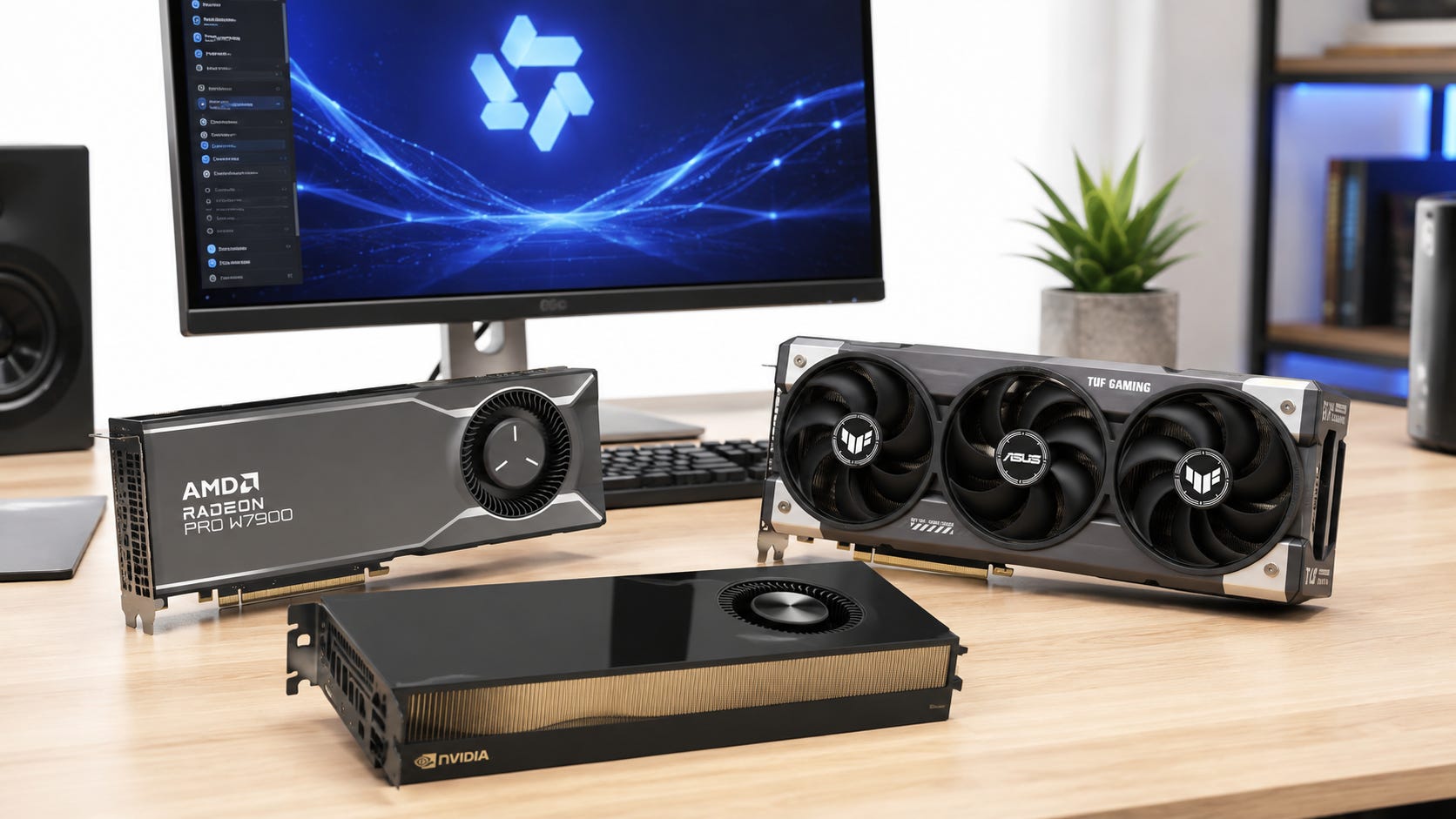
Qwen3.8-27B gives local AI users an unusually useful hardware problem. The model is capable enough to justify serious agent workloads, yet compact enough at Q4 to run on a 24GB RTX 3090.
Qwen released the 27B model on August 14, 2026. It is a dense multimodal model with a native 262,144-token context window, Multi-Token Prediction, image and video understanding, and downloadable weights under Apache 2.0.
That combination changes the hardware discussion. You do not need a current workstation GPU to get started. A good Q4 build can turn an older GeForce RTX 3090 24GB into a capable Qwen3.8-27B agent machine.
The practical answer is straightforward: 24GB works, 32GB is comfortable, 48GB removes most of the compromises, and 72GB becomes interesting if you want BF16 or more room for whatever comes after Qwen3.8.
The upper end has also become more interesting. NVIDIA’s RTX PRO 5000 Blackwell comes in 48GB and 72GB versions. Both are specified with 1,344 GB/s of memory bandwidth and a 300W dual-slot design. That gives local AI buyers another route beyond older 48GB workstation cards and complicated multi-GPU builds.
Disclosure: This post includes Amazon affiliate links. If you buy through them, Popular AI may earn a small commission at no extra cost to you.
Key takeaways
24GB remains the value sweet spot for Qwen3.8-27B. A good Q4 quant leaves enough VRAM for useful context, MTP, vision, and a real agent harness.
32GB is the comfort tier. Q5 and Q6 become much easier, while long-context workloads have more margin.
48GB is where Q8 and long-running agents stop feeling like a memory puzzle. The RTX PRO 5000 Blackwell 48GB is the strongest modern single-GPU option in this comparison, while a used RTX A6000 can offer better value.
Dual RTX 3090s remain a VRAM-per-dollar option, rather than the only route to 48GB. A single 48GB workstation GPU is substantially easier to build around.
72GB is a meaningful new tier. The RTX PRO 5000 Blackwell 72GB can hold the roughly 54.7GB BF16 model weights with significant room left, although full native context still makes the total memory budget tight.
16GB can run the model, but buying a 16GB GPU specifically for Qwen3.8-27B is not recommended.
What Qwen3.8-27B actually is
Qwen3.8-27B is a 27B-parameter dense vision-language model designed around coding, professional work, research, and long-horizon agent tasks. It has 64 language-model layers and native support for image and video input. Thinking is enabled by default and can be controlled per request.


Its architecture matters when you start calculating VRAM requirements.
Rather than using conventional full attention in every layer, Qwen3.8-27B uses a repeating hybrid layout of three Gated DeltaNet layers followed by one gated full-attention layer. With 64 layers in total, that means 16 full-attention layers. Those attention layers use four KV heads with a head dimension of 256.
That hybrid design is one reason very large contexts can remain plausible on hardware that would look undersized if you estimated memory requirements from a conventional 27B architecture.
Qwen lists a native 262,144-token context window, with extension up to 1 million tokens through long-context scaling. One million tokens should be treated as an advanced deployment capability, rather than a sensible default setting for an RTX 3090.
The official repository also documents support around common inference tooling, including Transformers, vLLM, SGLang, and TokenSpeed. That matters because the practical limits of a 24GB or 32GB card depend heavily on the runtime, cache format, quantization method, vision setup, and speculative decoding configuration.
Start with the quant, not the 27B parameter count
The most misleading way to answer “How much VRAM does Qwen3.8-27B need?” is with one number.
The full-precision checkpoint and the version most people will run locally are completely different hardware propositions.
The available Unsloth GGUF repository puts the practical model-file sizes at approximately:
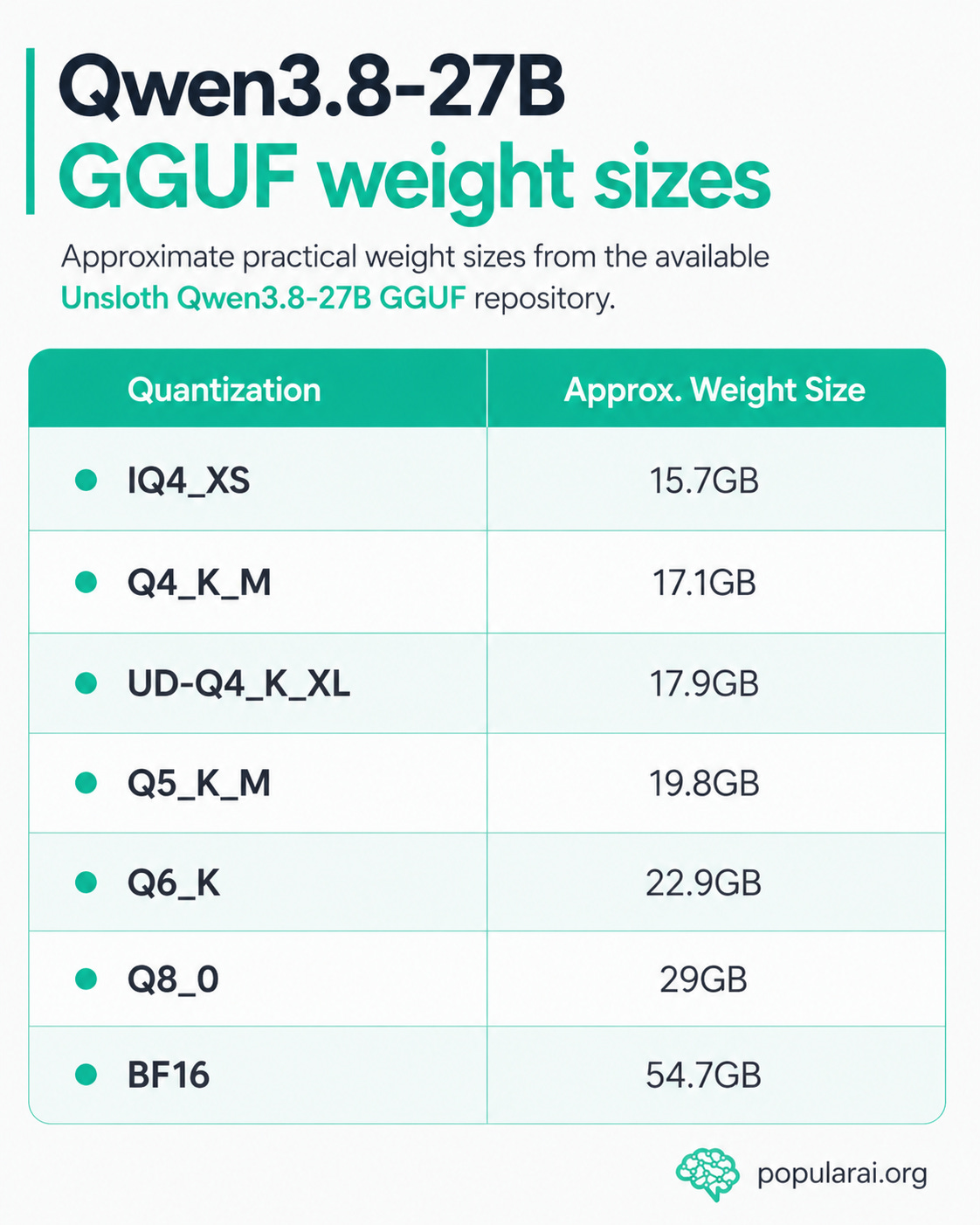
Those figures describe model weights. They are not total VRAM requirements.
Your inference engine still needs memory for context state, the conventional KV cache, recurrent state, MTP, vision components, temporary buffers, and other runtime allocations.
That is how a model with roughly 54.7GB of BF16 weights can still be practical on a 24GB consumer GPU once the weights are quantized.


For local Qwen3.8-27B hardware planning, quantization is the bridge between “27B model” and the GPU you can actually use.
16GB is possible, but it is not the tier to target
Qwen3.8-27B can run on some 16GB cards with sufficiently compact quantization and aggressive memory settings.
That is useful if you already own a 16GB GPU. It is much less convincing as a buying strategy.
An IQ4_XS model around 15.7GB already consumes nearly the entire nominal capacity of a 16GB card before context, MTP, vision, and runtime memory enter the picture.
A standard Q4_K_M build is roughly 17.1GB, so the weights alone exceed a 16GB GPU.
Community testing illustrates both sides. Compact configurations have been made to run on RTX 5060 Ti 16GB cards. Another Q4_K_M test spilled part of the model into system RAM and reported only about 5.5 tokens per second.
That is an individual result, rather than a universal benchmark. It still illustrates the distinction that matters for hardware planning: loading a model is not the same as running it well.
If you already have a 16GB card, experimenting with IQ4-class builds makes sense. You can find out whether your actual prompts and context sizes fit before spending more money.
⚠️ If you are buying a GPU specifically for Qwen3.8-27B, 24GB is the better starting point.
24GB is the Qwen3.8-27B sweet spot
This is where Qwen3.8 becomes unusually compelling.
An RTX 3090 gives you 24GB of VRAM. A 17GB to 18GB Q4 model therefore leaves roughly 6GB to 7GB before the model’s other GPU memory requirements are counted.
That sounds tight compared with modern workstation cards, but it is enough to do real work.
Popular AI’s RTX 3090 24GB local LLM guide currently recommends Qwen3.6-27B as its best overall model. Qwen3.8-27B is now the obvious candidate to replace it because it occupies the same attractive hardware class while pushing further into agent-oriented workloads.
Users are already doing more than one-turn chat tests.
One reported single-3090 configuration reached roughly 131K context with vision enabled. Another used Q4_K_M, MTP, and a 64K context with OpenCode for an autonomous coding task.
These are community configurations. Exact limits should not be generalized to every quant, runtime, operating system, or agent harness. They do establish that 24GB Qwen3.8 is a practical agent platform rather than a model-loading stunt.
That keeps the RTX 3090 unusually relevant in 2026.

The important question is no longer whether 24GB can run Qwen3.8-27B. It can.
The better question is what you have to give up when context, MTP, vision, and higher-quality quantization all begin competing for the same remaining VRAM.
Check out our earlier RTX 3090 guide:

Why large context can fit on 24GB at all
The official architecture lets us estimate the conventional full-attention portion of the KV cache.
Qwen3.8-27B has:
16 full-attention layers
4 KV heads in each
a head dimension of 256
separate key and value tensors
At FP16 or BF16, that works out to approximately 64 KiB per token for the conventional attention KV cache.
The rough memory requirement is therefore about:
32K context: 2GiB at FP16, about 1GiB at 8-bit, about 0.5GiB at 4-bit
64K: 4GiB, 2GiB, or 1GiB
128K: 8GiB, 4GiB, or 2GiB
262K: 16GiB, 8GiB, or 4GiB
These are architecture-derived estimates. They are not measurements of total Qwen3.8-27B VRAM consumption.
The calculation excludes Gated DeltaNet state, vision processing, MTP, temporary allocations, runtime buffers, and implementation-specific overhead. The model’s published 64-layer hybrid architecture includes 16 gated attention layers with four KV heads and a 256-dimensional head size, which is the basis for the estimate.
Even with those caveats, the calculation explains why quantized KV cache has such a large effect.
A 128K context does not necessarily consume the amount of conventional attention memory you might expect from a 27B transformer using full attention throughout the network.
It also explains why two llama.cpp, vLLM, or SGLang configurations can produce very different maximum-context results on the same GPU.
The GPU model is only one variable. Cache precision and implementation choices can decide whether a large context fits at all.
Where 24GB starts to hurt
There is no single context length where an RTX 3090 suddenly becomes inadequate.
The pressure arrives when multiple useful features start stacking together.
▪ Higher-quality quants consume the margin
Q5_K_M is roughly 19.8GB.
On a 24GB GPU, that leaves around 4GB before runtime memory.
Q6_K is roughly 22.9GB.
That effectively consumes the card before you have given the model a serious context window or accounted for the rest of the inference stack.
This is why Q4 can be the more practical 24GB choice for an agent. The VRAM saved on the weights can be worth more as context headroom than the extra precision of a larger quant.
The best quant is therefore not automatically the largest file your GPU can technically load.
For an agent, “fits with useful context” matters more than “fits before the first prompt.”
▪ MTP uses part of the budget
Qwen3.8-27B was trained with multiple-step Multi-Token Prediction.
Compatible runtimes can use the MTP head for speculative decoding, which can substantially improve generation speed.
That speed is not free from a memory perspective.
One RTX 3090 user reported that enabling MTP greatly increased generation speed at short context but forced the configured maximum context down to 96K because of the additional VRAM demand.
That is one implementation and one configuration. It should not be treated as a universal 96K limit.
The broader lesson does generalize. If you intend to use MTP, include it in the memory budget before deciding how much context your GPU can sustain.
▪ Vision makes a text-only VRAM estimate incomplete
Qwen3.8-27B has a native vision encoder and supports image and video understanding.
A coding agent looking at screenshots, a browser agent repeatedly reading its desktop, or a document workflow sending page images through the model does not behave like a text-only benchmark.
A setup that looks comfortably within 24GB during plain text testing can become much less comfortable once visual inputs are part of the real workflow.
Leave more headroom when vision is central to the job.
This is especially important for agents because visual inputs may arrive after the text history has already become large.
▪ Agents fill context with things humans do not
Long-running agents accumulate terminal output, source files, diffs, screenshots, tool responses, browser text, previous reasoning, errors, retries, system instructions, and intermediate results.
The model also supports retaining prior thinking context between turns through its thinking-preservation behavior.
A 64K window can feel enormous in ordinary chat and surprisingly finite after an agent has been modifying a repository for an hour.
That changes the value of VRAM.
For simple prompts, spending more money to move from 24GB to 48GB may achieve little. For a coding or computer-use agent whose context keeps expanding while other memory features remain enabled, additional VRAM can affect how long the workload remains comfortable.
That is where more memory starts to matter more than another small increase in raw GPU speed.
32GB is the comfort tier
A 32GB GPU does not unlock a fundamentally different Qwen3.8-27B model.
It makes the same model much easier to live with.
The RTX 5090 is the obvious consumer example. Popular AI’s RTX 5090 vs RTX 4090 vs RTX 3090 local AI comparison covers the broader buying decision among those cards.

For Qwen3.8 specifically, the extra eight gigabytes above a 24GB card change several practical choices.
▪ Q4 is roomy. There is substantially more memory for long context, MTP, vision, and the rest of the desktop workload.
▪ Q5 is comfortable. A roughly 20GB model leaves around 12GB of nominal capacity before runtime overhead.
▪ Q6 becomes practical. The roughly 22.9GB weights leave about 9GB of nominal capacity.
▪ Q8 remains awkward for agent work. The 29GB Q8_0 file can nominally fit in 32GB, but the remaining three gigabytes do not make it a comfortable long-context configuration.
That is important to keep in mind because a GPU can fit model weights while still being a poor match for the workflow around them.
An RTX 5090 is therefore not necessary for Qwen3.8-27B.
Buy 32GB for speed and single-card headroom. Do not buy it because a 3090 supposedly cannot run the model.

More on GPUs for local AI:

48GB is where the hardware choices become more interesting
Forty-eight gigabytes changes the character of the workload.
Q8 weights now leave close to 19GB before runtime overhead. Q5 and Q6 stop feeling like constrained configurations. Large agent contexts, vision, and MTP have far more room to coexist.
The additional capacity also makes it easier to treat Qwen3.8-27B as one part of a larger local AI workstation rather than the only process that matters.
There are several credible routes to 48GB, and dual RTX 3090s are only one of them.
RTX PRO 5000 Blackwell 48GB is the strongest modern single-GPU option
For someone buying a new professional 48GB card for local AI, the RTX PRO 5000 Blackwell 48GB is the most interesting NVIDIA option in this hardware ladder.
NVIDIA specifies 48GB of ECC GDDR7, 1,344 GB/s of memory bandwidth, fifth-generation Tensor Cores, 300W maximum power, and a dual-slot active design. NVIDIA also positions the card for AI development, inference, local AI assistants, and agentic AI workloads.
That combination fits this particular problem unusually well.
You get 48GB on one CUDA device. There is no need to split the model across two GPUs simply to access the full capacity, and no requirement to engineer a workstation around the combined GPU power draw of two RTX 3090s.
The published 1,344 GB/s bandwidth is also substantially higher than the RTX A6000’s 768 GB/s and the RTX 6000 Ada’s 960 GB/s.
That does not turn into a guaranteed tokens-per-second multiplier. Qwen performance depends on kernels, runtime support, quantization, context length, speculative decoding, and compute utilization.
It does make the PRO 5000 a much more interesting modern inference card than a comparison that treats every 48GB workstation GPU as interchangeable.
The catch is cost.
Professional Blackwell hardware is expensive enough that Qwen3.8-27B alone does not justify the purchase for most people. A 24GB RTX 3090 already runs the model well at an appropriate quant.
Best for: Buyers who need one modern 48GB CUDA GPU for several serious local AI workloads and value a clean 300W dual-slot workstation design.

RTX A6000 48GB is the used-market single-GPU value
The RTX A6000 remains one of the most useful older workstation cards for local AI.
NVIDIA specifies 48GB of ECC GDDR6, a 300W board-power rating, PCIe 4.0 x16, active cooling, a dual-slot form factor, and support for two-way NVLink.
Its published memory bandwidth is 768 GB/s.
For Qwen3.8, though, its central advantage is simpler than any benchmark.
All 48GB are on one CUDA GPU.
There is no tensor-parallel configuration required merely to access that capacity. There is no pair of enormous consumer cards to cool. There is no 700W combined GPU power budget from two 350W RTX 3090s.
If used pricing is favorable, the A6000 can therefore be the better 48GB value for someone who prioritizes capacity and simplicity over maximum modern-GPU speed.
Do not buy it expecting a Q4 Qwen3.8 session to become automatically faster than every newer consumer card. Its appeal is memory capacity, ECC, workstation packaging, and the convenience of one CUDA device.
Best for: Used-market buyers who want 48GB on one NVIDIA GPU without paying current-generation workstation prices.

RTX 6000 Ada 48GB is excellent, but Blackwell changes the game
The RTX 6000 Ada remains a formidable 48GB workstation GPU.
NVIDIA specifies 48GB of ECC GDDR6, 300W maximum power, a dual-slot active design, and PCIe Gen 4 x16. Its published memory bandwidth is 960 GB/s.
Before the RTX PRO 5000 Blackwell, it was an easy premium recommendation in the 48GB workstation category.
Its position is less comfortable now.
The newer PRO 5000 Blackwell offers the same 48GB capacity, higher published memory bandwidth, newer Tensor Cores, and the same 300W dual-slot power envelope.
Unless the RTX 6000 Ada is materially cheaper, the Blackwell card is the stronger new-purchase recommendation for the local AI workload considered here.
That does not make the 6000 Ada obsolete. A used, discounted, or already-owned card remains excellent hardware for Qwen3.8-27B and other models that benefit from 48GB on one CUDA device.
The value argument has simply changed.
Best for: Buyers who find one at a strong price below comparable Blackwell hardware, or people who already own one.

Radeon Pro W7900 48GB is the serious AMD alternative
AMD’s Radeon Pro W7900 gives local AI buyers another single-card 48GB route.
More importantly for local AI, the ROCm 7.2 Linux support documentation lists both the Radeon Pro W7900 and W7900 Dual Slot as supported RDNA 3 hardware.
That turns the W7900 into a genuine local AI option rather than a theoretical 48GB GPU with no compute ecosystem behind it.


The remaining caveat is software compatibility.
⚠️ ROCm support does not guarantee that every CUDA-first inference project, custom kernel, speculative decoder, extension, or newly released GitHub tool will behave identically on AMD.
If you already know that your runner works well with ROCm, the W7900 deserves consideration.
If your priority is downloading whatever local AI project appeared yesterday and expecting minimal friction, CUDA remains the safer default in the context of the software compatibility described here.
That distinction can matter more than the specifications on the box.
Best for: ROCm users who want 48GB on one GPU and have verified the exact inference stack they intend to use.

Dual RTX 3090s are still the VRAM-per-dollar route
Two RTX 3090s give you 48GB of aggregate VRAM.
That word matters.
Your inference software has to distribute the model or workload across both devices. They do not become one transparent 48GB GPU.
Popular AI’s dual RTX 3090 local AI guide covers the motherboard, slot-spacing, cooling, power, and PCIe complications in more detail.
The attraction is price.
If two good used cards cost far less than one professional 48GB GPU, accepting the extra complexity may be completely rational.
The drawbacks are physical as well as software-related.
Two 350W GPUs make cooling, power delivery, case choice, motherboard layout, slot spacing, noise, and workload distribution part of the inference setup.
That can be a worthwhile trade if aggregate CUDA VRAM per dollar is the priority. It is much less attractive if you want a compact, quiet workstation that behaves like a conventional single-GPU PC.
Best for: Experienced builders who want maximum aggregate CUDA VRAM per dollar and are comfortable with multi-GPU friction.
More on dual RTX 3090 local AI builds:

The 48GB buying hierarchy for Qwen3.8
If Qwen3.8-27B and similar models are your target, the 48GB choices break down like this.
▪ Best modern single-GPU choice: RTX PRO 5000 Blackwell 48GB. You get a newer architecture, 48GB of ECC GDDR7, very high published memory bandwidth, a 300W power envelope, dual-slot packaging, and CUDA on one device.
▪ Best used single-GPU value: RTX A6000 48GB. It is much older, but one clean CUDA device with 48GB can matter more than benchmark prestige when capacity is the main constraint.
▪ Best aggregate VRAM value: dual RTX 3090s. The pair can be substantially cheaper than professional 48GB hardware, with considerably more build and software complexity.
▪ Best AMD option: Radeon Pro W7900 48GB. It combines useful capacity and bandwidth with current ROCm support. Verify your applications first.
▪ Buy an RTX 6000 Ada when the price beats Blackwell. It remains excellent hardware, but the RTX PRO 5000 makes it much harder to recommend at similar pricing.
The important point is that “48GB” no longer appeals to one single type of buyer.
A used A6000 buyer, a dual-3090 builder, an AMD ROCm user, and someone purchasing a new RTX PRO workstation may all arrive at 48GB for completely different reasons.
72GB is the new workstation tier worth paying attention to
The 72GB RTX PRO 5000 Blackwell is arguably more interesting for local AI than the 48GB version because consumer hardware has no close equivalent in this comparison.
NVIDIA lists the RTX PRO 5000 72GB Blackwell with 72GB of ECC GDDR7, 1,344 GB/s of memory bandwidth, 300W maximum power, and a dual-slot active form factor.
That makes 72GB a useful bridge between the familiar 48GB workstation class and substantially larger accelerator configurations.
For Qwen3.8-27B, it changes one particular question: BF16.
The available BF16 GGUF is about 54.7GB. On a 72GB card, that leaves roughly 17GB of nominal capacity before runtime overhead.
That is enough for BF16 inference to become a plausible single-GPU configuration rather than an obvious nonstarter.
It still does not mean BF16 with the maximum native 262K context is automatically comfortable.
The architecture-derived estimate puts the conventional FP16 KV cache at roughly 16GiB at 262K tokens. Combine that with approximately 54.7GB of weights and the nominal 72GB capacity is nearly exhausted before Gated DeltaNet state, vision, MTP, temporary buffers, and other runtime memory are included.
That distinction changes the recommendation.
▪ BF16 with moderate context: realistic.
▪ Q8 with giant context: extremely comfortable by comparison.
▪ BF16 with the full 262K window, vision, MTP, and significant runtime overhead: a configuration to approach carefully rather than assume will fit.
For someone spending workstation money and expecting to run larger models after Qwen3.8, the 72GB version has a stronger longevity argument than buying exactly enough VRAM because today’s Q8 happens to fit.
It creates space for workloads that a 48GB card cannot address as cleanly, while remaining a single desktop GPU.

Do you actually need BF16?
Probably not.
The existence of a 72GB card that can hold Qwen3.8-27B at BF16 does not make BF16 the sensible default for local inference.
The central hardware appeal of Qwen3.8-27B is that its Q4, Q5, and Q6 versions preserve useful capability while fitting dramatically cheaper hardware.
A Q4 version around 17GB can run on a used RTX 3090.
A Q8 version around 29GB becomes roomy on 48GB.
BF16 requires roughly 55GB for the weights alone.
Unless your own workflow has demonstrated a measurable quality benefit from higher precision, spending workstation-level money purely to avoid quantization is difficult to justify from the hardware requirements presented here.
There are stronger reasons to buy more VRAM.
Larger future models can use it. Longer context can use it. Concurrency can use it. Vision and agent workloads can use it. Running several local AI services on the same machine can use it.
A precision label by itself is a weaker buying argument.
The useful question is what the extra memory allows your workload to accomplish.
What about two RTX 5060 Ti 16GB cards?
This is one of the real buying questions around Qwen3.8, and the answer remains: probably not if Qwen3.8-27B is the main reason for the build.
Two 16GB cards provide 32GB of aggregate memory to inference software capable of dividing a model between them.
They do not become one transparent 32GB GPU.
Qwen3.8 Q4 already fits on a single 24GB card, which means a dual-5060-Ti configuration introduces multi-GPU communication and configuration before the model actually requires multiple GPUs.
A pair can still make sense in particular circumstances.
You may already own one card. You may strongly prefer buying new hardware with warranty coverage. You may run parallel workloads that benefit from two independent GPUs rather than one large device.
Those are legitimate reasons.
For a new workstation built primarily around Qwen3.8-27B, one 24GB or 32GB device remains the cleaner choice.
The model itself does not create a strong reason to build around two 16GB cards.
What the rest of the PC actually needs
The GPU is still the component that defines whether the model and its working memory fit.
For a single RTX 3090 Qwen3.8 workstation, 64GB of system RAM is a sensible practical starting point.
Move to 128GB if agents, browsers, Docker containers, vector databases, RAG systems, CPU offload, and other tools regularly run alongside the model.
Popular AI’s budget RTX 3090 local AI PC build covers complete-system choices in more detail.
A modern 8-core CPU is enough when inference remains GPU-resident. CPU spending should follow the workloads that actually use the CPU rather than the model’s parameter count.
A 2TB NVMe SSD is the sensible minimum for a machine intended for model experimentation.
One Qwen3.8 quant can occupy roughly 15GB to 55GB. Keeping several versions for comparison consumes storage quickly, especially once the machine also holds other LLMs, multimodal models, embedding models, datasets, Docker images, project repositories, and caches.
At 48GB and above, 128GB of system RAM becomes more attractive because the machine is increasingly likely to do more than serve one model in isolation.
The RTX PRO 5000 Blackwell 72GB pushes the workstation further into that category. Large-GPU systems benefit from having enough system memory for offload, datasets, applications, and the rest of the agent stack.
The source article’s workstation guidance makes 128GB a reasonable minimum-class configuration around a 72GB GPU, with 192GB becoming more appropriate when CPU offload or large datasets are routine.
The CPU and RAM should therefore scale with the workload around the model.
Buying a large GPU and then starving the agent harness, browser, containers, and data pipeline of system memory defeats much of the point of moving to a workstation-class setup.
More on maximizing VRAM on a budget:

Qwen’s benchmarks are promising, but they are not the buying decision
Qwen reports substantial improvements over Qwen3.6-27B on several agent-oriented benchmarks.
Its model card reports:
Terminal Bench 2.1: 73.0 versus 63.4 for Qwen3.6-27B
SWE-bench Pro: 61.7 versus 53.5
CoWorkBench: 70.7 versus 61.0
OSWorld-Verified: 84.3 versus 63.9
WebArena-Verified: 64.8 versus 48.8
AndroidWorld: 81.9 versus 70.3
These are Qwen-reported benchmark results.
Some evaluations use specific agent harnesses, corrected task sets, or Qwen’s own in-house benchmarks. They indicate where Qwen focused development effort.
They do not establish that your coding agent will improve by the same percentage, or that your local agent will complete every real-world task successfully.
For a hardware buyer, another kind of evidence is at least as important.
The model is already being used with substantial contexts and agent workloads on ordinary 24GB GPUs.
That tells you something a leaderboard cannot.
Qwen3.8-27B sits in a particularly valuable size class because the model is capable enough to make an agent workstation worthwhile while remaining small enough to run on consumer hardware that already exists in large numbers.
That fit between capability and hardware requirement is the real buying story.
The license and local-control advantage
Qwen3.8-27B’s official Hugging Face repository lists an Apache 2.0 license and provides downloadable model files.
That removes an important dependency from the core inference path.
The local copy does not disappear because an API account is suspended, a hosted provider changes pricing, a rate limit is tightened, or a commercial model is replaced with another version.
That does not mean every Qwen-powered agent is automatically private.
A local coding agent may still call GitHub, package repositories, web search, cloud APIs, browsers, or other external tools. Anything you authorize it to use can create its own network and data exposure.
The useful distinction is narrower.
The model inference itself can remain on hardware you control.
For private code, unpublished research, internal documents, or workflows expected to survive several platform cycles, that can be valuable independently of benchmark performance.
It also makes hardware ownership part of the deployment decision rather than merely a way to save API costs.
Who should buy which hardware for Qwen3.8-27B?
▪ Already own 16GB: Try a compact IQ4 configuration before buying anything. Accept that context headroom will be limited and verify whether your real workload remains fully GPU-resident.
▪ Buying specifically for Qwen3.8: Target 24GB. A used RTX 3090 remains difficult to beat when the price and card condition are sensible.
▪ Want a faster, easier single-GPU experience: 32GB is the comfort tier. The RTX 5090 gives Q5 and Q6 far more room while retaining a consumer single-GPU setup.
▪ Want Q8, giant contexts, or larger future models on one GPU: Move to 48GB. The RTX PRO 5000 Blackwell is the strongest modern option in this comparison. A used RTX A6000 can make more financial sense.
▪ Want 48GB for the lowest possible CUDA hardware cost: Compare two used RTX 3090s, then decide whether the savings justify the heat, power, PCIe, case, and multi-GPU complications.
▪ Want AMD: The Radeon Pro W7900 is a legitimate 48GB ROCm choice. Verify the exact software stack you intend to use before purchasing.
▪ Want BF16 or substantially more future headroom: The RTX PRO 5000 Blackwell 72GB is a meaningful step beyond 48GB. Even 72GB can become tight when BF16 is combined with extreme context and the rest of the runtime stack.
None of these tiers is universally best.
The correct tier depends on whether your constraint is initial model fit, context length, quantization quality, multimodal work, concurrency, software compatibility, physical workstation design, or the size of the models you expect to run next.
Test your workload before buying more VRAM
▪ Do not decide your GPU requirement from a one-turn chat prompt.
▪ Run the workload that is supposed to justify the purchase.
▪ Give a coding agent a real repository and let it work long enough for the context to fill.
▪ Feed screenshots into a vision workflow after the conversation is already large.
▪ Try 32K, 64K, 96K, and 128K rather than selecting 262K simply because the model supports it.
▪ Enable MTP and watch both generation speed and VRAM use.
▪ Check whether the model remains GPU-resident.
▪ Watch what happens after the agent has generated dozens of tool calls rather than after its first response.
▪ This matters because a 24GB configuration can look perfect during a short benchmark while becoming increasingly constrained during the workload you actually bought the machine to run.
▪ A 48GB configuration can look excessive in a two-minute test and become useful several hours into an agent session.
▪ Measure the thing that matters.
The practical compatibility question is whether Qwen3.8-27B can keep doing your real work after the context becomes large, tools have produced a substantial history, and the optional features you care about are enabled.
That is a much better basis for a GPU purchase than whether the weights load once.
FAQ
Can Qwen3.8-27B run on an RTX 3090?
Yes. Q4-class builds around 16GB to 18GB leave enough of the RTX 3090’s 24GB VRAM for useful context and runtime memory. Community configurations have demonstrated contexts above 100K on a single card, although exact limits depend heavily on quantization, KV-cache format, MTP, vision use, and inference software.
How much VRAM does Qwen3.8-27B need?
There is no single requirement. Practical GGUF builds range from below 16GB for compact quants to approximately 54.7GB at BF16. For serious everyday local use, 24GB is the practical Q4 target, 32GB makes Q5 and Q6 comfortable, and 48GB is where Q8 and large-context agents become much easier.
Is 48GB overkill for Qwen3.8-27B?
For ordinary Q4 chat, yes. For Q8, large context, multimodal agents, multiple concurrent workloads, or larger future models, 48GB can be a very useful upgrade.
Is the RTX PRO 5000 Blackwell better than the RTX A6000 for local AI?
As a new purchase, generally yes if the budget permits. The RTX PRO 5000 has newer Blackwell hardware, GDDR7, and 1,344 GB/s of published memory bandwidth versus 768 GB/s on the A6000. The A6000’s appeal is used-market value and the fact that it still gives you one clean 48GB CUDA device at 300W.
RTX PRO 5000 Blackwell 48GB or 72GB for Qwen3.8?
Buy 48GB if your goal is Q4 through Q8 Qwen3.8, long context, and room for larger quantized models. The 72GB version becomes more attractive if you specifically want BF16, multiple models, concurrency, or substantially more headroom for future models.
Will Qwen3.8-27B BF16 fit on a 72GB RTX PRO 5000?
The roughly 54.7GB BF16 weights leave enough nominal memory that moderate-context inference is plausible. The full 262K context can still make 72GB tight once KV cache and other runtime memory are included.
Is an RTX A6000 better than dual RTX 3090s?
It is simpler. One RTX A6000 gives you 48GB on one CUDA device at a 300W board-power rating. Dual RTX 3090s can offer better aggregate VRAM per dollar, but require software that splits the workload and a system capable of powering and cooling two 350W GPUs.
Is the Radeon Pro W7900 supported by ROCm?
Yes. AMD’s ROCm Linux documentation lists the Radeon Pro W7900 and W7900 Dual Slot as supported RDNA 3 GPUs. The remaining question is application-level compatibility with the specific local AI tools you intend to use.
Is the RTX 5090 worth buying for Qwen3.8-27B?
It is useful if you want the speed and 32GB comfort tier, particularly for Q5 or Q6, but it is not required to run Qwen3.8-27B. A 24GB RTX 3090 remains a practical Q4 option. Buyers considering the 32GB tier can check the ASUS TUF Gaming GeForce RTX 5090 32GB.
Is Qwen3.8-27B open source?
“Open weight” is the more precise description. Qwen publishes the downloadable model files under Apache 2.0, allowing local deployment and redistribution under that license.
Qwen3.8-27B hardware requirements come down to usable headroom
Qwen3.8-27B makes the old 24GB RTX 3090 look surprisingly current.
A Q4 build around 16GB to 18GB leaves enough memory for meaningful context, MTP, vision, and genuine agent workflows. That makes 24GB the hardware target that makes the most sense for most people buying specifically for this model.
Sixteen gigabytes is the experimentation tier for people who already own the hardware.
Twenty-four gigabytes is where Qwen3.8-27B becomes a practical local agent model without requiring an expensive workstation.
Thirty-two gigabytes buys comfort. Q5 and Q6 are easier to accommodate, while Q4 gains significantly more space for context and optional features.
Forty-eight gigabytes changes the experience more substantially. Q8 becomes straightforward, agent context has room to grow, and every feature no longer has to be optimized around the final few gigabytes of free VRAM.
The 48GB buying decision has also become more nuanced.
For a new high-end workstation, the RTX PRO 5000 Blackwell 48GB is the stronger modern recommendation in this comparison. A used RTX A6000 remains the single-GPU value play. The Radeon Pro W7900 deserves consideration for ROCm users, while dual RTX 3090s continue to make sense when aggregate CUDA VRAM per dollar matters more than power, thermals, and simplicity.
The RTX 6000 Ada remains capable, but Blackwell changes the price comparison it has to win.
Seventy-two gigabytes opens another door.
The RTX PRO 5000 Blackwell 72GB represents a class of local workstation where BF16 Qwen3.8 becomes plausible on one GPU and there is substantially more room for larger models that may follow.
Even there, capacity should be bought for a workload rather than a specification sheet.
BF16 plus an extreme context can still consume 72GB quickly once runtime memory is included. A 72GB GPU is most compelling when the extra capacity has several jobs to do, such as larger future models, concurrency, long context, or less aggressive quantization.
Qwen3.8-27B’s most important hardware lesson is therefore the inexpensive one.
You do not need a workstation GPU to get serious local agent capability. One 24GB RTX 3090 is enough to start. Buy more VRAM when your actual workload proves that 24GB is the thing holding it back.
Explore more from Popular AI:
Start here | Local AI | Builds & gear | Autonomy & policy | Fixes & guides | Popular AI podcast
What GPU would you actually choose for Qwen3.8-27B today: 24GB for value, or more VRAM for fewer compromises?