


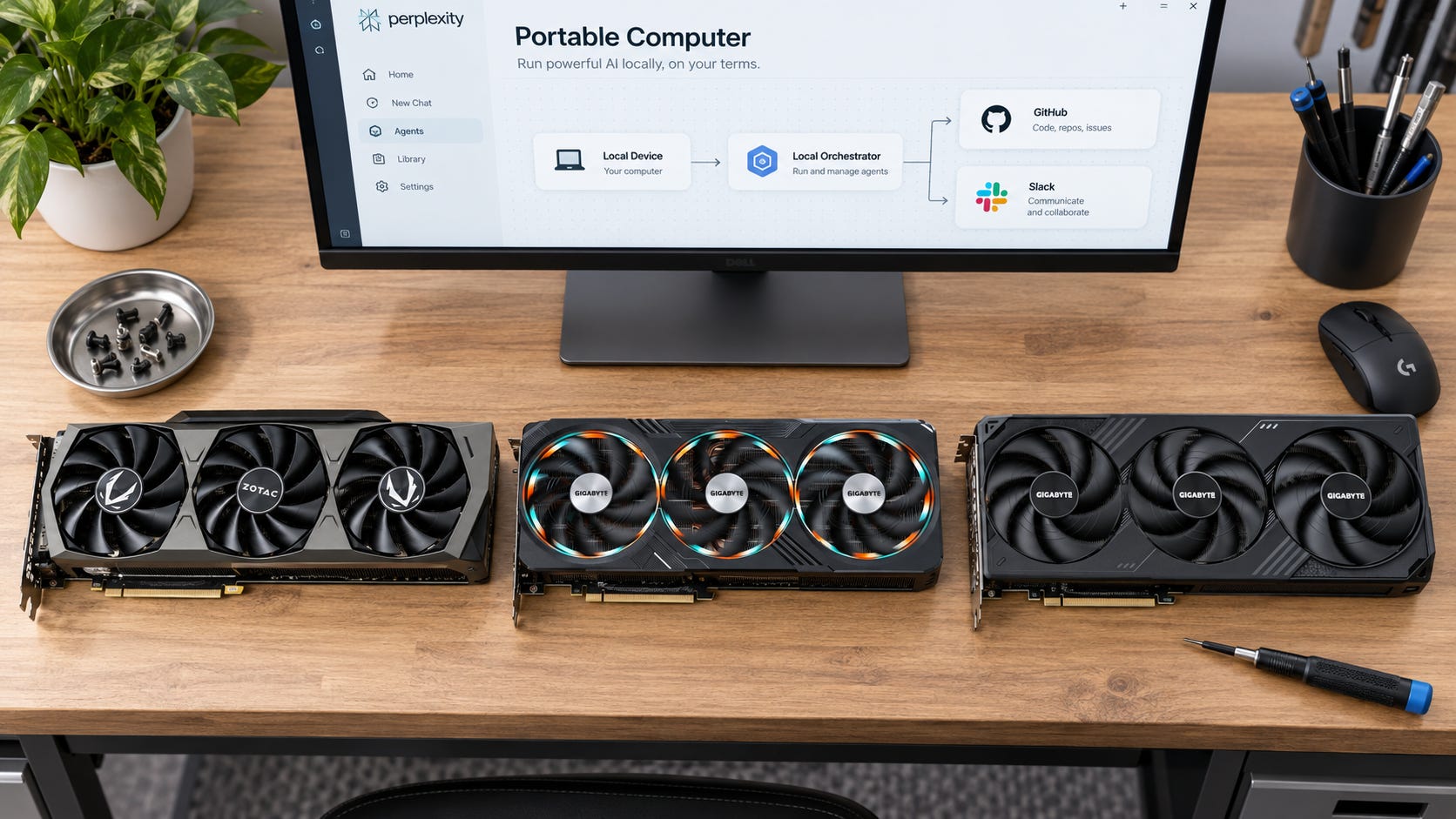
Perplexity Portable Computer now runs local inference on Windows RTX PCs, but the hardware floor is steep. Perplexity says Windows local inference needs a supported NVIDIA RTX GPU with at least 24GB of VRAM. That immediately rules out the RTX 5080, RTX 5070 Ti, RTX 4080, and practically every mainstream AI PC with 16GB or less.
On Windows, the currently listed local model is PPLX 27B. Qwen 3.8 27B is not available on Windows RTX PCs, and only one local model runs at a time.
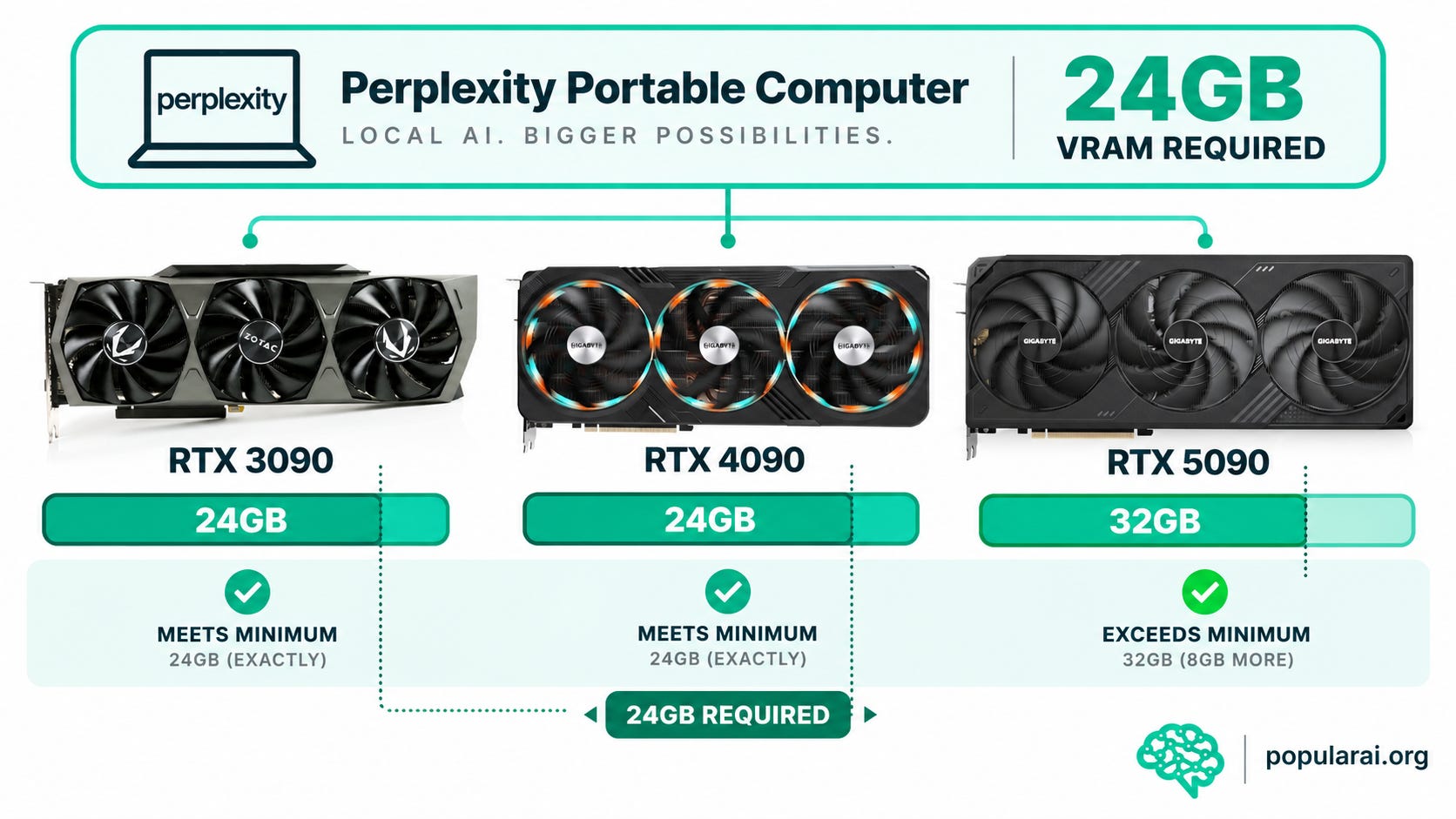
If you already own an RTX 3090 or RTX 4090, the buying decision is easy: use the GPU you have. Both meet the 24GB requirement. Do not replace either card merely to run Portable Computer.
If you are starting from 16GB or less, the choice gets more expensive. A used RTX 3090 is the lowest-cost sensible entry point in this comparison. The RTX 4090 gives you the same 24GB VRAM at a much higher current price. The RTX 5090 moves up to 32GB and gives you more room for other local AI workloads, but September 2026 pricing is still ugly enough that buying one specifically for Perplexity makes little sense.
For a retail reference, you can check current RTX 3090 24GB listings. For this older card, compare those listings with reputable used sellers before paying new-old-stock pricing.


Disclosure: This post includes Amazon affiliate links. If you buy through them, Popular AI may earn a small commission at no extra cost to you.
Quick verdict
Already own an RTX 3090: Keep it. Portable Computer’s current Windows requirement gives you no reason to upgrade just for this feature.
Already own an RTX 4090: Keep it. You already have the required 24GB, plus far more compute than a 3090.
Buying specifically for Portable Computer: Look for a good used RTX 3090. It gets you into the required 24GB memory tier for far less than the current 4090 or 5090 market.
Want 32GB for broader local AI work: The RTX 5090 is the obvious GeForce step up, but current pricing is still far above its original $1,999 launch price. Check RTX 5090 32GB listings as a price check, not as a reason to rush.
The awkward option is the RTX 4090. It is much faster than a 3090 in workloads that can use the extra compute, but it still has the same 24GB memory ceiling. If Portable Computer is the whole reason for the purchase, paying a large premium for the same VRAM capacity is hard to justify.
What Perplexity’s 24GB requirement actually means
The important number is 24GB, not the GPU generation.
Perplexity’s published requirement creates a hard cutoff. A Windows or Linux PC needs a supported NVIDIA RTX GPU with 24GB of VRAM or more for Portable Computer local inference. On Windows RTX PCs, PPLX 27B is the available local model. NVIDIA says sensitive information can stay on the device, locally completed work does not consume Perplexity Computer credits, and heavier work can move to cloud models with permission.
That creates a strange buying problem. An RTX 5080 can be an extremely fast GPU, but its 16GB does not satisfy the published Portable Computer requirement. A much older RTX 3090 with 24GB does.
This memory-first split keeps showing up across local AI. Our guide to choosing local LLMs by VRAM tier explains why 16GB and 24GB can behave like different hardware classes once larger models, longer context, and agent workloads enter the picture.
The RTX 5090 does not change Portable Computer’s current Windows model lineup. Perplexity does not list a different Windows model for 32GB cards. You get another 8GB of hardware capacity, but that extra memory does not currently unlock a higher-end Portable Computer model.
That 32GB may become more useful as the software changes. Perplexity also says NVIDIA Nemotron 3.5 Lightning is coming soon. Nobody should spend thousands of dollars today by guessing what an unreleased configuration might require.
More on VRAM for local AI:

Local Perplexity still requires a Perplexity subscription
The GPU is only one part of the bill.
Portable Computer is currently available to Pro and Max subscribers. Perplexity’s pricing page lists Pro at $20 per month and Max at $200 per month.
Buying an RTX 3090 therefore does not turn Perplexity into free software that happens to run on hardware you own.
The benefit is local execution. Work that finishes locally can avoid Computer-credit usage, and sensitive processing can stay on the PC. You still depend on Perplexity for the product, subscription, software distribution, supported models, and future feature availability.
That weakens the case for buying an expensive workstation purely for Portable Computer. A $1,000 GPU does not replace the $20 subscription. It gives you local execution inside a product that still requires an eligible paid plan.
If you already wanted a bigger GPU for Ollama, ComfyUI, local coding agents, private RAG, video generation, or other CUDA-heavy workloads, Portable Computer can be another use case. If Portable Computer is the only reason, the economics are much worse.
How we chose between the RTX 3090, 4090, and 5090
This comparison starts with four practical questions: does the card meet Perplexity’s published memory floor, what does it cost now, what does it take to install in a real PC, and what else can it do for local AI?
We did not find a current Perplexity benchmark that compares the RTX 3090, RTX 4090, and RTX 5090 directly inside Portable Computer. Perplexity publishes the support floor and available local models, but not card-by-card tokens-per-second figures for these three GPUs.
It would be easy to turn general GPU performance differences into fake Portable Computer precision. The 4090 and 5090 are much newer and faster GPUs overall. That does not give us permission to invent exact Portable Computer speedups.
The broader hardware differences are clear. NVIDIA lists the RTX 3090 with 24GB and 350W graphics-card power, the RTX 4090 with 24GB and 450W total graphics power, and the RTX 5090 with 32GB and 575W total graphics power.
For the wider local-AI comparison, see our RTX 3090 vs RTX 4090 vs RTX 5090 guide. Portable Computer makes the buying decision simpler because Perplexity itself sets the 24GB floor.
More on NVIDIA RTX for local AI:

RTX 3090 24GB: the sensible low-cost entry point
The RTX 3090 is old, hot, power-hungry, and still annoyingly relevant.
NVIDIA lists the Founders Edition with 24GB of GDDR6X, 350W graphics-card power, a 750W required system power figure, a three-slot cooler, and 313mm length. Board-partner cards vary, so check the exact model before assuming it fits your case.
For Portable Computer, the 24GB is the part that decides whether you get through the door.
Recent used examples in our research show why the card remains interesting. One Zotac RTX 3090 sold for $881.95, while other examples we found included a Dell OEM card around $950 and a Founders Edition at $1,159.99. Those are individual examples, not a market average. They are useful because they show the rough order of magnitude for getting into the 24GB tier without paying current 4090 or 5090 prices.
Around the lower end of that range, you are paying roughly $900 for the memory capacity Perplexity requires. That is much easier to defend than spending several thousand dollars for the same 24GB on a 4090.
The catches are real. A used 3090 may have years of gaming, rendering, mining, or AI use behind it. It can dump 350W of heat into the case. A suspiciously cheap card is not a bargain if the memory is unstable, the fans are failing, or the board has been abused.
Before buying, check the seller’s history, return policy, physical condition, fan noise, memory stability, temperatures, and the exact dimensions of the board. The Founders Edition dimensions are only a reference. Some partner cards are larger.
For a broader local AI workstation, the 3090 remains useful beyond Perplexity. Our 2026 RTX 3090 local LLM guide covers models that make sense within the same 24GB VRAM envelope.
More on the RTX 3090 for local AI:

Buy an RTX 3090 if: you currently have 16GB or less, specifically need 24GB for Portable Computer or other local AI workloads, and can find a clean used card at a price that makes the risk worthwhile.
Skip it if: you dislike used hardware, need much lower power consumption, or already know your normal workloads are running into the 24GB ceiling.

RTX 4090 24GB: much faster hardware, same memory wall
The RTX 4090 is a far more capable GPU than the 3090. NVIDIA lists 16,384 CUDA cores, fourth-generation Tensor Cores, 24GB GDDR6X, 450W total graphics power, an 850W system-power requirement, and a three-slot 304mm Founders Edition.
Portable Computer creates a value problem because both cards sit in the same 24GB memory tier.
If Perplexity requires 24GB, both qualify. If a future local workload needs more than 24GB, neither card solves the capacity problem. The 4090 gives you more speed, not more VRAM.
That extra speed can still be worth paying for. ComfyUI, image generation, GPU rendering, training, video work, and high-volume inference can reward a faster card even when memory capacity stays fixed. If those workloads save you enough time, the 4090 can make sense as part of a larger workstation decision.
Buying one specifically for Perplexity is harder to defend. Recent examples in our research sat around $2,500 to $3,150, and one used Founders Edition listing was $3,000 when checked. That is a brutal premium over a used 3090 when both cards clear the same 24GB Portable Computer requirement.
You can check current RTX 4090 24GB listings if the 4090 is part of a broader workstation purchase. Do not pay a big premium merely because it has a newer badge.
Buy an RTX 4090 if: Portable Computer is only one part of your workload and you already have a strong reason to pay for 4090-class performance elsewhere.
Skip it if: you are moving up from 16GB purely because Perplexity says 24GB.

RTX 5090 32GB: better local AI headroom, bad current pricing
The RTX 5090 is the only card in this three-way comparison that changes the capacity question.
NVIDIA lists 32GB GDDR7, a 512-bit memory interface, fifth-generation Tensor Cores, 575W total graphics power, a 304mm dual-slot Founders Edition, and a 1000W required system-power figure. Partner cards can be considerably larger than the Founders Edition.
Thirty-two gigabytes gives you 8GB more VRAM than a 3090 or 4090. That extra room becomes useful once Portable Computer stops being the only workload you care about.
Larger local models, longer context, heavier ComfyUI workflows, local video, model serving, and other agent stacks can all consume the extra capacity. Our RTX 5090 local AI analysis goes deeper into where the 32GB card helps and where it still hits a memory wall.
More on the RTX 5090 for local AI:

At a normal price, the 5090 is the strongest single GeForce card of these three for a new high-end local AI workstation. September 2026 is not a normal market.
NVIDIA launched the RTX 5090 at $1,999 in January 2025. In September 2026, Best Buy RTX 5090 graphics-card listings have been showing roughly $4,400 to $5,500 examples, with availability varying by model.
At those prices, do not buy a 5090 just to run Portable Computer.
If supply improves and pricing moves back toward MSRP, revisit the calculation. Around the original $2,000 launch price, a 32GB 5090 can make sense for a serious local AI user who will use its speed and extra memory across several workflows. At $4,000 or $5,000, Portable Computer is nowhere close to a sufficient reason by itself.

RTX PRO cards solve different workstation problems
NVIDIA’s Windows announcement also names RTX PRO workstations as supported hardware. That opens the door to professional cards with more memory, ECC, lower-power designs, or workstation-oriented physical layouts.
The RTX PRO 4500 Blackwell is a good example. NVIDIA lists 32GB of ECC GDDR7 and a 200W maximum power draw, with a dual-slot design. On paper, that is a much tidier physical configuration than a 575W RTX 5090.
Then the price arrives.
B&H had RTX PRO 4500 Blackwell options around $4,800 to $5,200 when checked for this article. That moves the card into a professional workstation budget, not a cost-conscious Portable Computer build.
The RTX PRO 6000 Blackwell goes much further with 96GB of ECC GDDR7. That memory capacity changes the local AI ceiling dramatically, but the card belongs in a completely different budget class.
These GPUs make sense when the workstation itself earns money and you specifically need ECC, large VRAM capacity, workstation support, a professional cooler design, or another feature that justifies the cost.
Buying one for PPLX 27B alone would be like buying a forklift because your groceries are heavy.
Your 16GB GPU is still useful for local AI
Portable Computer’s 24GB floor applies to Portable Computer. A 16GB card can still run a large range of local AI software.
If you have an RTX 4080, RTX 5080, 16GB RTX 5060 Ti, or another capable 16GB card, you can still run local models and self-hosted AI tools. You just cannot use the current supported Portable Computer local-inference path on that GPU.
That can save you thousands of dollars if your real goal is private local AI rather than specifically Perplexity’s interface.
Popular AI’s local AI hub covers Ollama, llama.cpp, LM Studio, private agents, local model selection, and hardware tiers. There is plenty to test before buying another GPU.
For research workflows, our local Perplexity alternative using Vane, Ollama, and SearXNG gives you a self-hosted route without adopting Perplexity’s 24GB hardware floor.
That stack is less polished and demands more maintenance. It also lets you choose the local model yourself instead of buying hardware around one vendor’s current support matrix.
If your existing 16GB GPU already handles the models and tools you care about, keep using it. The fact that one product draws the support line at 24GB does not make your current hardware obsolete.
More on local AI search:


Power, case space, and the upgrade nobody budgets for
GPU price is not the full upgrade bill.
The RTX 3090 Founders Edition is rated at 350W and NVIDIA gives a 750W system-power requirement for its reference configuration. It uses three slots and is 313mm long.
The RTX 4090 moves to 450W and an 850W required system-power figure. Its Founders Edition is three slots and 304mm long, and the power connector needs enough physical clearance to avoid an ugly cable bend.
The RTX 5090 reaches 575W and a 1000W required system-power figure. The Founders Edition is only two slots, but partner cards vary substantially in thickness and length.
That means a buyer moving from a typical 16GB gaming card may also be buying a power supply, a larger case, better airflow, or some combination of all three.
The power difference also shows up after installation. A GPU that pulls hundreds of watts under load becomes heat that your room and case have to remove. For occasional local inference, that may not bother you. For long-running agents, rendering, model serving, or other sustained workloads, it becomes part of the ownership cost.
A $900 used 3090 can stop being a $900 upgrade if your current PSU and case are not ready for it. The same problem becomes even more expensive with a 4090 or 5090.
Should you upgrade from 16GB for Portable Computer?
Only if you already have a real workload waiting for the extra memory.
If you are curious about Portable Computer and want to play with a local agent for a weekend, spending roughly $900 to several thousand dollars on a GPU is a bad experiment. Try local tools on the GPU you already own first.
If you repeatedly work with private documents, code, business files, research material, or automated workflows and already know local execution belongs in your normal work, a 24GB upgrade becomes easier to justify.
The best test is practical: would you still want the GPU if Perplexity discontinued Portable Computer next month?
If the answer is yes because you also want Ollama, ComfyUI, local coding agents, private RAG, local video, model serving, or other GPU-heavy AI workloads, you are buying a local AI workstation. Portable Computer is one application on top.
If the answer is no, you are spending workstation money for access to one feature inside a subscription product. That is a much weaker purchase.
Who should buy, wait, or skip
Buy a used RTX 3090 if you currently have less than 24GB, want the lowest-cost reasonable NVIDIA entry into Portable Computer, and can find a clean card near the better end of the used market.
Keep your RTX 4090 if you already own one. It meets the requirement and gives you much more compute than a 3090. Do not move to a 5090 for Portable Computer alone.
Wait on the RTX 5090 while U.S. pricing remains far above the original $1,999 launch price. Revisit it when pricing improves and only if your wider local AI workloads will genuinely use 32GB.
Skip the upgrade entirely if Portable Computer is the only reason you want a bigger GPU. Run another local stack on your current hardware and see whether local agents actually become part of your work before buying around Perplexity’s support matrix.
FAQ
Can an RTX 5080 run Perplexity Portable Computer locally?
Not under Perplexity’s current published requirement. Portable Computer requires a supported NVIDIA RTX GPU with at least 24GB of VRAM, while the RTX 5080 is a 16GB card.
Is an RTX 3090 enough for Perplexity Portable Computer?
Yes, it meets the stated 24GB VRAM floor, assuming the specific GPU and the rest of the system are supported. Perplexity currently lists PPLX 27B as the available Windows RTX local model. If you are shopping for one, compare current RTX 3090 24GB listings with reputable used-market options before buying.
Is the RTX 4090 better than the RTX 3090 for Portable Computer?
The RTX 4090 is a substantially newer and more powerful GPU, but both cards have 24GB of VRAM. Perplexity has not published card-specific Portable Computer performance figures for the 3090 and 4090, so an exact speed difference for this application would be guesswork.
Does the RTX 5090 unlock a larger Perplexity local model?
Not according to the current Windows documentation. The RTX 5090 gives you 32GB rather than 24GB, but Perplexity currently lists PPLX 27B for Windows RTX PCs regardless.
Does running Portable Computer locally eliminate the Perplexity subscription?
No. Portable Computer is currently offered to Pro and Max subscribers. Local work can avoid consuming Computer credits when it finishes on-device, but the product itself remains tied to an eligible Perplexity subscription.
The sensible Perplexity Portable Computer GPU choice in 2026
Do not buy an expensive new workstation just because Perplexity Portable Computer sounds useful.
An RTX 3090 owner already has the required 24GB. An RTX 4090 owner already has it with much more compute. Neither needs a 5090 for today’s Windows Portable Computer configuration.
For a new buyer, a used RTX 3090 remains the sensible minimum-cost route when you can find a clean card at a reasonable price. The RTX 4090 currently asks too much money if your only goal is to clear the same 24GB memory floor. The RTX 5090 is the stronger long-term single-GPU option for broader local AI because 32GB gives you real capacity headroom, but current pricing makes it a wait rather than an automatic buy.
If you are still tempted by the 5090, check current RTX 5090 32GB listings and compare them with the $1,999 launch price before treating today’s market as normal.
If you have a perfectly good 16GB GPU, test a different local agent stack first. Perplexity chose 24GB as its current support floor. You do not have to make that your personal hardware floor.
The cleanest buying rule is simple. Buy more VRAM because you already need more VRAM across several workloads. Do not spend workstation money to satisfy one vendor’s present-day checkbox.
Explore more from Popular AI:
Start here | Local AI | Builds & gear | Autonomy & policy | Fixes & guides | Popular AI podcast
Would Perplexity Portable Computer convince you to buy a 24GB RTX GPU, or would you rather spend that money on a more independent local AI setup?